The official Mikrotik router thread

Is it possible to allow a device to connect to an external IP once and only once then drop connections to that external IP after that - through using a script + firewall rules?

We have devices we are testing that need to 'phone home' to google before they work - but only the first time - and google is not on the company ACL for those device types.
Companies will often have an unrestricted guest network for this,then switch to whitelisted/Authenticated network after

I can think of a way but **** thats alotta nasty scriptwork
 
Companies will often have an unrestricted guest network for this,then switch to whitelisted/Authenticated network after

I can think of a way but **** thats alotta nasty scriptwork
That's what i was afraid of - the nasty scripting... Oh well

What was interesting is the device needs to phone home on the secured network - we got it to connect just fine on an unsecured network but the resources it needs are on the secured portion, anyhow - will feedback if we come up with an answer
 
Hopefully one of you smart people will be able to assist

We have multiple Mikrotiks in the field, we mainly use them for QoS

One site I have has a weird issue. The SIP phones drops registration every now and then, the only way to get registration back is to clear all the connections and re-reg the phone. This works but the client is getting irate because every second day its another phone going down

Have any of you experienced anything like this
 
That's what i was afraid of - the nasty scripting... Oh well

What was interesting is the device needs to phone home on the secured network - we got it to connect just fine on an unsecured network but the resources it needs are on the secured portion, anyhow - will feedback if we come up with an answer
First you need to work out the logic behind what you intend to do
I'm not sure how you're handling your firewalling/gateways/blackholing/DHCP etc,but you might want to have the MAC addresses get recorded to a list on first connection or by some other means,and use that list to fill a group. Said group first gets unrestricted access for x time,after which it gets added to a 2nd higher priority group list that gets more restricted access
 
Is it possible to allow a device to connect to an external IP once and only once then drop connections to that external IP after that - through using a script + firewall rules?

We have devices we are testing that need to 'phone home' to google before they work - but only the first time - and google is not on the company ACL for those device types.

Do you mean one packet or one connection, http2 uses one connection for multiple requests

You could make a firewall mangle rule to add the ip (source or dest, depending what you going for) to the address list, then another rule to block tcp syn for any further connections from said address list

Screenshot 2021-08-19 at 17.27.46.png
 
Do you mean one packet or one connection, http2 uses one connection for multiple requests

You could make a firewall mangle rule to add the ip (source or dest, depending what you going for) to the address list, then another rule to block tcp syn for any further connections from said address list

View attachment 1130228
I understood it to mean a small window for it to phone home,have a chat,and then forgeddaboutit after
 
Hopefully one of you smart people will be able to assist

We have multiple Mikrotiks in the field, we mainly use them for QoS

One site I have has a weird issue. The SIP phones drops registration every now and then, the only way to get registration back is to clear all the connections and re-reg the phone. This works but the client is getting irate because every second day its another phone going down

Have any of you experienced anything like this
You could get the Mikrotik to reboot every morning at 4am so the phones re-register.
 
I have a script that does this, but the problem persists
This issue is more related to the fact that the UDP connections are stateless and you are likely experiencing a momentary internet drop, thus the phones think they are registered but the server considers them unregistered.

So you need a script that will reset all connections when it detects an internet connection drop, or you need to consider another VoIP solution that is more hardy to such drops.

I have personally found that using a hosted 3CX server with a 3CX SBC solved this issue completely.

PM me if you want to discuss the 3CX setup.
 
This issue is more related to the fact that the UDP connections are stateless and you are likely experiencing a momentary internet drop, thus the phones think they are registered but the server considers them unregistered.

So you need a script that will reset all connections when it detects an internet connection drop, or you need to consider another VoIP solution that is more hardy to such drops.

I have personally found that using a hosted 3CX server with a 3CX SBC solved this issue completely.

PM me if you want to discuss the 3CX setup.
We use a hosted solution at the moment and my boss will NEVER use 3CX.

I know 3CX has come far over the years, but he used it back in 2010 and had bad experiances with it an now is against it completely
 
We use a hosted solution at the moment and my boss will NEVER use 3CX.

I know 3CX has come far over the years, but he used it back in 2010 and had bad experiances with it an now is against it completely
Which is a pity because 3CX v18 just launched and it supports Teams Direct Routing. Which means you can integrate 3CX and Teams and still remain relevant to your clients rather than losing them to Teams.
But each to their own.

But with regards to your problem, I would monitor the clients internet connection over a few days to see if its dropping (even briefly).
 
The SIP phones drops registration every now and then, the only way to get registration back is to clear all the connections and re-reg the phone. This works but the client is getting irate because every second day its another phone going down
Are you using multiple gateways, and switching between? Anything that could cause your phones outgoing public IP to change, like load balancing? Then yes you have an issue where you have to delete the connection tracking from the firewall.
 
Are you using multiple gateways, and switching between? Anything that could cause your phones outgoing public IP to change, like load balancing? Then yes you have an issue where you have to delete the connection tracking from the firewall.
Nope only using 1 provider.

I am going to disable the public IP and see if that makes a difference
 
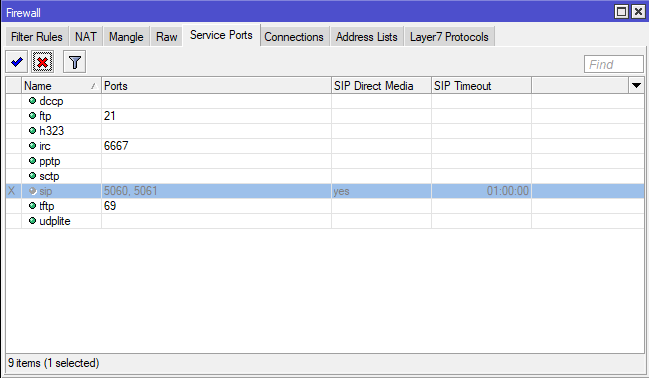
Have you checked the settings Under Firewall, Service Ports, then sip?

I havent used SIP in years but I think I ended up disabling that whole service/proxy

Edit: actually found it mentioned in an article/KB
 
Don't know if anyone has noticed, but:

RouterOS version 7.1rc2 has been released in public "development" channel!

Some good movement on ZeroTier being added too !

 
IP Cloud not working for any Mikrotik router since about 16h ago. The domain (mynetname.net) hasn't expired, but has been suspended. A lot of people are having a very bad day.
 
IP Cloud not working for any Mikrotik router since about 16h ago. The domain (mynetname.net) hasn't expired, but has been suspended. A lot of people are having a very bad day.
Yip, and as per usual Mikrotik response is piss poor. Not a happy chappy.
 
Top
Sign up to the MyBroadband newsletter
X