The PC Build Thread

Status
Not open for further replies.
Nice rig. I'll be honest, I don't know much about those types of applications and whether thread-count / clock speed is more beneficial.

However, being a Ryzen-based rig, you'll benefit largely from faster RAM. Go for 3600 if you can.

Also, NEVER deal with Evetech. Just a quick search of Carbonite or MyBB will show many reasons why they are a terrible choice.
Also, that bundle oif theirs is terrible. One of the fastest AMD CPUs coupled with the shittiest motherboard and crap RAM.

Safe options would be wootware, titan-ice.co.za, dreamwaretech.co.za.

Edit: I see you have a case already, so maybe something like this (if you case can fit an AIO)

View attachment 888780
Thanks. After checking out wootware, dreamtech, titan-ice, computersonly and evetech and deciding on a 2070 (best bang for buck for my system and what I want to do based on this article: https://arxiv.org/pdf/1903.05918.pdf) and watching the LTT video for RAM (and being a fan of ASUS MBs) I think I will go for the following setup:
CPUWootware3900X
9999​
MBWootwareAsus TUF GAMING X570-PLUS (WI-FI) AMD X570 Ryzen Socket AM4 ATX Desktop
5899​
MemoryWootwareG.Skill F4-3600C16D-32GVKC Ripjaws V 32GB (2x16GB) DDR4-3600MHz CL16 1.35V Black Desktop Memory
3319​
GraphicsWootwarePalit GeForce RTX 2070 SUPER JS NE6207SS19P2-1040J 8GB GDDR6 256-bit PCI-E 3.0 Desktop Graphics Card
10999​
PSUDreamtechCooler Master MWE 650 Bronze V2 80+ Bronze 650W Power Supply
1199​
CoolerDreamtechCooler Master MasterAir MA610P Dual RGB 120mm Fan CPU Cooler
879​

Total: 32294

Now I don't want to screw up the installation of these parts. What do you think will be the best place to ask for assembly of these parts if I bring my own case?
 
Thanks. After checking out wootware, dreamtech, titan-ice, computersonly and evetech and deciding on a 2070 (best bang for buck for my system and what I want to do based on this article: https://arxiv.org/pdf/1903.05918.pdf) and watching the LTT video for RAM (and being a fan of ASUS MBs) I think I will go for the following setup:
CPUWootware3900X
9999​
MBWootwareAsus TUF GAMING X570-PLUS (WI-FI) AMD X570 Ryzen Socket AM4 ATX Desktop
5899​
MemoryWootwareG.Skill F4-3600C16D-32GVKC Ripjaws V 32GB (2x16GB) DDR4-3600MHz CL16 1.35V Black Desktop Memory
3319​
GraphicsWootwarePalit GeForce RTX 2070 SUPER JS NE6207SS19P2-1040J 8GB GDDR6 256-bit PCI-E 3.0 Desktop Graphics Card
10999​
PSUDreamtechCooler Master MWE 650 Bronze V2 80+ Bronze 650W Power Supply
1199​
CoolerDreamtechCooler Master MasterAir MA610P Dual RGB 120mm Fan CPU Cooler
879​

Total: 32294

Now I don't want to screw up the installation of these parts. What do you think will be the best place to ask for assembly of these parts if I bring my own case?
Do it yourself, save money and you'll probably do a brilliant job
 
Thanks. After checking out wootware, dreamtech, titan-ice, computersonly and evetech and deciding on a 2070 (best bang for buck for my system and what I want to do based on this article: https://arxiv.org/pdf/1903.05918.pdf) and watching the LTT video for RAM (and being a fan of ASUS MBs) I think I will go for the following setup:
CPUWootware3900X
9999​
MBWootwareAsus TUF GAMING X570-PLUS (WI-FI) AMD X570 Ryzen Socket AM4 ATX Desktop
5899​
MemoryWootwareG.Skill F4-3600C16D-32GVKC Ripjaws V 32GB (2x16GB) DDR4-3600MHz CL16 1.35V Black Desktop Memory
3319​
GraphicsWootwarePalit GeForce RTX 2070 SUPER JS NE6207SS19P2-1040J 8GB GDDR6 256-bit PCI-E 3.0 Desktop Graphics Card
10999​
PSUDreamtechCooler Master MWE 650 Bronze V2 80+ Bronze 650W Power Supply
1199​
CoolerDreamtechCooler Master MasterAir MA610P Dual RGB 120mm Fan CPU Cooler
879​

Total: 32294

Now I don't want to screw up the installation of these parts. What do you think will be the best place to ask for assembly of these parts if I bring my own case?
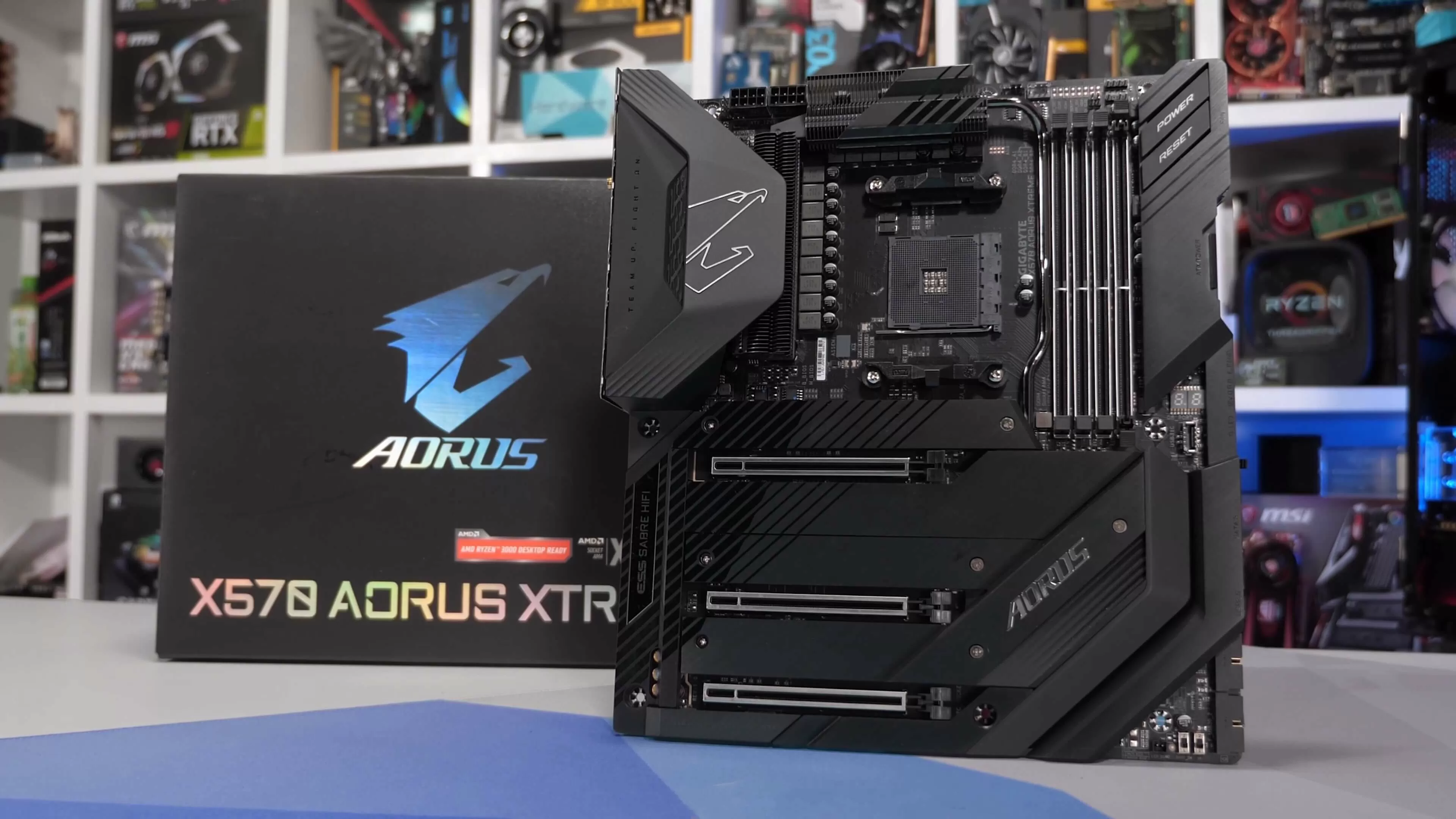
You could save some money and go with a B550 board instead. Identical performance, not much downside. Although I see the X570 board comes with both Dying Light games, so...

If you had to drop to an ASUS PRIME B550-PLUS, and the G.Skill F4-3600C18D-32GVK kit instead, that gives you enough headroom for an upgrade to a Palit RTX 2080 Super. Will the change from CL16 to CL18 matter? Not that much for the kind of computation you want to do.

DIY the system yourself. You'll be fine, there's plenty of guides out there, including one by Henry Cavill.
 
You could save some money and go with a B550 board instead. Identical performance, not much downside. Although I see the X570 board comes with both Dying Light games, so...

If you had to drop to an ASUS PRIME B550-PLUS, and the G.Skill F4-3600C18D-32GVK kit instead, that gives you enough headroom for an upgrade to a Palit RTX 2080 Super. Will the change from CL16 to CL18 matter? Not that much for the kind of computation you want to do.

DIY the system yourself. You'll be fine, there's plenty of guides out there, including one by Henry Cavill.
Good point about the MB. After reading about the different features I agree that the B550 board is better value. The machine learning app I am using is pretty RAM intensive but I am unsure how much of a difference the CL16 vs CL18 will make. Likely not much so the CL18 seems like a better option in terms of value. The 2080 is a good idea but now after looking at a few Moore's_Law_Is_Dead and RedgamingTech videos I am torn between waiting for the new AMD and Nvidia chips and biting the bullet and buying now.
 
You could save some money and go with a B550 board instead. Identical performance, not much downside. Although I see the X570 board comes with both Dying Light games, so...

If you had to drop to an ASUS PRIME B550-PLUS, and the G.Skill F4-3600C18D-32GVK kit instead, that gives you enough headroom for an upgrade to a Palit RTX 2080 Super. Will the change from CL16 to CL18 matter? Not that much for the kind of computation you want to do.

DIY the system yourself. You'll be fine, there's plenty of guides out there, including one by Henry Cavill.

I remember watching a youtube video saying that there's very little reason to get X570 over B550. I think X570 supports PCIe 4.0 of the SSD in addition to the PCIe 4.0 of the CPU, so you can have 2 x PCIe 4.0 SSDs instead of the one on the B550?
I'm not sure about that at all, but compare the two and decide if you really need X570 over B550.

If you want wifi, you can buy an adapter from takealot for R400.
 
The machine learning app I am using is pretty RAM intensive but I am unsure how much of a difference the CL16 vs CL18 will make. Likely not much so the CL18 seems like a better option in terms of value.

Keep in mind that most 3600MHz CL16 and CL18 kits are sourced from the same pool of E-Die (a rating of it's quality) memory modules from Samsung. There's a very, very high chance that the CL18 kit can be tweaked to CL16 timings and it will be perfectly stable.

The latency does impact performance for memory intensive applications, but it's not an impactful difference on machine learning or computational workloads. See more here:


Memory tuning is a deep rabbit hole that I don't advise anyone but overclockers and record-breakers delve into. Otherwise you're going to be ironing out things for a long time. XMP profiles for the 3600MHz CL18 kit will be more than fine.

Your motherboard choice and luck factors highly into whether picking faster memory actually benefits you.

The 2080 is a good idea but now after looking at a few Moore's_Law_Is_Dead and RedgamingTech videos I am torn between waiting for the new AMD and Nvidia chips and biting the bullet and buying now.

If you can wait, Ampere cards will be faster for machine learning purposes because NVIDIA is building up the Tensor core logic in Ampere to accelerate those workloads (which means machine learning in general is still dependent on CUDA workflows for the forseeable future). This is partly why RAM isn't a big sticking point for the work you want to do - most of it is going to take place on the VRAM allocated to the GPU.

Ampere's launch is due for early September, with an initial release in mid-September. We might only get stock locally at the beginning of August, and it will be expensive. The Ryzen 4000 series is due for October, along with RDNA2 in late October or very early November in order to skip most of the buzz created by pre-orders opening up for next-gen consoles.

So, you could always wait for a Ryzen 4000 series chip and discounted RTX 2080 Super models. There will be performance improvements, but it's impossible to say how much that would be worth to you right now.

What some people are doing now over at /r/buildapc is buying their systems now with cheap APUs like the Athlon 3000G, and planning to swap it out for a Ryzen 4000 series chip when it becomes available. That way the rest of the system is built, it's just the processor that needs to be launched. Quite a good idea too since most boards will need to have their BIOS updated for the new chips.

EDIT: Not sure if the ASUS Prime B550-PLUS would boot with an Athlon 3000G though.

I remember watching a youtube video saying that there's very little reason to get X570 over B550. I think X570 supports PCIe 4.0 of the SSD in addition to the PCIe 4.0 of the CPU, so you can have 2 x PCIe 4.0 SSDs instead of the one on the B550?
I'm not sure about that at all, but compare the two and decide if you really need X570 over B550.
B550 is an X570 chipset with things chopped off to make up for the lower price, and to reduce thermals.

You get PCIe 4.0 support for the first and second slots (dividing in to PCIe 4.0 x8/x8) as well as a single four-lane PCIe 4.0 M.2 slot for an SSD. The second one is through the chipset at PCIe 3.0 x4 or x2 depending on the board vendor.
 
Last edited:
I remember watching a youtube video saying that there's very little reason to get X570 over B550. I think X570 supports PCIe 4.0 of the SSD in addition to the PCIe 4.0 of the CPU, so you can have 2 x PCIe 4.0 SSDs instead of the one on the B550?
I'm not sure about that at all, but compare the two and decide if you really need X570 over B550.

If you want wifi, you can buy an adapter from takealot for R400.
Went with the B550 over the X570 for my son 2 months ago ... good decision on our part ... great board, and more pocket friendly
 
Toying with the idea of getting one of these.


Any feedback?
Fine for games and movies but PPI is similar to 27 inch 1080p. Not crisp at all(particularly text) but some people don't seem to mind.
 
Toying with the idea of getting one of these.


Any feedback?
I own the older LG 29-inch version of this panel. My one is a fine monitor.

I would absolutely not buy this 34-inch version. The resolution is way too low, it's not even curved, and you would visibly see pixels. Better panels are 3440 x 1440 pixels, but they are also more expensive.

It also advertises HDR10 support, but HDR10 requires a 10-bit input from the GPU (which means you use Displayport). But the monitor advertises 8-bit support (6-bit plus dithering) so there's no way it's going to be able to output a 10-bit signal. The FreeSync range is also too low, at 40-75Hz it has a really narrow range that doesn't allow for low framerate compensation.

There are better displays to spend your money on. The only viable (personally) upgrade from my 29-inch ultrawide would be to a 40-inch 4K panel that has 10-bit HDR Support and HDMI 2.1.
 
Last edited:
Keep in mind that most 3600MHz CL16 and CL18 kits are sourced from the same pool of E-Die (a rating of it's quality) memory modules from Samsung. There's a very, very high chance that the CL18 kit can be tweaked to CL16 timings and it will be perfectly stable.

The latency does impact performance for memory intensive applications, but it's not an impactful difference on machine learning or computational workloads. See more here:


Memory tuning is a deep rabbit hole that I don't advise anyone but overclockers and record-breakers delve into. Otherwise you're going to be ironing out things for a long time. XMP profiles for the 3600MHz CL18 kit will be more than fine.

Your motherboard choice and luck factors highly into whether picking faster memory actually benefits you.


If you can wait, Ampere cards will be faster for machine learning purposes because NVIDIA is building up the Tensor core logic in Ampere to accelerate those workloads (which means machine learning in general is still dependent on CUDA workflows for the forseeable future). This is partly why RAM isn't a big sticking point for the work you want to do - most of it is going to take place on the VRAM allocated to the GPU.

Ampere's launch is due for early September, with an initial release in mid-September. We might only get stock locally at the beginning of August, and it will be expensive. The Ryzen 4000 series is due for October, along with RDNA2 in late October or very early November in order to skip most of the buzz created by pre-orders opening up for next-gen consoles.

So, you could always wait for a Ryzen 4000 series chip and discounted RTX 2080 Super models. There will be performance improvements, but it's impossible to say how much that would be worth to you right now.

What some people are doing now over at /r/buildapc is buying their systems now with cheap APUs like the Athlon 3000G, and planning to swap it out for a Ryzen 4000 series chip when it becomes available. That way the rest of the system is built, it's just the processor that needs to be launched. Quite a good idea too since most boards will need to have their BIOS updated for the new chips.

EDIT: Not sure if the ASUS Prime B550-PLUS would boot with an Athlon 3000G though.


B550 is an X570 chipset with things chopped off to make up for the lower price, and to reduce thermals.

You get PCIe 4.0 support for the first and second slots (dividing in to PCIe 4.0 x8/x8) as well as a single four-lane PCIe 4.0 M.2 slot for an SSD. The second one is through the chipset at PCIe 3.0 x4 or x2 depending on the board vendor.
Thanks for the information! My 512GB SSD seems to be dying (bash script says it is full but du command says still >150GB left, might just be Linux quirk though). I am looking for a 1TB SSD to replace it and just increase my SSD capacity anyway (faster write speeds is important). Any suggestions? I am looking at these now:
 
Thanks for the information! My 512GB SSD seems to be dying (bash script says it is full but du command says still >150GB left, might just be Linux quirk though). I am looking for a 1TB SSD to replace it and just increase my SSD capacity anyway (faster write speeds is important). Any suggestions? I am looking at these now:
The Mushkin and Teamgroup SSDs are practically identical, there's no real difference between them. The 860 QVO is moderately faster and has better write endurance, but it is DRAM-less like the other two. 42GB of the drive's capacity is set aside in SLC mode to make up for it.

If you were going to pay that much for an 860 QVO, I would consider picking up the Sabrent Q 1TB NVMe drive instead if you have an open M.2 slot. If you don't, you can still find a cheap enough PCIe adapter for it. Those have a longer warranty and 5x higher read and write speeds, with better write endurance to boot.
 
Last edited:
The Mushkin and Teamgroup SSDs are practically identical, there's no real difference between them. The 860 QVO is moderately faster and has better write endurance, but it is DRAM-less like the other two. 42GB of the drive's capacity is set aside in SLC mode to make up for it.

If you were going to pay that much for an 860 QVO, I would consider picking up the Sabrent Q 1TB NVMe drive instead if you have an open M.2 slot. If you don't, you can still find a cheap enough PCIe adapter for it. Those have a longer warranty and 5x higher read and write speeds, with better write endurance to boot.
My trusty old ASUS X99-A MB has one M.2 slot and I am very happy with the 256GB SSD in there. So I think I will rather go for your suggestion and get that PCIe adapter. Thanks!
 
Looking at building a PC... it's been a long time. Budget is R18k.

AMD 100-100000022BOX Ryzen 5 3600X Hexa Core 3.8GHz (4.4GHz Boost) Socket AM4 Desktop CPU
Gigabyte B450 AORUS ELITE AMD B450 Ryzen Socket AM4 ATX Desktop Motherboard
G.Skill F4-2666C15D-16GVR Ripjaws V Series 16GB (2x8GB) 2666MHz DDR4 CL15 1.2V Red Desktop Memory
Super Flower SF-650F14MT(BK) Leadex 650W 80 Plus Silver Certified Fully Modular Black Desktop Power Supply
XFX Radeon RX 5600 XT THICC III Pro RX-56XT6TF48 6GB GDDR6 14Gbps PCI-E 4.0 Desktop Graphics Card
TeamGroup T253X2256G0C101 GX2 256GB SATA 6Gb/s 2.5" Solid State Drive
Western-Digital WD10EZEX Blue 1TB 7200rpm SATA 6Gb/s 64MB Cache 3.5 Inch Internal Hard Drive

Is this descent?
 
Looking at building a PC... it's been a long time. Budget is R18k.

AMD 100-100000022BOX Ryzen 5 3600X Hexa Core 3.8GHz (4.4GHz Boost) Socket AM4 Desktop CPU
Gigabyte B450 AORUS ELITE AMD B450 Ryzen Socket AM4 ATX Desktop Motherboard
G.Skill F4-2666C15D-16GVR Ripjaws V Series 16GB (2x8GB) 2666MHz DDR4 CL15 1.2V Red Desktop Memory
Super Flower SF-650F14MT(BK) Leadex 650W 80 Plus Silver Certified Fully Modular Black Desktop Power Supply
XFX Radeon RX 5600 XT THICC III Pro RX-56XT6TF48 6GB GDDR6 14Gbps PCI-E 4.0 Desktop Graphics Card
TeamGroup T253X2256G0C101 GX2 256GB SATA 6Gb/s 2.5" Solid State Drive
Western-Digital WD10EZEX Blue 1TB 7200rpm SATA 6Gb/s 64MB Cache 3.5 Inch Internal Hard Drive

Is this descent?
I would wait a week. New GPUs are coming soon, might cause current GPU prices to drop
 
Status
Not open for further replies.
Top
Sign up to the MyBroadband newsletter
X