


RedViking
Nord of the South
Thanks for the reminder!@RedViking Update update
I can report the latest update was performed successfully.
View attachment 1868949

South Africa’s biggest forum. Discuss, discover, and connect with thousands of members.
Thanks for the reminder!@RedViking Update update
I can report the latest update was performed successfully.
View attachment 1868949

Probably been mentioned here before, if so sorry for coming late to the party.
Anyway, best dam script on a new Windows install as Admin PowerShell
Bye bye Ninite, & debloat (Old method)
Say hello to Chris Titus your new friend for fresh installs:
 ....
....

I could live with a huge start menu, I’d love more icons and customisationDark Clouds Looming for Windows 11 25H2 users - MASSIVE update for the Start Menu...
It’s not just you: Windows 11’s new Start menu really is huge - Windows Latest
View attachment 1868764
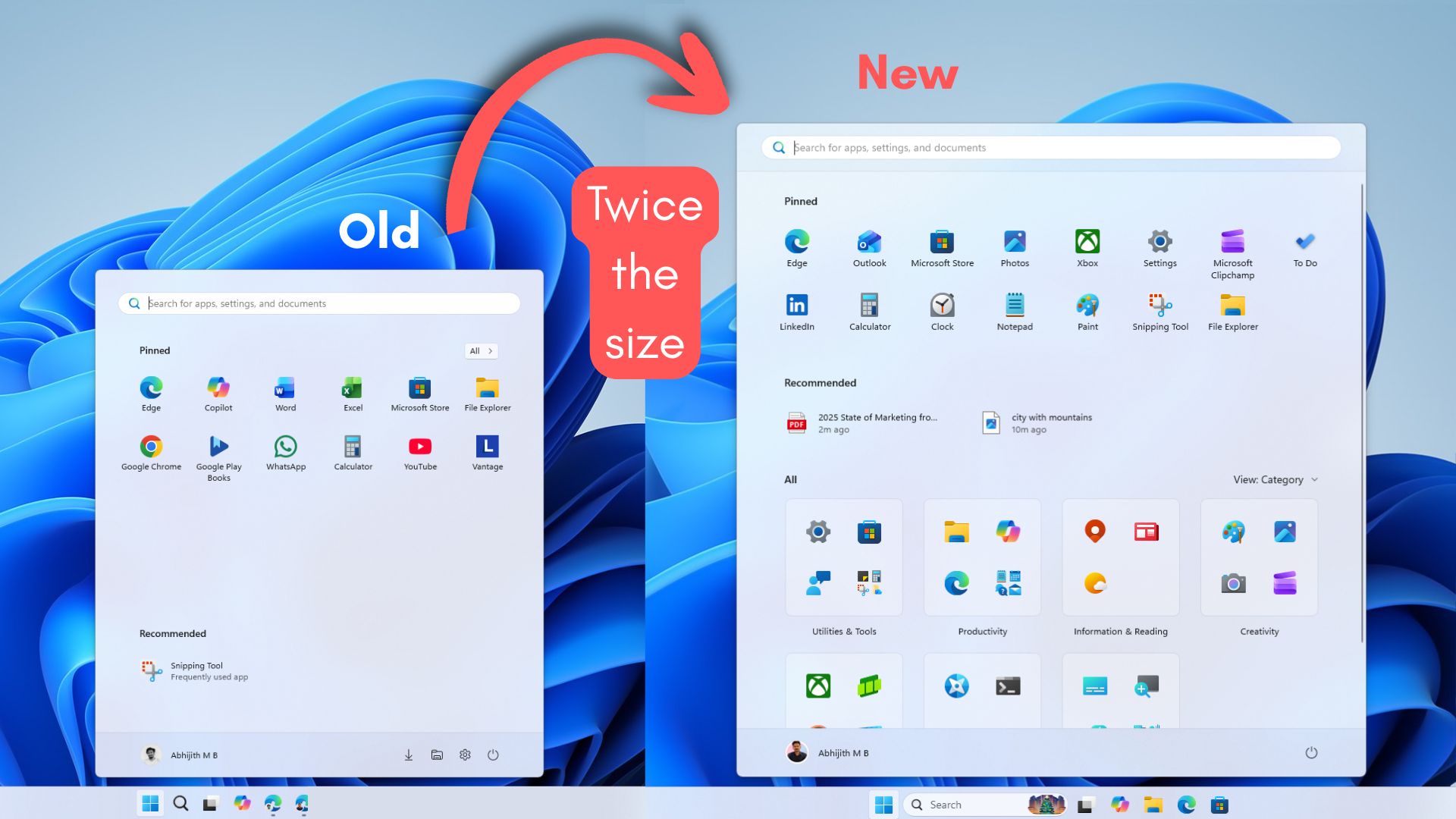
It’s not just you: Windows 11’s new Start menu really is huge
Windows 11’s new Start menu is more customizable than ever, but it now takes up nearly the entire screen, and the November update is to blame.www.windowslatest.com
If you install the monitor driver it will display the make and model correctly
Chris Titus's tool has some very interesting options, it just makes Windows add this weird profile loading thing when you restart the computerProbably been mentioned here before, if so sorry for coming late to the party.
Anyway, best dam script on a new Windows install as Admin PowerShell
Bye bye Ninite, & debloat (Old method)
Say hello to Chris Titus your new friend for fresh installs:


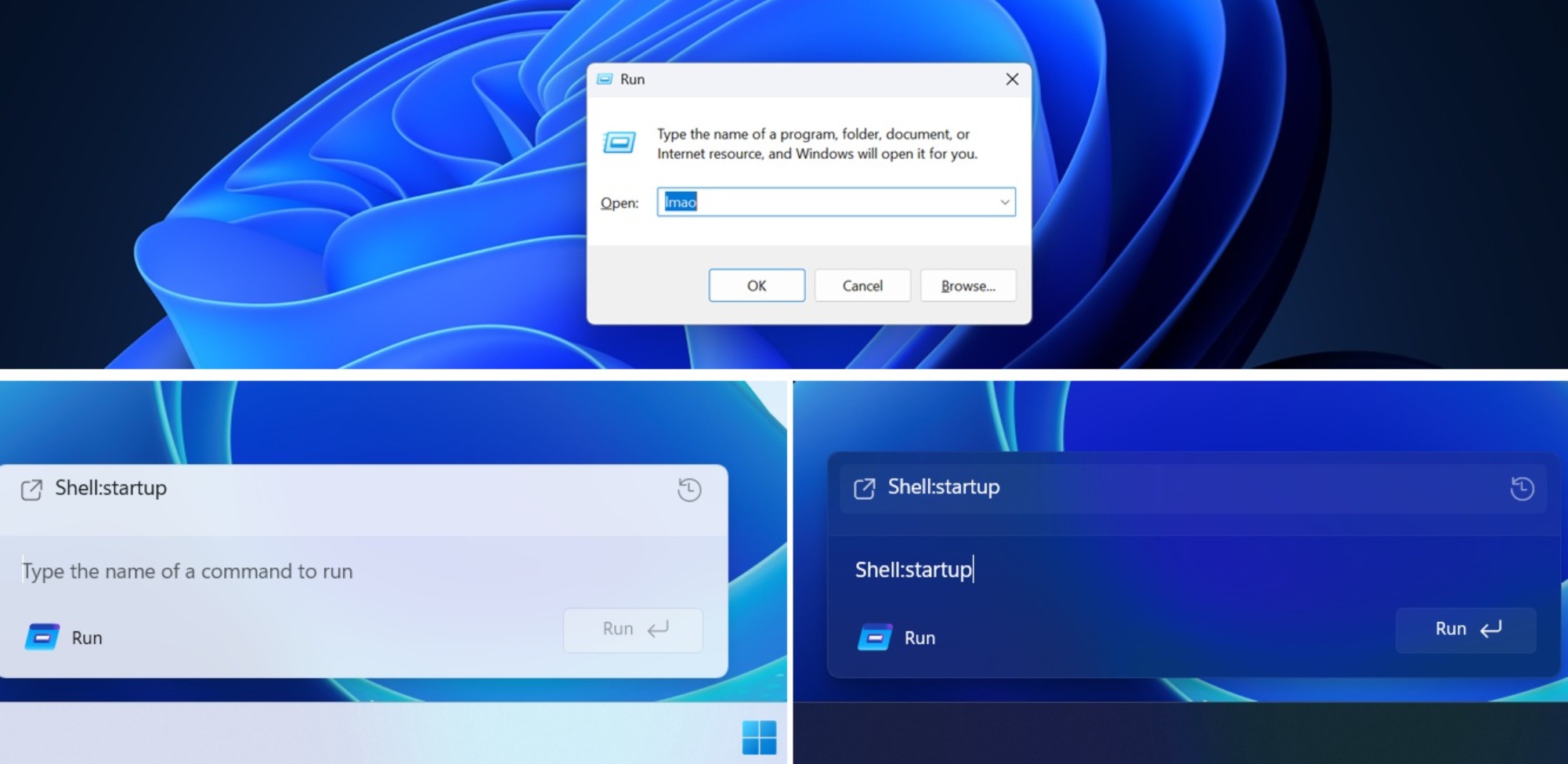
Microsoft is testing a new Windows Run, but don’t worry. It won’t replace the existing legacy Windows Run dialog that we all have grown up using.
It’s here to stay, but you’ll be able to switch to a new Windows Run, which has Fluent Design and rounded corners, aka “modern” design. This optional Windows Run could also get new features at some point.
Unlike Windows Search, Run is mostly used to directly run something, such as cmd, regedit, or services.msc, etc. It doesn’t search your PC, as Run expects a file name or command. I personally use Windows Run as my text field for CTRL+ V, CTRL + and CTRL+C, but that’s a story for another day.
Run looks legacy and ignores dark mode because it’s based on very old UI code that Microsoft has never fully modernized. It’s a classic Win32 dialog using old system controls, and the code is probably 20+ years old because it first debuted in Windows 95.
This could change soon.
 www.windowslatest.com

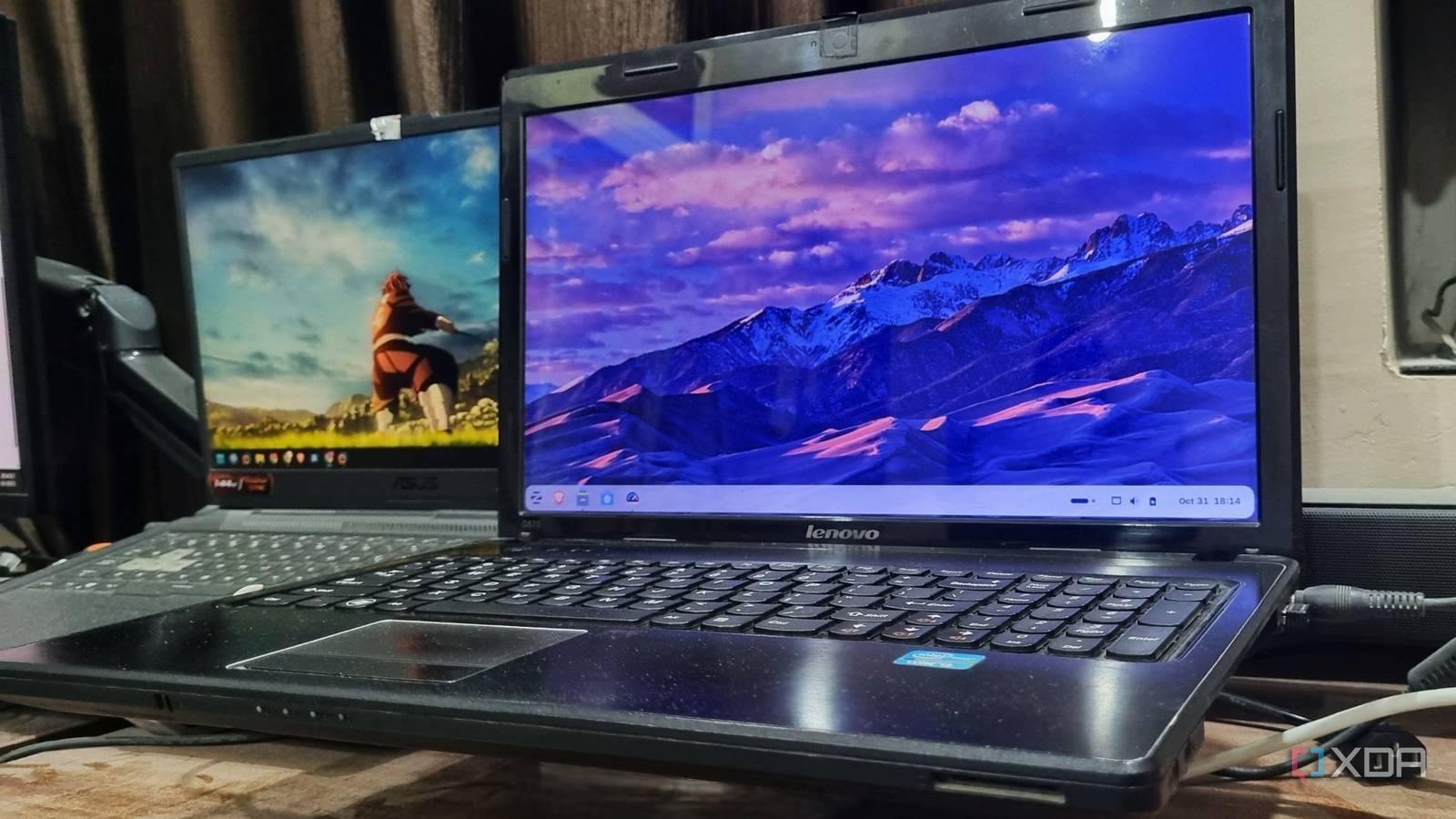
Overall, I think Zorin OS 18 is a good way for Windows users to give Linux a try. Whether or not they stay with Zorin OS is entirely down to what they want from their system.
Some may fall in love with the free version, and others may opt to pay, but honestly, I think they'd be doing themselves a disservice if they didn't, at the very least, sample other distros that the world of Linux has to offer.
And as that initial launching point, I think Zorin OS 18 does a great job.
 www.xda-developers.com

Microsoft recently acknowledged both Windows 11 24H2 as well as 25H2 have major Shell issues as key UI components like the Start menu, Explorer, Taskbar, among others break.
Home users should be alright though, as it mainly affects certain enterprise systems. You can read the detailed report here.
However, it does not mean that personal computers are not affected.
The latest KB5070311 update has confirmed dark mode artifacts but they can be fixed using a File Explorer tweak which also makes the app faster.
Despite this, Microsoft has confirmed that it is now allowing all supported systems download and install Windows 11 25H2.
Whether you are on Windows 11 or Windows 10, users can opt to upgrade to the 2025 feature update provided they have a system that meets the system requirements of Windows 11.


Microsoft has released a new Windows 11 preview build today that introduces a new feature that will show recommended apps from the Microsoft Store in the "open with" menu when attempting to open a file that has no default app set or has an unknown file extension.
The feature is designed to streamline the process between attempting to open an unknown file, and installing an app necessary to view said file.
"When you try to open a file in Windows with no associated app, the Open With dialog box pops up to suggest apps you can use by clicking on “see more apps in the Microsoft store”. Now, apps from the Microsoft Store are included directly in this list, so you don’t have to navigate to the Microsoft Store to find the right one. This makes it faster and easier to find and install the app you need."
The new change is rolling out gradually for Insiders in the Beta and Dev Channels, meaning you won't see it right away when you install today's preview build. It's unclear if the feature can be disabled for those who don't want to see recommended Microsoft Store apps, either.
Some may view this addition as another avenue for advertising, but if the feature really does only recommend apps that are known to deal with the file type in question, I can see this being a really handy streamlined experience.
It's often frustrating when you try to open a file and find that you don't have the app installed to deal with it. Being able to install it directly via the Open With menu is a nice addition.

Now the 'Microsoft Store' is infiltrating the 'Open With' dialog box as well...
Windows 11 will soon show Microsoft Store app download recommendations in the "open with" menu - Windows Central
An upcoming change to Windows 11 will see the "open with" interface recommend apps from the Microsoft Store when dealing with files with no default app set or unknown extensions.
View attachment 1869102
Chris Titus's tool has some very interesting options, it just makes Windows add this weird profile loading thing when you restart the computer
Good or Bad ?
Explain? ... screenshot maybe?

 www.windowslatest.com
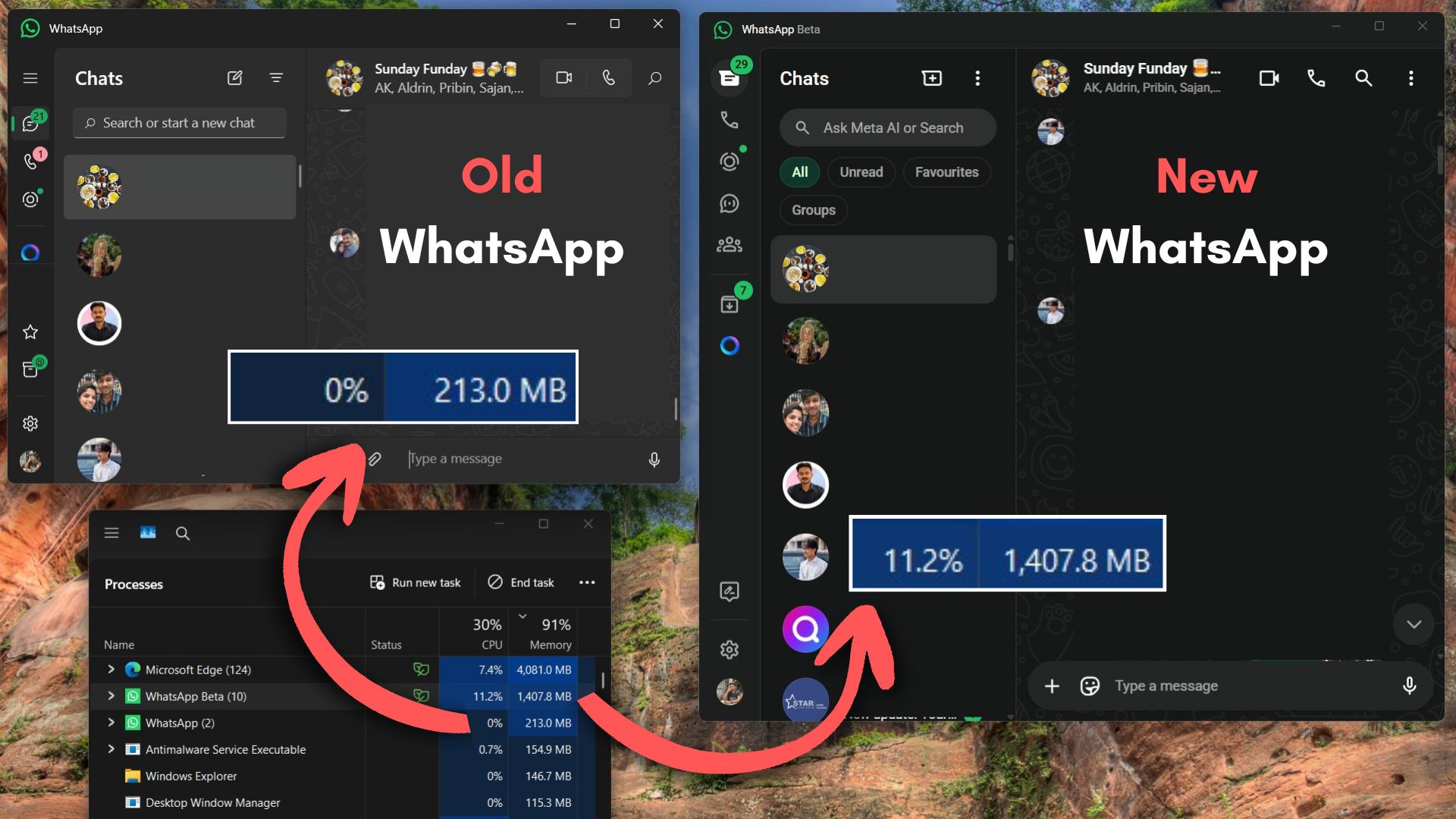
I tested the new WhatsApp for Windows 11 (a web wrapper) and it's a performance nightmare
I tested the new Chromium-based WhatsApp for Windows, and it uses up to 3X more RAM than the old UWP app while feeling slower and heavier.


Microsoft has released an update for its Prism emulator to boost performance and increase the number of apps that can be run under emulation on Windows on Arm devices, including those powered by the Snapdragon X series processors.
For those unaware of the Prism emulator, it converts x86 instructions to Arm64 code. With the latest update, it now supports the translation of additional instruction set architecture extensions, including AVX and AVX2. It also supports other related extensions, including BMI, FMA, and F16C.
Microsoft said that these extensions are especially relied on by creative tools and games that depend on the efficient parallel processing that these CPU instructions provide.
With the new Prism update, apps such as Ableton Live 12, which couldn't be installed before due to missing system requirements (AVX support in this case), will be able to run on Windows on Arm systems.
The Redmond giant said that Ableton Live will also be coming to Windows on Arm as a native app next year, but in the meantime, it will work on the emulator.
This update to Prism has been rolled out to all Windows on Arm devices running Windows 11, version 24H2 or later. The updated CPU feature support is enabled by default for 64-bit x86 apps, but with 32-bit apps, support is off by default. You can turn on 32-bit app support via the compatibility settings.
Microsoft said that it is committed to enhancing Prism emulation on Windows and that it's excited about the apps and games today's update enables. We should expect future updates like this to continue adding support for more apps, and hopefully, 32-bit app support gets enabled by default too.
If you need to enable 32-bit support now, you can check out this documentation page to adjust your settings to allow these apps to run.

On Tuesday, December 9, 2025, Microsoft is expected to begin rolling out the final Patch Tuesday update of 2025 for Windows 11, which introduces several significant features, improvements, and bug fixes.
In this update, the company is finally addressing design inconsistencies between the Start menu and Windows Search, and an updated version of File Explorer brings dark mode improvements.
Also, the Settings app is getting a slew of improvements on the Home page with the addition of a new "Device info" card. The "About" page is getting another redesign. The Mobile Devices options are now integrated into the Settings app. Virtual Workspaces make it easier to manage virtualization features on Windows 11. More keyboard and mouse settings are coming to the app from Control Panel, and more.
Furthermore, there's a new Widgets dashboard design with a new settings experience. The Xbox Full Screen Experience (FSE) is rolling out to more handheld devices and more.
Microsoft uses the Controlled Feature Rollout (CFR) technology to push new features and changes gradually, so it may take some time before you see them all on your computer.

Windows 10 is officially dead. Well, kind of. Microsoft officially declared the end of support date to be October 14, 2025, after which the operating system will receive no further updates.
That is, if you didn't sign up for the Extended Security Update (ESU) program that the company made available through a variety of methods, some of which have no monetary cost.
In fact, in the EU, there isn't any special requirement — you can just keep getting updates for another year.
But even that is just an extra year, and for enterprise users paying for the ESU program, you can only go up to three years of updates.
However, there's a special edition of Windows 10 that will be supported for a good while longer: the LTSC release. The latest version of Windows 10 LTSC was released in 2021, and it will be supported until 2031.
Microsoft probably doesn't want you using this release, but if you really can't stand upgrading to Windows 11 or switching to Linux, maybe it's worth taking a look at.

There was a time when I opened Windows and felt in control. Now? I feel like I'm living in Microsoft's experiment lab. Even after four years of launch, Windows 11 still feels like a work in progress.
It started innocuously enough. A feature here, an AI integration there. But somewhere along the way, something shifted. Microsoft didn't just add AI to Windows 11—it made AI the entire point.
And frankly, that scares me for the future of Windows.

 www.makeuseof.com

