Xperia S

there are many reviews out there yes, but I'd like to hear from someone local and someone you could interact with, poke and prod with questions :)

Well I'll be back in PE on Monday, so will pick mine up then, but I am sure you can start shooting the Q's there is a couple on the forum that already has one.
 
So far pretty good :)

With heavy use (as one tends to do with a new toy) the battery life has been around 14 hours. Started complaining around 30 minutes back but it will not be charged as yet.

It's a very easy phone to use, the camera is awesome for a cellphone with almost no delay between shots and practically no time to take a photo in good light. I was taking photos of moving cars from a moving car and you can read the number plate :)
The macro is good and the panorama photos are also great and quick to take (no lining up photos to each other, just press the shutter button and sweep the phone across the scene you want to tak a photo of).
Pity it has no 3d screen as I would like to see how those photos look in 3d.
Also nice that you can take the phone, point it at something you want a photo of and press the shutter button. Unlocks the phone and takes a picture with around a 1/2 second delay.

only one issue I have so far but I will make a seperate thread for that (basically I disable data via mobile then use wi-fi but it still uses mobile data).
http://mybroadband.co.za/vb/showthr...-using-HSDPA-HSUPA-data-when-set-to-use-Wi-Fi

Android is android so I will not go into that.
 
Last edited:
Just another point, the hotspot feature works extremely well, I had an uncapped 3G sim in the phone in the UK, and my GF and I had both tablets and netbooks slaving off the Xperia S, worked very well.
 
So my unofficial review:

I don't want to compare it to other phones and will be getting much of my technical info off GSMarena (where you can go for all the nitty gritty).
As all the real reviews you need can already be found on the net (and for a really negative and biased review you can look right here on mybroadband) I will not be focusing on hardware or specifications to any great degree.

The hardware specifications that did impress me are as follows:

Sony Bravia
12mp Camera
Sweep Panorama
Full HD video
HDMI port
720 x 1280 pixels, 4.3 inches
342ppi
NFC

Things I would like changed for the South African version is the lack of NFC tags but we were lucky in that we got a micro HDMI cable which is something I am more likely to use than NFC tags.

The phone weighs in at 144g and for me personally this is no issue.
Many may complain about this but for me personally it is perfect as there is enough space for my huge fingers to easily use the virtual keyboard without making to many spelling mistakes and the size as well as ppi of the screen means I can watch high quality video as well as send an sms or update facebook without any loss of detail or embarrassing spelling mistakes. I know I have the device in my hand but at the same time it is still small and light enough for me not to worry about the weight. my thumbs (at the last measurement) are 38mm thick so as you can imagine the size of my hands (no jokes about thumb size, foot size of other appendages please) are a little above average.

I really love the shape, The sharp corners and the slight angle to the back of the phone make it both a lovely device to look at and to hold. In my line of business ergonomics is a huge factor and having a device that has sharp corners (compared to the competition), and still feels great in hand is something you can only appreciate. At first I did not like the transparent strip but after using it for a while I realized that this not only accentuates the look of this device but actually enhances the use and feel in it's own, typically Sony way.
As with all Cellular devices the first thing I looked at was how well you can view the screen in daylight. All I have to say on this is more than adequate, It's not a Kindle but if I wanted a E-Ink phone I would just have to keep wishing (as I am doing right now).

I still have not tried the front facing camera as I have not yet figured out how (or if) video calls are possible besides skype.

I will comment on the HDMI and MicroUSB cables when I actually get to them as the cables that came with the phone are not able to do the tasks I require of them.

The battery life seems more than adequate. I have spent hours on this device and after hour 14 it only started complaining about a flat battery.

Overview mode is a nice addition, Pinch the screen and you have an overview of everything that is happening on your device.
Timescape is one of my favorite widgets, It lets you see all the feeds and so forth that have happened in the last couple of hours. Something you would want in case of fire or some less worrying that may have changed your outlook on life.


More later, :)
 
Last edited:
weird that you say the white strip at the bottom makes it look class... thats what puts me off about the phone :(
 
I don't have cash for the crap you are buying. Hope your crap breaks in the first week so your crappy warranty can bite you in the karma ass :)

One man's crap is anothers treasure :)

Personally i recon, you can stick that huge piece of junk where the sun dont shine. For one the S3 looks like is designed by a 3 year old and for another the build quality looks like one of the toys you'll get at toys'r'us.

Beside that, I am not a fan of huge phones and prefer my 4'3" screen thank you ver much.

Now go troll over in the Windows Phone section :p

ROFL

//damnit - now there is fanta all over my monitor//
 
Thanks Astro

What do you mean by the supplied cables are not able to do what you want to do with them? :confused:

Agg I want to try attach a usb flash drive and that kinda stuff. Nothing huge, just want to try all it's abilities.
Am itching to get an NFC tag.

The hdmi cable is pretty good and easy enough to set up although I don't think the tv remote will work with my lg, will have to try it I guess.

The GPS is awesome and stable as a rock, I turned data off just to see if it still works and absolutely no issues.

Some of the fun bits I have added so far:

Swiss army knife
root free ubuntu but no time to play with that as yet (called c u n t b u n t u).
nice to be able to RDP into work machines, will come in handy for camera installs and such but think I must find a different client as the one I am using only allows me to view the remote screens in portrait mode.
Put Firefox on instead of the default browser. Nice to be able to sync with my pc.

so far everything I have tried works flawlessly, just wish I could get SU without rooting the phone.
 
weird that you say the white strip at the bottom makes it look class... thats what puts me off about the phone :(

Different people have different tastes.

I didn't get a samsung because to me it looks like a used bar of soap (rounded edges and corners) but my wife prefers the look of hers over mine.
 
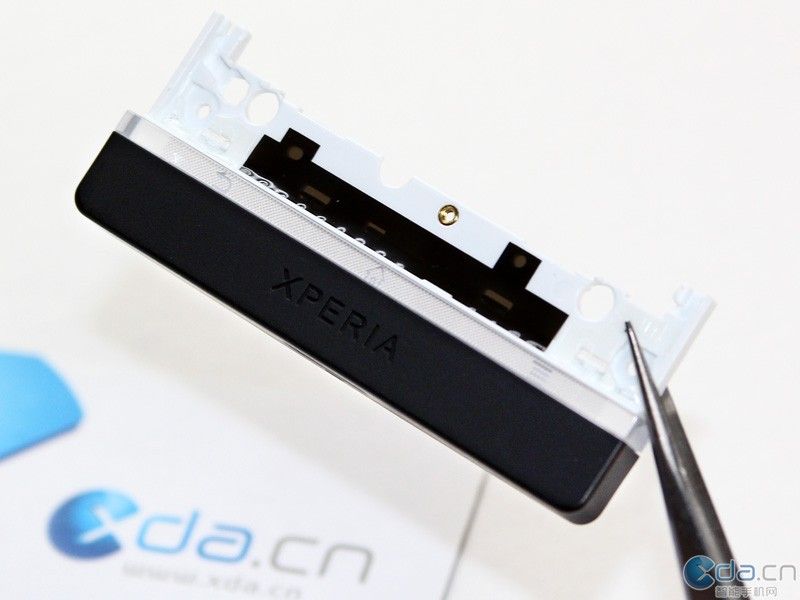
I originally though that the black piece at the bottom was useless and made the phone too long - then I read somewhere that it assist with the phone reception.
 
I originally though that the black piece at the bottom was useless and made the phone too long - then I read somewhere that it assist with the phone reception.

XperiaSDisassembly_21.jpg


"The antenna can be seen in a grid fashion through the transparent bar of the phone. "
 
Interesting - I think that I will leave this until I have to replace the battery or something else !

lol, if it wasn't for disassembly guides I would strip half my equipment out of curiosity.
 
lol, if it wasn't for disassembly guides I would strip half my equipment out of curiosity.

I actually use those guides a lot, I don't have a notebook that I haven't stripped for one reason or another.

The problem is that if you fix a few niggles here and there, and upgrade them, then they tend to last forever, and you never get to enjoy the pleasure of a nice new notebook.
 
I actually use those guides a lot, I don't have a notebook that I haven't stripped for one reason or another.

The problem is that if you fix a few niggles here and there, and upgrade them, then they tend to last forever, and you never get to enjoy the pleasure of a nice new notebook.

Yea me to.
Pity most of the equipment I end up stripping do not have such guides (or when they do they are in German/Engrish/Chinese).

Took a Krypton laser metal marker apart and put it back together again last month, ended up going to China for training on the thing as the manuals they gave me and advice they gave me via email/msn was horridly inaccurate, definitely fun though (working with light that can make holes through your fingers is awesome).
 
Top
Sign up to the MyBroadband newsletter
X