Your Raspberry Pi Projects

Well who ever at micro robotics that gave you the 5.1V advice, Give him bells :)
The Pi has always been sensitive when it comes to voltage.

Besides the PI 4 that I have posted earlier on using the 3D printed enclosure. I also have a Pi2B, connected to a 3.5" adafruit LCD, with a 3W audio amplifier running retro pi. Running retro game emulator on a PI2 most certainly is a good way to punish the CPU and draw more current. Add 3.5" LCD and an Audio amplifier and some Wireless adapters to run a keyboard and mouse causes the dedicated PSU with micro USB to still bring up a low voltage warning little yellow lightning bolt on the screen.

HOWEVER! a single 18650 3.7V runs my retro pi setup happily without any warnings. Only when I turn on the audio will it briefly show the lightning bolt due to the dip it creates when turning it on. And it will run for about an hour.
A shorted out 18650 = +- 20A so its VERY capable.

I don't think the issue is the 5.1V as such. When you connect a load to a power ource depending on how much current it's drawing it will cause a voltage drop.

See this.
https://www.robotics.org.za/AF1903?search=boost , It will boost anything from 1.8V and up to 5.2V, check out the link and read the product description. The extra 0.2V compensates for the voltage drop.

So to answer the question. It all depends what you are running on the PI and what else it's powering via the headers and USB ports.

I'm using the mentioned PCB along with a Lithium charger to power my PiGRRL running retro pi.


763328
763324

763326
 
powerbank does not like supplying V and charging at teh same time!
 
I also read something about the Pi expecting 5.1v and most powerbanks supplying 4.8-5.0v on average.

I'm keen to see if I'll be able to power the Pi and maybe a 2.5" external HDD from it in which case I'll turn it into a portable media server of sorts.

I already have my Unifi AP, Edgerouter and B315 running off a Gizzu UPS and my intention is to make my entire setup LS-proof. All the Pi needs to run is the Unifi Controller, Dynamic DNS updated via crontab, PiHole and if the HDD idea works, an SMB server. It will be headless so power draw ought to be small although with the HDD I have my doubts
Update on this:

The setup that I had running on my old Pi3B doesn't work on the Pi3B+. I see too many errors in syslog of undervoltage when connected to the USB port on the B315, so running a HDD off of it is out of the question.

I tried bringing down the power consumption by disabling BT and Wifi (add dtoverlay=disable-wifi and dtoverlay=disable-bt to config.txt) but didn't notice too much of a difference as the errors still appeared. I unfortunately don't have a meter to measure current draw, but reading up on it said it should only net me a few mA at most anyway. My next step is to try disable the two USB ports nearest to the Ethernet jack, as these run off a separate hub and not on the hub that controls the farthest USB ports and the Ethernet port.

Once my powerbank arrives from Loot I will try add the HDD again and see if the bank has enough grunt to power both at the same time.
 
Rather run it off a 12v supply with a simple high efficiency regulator to the pi.

I'm thinking of doing something like this rather. I already ordered the powerbank so will see if it works. If not, it goes to the SO so a win win either way.

The next step is to make a nice rack for all the items in my cupboard so that it's neatened up a little:

Huawei B315
Pi 3B+
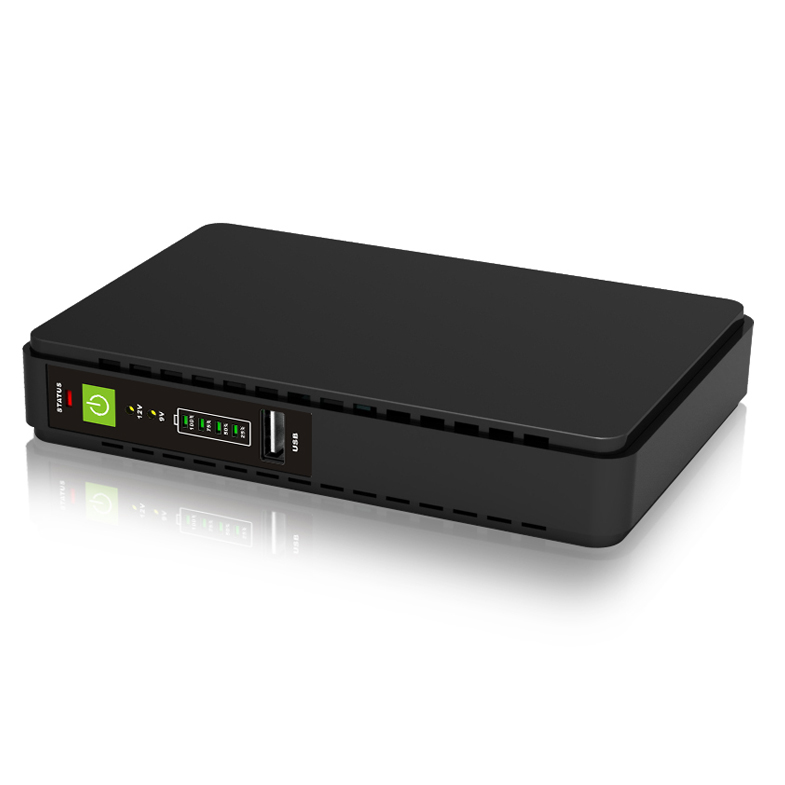
Gizzu Mini-UPS
Edgerouter X
Fibre termination box
To be added: 10Ah powerbank
To be added: 1TB 2.5" HDD

I was thinking of making a neat little rack using Lego such as this:


Any thoughts?
 
I'm thinking of doing something like this rather. I already ordered the powerbank so will see if it works. If not, it goes to the SO so a win win either way.

The next step is to make a nice rack for all the items in my cupboard so that it's neatened up a little:

Huawei B315
Pi 3B+
Gizzu Mini-UPS
Edgerouter X
Fibre termination box
To be added: 10Ah powerbank
To be added: 1TB 2.5" HDD

I was thinking of making a neat little rack using Lego such as this:


Any thoughts?
That rack is nice. I need one too, but not lego. Too pricey. Tell us what you end up using.
I second the idea of using a small boost converter from the power bank to the pi. That'll be the most efficient option and you'll only need to boost a little bit. It should run for hours.
Why not run the Pi off the Gizzu? Maybe cheaper to buy a bigger Gizzu rather than a power bank plus extras.
 
That rack is nice. I need one too, but not lego. Too pricey. Tell us what you end up using.
I second the idea of using a small boost converter from the power bank to the pi. That'll be the most efficient option and you'll only need to boost a little bit. It should run for hours.
Why not run the Pi off the Gizzu? Maybe cheaper to buy a bigger Gizzu rather than a power bank plus extras.
I think I may end up using some old Lego. It won't look as snazzy as the one linked, but should be functional. I even bought the Lego-compatible Pi case so it will look right at home :)

The Gizzu only outputs at 9V DC and 24V PoE so I will most likely need to use a buck converter and bring down the 9V to 5.1V for the Pi, and then find a female DC jack to Micro USB adapter. The reason I got the powerbank is because I don't have to worry about converting down from another voltage. The bank outputs 5V anyway which should be enough to run the Pi and a HDD (I am hoping).

Either way there are many ways to skin this cat but I am keen to get it up and running soon!
 
I think I may end up using some old Lego. It won't look as snazzy as the one linked, but should be functional. I even bought the Lego-compatible Pi case so it will look right at home :)

The Gizzu only outputs at 9V DC and 24V PoE so I will most likely need to use a buck converter and bring down the 9V to 5.1V for the Pi, and then find a female DC jack to Micro USB adapter. The reason I got the powerbank is because I don't have to worry about converting down from another voltage. The bank outputs 5V anyway which should be enough to run the Pi and a HDD (I am hoping).

Either way there are many ways to skin this cat but I am keen to get it up and running soon!
I reckon you're gonna need a boost converter. Or get a fast charge powerbank, but then you need one of those "trigger" things to get it to output the higher voltage.
 
Love that Lego rack!!

The Gizzu only outputs at 9V DC and 24V PoE so I will most likely need to use a buck converter and bring down the 9V to 5.1V for the Pi, and then find a female DC jack to Micro USB adapter. The reason I got the powerbank is because I don't have to worry about converting down from another voltage. The bank outputs 5V anyway which should be enough to run the Pi and a HDD (I am hoping).


I see some of the Gizzu's have adjustable outputs, like this one

1578504109016.png

I gather yours is a bit different?

Also you could perhaps think of powering it on the GPIO pins, I like to do that as it looks a bit neater sometimes, and has less chance of a plug slipping loose.
Make your Lego case a bit bigger to house the voltage converter perhaps?
 
Love that Lego rack!!


I see some of the Gizzu's have adjustable outputs, like this one

View attachment 763756

I gather yours is a bit different?

Also you could perhaps think of powering it on the GPIO pins, I like to do that as it looks a bit neater sometimes, and has less chance of a plug slipping loose.
Make your Lego case a bit bigger to house the voltage converter perhaps?
That's the exact model UPS that I have. Currently I have the output set to 9...I mean 12V as that's what my B315 and Edgerouter uses. PoE set to 24V to power my Unifi AP.

Eventually I'll do away with the B315 and just have the Edgerouter when our fibre is finally live, and I can actually power the Edgerouter using PoE passthrough which is quite handy. So then I could, in fact, use the DC output at 5V and just find a DC to MicroUSB adapter. By Jones, I think we've got a solution!
 
Eventually I'll do away with the B315 and just have the Edgerouter when our fibre is finally live, and I can actually power the Edgerouter using PoE passthrough which is quite handy. So then I could, in fact, use the DC output at 5V and just find a DC to MicroUSB adapter. By Jones, I think we've got a solution!

The fibre ONT wil probably require 12v, if you need internet access when the power is off...
 
The fibre ONT wil probably require 12v, if you need internet access when the power is off...
Oh yes, didn't think about that. Facepalm

EDIT: Setup Grafana last night to pull in some local Rpi stats. I only installed it yesterday afternoon so I'm still figuring it out, but I'd like to try and pull network traffic stats using SNMP when I have the time again.

EDIT EDIT: I think the most elegant solution for me would to just get rid of the Gizzu and replace it with one of those Ratel 860P's when they are back in stock. They have double the capacity vs what I have right now (16.6Ah vs 8.8Ah) and they have dedicated USB ports on the actual unit, so I can drive 5VDC/9VDC/12VDC, 5V USB and 24V PoE from one elegant unit.

I guess the SO is getting the power bank after all :)
 
Last edited:
With the latest VLC updates you can now finally play 1080p H265 files fullscreen. Great news.
On which board? Would be great for me if it was the Pi 3. I wonder which part of the chain was optimised and whether it was a shared library such that other software (Kodi in particular) would benefit as well.
 
You might be surprised. The ARM processors traditionally punched above their weight performance wise and I would guess that a modern ARM would handle something like a Wordpress site pretty well (from a CPU point of view at any rate.)

When the PI first came out, I thought it would kick the Arduino into touch for cheap embedded applications but now I think that both will occupy complementary spaces. They would both be a great addition to any classroom.

Microcontroller programming is highly sought after at the moment, too few guys who can do it...
 
On which board? Would be great for me if it was the Pi 3. I wonder which part of the chain was optimised and whether it was a shared library such that other software (Kodi in particular) would benefit as well.
The Pi 4 with HW decoder. Doubt the Pi 3 would be able to handle it but you can try Libreelec 19.2 AFAIK the fixes are there aswell.
 
These 3B+ Pi's run quite warm, I must say.

Mine is currently idling at 65*C inside the Brix case I ordered it with:

31KUEkhrQYL._AC_.jpg


Removing the top half of the case drops it to around 58*C, and I have disabled BT and Wifi to get the power draw a little less. Currently it's in an empty cupboard in a room in our house, with an ambient temperature of around 24*C. I have a heatsink attached to the main SoC chipset housing the ARM cores and it gets quite warm to the touch, so I have no doubt it does transfer some heat away from the board.
 
These 3B+ Pi's run quite warm, I must say.

Mine is currently idling at 65*C inside the Brix case I ordered it with:

31KUEkhrQYL._AC_.jpg


Removing the top half of the case drops it to around 58*C, and I have disabled BT and Wifi to get the power draw a little less. Currently it's in an empty cupboard in a room in our house, with an ambient temperature of around 24*C. I have a heatsink attached to the main SoC chipset housing the ARM cores and it gets quite warm to the touch, so I have no doubt it does transfer some heat away from the board.
Yeah, my 3 also has a heatsink, and I "upgraded" from the original pi case to one with holes above the chip. No idea what temp it runs but it doesn't shut down so that's the main thing.
 
Yeah, my 3 also has a heatsink, and I "upgraded" from the original pi case to one with holes above the chip. No idea what temp it runs but it doesn't shut down so that's the main thing.
The 3B that I had previously was a very cool-running board, but the + seems to be much worse WRT thermals. At the moment I am running it off the B315 USB port (headless, only 5V USB + LAN plugged in) so I am getting 0x50005 when I run vcgencmd get_throttled which causes it to remain at 600MHz clockspeed anyway. When plugged into the official Rpi PSU, it boosts up to 1400MHz as per the device spec when running sysbench but temps are unchanged.

I am toying with the idea of using some Lego and making a 'case' out of Technics parts to try and get some airflow around the board and components.

As soon as I have some spare time I will fire up leocad and see what I can hack together.
 
So an update on my little venture:

  • The Adata powerbank doesn't actually supply 5v as per the spec sheet, but rather ~4.6v. The Pi3 voltage regulator squeals at anything lower than 4.73v and clocks the ARM cores down to 600MHz until a reboot is performed. If the sensor grabs 4.75v and up upon reboot, it will not throttle the ARM cores. I tried with the 1A and 2.1A outputs on the Adata powerbank, to no avail.

  • The Boabab Micro-USB Travel Adapter, rated 5v and 2.1A, also only delivers around 4.7v at best and fails to power the Pi properly. I am using a very short (15cm) thick little USB cable that was supplied with the powerbank, so internal resistance should be low. There are no AWG numbers on the cable, however, so I am speculating that it must be around 24/26. My other USB cables are all 28AWG and much longer so I didn't try them.

  • (off topic) Even the weedeater bump feed head that I ordered along with the above is incorrect, as it doesn't include the piece that mounts on the shaft - so I can essentially return my entire order due to it not being suitable for my needs.
My best bet would be to pull a 9V supply off the Gizzu powerbank and use a buck converter and set it at 5.1v to power the Pi, and increase it to get exactly 5v at the microUSB end. This is becoming one massive headache :(
 
So an update on my little venture:

  • The Adata powerbank doesn't actually supply 5v as per the spec sheet, but rather ~4.6v. The Pi3 voltage regulator squeals at anything lower than 4.73v and clocks the ARM cores down to 600MHz until a reboot is performed. If the sensor grabs 4.75v and up upon reboot, it will not throttle the ARM cores. I tried with the 1A and 2.1A outputs on the Adata powerbank, to no avail.

  • The Boabab Micro-USB Travel Adapter, rated 5v and 2.1A, also only delivers around 4.7v at best and fails to power the Pi properly. I am using a very short (15cm) thick little USB cable that was supplied with the powerbank, so internal resistance should be low. There are no AWG numbers on the cable, however, so I am speculating that it must be around 24/26. My other USB cables are all 28AWG and much longer so I didn't try them.

  • (off topic) Even the weedeater bump feed head that I ordered along with the above is incorrect, as it doesn't include the piece that mounts on the shaft - so I can essentially return my entire order due to it not being suitable for my needs.
My best bet would be to pull a 9V supply off the Gizzu powerbank and use a buck converter and set it at 5.1v to power the Pi, and increase it to get exactly 5v at the microUSB end. This is becoming one massive headache :(
Or a boost converter from one of your 5V sources (well, almost 5V, lol) just to pump it up a bit. Assuming you have enough current to play with as well.
 
Top
Sign up to the MyBroadband newsletter
X