Calling Laptop Repairers -- Looking for Bluetooth Module

MidnightWizard

Executive Member
Joined
Nov 14, 2007
Messages
5,718
Reaction score
497
Location
KZN
SO
Take advantage of Makro Easter Special to get a Microsoft Bluetooth mouse ( Model 3600 )
Problem is ..
M$ do not tell you that this BT mouse works on BT4.0 ONLY and is NOT backwards compatible !

Mouse will not work on my Apple Mac Mini OR my Windows Laptop :mad:

To negate the absurdity of buying a new laptop to make a mouse work I can obtain an upgraded BT module
Problem is
Where do I find one small discrete item here in SA when no-one on eBAY is interested in sending to SA ?

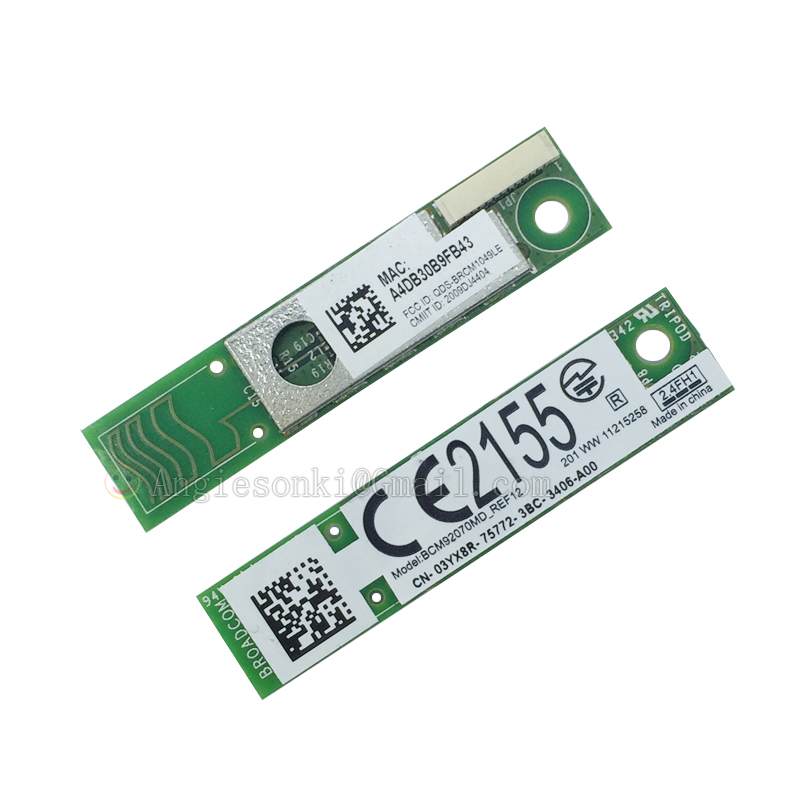
THIS is what I am looking for

DELL Wireless 380 Bluetooth 4.0 Module


Dell Wireless 380 Bluetooth 4.0 Module CN-3YX8R latitude E6230 E6330 E6430 E5510

s-l1600.jpg


As seen above -- standard DELL part in models latitude E6230 E6330 E6430 E5510 ( and possibly others )

I am requesting Techs that work on Laptops / Laptop repairers who may have broken / scrapped / upgraded laptops on hand to check if these "dead" laptops have such a [WORKING] Bluetooth module.
If so I am ready with the CASH !

Thanks
 
Nope they don't. The wireless ones do, but Bluetooth ones don't.
The Bluetooth wireless transceiver is normally integrated into the device -- Windows / Apple / Android
I believe most devices are backwards compatible between the different version of BT
the M$ Mouse 3600 is NOT -- not even drivers for Windows 7 !!!!!!!!!!!!!
( want you to UPGRADE your devices PLUS Windows TEN )
 
Why not just get this?
Check this out on takealot, http://takealot.com/og/v1/PLID51973444
YES
Thank you that would work -- for both windows as well as Mr APPLE -- as a temporary stopgap
( Handy to have in your "toolbox" )
R200.00 for a R400.00 mouse .....:giggle:

Hopefully someone will find -- in their pile of "spares" -- the correct INTERNAL device <praying>
 
This Takealot dongle is not LE version, while on Amazon it says specifically that this mouse reqquires BT Low Energy platform: https://www.amazon.com/Microsoft-Bluetooth-Mobile-Mouse-PN7-00001/dp/B015HWLB2G

This is what Microsoft mean by saying "Smart Bluetooth", while not telling the truth. It means that you will have to battle in Windows disabling power management settings, experience regular disconnections or lack of response for a couple seconds. It is what users report in the review section. Also a battery on the mouse will not last long while working in non-LE compatibility mode.

Send it back, get a wireless mouse with dongle, or see you in Classified section later, sorry.
 
The Bluetooth wireless transceiver is normally integrated into the device -- Windows / Apple / Android
I believe most devices are backwards compatible between the different version of BT
the M$ Mouse 3600 is NOT -- not even drivers for Windows 7 !!!!!!!!!!!!!
( want you to UPGRADE your devices PLUS Windows TEN )

On the plus side the MS Mouse 3600 works perfectly fine with Linux Mint 19.1 on an Acer Swift3 laptop
 
On the plus side the MS Mouse 3600 works perfectly fine with Linux Mint 19.1 on an Acer Swift3 laptop
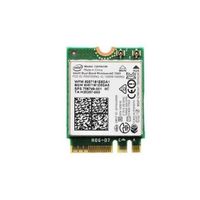
It should, as you have BT 4.1/4.0+LE in an Intel WLAN 7265.NGWG.W D0 module, isn't?

Check If I am right. :)
 
Last edited:
This Takealot dongle is not LE version, while on Amazon it says specifically that this mouse reqquires BT Low Energy platform: https://www.amazon.com/Microsoft-Bluetooth-Mobile-Mouse-PN7-00001/dp/B015HWLB2G
Send it back, get a wireless mouse with dongle, or see you in Classified section later, sorry.
Thanks Mr J
For your kind words of optimism and encouragement -- which should rather be spared for CURSING M$

Searched the whole day yesterday -- could only find an ASTRUM BT 4 USB dongle
Installed OK -- crappy software Unfortunately NO cigar M$ "MAGIC" Mouse still not working.
Does not work on Apple MAC either
( For APPLE just FORGET everything else and get the -- MAGIC whatever -- at some EXORBITANT price ! )

I WILL persevere
Just need the correct internal BT device -- partition the HDD for dual boot and install <SHUDDER> Windows 10
Maybe it IS time for a new Laptop -- perhaps Patreon or Fund-Me might help ? :laugh:
 
Thanks Mr J
For your kind words of optimism and encouragement -- which should rather be spared for CURSING M$

Searched the whole day yesterday -- could only find an ASTRUM BT 4 USB dongle
Installed OK -- crappy software Unfortunately NO cigar M$ "MAGIC" Mouse still not working.
Does not work on Apple MAC either
( For APPLE just FORGET everything else and get the -- MAGIC whatever -- at some EXORBITANT price ! )
Well, I am not considered myself a Microsoft enemy, I just trying to protect a weaker side. If they have a good product, this is fine. The same is that I don't hate you guys, so no cursing, never. :)

If you have the same Astrum, this is LE model with Qualcomm chip, but no user feedback: https://www.amazon.in/Astrum-BT040-Bluetooth-Dongle-CSR4-0/dp/B01N1MNLCJ

You may have configuration problem. Many laptops have a dual disable switch for wireless functions. One triggers a software switch with a driver still in memory, the other one completely removes BT device from Device Manager. Before installing external dongle you have to find a hardware switch and disable on-board BT. It is because BT can share the same module with WiFi and WiFi drivers may interfere with BT drivers of the external dongle. So find the switch, it is either a hardware switch on the edge of laptop case or triggered in some Dell software tool. BIOS setup will be the last resource.

Only then install a BT dongle. Hope it helps.

ADDED: And remember the old Microsoft mouse trick: pressing two mouse buttons simultaneously can wake up your laptop. The same way it can reset BT connection, try it. :)
 
Last edited:
If you have the same Astrum, this is LE model with Qualcomm chip, but no user feedback:

https://www.amazon.in/Astrum-BT040-Bluetooth-Dongle-CSR4-0/dp/B01N1MNLCJ

You may have configuration problem. Many laptops have a dual disable switch for wireless functions. One triggers a software switch with a driver still in memory, the other one completely removes BT device from Device Manager. Before installing external dongle you have to find a hardware switch and disable on-board BT. It is because BT can share the same module with WiFi and WiFi drivers may interfere with USB stack of external dongle. So find the switch, it is either a hardware switch on the edge of laptop case or triggered in some Dell software tool. BIOS setup will be the last resource.

Only then install a BT dongle. Hope it helps.
Thanks Mr J
That is the one I have --
Software BlueSoleil says device is CAMBRIDGE Silicon Radio

BlueSoleil

Cambridge Silicon Radio

( Taken over by Qualcomm )

As to BT Laptop instructions -- YES -- did all that -- turned off embedded BT in BIOS FIRST
STILL no luck

Think the missing bit now is M$ drivers for the mouse -- ONLY available for Windows 8 and above
(pref Windows 10 )
Perhaps a bit on INF modifying is required ?

Good Instructions here ( Plus drivers )

Sevens Forum

CSR USB 4

As I mentioned -- it may STILL NOT work until you install the WINDOWS TEN mouse drivers
M$ had to make it as DIFFICULT as possible -- they REALLY want you ALL to upgrade to Windows TEN
SO they ( and others ) can snoop in YOUR computer

Perhaps there are BT 4.0 LE drivers in LINUX ?
and
Perhaps the M$ mouse 3600 will work under LINUX ?
The opposite of what M$ want -- poetic justice !

BTW:
DELL Bluetooth wireless module 360 is ALSO CSR
BUT
Works with a TOSHIBA Bluetooth stack and software ! ( which I prefer -- more professional )
I wonder what BROADCOM use ?
 
Top
Sign up to the MyBroadband newsletter
X