CSGO Sticky thread

When you've built your new PC eventually, I'm gonna hit you with that..."7950x3d, 7900 XT - wow, you must really be dogshit."

For that I will need a new K+M too :ROFL: I will probably only build the PC in August. I am waiting for the new 800 series boards. From what I am reading, it is not only more stable, but more compatible too.
 

The Real MVP

JUNE 26, 2024

Since the launch of CS2, community map mappers have been hard at work creating new experiences and updating some classics. Today, we're excited to add the first community maps to CS2!

For those of you who dream of Italian weddings, or airplane manufacture (or both!), we've got you covered. Memento and Assembly are now available in Wingman.

And if you're in the mood for something a bit more... chaotic, take a dip in the classic Pool Day, which is now available in Arms Race.

Finally, fight your way through the streets of Thera and Mills in Deathmatch and Casual, and put these maps through their paces in Competitive Matchmaking.

Speaking of Competitive Matchmaking, we've given map-based skill groups an overhaul. In addition to redistributing players across the Skill Groups, we've also made it easier to earn those badges in the first place.

There are a bunch of other fixes and adjustments in today's update, including a brand new MVP panel (and animated MVPs in Premier!) and new ways to optimize your video settings.

Jump into a match and check it out!
 
I got a message saying my PC was set to 60Hz and my monitor is 144Hz. What is the benefit of changing?
 
You see they're also saying to use Reflex + G-Sync \ Free-Sync + V-Sync? What kind of blasphemy is this?

I've seen people demoing of all 3 on at the same time and it looked smooth but turning on V-Sync feels dirty.

Where do they recommend V-sync? G-Sync and FreeSync I can understand, but V-sync? Just from theorizing I can't see the benefit thereof versus improved latencies and polling rates. Unless of course you aren't bottle necked by the refresh rate. For casual play 144Hz should be enough, but for competitive play you need to eliminate the lowest of the bottlenecks. The performance gained, the difference is negligible, but everything adds up. If there is a 1v1, and 10ms can make the difference between winning or losing... I will take it.

This said, professional players train for winning. For ordinary players, cutting back on features won't magically make you a better player.
 
Where do they recommend V-sync? G-Sync and FreeSync I can understand, but V-sync? Just from theorizing I can't see the benefit thereof versus improved latencies and polling rates. Unless of course you aren't bottle necked by the refresh rate. For casual play 144Hz should be enough, but for competitive play you need to eliminate the lowest of the bottlenecks. The performance gained, the difference is negligible, but everything adds up. If there is a 1v1, and 10ms can make the difference between winning or losing... I will take it.

This said, professional players train for winning. For ordinary players, cutting back on features won't magically make you a better player.

CS2 - Video Settings Recommendations

If You are using NVIDIA G-Sync, you should also use V-Sync and NVIDIA Reflex
Running a game at a frame rate higher than your display's refresh rate has several downsides. The most obvious is "screen tearing," which occurs when a display receives a new frame from a game in the middle of refreshing. The top half of your screen will show one frame while the bottom half shows another.

A less-obvious problem is "microstuttering." When a display's refresh rate is lower than the game's frame rate (e.g., a display that renders at 60 Hz while the game renders at 70 FPS), the game will render a frame before the display is able to show it. Over time, the display and the game begin to drift away from each other, until eventually the game renders two frames in a row before the display is able to show you one. This results in a "microstutter" where the game looks like it's jumping forward a frame.

Many games have a setting called V-Sync to solve these problems. V-Sync forces a game to "sleep" after it's finished a frame until the next display refresh, which helps synchronize the game's frame rate with the display's refresh rate. This usually eliminates both screen tearing and microstuttering.

V-Sync has one major downside; when the game is sleeping, it is not processing input from keyboards and mice, and those input events are queued up for processing on the next frame instead. This results in higher input latency (the amount of time between an input event and the time you see its effects on-screen).

This input latency added by V-Sync can be eliminated if you also enable both NVIDIA G-Sync and NVIDIA Reflex
. NVIDIA Reflex is an option on many NVIDIA graphics cards that reduces input latency by inserting a sleep interval before input processing, meaning the game has more time to collect the latest input before rendering the next frame. Because the sleep interval that Reflex inserts is an estimate, it is possible that the game will miss a display refresh deadline (which would result in a stutter). But if you also have G-Sync enabled (see above), your display will automatically adjust to match the effective frame rate, and you will not experience a stutter problem.

For all these reasons, we recommend enabling V-Sync, NVIDIA G-Sync, and NVIDIA Reflex all together when all three features are available.
Please note that enabling all three settings will limit your frame rate to slightly below your monitor's refresh rate
. This is by design, and is usually the smoothest-looking and lowest input latency settings combination.

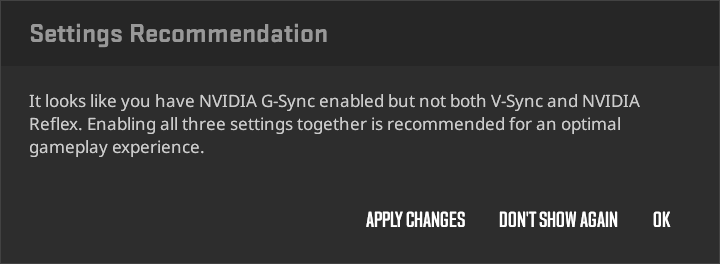
CS2 can detect when this configuration is available at startup but you're not using it. You will receive a popup with several options. Pressing the "Apply Changes" button will apply the recommendation automatically:

172a0a1001e053aff9608472a9c78d4fefc30f39.png

That bold bit is a lie, surely? Someone locking their game to 58 fps or 142 fps can't have the same input latency as someone running at 600 fps.
 
Last edited:
Valve has announced the launch of their own game recording software. It is part of Steam, and in a beta state.


I see they have taken a queue from Steelseries's game recording software which is part of their GG suite. Having the feature of recognizing "moments". I am curious how this will measure up to ShadowPlay?

Not comparing it to OBS which is a lot more versatile.
 
Valve has announced the launch of their own game recording software. It is part of Steam, and in a beta state.


I see they have taken a queue from Steelseries's game recording software which is part of their GG suite. Having the feature of recognizing "moments". I am curious how this will measure up to ShadowPlay?

Not comparing it to OBS which is a lot more versatile.
I am very interested to see what they do with this, do they want people to replace Shadowplay etc with this or just have it as a little extra quick clipping you can share in your chat.

It could be amazing if devs adopt it and you can use the Nvidia Highlight-esque features to save interesting moments automatically, have the timeline indicate what part of the video is menu and what is ingame etc but currently it's just an extremely basic tool, maxes out at 24Mbps and x264 only.
 
Anyone here uses a VXE mouse? I heard good things. I just want a use perspective from a user on here.

I'm on the verge of giving up on the Logitech K+M ecosystem. It is the same faults over and over, again, within short use periods. Maybe I have bad luck with their products... However, Logitech gets a big upvote for their after-sales service, as they honour RMAs and recognize the issues. Other brands have similar challenges, but their products seem to last longer based on the feedback I have observed.

My Cooler Master MM710 which is from the original batch is still as new.

Currently, I am eyeing a VXE because of its price point. I just want to know if it is worth the buy. I still have an unused Viper Mini, lol, but I am giving it to my kid who has a Redragon mouse which seemingly can't die.
 
Anyone here uses a VXE mouse? I heard good things. I just want a use perspective from a user on here.

I'm on the verge of giving up on the Logitech K+M ecosystem. It is the same faults over and over, again, within short use periods. Maybe I have bad luck with their products... However, Logitech gets a big upvote for their after-sales service, as they honour RMAs and recognize the issues. Other brands have similar challenges, but their products seem to last longer based on the feedback I have observed.

My Cooler Master MM710 which is from the original batch is still as new.

Currently, I am eyeing a VXE because of its price point. I just want to know if it is worth the buy. I still have an unused Viper Mini, lol, but I am giving it to my kid who has a Redragon mouse which seemingly can't die.
The amount of things I've seen of these mice when my mouse is still working perfectly is insane, it's reaching SHP9500 notoriety.

The YouTube reviews and then the more in depth and long term reddit reviews can't stop ranting and raving about it, especially the R1 Pro not necessarily the Pro Max.
 
I am very interested to see what they do with this, do they want people to replace Shadowplay etc with this or just have it as a little extra quick clipping you can share in your chat.

It could be amazing if devs adopt it and you can use the Nvidia Highlight-esque features to save interesting moments automatically, have the timeline indicate what part of the video is menu and what is ingame etc but currently it's just an extremely basic tool, maxes out at 24Mbps and x264 only.

I have never used Shadowplay since I have been an AMD user for over a good decade now. Steelseries GG, Moments, supports CS2, Apex, CoD, Destiny 2, etc. I think it is around ~15 or so games, and I have seen people upload those clips. It is a nice to have feature.

Steam might be on to something. I am happy to see them expand their own ecosystem. From the article, it does have Steamworks API support, so that is a big advantage for anyone who already uses Steam DRM, that is if older titles will get the support. Third-party integration is a must-have for such a product; it will ease them up on the monopoly aspects that Valve is challenged by.

If Steam is doing this, the people over at Epic (and Unreal) must be rushing to the whiteboard too. GOG have their thing with Amazon going, so I can see it in the works over there too though it might be a bit more contained if it will apply to cloud gaming, but who knows?

If there is interest in the product, there will be feedback, and though Valve is tight-lipped, they do listen to their users. I can see the product evolve.

CS2 players will love it, pending on the overhead of course.
 
Anyone here uses a VXE mouse? I heard good things. I just want a use perspective from a user on here.

Never heard of it but it looks nice. Their tiering is interesting - same sensor for all tiers, nice to haves for the higher tiers is unusual, I think. I'd just get the cheap one then :D

I stopped paying attention to mouse reviews once I got an Xtrfy - also budget, also nice.

Remind me when I break this one.
 
Never heard of it but it looks nice. Their tiering is interesting - same sensor for all tiers, nice to haves for the higher tiers is unusual, I think. I'd just get the cheap one then :D

I stopped paying attention to mouse reviews once I got an Xtrfy - also budget, also nice.

Remind me when I break this one.

Xtrfy is superb, if not for big sponsorships they would have had their place in the esports arenas. Rocket Jump Ninja is also kinda not making too many new videos since he is tied to Xtrfy. Steelseries also recently denied him review mice because of Xtrfy. Essentially, he is not deemed impartial by all brands anymore.

As he said in his latest video:


All mice are good now; it's just for the mice makers finding the right shape.
 
Top
Sign up to the MyBroadband newsletter
X