E1820 External Antenna Connector

According to this post Glipsie is connecting with the pigtail.

Therefore, please @Glipsie, use the same speedtest server and repeat the test with the E1820 comparing the E367 and the E1820 external connections.
If he's using the pigtail on the E1820, is there any point in repeating the tests? I thought we had concluded the E1820 needs an inductive coupler. :confused:
 
If he's using the pigtail on the E1820, is there any point in repeating the tests? I thought we had concluded the E1820 needs an inductive coupler. :confused:

There's lots of confusion regarding the speed benefit of the pigtail for the E1820. We know the signal reported is that of the internal antenna regardless of whether the external is connected, but earlier in the thread there are reports that the pigtail made a difference in speed using the E1820. It would be interesting to see the two modems compared in the same location with the same towers and external antenna.
 
If he's using the pigtail on the E1820, is there any point in repeating the tests? I thought we had concluded the E1820 needs an inductive coupler. :confused:

Hi Guys

I swapped a friend for his modem as he does not have an external antenna. I will try and get them at the same time to do more tests. He has an 8ta sim so I will try and do comparisons with it as well.

I have both the inductive coupler and the pigtail. The E1820 jumps towers between 12201 and 19172 with the pigtail so I have used the inductive coupler for about 9 months. This forces it to use tower 19172 (the closer tower)
Tests I did in December to tower 12201: http://mybroadband.co.za/vb/showthr...na-Connector?p=5175277&viewfull=1#post5175277
I have always averaged around 3Mb @ between -71 and -78.
The E367 is currently >= -51 and connecting 19175 (problem with 19172?)


What I can say is that it currently feels multiples faster than my E1820 with the inductive coupler (streaming video is no longer buffering)

In reference to this post: http://mybroadband.co.za/vb/showthr...-Report-Here?p=6786308&viewfull=1#post6786308
I was unable really do anything at the time, hence why I ran the speedtest. The speedtest was one of 3 tests.
Here is the speedtest history:
1463112355.png

1463102499.png

1463078350.png


For 20+ db gain it seems worthwhile for me to scrap the E1820 and get a E367!

/Glipsie
 
Last edited:
Hi Guys

I got the idea of switching modems on Sunday the 28th of August. These are the results from tests that I did then

8ta sim + E67
No Antenna
-83dBm
26112
1454396862.png


Inductive:
-77dBm
26112
1454397850.png


Pigtail
-59dBm
26221
1454402809.png


Cell C with E367
-55dBm
19175
1454434293.png

1454436194.png


I did not move my antenna so I assume that 8ta and cell c share the same tower

/Glipsie
 
Last edited:
mdma.exe /hwband:400380
Tower 19175 -55dBm


mdma.exe /hwband:2000000000380
Tower 19172 >= -51dBm
Speedtest fails, pages fail to load
Pinging www.l.google.com [74.125.233.18] with 32 bytes of data:
Request timed out.
Reply from 74.125.233.18: bytes=32 time=3836ms TTL=51
Request timed out.
Request timed out.
Reply from 74.125.233.18: bytes=32 time=1618ms TTL=51
Reply from 74.125.233.18: bytes=32 time=495ms TTL=51
Reply from 74.125.233.18: bytes=32 time=416ms TTL=51

Ping statistics for 74.125.233.18:
Packets: Sent = 7, Received = 4, Lost = 3 (42% loss),
Approximate round trip times in milli-seconds:
Minimum = 416ms, Maximum = 3836ms, Average = 1591ms

Conclusion = 19172 (900mHz) is broken ... still :(
 
so on the default settings - all bands - the E1820 wasn't switching over to the 2100Mhz tower yeah?
From what you posted above maybe it wouldn't as the RSSI on tower 19172 is still the stronger of the 2
 
Last edited:
so on the default settings - all bands - the E1820 wasn't switching over to the 2100Mhz tower yeah?
From what you posted above maybe it wouldn't as the RSSI on tower 19172 is still the stronger of the 2

According to a colleague of mine in the field the network has sophisticated algorithms taking into account signal strength as well as throughput (among others) which should switch modems automatically to the tower with the better throughput. Strange that it is not happening in Glipsie's case.
 
According to a colleague of mine in the field the network has sophisticated algorithms taking into account signal strength as well as throughput (among others) which should switch modems automatically to the tower with the better throughput. Strange that it is not happening in Glipsie's case.
See here.
 
...I connect an external to it through the connector to antenna A and then I put on an inductive coupler which connects to antenna B...
This got me thinking. How can I split the signal from the external antenna connector so I can use the inductive coupler and the pigtail at the same time?

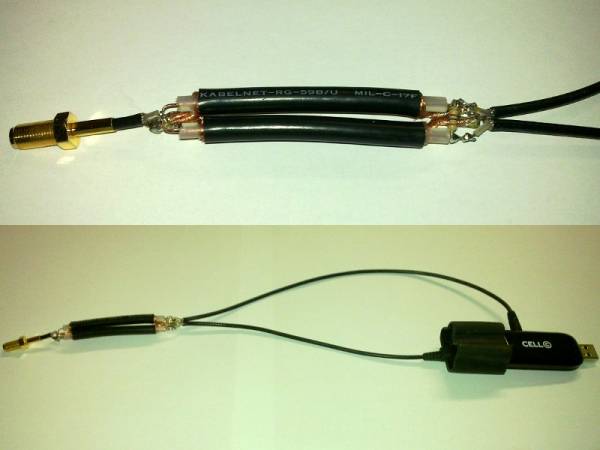
The easiest way, by using a Wilkinson Power Divider:
640px-Wilkinson_divider.png

I happened to have some RG59B/U cable and a 100 Ohm resistor (I measured a couple and found one that was 100.3 Ohms).
Using this handy coaxial power split calculator, and a centre frequency of 920MHz, I calculated a coaxial length of 54mm. A centre frequency of 2045MHz would have a coaxial length of 24mm.

Why not 900MHz and 2100MHz? See UMTS Frequency Bands, Band I (2100MHz) consists of an uplink band between 1920 and 1980MHz, and a downlink band between 2110 and 2170MHz. Similarly, Band VIII (900MHz) consists of an uplink band between 880 and 915MHz, and a downlink band between 925 and 960MHz.

The finished article:

My first speedtest result was a little disappointing:
1464767036.png

But speeds improved as it got later without me changing anything, so I'm putting that first result down to congestion. Getting better:
1464782355.png

...and better:
1464896645.png

...and better still:
1464916005.png


Since I have now butchered both my inductive coupler and my pigtail connector, I can't do comparative tests against the inductive coupler or pigtail on their own. I used firmware 11.865.07.00.618 for the above tests, cell ID was 40541 and RSSI -75dBm (so the power divider introduced a loss of 6dBm).

Update: I shortened all the exposed coaxial cores and resoldered all the connections. My signal strength is mostly showing -71dBm and occasionally switching to -73dBm. I think I have it very close to the ideal 3dB loss now.
1473591488.png

I see a typical improvement in download speed of around 20%.

Edit: Why?
  1. From my test with the K4605 it appears the inductive coupler introduces a loss of about 12dBm. When using the inductive coupler I get around -69dBm so I figure that using the pigtail I should be getting around -57dBm at the external antenna connector. Unfortunately the E1820 does not report the signal strength on the external antenna connector.
    In theory, the power divider should only introduce a loss of 3dB, so I was hoping for -72dBm from the inductive coupler and -60dBm on the external antenna connector (although the modem can only report odd values of signal strength).
  2. MIMO: As far as I know, none of the network operators in South Africa are using MIMO, I don't recall any announcements about 28.8Mbps speeds or MIMO-enabled modems or firmwares. I'm not sure that this combo adapter would help though, as MIMO, by definition, requires more than one antenna.
  3. DC-HSPA+: Both Vodacom and Cell-C have announced DC-HSPA+ at 43.2Mbps. I think this combo adapter would show an improvement in transfer rates on a DC-HSPA+ modem like the Vodafone K4605.
 
Last edited:
I sense a new avatar required;)
attachment.php


I always found the sweet spot for the inductive to be lower down with all of it just below the LED - Possible to put a hole in the rubber? or is that going to destroy it - i don't know what's inside that rubber.
Should it still work if there is an off switch to the other antenna once the pigtail is plugged in? thought i remember reading somewhere there was.
 
I always found the sweet spot for the inductive to be lower down with all of it just below the LED
Once again, opinion is divided. :) Edit: So you are actually coupling to the modem's secondary antenna? Does your signal strength change when you connect the external antenna this way?
Possible to put a hole in the rubber? or is that going to destroy it - i don't know what's inside that rubber.
I think putting a hole in the side or the back (the flexible part) of the rubber should be fine. As far as I know, the flat side contains a PCB with a trace antenna.
Should it still work if there is an off switch to the other antenna once the pigtail is plugged in? thought i remember reading somewhere there was.
As I understand it, the E272's internal antenna is bypassed when the external antenna is connected and the modem reports the RSSI at the external connector.

With the E1820 I don't think this is the case. Firstly, the modem always reports the RSSI of its internal antenna, and secondly, it appears that the internal antenna and the external antenna connector need to "see" the same cell, as shown here and here.
 
Last edited:
I found this nice picture of the inside of the E1820 on nev's occasional thoughts blog (nev is also having trouble with his E1820 external antenna connector):

The modem's main antenna is on the left hand side, furthest from the USB connector, marked 'SAA RF1.5' in this picture.
The modem has a secondary antenna on its under side, where the CE and serial numbers are printed, marked 'SAA RF1.1' in this picture.
I suspect that the secondary antenna is bypassed when something is plugged in to the external antenna connector.

[-]Edit: Would someone with a blogspot account leave nev a comment with a link back to this thread please?[/-]
Thanks Ana.
 
Last edited:
for DIY peoples

Modem picture @ main antenna conection:


Internal antenna 900/2100 connected @ point A - connection pad is big and robust - disconnect!
Coax cable central wire solder to A
Coax cable shield solder to body of the connector B
Coax cable (3mm OD) going out from the modem in direction C - make right hole in plastic cower. Connected cable has on the other end normal antenna connector (female).

Results:
Modem "as is" signal -78dB
Internal antenna disconnected -97dB
External andenna (logoperiodic, 900/2100, 9dB) connected -57dB
Speed - ~13M/2.6M (second antenna conected to the side connector)

Something strange for me - antenna rated @9dB, but signal improvement ~20dB
 
Last edited:
Antenna is exactly at the same place!
What i think - that internal antenna is very bad. If you look on it - it is 2 different (900/2100) quater wave elements connected together and folded around plastic piece.
 
Internal antenna 900/2100 connected @ point A - connection pad is big and robust - disconnect!
Coax cable central wire solder to A
Coax cable shield solder to body of the connector B
Coax cable (3mm OD) going out from the modem in direction C - make right hole in plastic cower. Connected cable has on the other end normal antenna connector (female).
Similar to what this guy did:
Solder a new antenna to Huawei E1820 E182e
 
Some results from my father's place in Somerset West yesterday.
He has a Poynting LPDA-A0021 aimed at tower 4426, 2.1km away.
Indoors he picks up a signal from tower 4422, 7.5km away.
Using the stock E1820 version 11.831.03.00.00 firmware.
'Combo' in the table below is the combination inductive / pigtail splitter described previously in this thread.

Antenna CouplingCell IDRSSIDownloadUploadPingResults
None44221-910.490.92153link
Inductive44262-791.801.03104link
Pigtail44221-910.681.26111link
Combo44262-851.291.6293link
None44221-930.341.19120link
Inductive44262-792.251.23101link
Pigtail44221-911.341.28108link
Combo44262-852.150.75103link
None44221-910.331.14120link
Inductive44262-772.141.1399link
Pigtail44221-911.131.57102link
Combo44262-832.181.67106link
Note the 6dBm loss from the splitter, I was expecting only a 3dBm loss (as half the power would go to each connector). Will have to check my soldering.
I think the results above show once again that there is little improvement using the external antenna connector on the E1820 when the external antenna and internal antenna "see" different towers.
Even though the external antenna used here is highly directional, it still picks up signals from other directions, this might account for the slight speed improvement when using the pigtail.
 
Last edited:
Top
Sign up to the MyBroadband newsletter
X