Flight Simulator 2020

Tried another trip from JHB to DBN last night. As I was approaching DBN airport suddenly my autopilot decided life wasn't worth living anymore.

So yeah, I'm going to have to play around with flight plans a bit I think. Unless that's a bug.
 
Any tips for a newbie? I just got into this lately :)

I'm focusing on the A320 mainly. Still getting used to all the controls and checks. Took a flight from JHB to DBN but for some reason the flight plan didn't line me up with the runway in Durbs. Wonder if those airports/plans are updated correctly or just me being a noob.

Also, do you guys fly with real ATC's (VATSIM?) and all assists off or not at that level yet?

The A320N FlyByWire mod fixes a lot of the issues with the stock plane.

That said, unless you're doing a manual approach, you have to check which runways offer ILS approaches. LOC approaches only do horizontal guidance, no glide slopes.

Do you pick the runway and approach or just leave it to automatic?

One thing I've noticed is everyone starts out on the biggest plane they can get their hands on and then slowly work their way down to the Cessna 172.

The more time you spend in the flight sim, the more you grow to enjoy the smaller planes and mastering their controls instead of bick-dicking it with fighter jets and airliners.

I'm currently spending most of my time trying to master the G1000 glass cockpit in the C172 and Caravan. I did my first full auto take-off, RNAV and auto approach and it worked surprisingly well. Before that I only ever did it via ILS...but overall I'd say I'm 60% in the Cessna 172 and 40% in everything else...in the beginning I only flew the A320 from coldstart.
 
Also, do you guys fly with real ATC's (VATSIM?) and all assists off or not at that level yet?

I've considered that, but registering with Vatsim requires WAY too much personal info from you. Incl copies of your passport or drivers license.
 
The A320N FlyByWire mod fixes a lot of the issues with the stock plane.

That said, unless you're doing a manual approach, you have to check which runways offer ILS approaches. LOC approaches only do horizontal guidance, no glide slopes.

Do you pick the runway and approach or just leave it to automatic?

One thing I've noticed is everyone starts out on the biggest plane they can get their hands on and then slowly work their way down to the Cessna 172.

The more time you spend in the flight sim, the more you grow to enjoy the smaller planes and mastering their controls instead of bick-dicking it with fighter jets and airliners.

I'm currently spending most of my time trying to master the G1000 glass cockpit in the C172 and Caravan. I did my first full auto take-off, RNAV and auto approach and it worked surprisingly well. Before that I only ever did it via ILS...but overall I'd say I'm 60% in the Cessna 172 and 40% in everything else...in the beginning I only flew the A320 from coldstart.

Off the top of my head I chose IFR (High Altitude), depart from FAOR and had set the approach to ILS 06-Y at FALE (King Shaka International Airport).

The last ATC instruction was to descend to 3600? if I recall correctly. I recall seeing what I thought must have been Virginia Airport ahead, and then suddenly the plane took a left turn dive while Autopilot was still on. I could have saved it, but decided to watch and see what happens lol.

But now as I'm having a quick look at the waypoints, from TGV onwards the altitude says 0FT, so perhaps it's just not updated correctly or I'm choosing the wrong thing.

Anyway, I'm having fun learning so all good :) Will try again this weekend.
 
Off the top of my head I chose IFR (High Altitude), depart from FAOR and had set the approach to ILS 06-Y at FALE (King Shaka International Airport).

The last ATC instruction was to descend to 3600? if I recall correctly. I recall seeing what I thought must have been Virginia Airport ahead, and then suddenly the plane took a left turn dive while Autopilot was still on. I could have saved it, but decided to watch and see what happens lol.

But now as I'm having a quick look at the waypoints, from TGV onwards the altitude says 0FT, so perhaps it's just not updated correctly or I'm choosing the wrong thing.

Anyway, I'm having fun learning so all good :) Will try again this weekend.
Oh yeah the stock Autopilot on the A320 will randomly bank left and try to kill you. Everyone uses FlyByWire.

Also if you use FBW, you'll have to punch in the ILS frequencies into your MCDU manually in order to intercept the localizer and capture the glide slope. It's under the PERF tab I think.

Make sure to have your thrusters in the CL indent and thrusters set to auto so it can regulate your speed for you.

You'll have to disengage autopilot around the 500ft mark because it also doesn't do AP landings yet and will dip the nose hard right before you're about to flare.

I've done a few JNB -> DBN flights and the runway lights never work - so I guess the realism with loadshedding is top notch :P
 
What kind of Joy sticks are you guys using?
Xbox controller :D

I bought my dad an X52 because he's on PC and he loves it. Got a good deal from FirstShop a while back.

Has anyone tried the new challenges? I did about 3 or 4 last night. Can only manage a B score. A seems achievable if I properly plan routes and get better at staying low. After reading the tips, I see it's best to flip over and pull up if you want to go down fast over ridges / mountains. My only struggle now is turning fast enough.

I have noticed that there are more hiccups than usual because you are moving a lot faster. My Series X sometimes struggles a touch. I have crashed once or twice because of a hard framerate drop. Otherwise it does freshen up the experience if you are a noob like me.
 
Xbox controller :D

I bought my dad an X52 because he's on PC and he loves it. Got a good deal from FirstShop a while back.


Has anyone tried the new challenges? I did about 3 or 4 last night. Can only manage a B score. A seems achievable if I properly plan routes and get better at staying low. After reading the tips, I see it's best to flip over and pull up if you want to go down fast over ridges / mountains. My only struggle now is turning fast enough.

I have noticed that there are more hiccups than usual because you are moving a lot faster. My Series X sometimes struggles a touch. I have crashed once or twice because of a hard framerate drop. Otherwise it does freshen up the experience if you are a noob like me.

Also on Xbox, need to redownload it again. Lats checked out MS Flight back in the Series S days
 
My lte is so slow during peak times that I can never get the online services to work at night, which is generally when I have time to fly. Very annoying. I feel like the live data streaming and satellite imagery is what makes this game so beautiful.
 

Microsoft Flight Simulator 40th Anniversary Edition Announced - FSELITE​

A new edition of Microsoft Flight Simulator has been announced.

1655118179047.png

In the Xbox & Besthesda Games Showcase 2022, Microsoft announced the Microsoft Flight Simulator 40th Anniversary Edition.

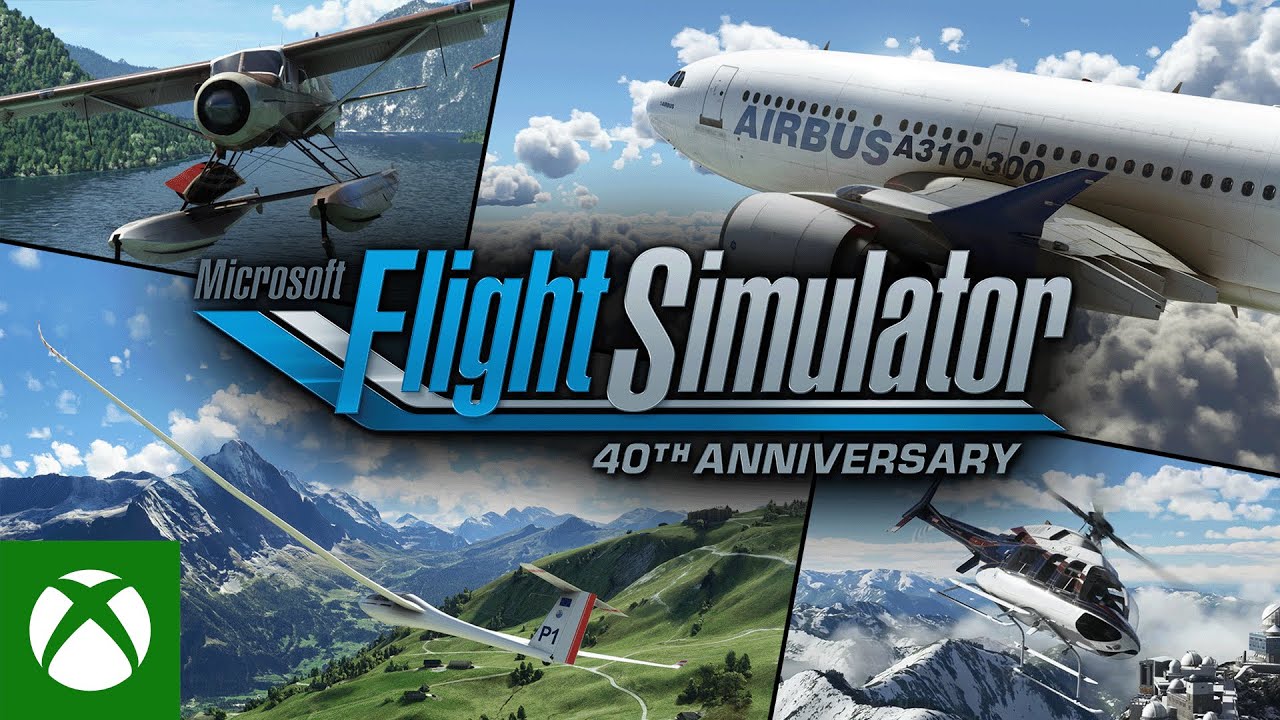
During the trailer, we saw glimpses of helicopters, historic aircraft, jetliners and also gliders. The helicopters were taking off from various helipads, buildings and more.

The historical aircraft include the Wright Flyer, the Douglas DC-3 and the De Havilland Canada DHC-2-Beaver. For fans of helicopters, there’s the Bell 407 and the Guimbal Cabri G2.

If gliders are for you, then you’ll be able to fly the DG Flugzeugbau LG8-18 and the DG Flugzeugbau DG1001E neo.

Perhaps the biggest surprise is the inclusion of the Airbus A310 from iniSimulations that will come with the update completely free. More details on this will follow soon.

1655118208609.png

The 40th Anniversary Edition will be a completely free update this November for those who own Microsoft Flight Simulator or play via Xbox Game Pass.

This is a “comprehensive celebration of the franchise with both a tribute to our past as well as an introduction to new and highly anticipated aircraft types.

As a nod to the past, the update will re-introduce some classic airports and several of the most famous planes from earlier versions including Microsoft Flight Simulator X and Microsoft Flight Simulator 2004: A Century of Flight.

Many of these aircraft were made in collaboration with iniSimulations, MilViz, Bluemesh, Aeroplane Heaven and others.

Here is a brief summary of what will be included as part of the free update as part of the 40th Anniversary Edition this November.

Historical Aircraft:
  • Wright Flyer
  • Ryan NYP (“Spirit of St. Louis”)
  • Douglas DC-3
  • De Havilland Canada DHC-2-Beaver
Helicopters:
  • Bell-407
  • Guimbal Cabri G2
Gliders:
  • DG Flugzeugbau LG8-18
  • DG Flugzeugbau DG1001E neo
True-to-Life Airliner:
  • Airbus A310


Microsoft Flight Simulator 40th Anniversary – Official Trailer - FSELITE​

Check out the official trailer for the upcoming Microsoft Flight Simulator 40th Anniversary Edition - coming free this November.


Microsoft’s longest-running franchise celebrates its 40th Anniversary with an expanded edition, coming November 2022.

Also, in partnership with Halo and 343 Industries, an exclusive Halo Infinite Pelican is available today in Microsoft Flight Simulator. This free add-on is included with Xbox Game Pass – get it now!

For the 40th Anniversary Edition releasing this fall, the Microsoft Flight Simulator team is partnering with the Smithsonian National Air and Space Museum in a one-of-a-kind collaboration.

Stay tuned in the coming months for more to come regarding this coveted partnership and enhanced Anniversary Edition.

 
Has anyone tried the your controls mod?

You’d think multiplayer mode (2 pilots) should be a pretty obvious built in feature.
 
Last edited:

Microsoft Flight Simulator 40th Anniversary Update (Sim Update 11) Release Times - FSELITE​

See when the 40th Anniversary Edition of Microsoft Flight Simulator launches in your region.​


1668153398816.png

On Friday 11th November 2022, the Microsoft Flight Simulator will celebrate its 40th anniversary with a huge free update for every single person who owns the sim.

Microsoft Flight Simulator 40th Anniversary Edition will include brand-new airports, aircraft, missions, improvements and more as a way to say thanks to the fans who have kept the simulator going for as long as it has.

Of course, any update of this size will also see many of you keen to learn when it will go live so that you can download your own copy. Luckily, Microsoft has given us all the heads up by announcing in advance when the update will go live in your region.

The following times are when the updates are planned to go live:
  • Seattle: 8:00AM (PST)
  • New York: 11:00AM (EST)
  • São Paulo: 1:00pm (BRT)
  • London: 4:00pm (BST)
  • Amsterdam: 5:00PM (CET)
  • Cape Town: 6:00PM (SAST)
Those in the following regions will get access to the update on November 12th 2022.
  • Singapore: 12:00AM (SGT)
  • Tokyo: 1:00AM (JST)
  • Sydney: 3:00AM (AEST)
  • Wellington: 5:00AM (NZST)
Microsoft Flight Simulator 40th Anniversary Edition will be a free update.

1668153744807.png

 
Top
Sign up to the MyBroadband newsletter
X