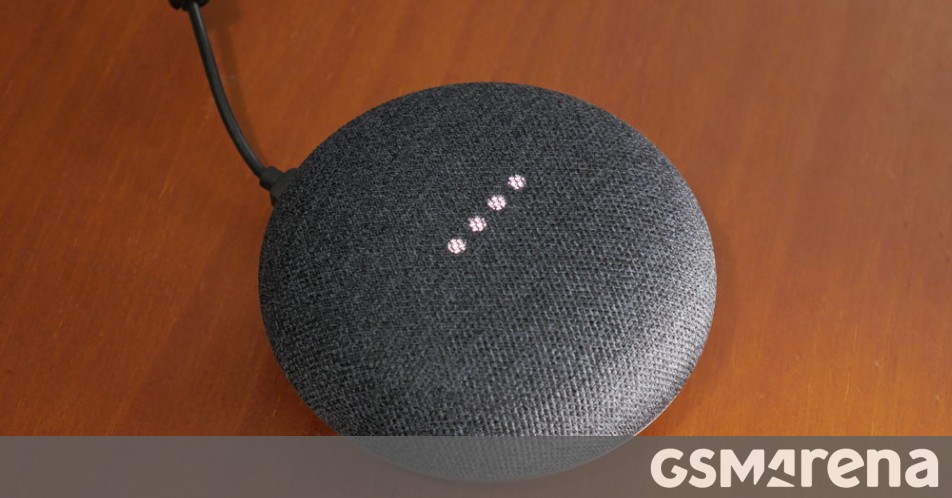
Google Home Mini

Hmm... I used Spotify though I wasnt on iOS. You do need a paid Spotify sub I believe.


I also suspect a paid sub is required, but Soul Assassin says he has it working with a free sub. But he's on Android, I'm on iOS, so it's a mystery.....
 
When I ask mine to play a song it will play the song from Spotify and when the song is done it will continue playing other songs. WTF? I assume its the playlist (not mine) on Spotify where the requested song is included so it just keeps on playing the rest of the playlist. Annoying koz I just want to hear one song. :confused:
 
When I ask mine to play a song it will play the song from Spotify and when the song is done it will continue playing other songs. WTF? I assume its the playlist (not mine) on Spotify where the requested song is included so it just keeps on playing the rest of the playlist. Annoying koz I just want to hear one song. :confused:
Is the device you use on iOS - I'm trying to narrow down if it's an Android/iOS thing
 
Yes, I've had it on for a while, works great with some Sonoff switches, my LIT box and a bridge with a bunch of PIR sensors.

Out of interest...what kind of routines, actions do you use your setup for? My home have lots of Google devices, 3 Litboxes and four google home connected cellphones.

I am interested in getting some sensors, sonofs, bulbs etc
 
Erm... so whats the problem, its already a service?
Exactly what I thought - TuneIn is also listed there as a service and that works perfectly. When I ask Google to play Spotify I get a reply that the account needs to be linked in Google Home. I imagine that could be done if Spotify appeared in the list of providers in the second image, but it doesn't.
 
Exactly what I thought - TuneIn is also listed there as a service and that works perfectly. When I ask Google to play Spotify I get a reply that the account needs to be linked in Google Home. I imagine that could be done if Spotify appeared in the list of providers in the second image, but it doesn't.
Okay.
Home app settings - linked media accounts - if linked already try unlink it and relink

Edit: I'm now thinking... is your google account the email you used for spotify account? ie should have auto linked if it were, and would probably require manual linking(and auth) if different email
 
Last edited:
I have a Spotify Premium (Family) account. Home is set to use English (US) language.
Spotify doesn't appear as an option in my Music Services list either.

That said, it may have something to do with the fact that I'm using a paid G-Suite google account (rather than a free gmail account), since we're treated like second-class citizens these days - not even Reminders are supported anymore :confused:
 
I think people are getting confused with that screen. Only google owned services appear there, non google fall into the 'no default'. Non google apps you 'link' and run the app 'through' 'home', ie, they aren't part of google home... eg, spotify account gets 'linked', when you select it from your 'services' it opens the spotify app and play 'though' home to mini... you can link and unlink non google app accounts in the 'linked media accounts' section... make sense?
 
I think people are getting confused with that screen. Only google owned services appear there, non google fall into the 'no default'.

Spotify used to be an option for me in that list. And with it selected, I didn't need to specify "..on Spotify" when asking the Home to play a track - it defaulted to Spotify every time anything music-related was mentioned.
Not sure what changed/when it was no longer an option - though I think it may have been the move from a gmail account to GSuite.
 
Spotify used to be an option for me in that list. And with it selected, I didn't need to specify "..on Spotify" when asking the Home to play a track - it defaulted to Spotify every time anything music-related was mentioned.
Not sure what changed/when it was no longer an option - though I think it may have been the move from a gmail account to GSuite.
Could have been, I can't speak to that, since I've had mine, its always been like this... any 3rd party supported app is automatically a 'service' and 'linked' once you sign in, not part of home itself... as long as you don't have a (google)default, it'll use the last one you used(spotify/drezzer etc) /shrug
 
I think people are getting confused with that screen. Only google owned services appear there, non google fall into the 'no default'. Non google apps you 'link' and run the app 'through' 'home', ie, they aren't part of google home... eg, spotify account gets 'linked', when you select it from your 'services' it opens the spotify app and play 'though' home to mini... you can link and unlink non google app accounts in the 'linked media accounts' section... make sense?
Thanks for this clue - it explains why TuneIn radio works fine but is also not listed on that particular screen. This led me to install and investigate the Google Assistant app, where I found a 'Play music on Spotify' button. Clicking that led to Spotify being linked to Google Home, so it now works via Google Home with voice commands.

TL/DR:

Spotify Free does work on iOS with Google Home - install Spotify, Google Home and Google Assistant, log in/register on each of these, then go to Google Assistant (NOT Google Home) and link your Spotify account from there.
 
This is mine for those interested

Best way is to setup the Google home again, but via VPN and location set to the US. Once you do that, set the default music services etc, you can then revert back to local. You only have to link these services once, after that if you set up again outside of a VPN, it will show that you are connected to spotify
a975dfe81d46d4cb5afa1c412e5b209b.jpg
 
Out of interest...what kind of routines, actions do you use your setup for? My home have lots of Google devices, 3 Litboxes and four google home connected cellphones.

I am interested in getting some sensors, sonofs, bulbs etc
Pretty basic stuff really - just casting photos and video on my phone to the TV, streaming internet radio to my hi-fi, and then doing 'good night' and 'good morning' routines to activate/deactivate various lights and lamps, PIR's, cameras etc. Between the Sonoff devices, the eWeLink app, Google Home and IFTTT you can achieve quite a lot. First prize though will be to flash the Sonoff kit and then use HASS/Home Assistant but I'm not there yet.
 
So with the upgraded new Nest Mini retailing at the same price I think there will be some big deals on the current Home Mini on Black Friday.

I doubt local retailers but does anyone have any US sites that may have specials on them that deliver to SA. I tried places like Amazon, Walmart and Best Buy but they don't list them on Amazon or don't deliver to SA.
 
Google discontinues the Google Home Mini

As 9to5Google reports, Google’s $50 smart speaker that launched alongside the Google Pixel 2 and 2 XL and Google Home Max back in 2017 is officially out of stock on the Google Store.

The Google Home Mini’s status on Google’s online Store is listed as “No longer available”. Since the initial launch of the small home speaker it has often been discounted and gifted with some YouTube or Spotify promotions for subscribers.

The smart speaker sold for more than four years and with the Google Nest Home mini (with stronger sound, better microphones, and proximity sensors for illuminating the speaker) there’s no longer a need for the original Google ‘mini’ speaker.

 
Google finally stops selling the Home Mini after four years

The Google Home Mini launched in October of 2017 and was replaced two years later by the Nest Mini. Despite that, the original affordable speaker has remained available for sale but is now finally out of stock on the Google Store.

Earlier today, Home Mini availability on the Google Store switched to “No longer available.” For the longest time, the diminutive smart speaker has remained on sale alongside the identically priced Nest Mini. Since mid-November, both have been discounted to $24.99. However, all four colors (Chalk, Charcoal, Coral, and Aqua) weren’t always available towards the end.

Over the original, Google’s second-generation features 2x stronger bass, a third far-field microphone, ultrasonic sensing to light up volume LEDs on nearby approach, wall mounting, and a machine learning chip for faster, local processing of frequent commands.

That said, the Home Mini used a micro-USB port instead of a barrel plug connector, and some people preferred that approach. At launch, a hardware issue emerged where the top cover was prone to activating Assistant, thus leading to accidental voice recordings. Google disabled the feature entirely, but later added the ability to play/pause (start/stop) by long-pressing the volume buttons.

Its in-store longevity could have been due to Google making too many at launch, and you will undoubtedly find a handful on store shelves if you still really want one. That said, the Home Mini does not appear on Best Buy or Target online stores today.

https://9to5google.com/2021/12/20/google-home-mini-out-of-stock/
 
Top
Sign up to the MyBroadband newsletter
X