-
- News
-
Categories
- 5G
- ADSL
- AI
- Banking
- Black Friday
- Broadband
- Broadcasting
- Business
- Business Telecoms
- Cellular
- Cloud and Hosting
- Columns
- Cryptocurrency
- Energy
- Enterprise
- Fibre
- Gadgets
- Gaming
- Government
- Hardware
- Industry News
- Internet
- Internet of Things
- Investing
- IT Services
- Motoring
- Reviews
- Science
- Security
- Smartphones
- Software
- Technology
- Telecoms
- Trending
- Wireless
- Press Office
- Forum
- Industry News
- What's Next
- Company hub
- Speed Test
- About us
- Advertise with us
- Contact
- Careers


-
Join the MyBroadband community
South Africa’s biggest forum. Discuss, discover, and connect with thousands of members.
-
Question of the Day: Museums you've been to, would recommend, or want to go to?

You are using an out of date browser. It may not display this or other websites correctly.
You should upgrade or use an alternative browser.
You should upgrade or use an alternative browser.
Handy Must Know Linux Applications
- Thread starter D3x
- Start date


I want a nice clean theme for kde before I switch back, Orta is a lovely Gnome theme, wish someone would port it to KDE.
I'm currently using "Dark-Translucent". Looks pretty nice, and text is very readable.

charlieharper
Expert Member
Been running Linux (Ubuntu 11.04) for the first time exclusively, since last week Sunday - And I'm loving it!
Although the Unity gui is just kinda weird...
Although the Unity gui is just kinda weird...
Last edited:
mici
Well-Known Member
Been running Linux (Ubuntu 11.04) for the first time exclusively, since last week Sunday - And I'm loving it!
Although the Unity gui is just kinda weird...
I love unity. Takes some getting used to but after that you're hooked

Looney
Executive Member
I cant stand unity, Iv been using gnome 3 on mint 11, its cool when u get used to it. similar to unity actually but i find gnome 3 easier. I had to download cairo dock because I dont like not having either a panel or dock that has all my most used apps.
atomcrusher
Expert Member
Having recently moved from years of M/Soft, and now using Ubuntu (11.04), I am looking for an app that will enable me to do screen captures, and in particular one where I can use the cursor to draw a rectangle around a portion of a screen, and save that portions as a JPG / PNG / etc. file.
Any recommendations for a simple app?
Any recommendations for a simple app?
MyWorld
Executive Member
Gimp, ksnapshot (KDE) and in Gnome, just search under applications for "screenshot", Gnome also has a default screenshot utility.
To add tot he list:
iotop - Check IO activity and who/what is responsible for activity.
To add tot he list:
iotop - Check IO activity and who/what is responsible for activity.
atomcrusher
Expert Member
@ MyWorld ..
Thanks .... but but that ksnapshot is a 55MB download / 190MB-odd installed. Any other smaller, simple one?
Thanks .... but but that ksnapshot is a 55MB download / 190MB-odd installed. Any other smaller, simple one?
MyWorld
Executive Member
I do not use unity, but there should be a bar somewhere to search for apps after you clicked the launcher...
Click launcher -> Search bar -> "screenshot" -> click app.

If there is nothing installed, which I highly doubt, then it will recommend to install one, click install.
Click launcher -> Search bar -> "screenshot" -> click app.
If there is nothing installed, which I highly doubt, then it will recommend to install one, click install.
graviti
Senior Member
If I remember correctly, press the print screen button loads the screenshot app. Never used anything more than that. If I only wanted a portion, I merely edited my fullscreen image
Sent from my new robot. Viva the Droid.
Sent from my new robot. Viva the Droid.
atomcrusher
Expert Member
If there is nothing installed, which I highly doubt, then it will recommend to install one, click install.
You were correct ... my newbie status in Linux OS is my excuse! It was there, and now installed - many thanks

i would like to move over to linux full time but it's just not graphics friendly enough yet. so far the audio player that works the best for me is Exaile but i would like to find something closer to MediaMonkey or Foobar (both windows apps). on the graphics app front Inkscape is very good, i use it over adobe illustrator on windows, the gimp however is close to useless as a professional image editor.
uTorrent - Deluge BitTorrent Client
Dos emulator - ScummVM (for those old games)
IDE - Aptana
uTorrent - Deluge BitTorrent Client
Dos emulator - ScummVM (for those old games)
IDE - Aptana
VirtualBox
I've run XP, Win7 and Server 2008 comfortably in VirtuaBox, and didnt have much problems with cross platforming. Would copy my VirtuaBox'es between my home Ubuntu and work Win7 VirtuaBox installations and all my VM's worked 100%.
I've run XP, Win7 and Server 2008 comfortably in VirtuaBox, and didnt have much problems with cross platforming. Would copy my VirtuaBox'es between my home Ubuntu and work Win7 VirtuaBox installations and all my VM's worked 100%.
mxc
Well-Known Member
Don't forget
* Blender,
* Open shot,
* gpodder &
* Eclipse/NetBeans for C/PHP/Java/Ruby etc IDE
PHP Training
* Blender,
* Open shot,
* gpodder &
* Eclipse/NetBeans for C/PHP/Java/Ruby etc IDE
PHP Training
grahamjohn
New Member
I downloaded ubuntu studio edition, its evry nimble, but it does take some getting used to, I will stay on dual boot for now...need freehand, though freehand 9 runs on wine i hear, how do you get freehand ver 9 though!!!

Have you tried Inkscape?I downloaded ubuntu studio edition, its evry nimble, but it does take some getting used to, I will stay on dual boot for now...need freehand, though freehand 9 runs on wine i hear, how do you get freehand ver 9 though!!!
Having recently moved from years of M/Soft, and now using Ubuntu (11.04), I am looking for an app that will enable me to do screen captures, and in particular one where I can use the cursor to draw a rectangle around a portion of a screen, and save that portions as a JPG / PNG / etc. file.
Any recommendations for a simple app?
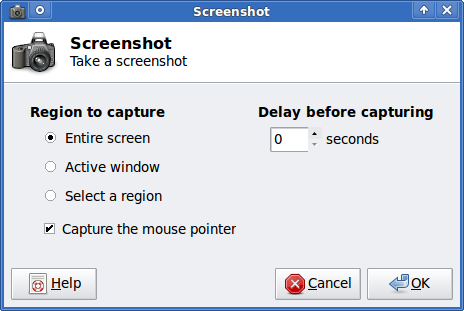
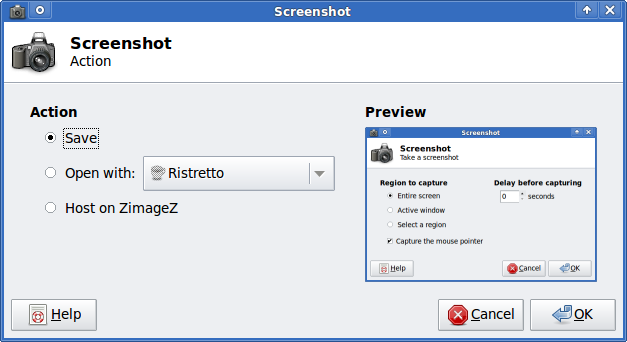
xfce4-screenshooter is small and does exactly what you want.
http://goodies.xfce.org/projects/applications/xfce4-screenshooter