


No idea. Bought the house with the fan like that.the bowl part that attaches to the ceiling
-
- News
-
Categories
- 5G
- ADSL
- AI
- Banking
- Black Friday
- Broadband
- Broadcasting
- Business
- Business Telecoms
- Cellular
- Cloud and Hosting
- Columns
- Cryptocurrency
- Energy
- Enterprise
- Fibre
- Gadgets
- Gaming
- Government
- Hardware
- Industry News
- Internet
- Internet of Things
- Investing
- IT Services
- Motoring
- Reviews
- Science
- Security
- Smartphones
- Software
- Technology
- Telecoms
- Trending
- Wireless
- Press Office
- Forum
- Industry News
- What's Next
- Company hub
- Speed Test
- About us
- Advertise with us
- Contact
- Careers
-
Join the MyBroadband community
South Africa’s biggest forum. Discuss, discover, and connect with thousands of members.
-
Question of the Day: Do you get motion sick?
You are using an out of date browser. It may not display this or other websites correctly.
You should upgrade or use an alternative browser.
You should upgrade or use an alternative browser.
Home Automation - Smartkit
- Thread starter Dolby
- Start date
The WiFi switch uses eWeLink, so I would think that he used the AlexxIT/Sonoff LAN integration https://github.com/AlexxIT/SonoffLAN
This worked! Using the AlexIT/Sonoff LAN integration and the eWeLink app. I bought the smart switch through:
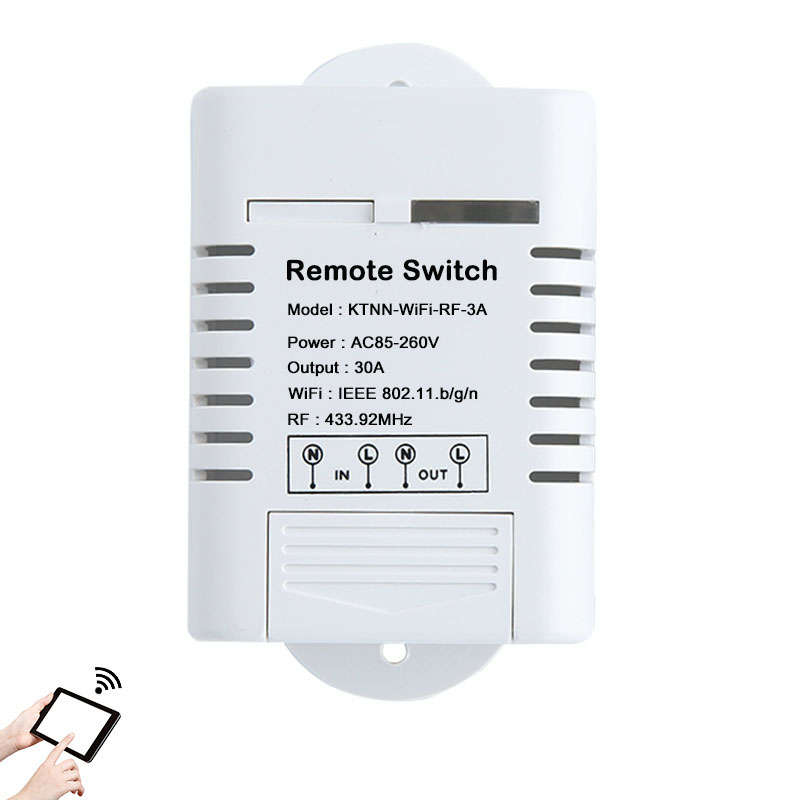
KTNNKG AC85-260V 30A 3000W High Power WIFI Smart Switch 433MHz Receiver Smart Home Gadgets Wireless | bobshop.co.za
Buy KTNNKG AC85-260V 30A 3000W High Power WIFI Smart Switch 433MHz Receiver Smart Home Gadgets Wireless for R367.29
Custom duties came to about R40
The device, when it arrived, had the following on the cover:
KTNNKG
30A wifi switch
Model: KTNN-Wifi-30A
Power: AC85-260V
Max Load: 6600W
Wifi: 802.11.b/g/n
RF: 433.92MhHz
Not bad for ~R400.00
Thought I would mention for anyone looking to get the Qualitel GU10 smart downlights - they are not flash-able using TuyaConvert so you do need to use the Smart Life app unless you open up the lights to solder.

alqassam
Expert Member
- Joined
- Aug 11, 2014
- Messages
- 4,254
- Reaction score
- 828
Incorrect. I bought 6 and tuya converted themThought I would mention for anyone looking to get the Qualitel GU10 smart downlights - they are not flash-able using TuyaConvert so you do need to use the Smart Life app unless you open up the lights to solder.

AlphaJohn
Honorary Master
On the sonoff mini you can connect a switch for normal switch use.
.why does it have a neutral in and neutral out?
It needs L + N to power itself as well.
There is special switches that can tap power off only 1 wire but basic is not one of them.
Nice video on the matter:


AlphaJohn
Honorary Master
Sonoff dont seem to be the worlds most robust devices.
FIFY
That's why put build mine into junction boxes. For the price they do the job and do it well. If they die I simply replace, if you want reliability look elsewhere but be prepared to pay esp if you want same functionality.
Oh interesting - I tried with two of them and they didn't work. I have flashed other lights with tuya-convert with the same setup. Did you get some of the GU10's from the latest bunch of stock which arrived in August?Incorrect. I bought 6 and tuya converted them
alqassam
Expert Member
- Joined
- Aug 11, 2014
- Messages
- 4,254
- Reaction score
- 828
Need to do a tasmota backup of mine then just in case.FIFY
That's why put build mine into junction boxes. For the price they do the job and do it well. If they die I simply replace, if you want reliability look elsewhere but be prepared to pay esp if you want same functionality.
Do you have to use the N out?It needs L + N to power itself as well.
There is special switches that can tap power off only 1 wire but basic is not one of them.
Nice video on the matter:
Mine was before August.Oh interesting - I tried with two of them and they didn't work. I have flashed other lights with tuya-convert with the same setup. Did you get some of the GU10's from the latest bunch of stock which arrived in August?
Got the 3 pin, 2 pin, gu10s and e27 flashed all with tuya convert.
You have to put it in fast blink mode if i remember correctly. Switch them off and on 5 times
AlphaJohn
Honorary Master


Yeah I do the same with flashes/backed up replacements ready do go. Though i wouldn't mind paying more for something a little more robust. Would be been better if it was POE.FIFY
That's why put build mine into junction boxes. For the price they do the job and do it well. If they die I simply replace, if you want reliability look elsewhere but be prepared to pay esp if you want same functionality.

Anyone used a rain sensor with the kit sold by smartkit.co.za?
Which kit is this -- the OpenSprinkler kit?
Yip - probably should have mentioned that.Which kit is this -- the OpenSprinkler kit?
https://www.smartkit.co.za/product/smartkit-openirrigation/
Yip - probably should have mentioned that.
https://www.smartkit.co.za/product/smartkit-openirrigation/
I don't know Open Irrigation that much, so don't know what you can connect to it. I use this at home: https://www.pishop.co.za/store/maplin-rain-gauge?keyword=rain sensor&category_id=0
Hi All,
Bit of a newbie to the site. Could not find the exact forum for my question, but it seemed like this forum have lots of people with a lot more knowledge than me on automation. Please see if you can assist me. I have googled and you tubed but could not find a solution. The problem it seems is that the motor gets rebranded in SA as super Drive, hence no info on the web.
I have a new Super Drive garage door motor and have just bought a ET Nice RX1 single channel receiver in order to use the second button on my gate remote also with my garage door. But I don't know how to connect the receiver to the pc board of my garage motor? Can you assist perhaps? See attached pictures of receiver and garage motor pc board.
Many thanks
Bit of a newbie to the site. Could not find the exact forum for my question, but it seemed like this forum have lots of people with a lot more knowledge than me on automation. Please see if you can assist me. I have googled and you tubed but could not find a solution. The problem it seems is that the motor gets rebranded in SA as super Drive, hence no info on the web.
I have a new Super Drive garage door motor and have just bought a ET Nice RX1 single channel receiver in order to use the second button on my gate remote also with my garage door. But I don't know how to connect the receiver to the pc board of my garage motor? Can you assist perhaps? See attached pictures of receiver and garage motor pc board.
Many thanks
Attachments


Steamy Tom
Executive Member
- Joined
- Jan 23, 2019
- Messages
- 9,882
- Reaction score
- 6,111
Hi All,
Bit of a newbie to the site. Could not find the exact forum for my question, but it seemed like this forum have lots of people with a lot more knowledge than me on automation. Please see if you can assist me. I have googled and you tubed but could not find a solution. The problem it seems is that the motor gets rebranded in SA as super Drive, hence no info on the web.
I have a new Super Drive garage door motor and have just bought a ET Nice RX1 single channel receiver in order to use the second button on my gate remote also with my garage door. But I don't know how to connect the receiver to the pc board of my garage motor? Can you assist perhaps? See attached pictures of receiver and garage motor pc board.
Many thanks
on the back of the motor imo there are 2 inputs for receiver, show me the back side of it, the part facing away from the garage door