


InternetSwag
Expert Member
Should be arriving Tuesday.
I'm excited
I'm excited
South Africa’s biggest forum. Discuss, discover, and connect with thousands of members.

Should be arriving Tuesday.
I'm excited

Looking at
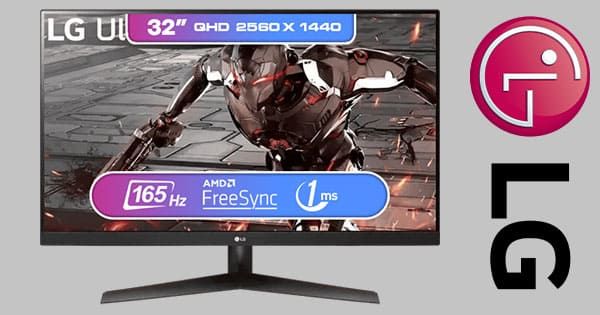
LG UltraGear 32GN600 Gaming Monitor - Ultra HD, 165Hz Refresh Rate
Experience immersive gaming with the LG UltraGear 32GN600 Gaming Monitor. Featuring 32-inch Ultra HD display, 165Hz refresh rate, and adaptive sync for smooth visuals. Perfect for gamers seeking top performance.www.evetech.co.za
As much as I hate evetech I can't deny that is a good price.
I am looking for a 32 inch 1440p 144hz
But I currently have a 4k 60hz 27 inch display and I wonder if this is a good screen or if going down to 1440p would bother me?
I cannot afford or run a 4k panel above 60hz anyways so idk
I have a 3080 but it crippled by games like cyberpunk and Warhammer
Aha, that is good to know.Bought this.. From Evetech. Wish I’d seen this thread earlier.
1. The picture quality is just off. Especially with text. And I’m a developer. The code looks horrible. Relatively anyway.
2. Brightness is low
I have the DELL S2721HN - (27") (1920x1080 at 75Hz) FHD IPS LED Monitor and it’s brightness and text clarity trumps the LG. And it was R2800.
The LG is okay for gaming though. I use it for that. But for reading text/work? Hell no. Next purchase will be another Dell. I don’t trust LG or VA panels anymore.

FYI, Dell gets their IPS panels from LG. In the case of the S2721DGFA, its EXACTLY the same panel as the LG 27GL850.Bought this.. From Evetech. Wish I’d seen this thread earlier.
1. The picture quality is just off. Especially with text. And I’m a developer. The code looks horrible. Relatively anyway.
2. Brightness is low
I have the DELL S2721HN - (27") (1920x1080 at 75Hz) FHD IPS LED Monitor and it’s brightness and text clarity trumps the LG. And it was R2800.
The LG is okay for gaming though. I use it for that. But for reading text/work? Hell no. Next purchase will be another Dell. I don’t trust LG or VA panels anymore.
If you're not noticing the Freesync it means it's working as intended. It just matches every frame with a screen refresh to stop screen tearing. Your screen refreshes at 165hz, so it matches it with 165fps.I got my screen btw.
I will post a review when I've used it for long enough.
First impressions are;
'its ****ing massive and looks expensive asf'
'165hz is really like 'snappy', even web browsing or playing non FPS games, its really responsive'
'a lot of AAA games don't support 3440x1440p (sekiro/dark souls)'
'I turned on freesync premium and have no idea what it actually is doing for me'
'HDR is really bright, but I actually prefer the preset profile 'scenery mode' as it makes the colors really vibrant'
I noticed some people had issues with red/green tearing with overdrive set to 100 - I also experience this. But not as bad as some people online showed holy heck.
Freesync/Gsync are the just AMD/nVidia versions of Vsync really, with slight differences. Vsync limits frames to match the refresh rate, while Freesync limits the refresh rate to match the frames (basically). Both have the same effect though: limit tearing, and 1:1 frame:hz.So I played some Horizon Zero Dawn, it has a slider to adjust HDR Brightness and Luminance. Brightness I didn't care much for but luminance made a big difference, I put it at 1000% and the colors looked a lot better, I set it to 0% and the colors looked dull, almost like a grey filter was put over it. I put it at 885% and I have no idea if that's the optimal number to put it at, but it looks really good.
The games really bright, like I can't look directly at the sun without feeling like im gonna go blind. So I turned down the brightness a bit. (not the HDR brightness, the games brightness - if that makes sense, there's two brightness sliders, at different parts of the games menu).
So this screen is G-sync compatible. I could see with G-sync the monitors refresh rate was constantly being updated to match my in game FPS. Visually however, same as with Freesync Premium, couldn't tell a difference. Which is a good thing I suppose.
So with Freesync/G-Sync - do I turn off V-sync in games?

So I played some Horizon Zero Dawn, it has a slider to adjust HDR Brightness and Luminance. Brightness I didn't care much for but luminance made a big difference, I put it at 1000% and the colors looked a lot better, I set it to 0% and the colors looked dull, almost like a grey filter was put over it. I put it at 885% and I have no idea if that's the optimal number to put it at, but it looks really good.
The games really bright, like I can't look directly at the sun without feeling like im gonna go blind. So I turned down the brightness a bit. (not the HDR brightness, the games brightness - if that makes sense, there's two brightness sliders, at different parts of the games menu).
So this screen is G-sync compatible. I could see with G-sync the monitors refresh rate was constantly being updated to match my in game FPS. Visually however, same as with Freesync Premium, couldn't tell a difference. Which is a good thing I suppose.
So with Freesync/G-Sync - do I turn off V-sync in games?

Playing left for dead 2 on my PC at 144FPS on a 144HZ monitor, wow it is super smooth.

lg 32gk650f had it for a year and a half now, been great actually. I've got a 27" IPS which does have better colours, but I mean marginally.What monitor you using? Just waiting for a good IPS 144Hz 24" - 27 monitor on special then I am buying

Bought this.. From Evetech. Wish I’d seen this thread earlier.
1. The picture quality is just off. Especially with text. And I’m a developer. The code looks horrible. Relatively anyway.
2. Brightness is low
I have the DELL S2721HN - (27") (1920x1080 at 75Hz) FHD IPS LED Monitor and it’s brightness and text clarity trumps the LG. And it was R2800.
The LG is okay for gaming though. I use it for that. But for reading text/work? Hell no. Next purchase will be another Dell. I don’t trust LG or VA panels anymore.

I have a 24" curved monitor, I say go for it.Takealot.com: Online Shopping | SA's leading online store
South Africa's leading online store. Fast, reliable delivery to your door. Many ways to pay. Shop anything you can imagine: TVs, laptops, cellphones, kitchen appliances, toys, books, beauty & more. Shop the mobile app anytime, anywhere.www.takealot.com
Wonder if anyone here has used a curved monitor ? Looking for a 24/27 inch 144hz IPS monitor not curved but this is tempting
Takealot.com: Online Shopping | SA's leading online store
South Africa's leading online store. Fast, reliable delivery to your door. Many ways to pay. Shop anything you can imagine: TVs, laptops, cellphones, kitchen appliances, toys, books, beauty & more. Shop the mobile app anytime, anywhere.
Wonder if anyone here has used a curved monitor ? Looking for a 24/27 inch 144hz IPS monitor not curved but this is tempting


What type of games are you playing? Taking a glance of page 1 (posts #1 - 19) of this thread IMO the advice there is all still relevant.It's two years later now.
And we are halfway through November.
What is the recommended purchase for gamers now?