-
- News
-
Categories
- 5G
- ADSL
- AI
- Banking
- Black Friday
- Broadband
- Broadcasting
- Business
- Business Telecoms
- Cellular
- Cloud and Hosting
- Columns
- Cryptocurrency
- Energy
- Enterprise
- Fibre
- Gadgets
- Gaming
- Government
- Hardware
- Industry News
- Internet
- Internet of Things
- Investing
- IT Services
- Motoring
- Reviews
- Science
- Security
- Smartphones
- Software
- Technology
- Telecoms
- Trending
- Wireless
- Press Office
- Forum
- Industry News
- What's Next
- Company hub
- Speed Test
- About us
- Advertise with us
- Contact
- Careers


-
Join the MyBroadband community
South Africa’s biggest forum. Discuss, discover, and connect with thousands of members.
-
Question of the Day: Have you registered your home solar with Eskom?

You are using an out of date browser. It may not display this or other websites correctly.
You should upgrade or use an alternative browser.
You should upgrade or use an alternative browser.
macOS Tahoe (macOS 26)
- Thread starter FiestaST
- Start date

semaphore
Honorary Master
- Joined
- Nov 13, 2007
- Messages
- 18,655
- Reaction score
- 9,744
His eyebrows are way too distracting.
Smiggles
Honorary Master
Just admit you're wrong. Say it.It's a rare exception here, as you can see with your own link, .04 of a year over 10 years. Vast majority are under 10 with as low as 6.
The problem is that Apple makes premium hardware and many of these devices hold out far longer. Editing 1080P video 10 years ago allows you to still use the machine now for office like situations, except Apple won't assist with that. OCLP however does allow this and with that, the performance often is very good, but security patches are there.
A 2012 retina Macbook with 16GB of RAM is more than fast enough for any Office like activity, even 8GB machines are still good. Except, you can't have security. It goes in the landfill to pollute.
That's 8 years of support from Intel. Just because you can hack Windows to run on old hardware doesn't mean it'll be secure or recommended.Consumer CPUs: For mainstream consumer processors (e.g., Core i3/i5/i7/i9), Intel typically supports new generations for several years after release. For example, some Coffee Lake processors (released in 2017) are slated to end active support around June 2025. Newer generations like Raptor Lake (released October 2022) and Alder Lake (released November 2021) are still in production and have active support.
semaphore
Honorary Master
- Joined
- Nov 13, 2007
- Messages
- 18,655
- Reaction score
- 9,744
The issue isn't whether the machine feels perfectly fine; it's about what's happening under the hood. Older macOS versions often have unpatched vulnerabilities, outdated encryption standards, and lack support for modern hardware acceleration, which are critical for both security and performance.If a machine is perfectly fine, why no official security patch support? Yearly MacOs versions which add new emojis and some silly calendar or other applet features make perfectly good hardware obsolete.
While it might seem like newer macOS versions just add emojis or minor app updates, they also include deep system-level changes,like memory protections, sandboxing improvements, and support for new APIs, that older versions simply can't handle without major rewrites.
Expecting Apple to backport all those security improvements to a 5-10-year-old OS isn't just unrealistic, it's inefficient and risky. Maintaining backwards compatibility with that level of legacy comes at the cost of innovation and introduces significant technical debt. At some point, hardware and software need to move forward together.
So I don't think you fully understand the nuances that go into operating system design and development, so you should stop speaking from a position of authority when you lack it entirely.

FiestaST
Honorary Master
quovadis
Honorary Master
Looks like they have a ton of work to do before they release it mainstream.

SauRoNZA
Honorary Master
I don't like the double borders around things for damn sure, but must dig into Settings maybe there is a way to turn it off.
Safari is a refreshingly great experience and my annoyance with not always being able to tell easily with Tab I'm on is now gone.
Safari is a refreshingly great experience and my annoyance with not always being able to tell easily with Tab I'm on is now gone.
SauRoNZA
Honorary Master
One thing I would really love to see is remembering my tiling across different screens.
When I work at my desk in clamshell mode on an ultra wide screen I tend to split things in three, with things like Slack on my 1/3rd left and Whatapp/Telegram on the right with my working space in the middle.
But then the moment I unplug stuff is too small and I tile to half half or just overlap and it would be great if it could just remember that.
Also Apple really needs to add 1/3rd tiling options along with a 2/3rds middle option, then I wouldn't need Magnet any more.
When I work at my desk in clamshell mode on an ultra wide screen I tend to split things in three, with things like Slack on my 1/3rd left and Whatapp/Telegram on the right with my working space in the middle.
But then the moment I unplug stuff is too small and I tile to half half or just overlap and it would be great if it could just remember that.
Also Apple really needs to add 1/3rd tiling options along with a 2/3rds middle option, then I wouldn't need Magnet any more.
FiestaST
Honorary Master
macOS Tahoe 26 is the last version for Intel-powered Macs and only some are supported
The new macOS Tahoe 26 is part of Apple’s push for a unified UI, but some Mac owners will not get to experience it as Tahoe drops support for certain Intel-powered Macs. And while some Intel-powered Macs will get Tahoe, this is the last macOS version that they will receive.
When macOS Sequoia was unveiled last year, it dropped support for 2018 MacBook Airs, but 2020 ones (with 10th gen Intel CPUs) were still able to update. Come next year, only Apple Silicon Macs will be getting updated.
Above is the list of which Macs are getting updated to Tahoe 26 – all Apple Silicon Macs, plus some Intel-powered ones. But Apple’s weird naming scheme requires some clarification as it can be hard to figure out which model is which.
Here is a table that shows the difference between last year’s Sequoia and this year’s Tahoe:
Let’s try to clear things up – 2020 MacBook Airs with Intel CPUs cannot be updated, only Apple-powered Airs get Tahoe. Intel-powered Mac minis also lose support (the last one was the 2018 model, from 2020 onward they use Apple M chips). The iMac Pro (which never got an Apple Silicon refresh) is also staying behind on Sequoia. However, iMac (Retina 5K, 27-inch, 2020) with 10th gen Core i5, i7 and i9 can be updated to Tahoe.
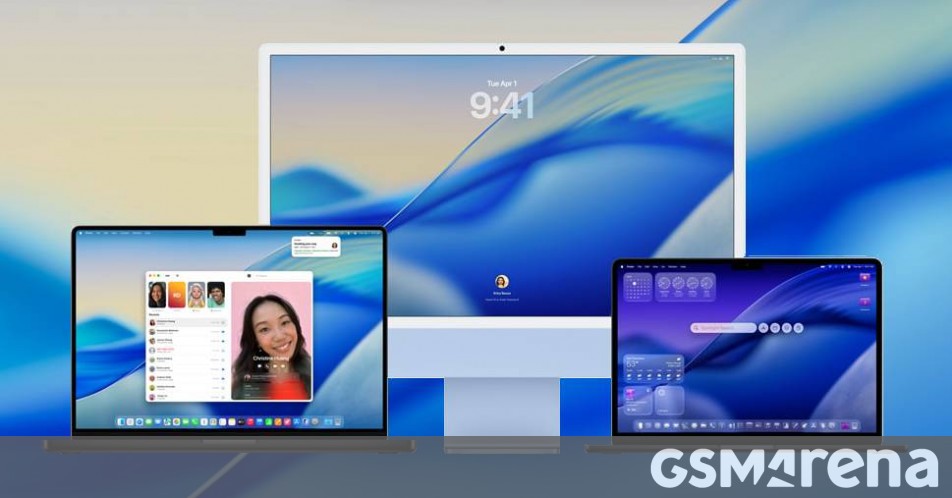
 www.gsmarena.com

The new macOS Tahoe 26 is part of Apple’s push for a unified UI, but some Mac owners will not get to experience it as Tahoe drops support for certain Intel-powered Macs. And while some Intel-powered Macs will get Tahoe, this is the last macOS version that they will receive.
When macOS Sequoia was unveiled last year, it dropped support for 2018 MacBook Airs, but 2020 ones (with 10th gen Intel CPUs) were still able to update. Come next year, only Apple Silicon Macs will be getting updated.
Above is the list of which Macs are getting updated to Tahoe 26 – all Apple Silicon Macs, plus some Intel-powered ones. But Apple’s weird naming scheme requires some clarification as it can be hard to figure out which model is which.
Here is a table that shows the difference between last year’s Sequoia and this year’s Tahoe:
Let’s try to clear things up – 2020 MacBook Airs with Intel CPUs cannot be updated, only Apple-powered Airs get Tahoe. Intel-powered Mac minis also lose support (the last one was the 2018 model, from 2020 onward they use Apple M chips). The iMac Pro (which never got an Apple Silicon refresh) is also staying behind on Sequoia. However, iMac (Retina 5K, 27-inch, 2020) with 10th gen Core i5, i7 and i9 can be updated to Tahoe.
macOS Tahoe 26 is the last version for Intel-powered Macs and only some are supported
Older Intel-powered Macs will remain on last year's macOS Sequoia. The new macOS Tahoe 26 is part of Apple’s push for a unified UI, but some Mac owners...
FiestaST
Honorary Master
quovadis
Honorary Master
Surprised they continued support for so long as it is. I'm guessing all those really expensive Intel Mac Pro's might have something to do with it.
FiestaST
Honorary Master
100%, Same thinking + the various Intel-based servers.Surprised they continued support for so long as it is. I'm guessing all those really expensive Intel Mac Pro's might have something to do with it.
Just admit you're wrong. Say it.
That's 8 years of support from Intel. Just because you can hack Windows to run on old hardware doesn't mean it'll be secure or recommended.
What must I admit, that you are trolling?
My argument from the first moment was that adding new emojis and a new name and now what looks like Windows Aero from Windows Vista and 7, i.e. a skin, pushes more Macs to the obsolescence pool. Macs which are still good performers, because Apple pays good attention to hardware.
People fawn over BS features which offer no value, it's not like they've improved performance or security, and more Macs have to go to the landfill. You on the other hand came in -- oh but Windows. Well yes, Windows which runs on 100s of thousands of configurations while Apple has to maintain security on the same hardware - maybe 3 or 4 dozen configurations in the past 10 years.
By the way Apple Silicon processors also suffer from serious security flaws, like Intel and AMD do.
Anyway there is no reason to fawn over more planned obsolescence.
And just wait for next year when they'll likely push the M1 Macs into the antiquated pool.
Last edited:
His iBrows are epic. You're just jealous.His eyebrows are way too distracting.
So I don't think you fully understand the nuances that go into operating system design and development, so you should stop speaking from a position of authority when you lack it entirely.
And yet when using OCLP the Macs are able to get the patched operating systems just fine.
It's not that hard.
I think you don't understand.
Smiggles
Honorary Master
tiftfyReeeeeeeeeeeeeeeeeeee reeeeeeeeeee
It's still the same Intel with the same +-8 year support. Get that though your skull. Nevermind it's not just BS features. I use window manager and the passwords app etc. every day since it came out with MacOS 14 and 15.My argument from the first moment was that adding new emojis and a new name and now what looks like Windows Aero from Windows Vista and 7, i.e. a skin, pushes more Macs to the obsolescence pool. Macs which are still good performers, because Apple pays good attention to hardware.
People fawn over BS features which offer no value, it's not like they've improved performance or security, and more Macs have to go to the landfill. You on the other hand came in -- oh but Windows. Well yes, Windows which runs on 100s of thousands of configurations while Apple has to maintain security on the same hardware - maybe 3 or 4 dozen configurations in the past 10 years.
No **** Sherlock.By the way Apple Silicon processors also suffer from serious security flaws, like Intel and AMD do.
Move to Windows then and hack it to run on old hardware. Nevermind Apple dropping security support doesn't mean the laptop self combusts and disappears.Anyway there is no reason to fawn over more planned obsolescence.
Talking out of your arse as usual.And just wait for next year when they'll likely push the M1 Macs into the antiquated pool.
Last edited:
FiestaST
Honorary Master
FiestaST
Honorary Master

$m@Rt@$$
Expert Member
So six year minimum for then intel boys. Not a bad stretch. If I can get 8 from my OG M1 I’ll be super happy.