MWEB Uncapped ADSL Feedback - Part 3

Hi MWEB Guy

Sorry to bother again but my connection is still not working properly. It is hampering my ability to work from home since I can't get a stable VPN connection to the office.

Right now I am doing an SVN update that should be almost instantaneous but is trickling through in bytes per second on average (large spans of 0 Bytes/second interspersed by brief bursts of data. I tread to sync my emails earlier and it was not pretty.

What should I do?

Hi

I checked your account now and it seems ok.
When I tested the line I noticed that the attenuation is currently at 57db.
This could certainly be impacting your connection and I would like to log a line fault for you.

Could you Please do a speeds test with the MWEB account and also with the Telkom guest account.
I'd like to compare the speeds and include this info in the fault.
 
There were two technicians at my place this morning but the problem could only be solved temporarily. They brought their own router, connected it and got a (slow but steady) connection. So the problem is my router. At least that is what they concluded. After doing a reset with my router I was online again. I told them that I tried several resets before and that this did not help –*or only temporarily. But they would not listen and were gone.

When I came home from work I wasn't surprised that the internet was down again... IF this is because of my router it should work with another one. Luckily I still got the brand new MWEB Fon router in the original packaging. So I connected the Fon router and what a surprise: Same problem as with my good one year old TP-LINK router. I got a ADSL signal but internet is so slow that I can't access one single website and can't perform a speed test.

What now MWEB Guy? Looks like not only my router but also the brand new Fon router is broken... :p

Hi

Thanks for the feedback, I will update the fault and have the team follow up with Telkom.
I will also ask them to contact you with the feedback they receive.
Hopefully the techs are able to isolate it this time round as we have now ruled out the router.
 
Hi

I checked your account now and it seems ok.
When I tested the line I noticed that the attenuation is currently at 57db.
This could certainly be impacting your connection and I would like to log a line fault for you.

Could you Please do a speeds test with the MWEB account and also with the Telkom guest account.
I'd like to compare the speeds and include this info in the fault.

Well if the account is fine it must be the line. Couldn't complete the speed test on either account.
 
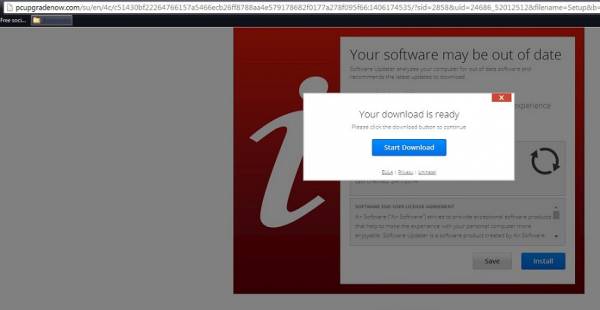
Went to Mweb.co.za and clicked on the mail link and it sent me to PCUpgradeNow page which -

PcUpgradeNow.com is yet another advertising platform that may be closely related to adwares and potentially unwanted programs.

You may wanna look into that asap.

Edit - it seems to only be the mweb mail page. Not popping up anywhere else for me (tested 17 different sites to be sure).
 
Last edited:
Mail link took me to, well, my email logon page. So seems to be sorted.
 
Last edited:
Went to Mweb.co.za and clicked on the mail link and it sent me to PCUpgradeNow page which -


You may wanna look into that asap.

Edit - it seems to only be the mweb mail page. Not popping up anywhere else for me (tested 17 different sites to be sure).


Exactly same issue I get right now on Chrome it leads to a download link, on Firefox its is stuck on "signing you in please wait".
 
Let me try again...

Worked fine, took me to email logon page, then to my inbox. Using IE8.
 
Found IE 11 on the computer and logged on,saved me the effort of downloading Thunderbird on someone else’s computer
 
Mail link took me to, well, my email logon page. So seems to be sorted.
..... it's leading to the 'correct' page now but after that I'm a bit wary that it is the real page.


Exactly same issue I get right now on Chrome it leads to a download link, on Firefox its is stuck on "signing you in please wait".

Interesting that it wasn't just I, thanks for the feedback.
 
Hi

Thanks for the feedback, I will update the fault and have the team follow up with Telkom.
I will also ask them to contact you with the feedback they receive.
Hopefully the techs are able to isolate it this time round as we have now ruled out the router.

The fault was fixed. So it was not my router ;) Obviously, some box outside our house needs to be replaced.
Still, download speed is very slow. Check the latest speed test:

Last Result:
Download Speed: 981 kbps (122.6 KB/sec transfer rate)
Upload Speed: 1024 kbps (128 KB/sec transfer rate)
Latency: 335 ms
23.7.2014 21:42:17
 
Virus_Mweb_1.jpg


virus_Mweb_2.jpg


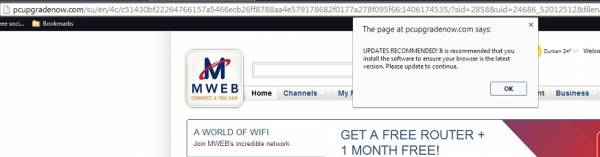
ONLY happening when I go to Mweb. We got no feedback at all yesterday and it persists. I'm essentially not willing to log in to my account and email while this is roaming your site. Please look into this asap. I have run all my security apps (MalwareBytes, ADWCleaner, etc etc) and when I navigate back to Mweb, it returns. Fix it :mad:
 
Last edited:
..... it's leading to the 'correct' page now but after that I'm a bit wary that it is the real page.

Interesting that it wasn't just I, thanks for the feedback.

Virus_Mweb_1.jpg


virus_Mweb_2.jpg


ONLY happening when I go to Mweb. We got no feedback at all yesterday and it persists. I'm essentially not willing to log in to my account and email while this is roaming your site. Please look into this asap. I have run all my security apps (MalwareBytes, ADWCleaner, etc etc) and when I navigate back to Mweb, it returns. Fix it :mad:

Morning, I cannot replicate the problem on my side.

Is the problem evident on all browsers or specific to one?

Does it occur on multiply devices or on a specific device?
 
It's happening from 2 PC's - 1 using Chrome and 1 using Firefox

Try clearing cookies and cache, then test again.

By typing the url: mweb.co.za and then clicking on mail.

I have tested on numerous PC's, browsers and cannot replicate it on my side
 
Done all that. The problem I have is I don't want to login because if the problem has been there for over a day and it was not just 1 client experiencing it, I will not be taking the chance until it's been certified safe somehow. If it was just me I'd accept that I got the infection elsewhere (even though it only shows up on Mweb) and moved on.

When I was testing yesterday - it would not even show up every single time I navigated to the page, it was intermittent no matter if I put the URL in, used a bookmark or followed the link from Google. Just saying.
 
Last edited:
Done all that. The problem I have is I don't want to login because if the problem has been there for over a day and it was not just 1 client experiencing it, I will not be taking the chance until it's been certified safe somehow. If it was just me I'd accept that I got the infection elsewhere (even though it only shows up on Mweb) and moved on.

When I was testing yesterday - it would not even show up every single time I navigated to the page, it was intermittent no matter if I put the URL in, used a bookmark or followed the link from Google. Just saying.

The thread shows 2 to 3 clients experiencing this problem and not having the same experience either.

Its hard to ascertain, cause the problem was only reported here and we were also not able to replicate it at all.
 
Done all that. The problem I have is I don't want to login because if the problem has been there for over a day and it was not just 1 client experiencing it, I will not be taking the chance until it's been certified safe somehow. If it was just me I'd accept that I got the infection elsewhere (even though it only shows up on Mweb) and moved on.

When I was testing yesterday - it would not even show up every single time I navigated to the page, it was intermittent no matter if I put the URL in, used a bookmark or followed the link from Google. Just saying.

Browser hijacker?
 
Browser hijacker?

I suspect not since Google Chrome on the computer i used had no browsing history, and the FireFox was stuck on a "signing in" loop, if it was just one browser, I would accept it was a hijacker but strange that Internet Explorer worked for me. I have not taken any action to remove any malware and the problem has disappeared yesterday.
 
I decided to test it from my side just to see, I'm also getting a "Signing you in .... please wait." loop. It seems like it is looping between different addresses all still MWEB and Verified by Entrust, will PM Mweb guy with what I can find.

EDIT/UPDATE:

Tried IE11 as I missed a post where it says that IE worked. Opened up IE, loaded the MSN site fine, punched in mweb.co.za and I got redirected to pcupgradenow.com and spammed with a download link.

*This was working fine until I tried logging in through Chrome and then trying IE.*

Closed IE, Opened IE again, tried opening www.mweb.co.za and it worked fine, tried opening mweb.co.za and it worked fine.
AV logs shows config of IE scanned and fixed and now it's fine again.

It's funny, I came here to prove that Mephisto_Helix had Malware on his system, tried replicating it and got EXACTLY the same problem.

Staying away from Mweb mail for now.
 
Last edited:
Top
Sign up to the MyBroadband newsletter
X