My LG 42" LED 3D

Thanks for all your comments and updates about this TV marine1. It is very much appreciated.

As a Samsung fan (same as you) I was a bit skeptical about buying a LG TV. Since you are saying that the picture quality and the 2D to 3D upscaling is great I'm going to purchase the TV (42" 3D LED at Game for R7699) tomorrow. Also, the 42" suits my needs perfectly and only costs R1000 more than a 40" 3D less Samsung 5 Series LED TV. This is definitely one special I will not miss out on.

I will report back tomorrow. :)

You won't be sorry - I can't get enough of mine - I'm frantically looking for some more 3D content besides the unlimited upscaled content. I find the realism of the "real 3D content" totally addictive with a lot of action taking place in the middle of my lounge. :D
 
Im watching the cricket in HD with the 3D conversion, very very very impressive.
 
I bought my 42" LG 3D LED today from Game Eastgate by the way they have 3 left in stock, Paid R7699 which is a bargain as after using the TV I believe it was money well spent
 
Im watching the cricket in HD with the 3D conversion, very very very impressive.
 
I bought my 42" LG 3D LED today from Game Eastgate by the way they have 3 left in stock, Paid R7699 which is a bargain as after using the TV I believe it was money well spent

I think all Game, Dion and Makro Stores will be out of stock by next week. This Tech is going to be big and become the standard in my prediction. Its just too good and makes everthing affordable, no more scarce, heavy, clumsy and expensive 3D glasses and also unlimited content....and...and..
 
Thanks for all your comments and updates about this TV marine1. It is very much appreciated.

As a Samsung fan (same as you) I was a bit skeptical about buying a LG TV. Since you are saying that the picture quality and the 2D to 3D upscaling is great I'm going to purchase the TV (42" 3D LED at Game for R7699) tomorrow. Also, the 42" suits my needs perfectly and only costs R1000 more than a 40" 3D less Samsung 5 Series LED TV. This is definitely one special I will not miss out on.

I will report back tomorrow. :)
Thats why I bought it, also at game, even if you hate the 3D, for a grand more, it was worth it to buy a slightly bigger TV and also get the 3D "gimmick"
 
You won't be sorry - I can't get enough of mine - I'm frantically looking for some more 3D content besides the unlimited upscaled content. I find the realism of the "real 3D content" totally addictive with a lot of action taking place in the middle of my lounge. :D
Whaty I find is if you want to upscale, you must make sure it is a very good HD show. I tried low quality old movies and it does not play well. I then tried other BDrips and they are just brilliant. I also tried some proper 3D content and thats just out of this world, better than the actual cinema
 
Anybody else getting the HDCP error on the HD PVR 2p when using another HDMI device besides the PVR, It started giving me that error after the firmware update
 
I bought the Tv yesterday and I must say that I am impressed, especially with the 2d to 3d conversion. It its perfect for when you just want that extra level of depth when watching a movie.

Edit: Does anyone know how to use the DLNA?

Sent from my Galaxy S II using Tapatalk
 
Last edited:
Depends on the model of the Tv set, the smart TV's have DLNA support but the LG LW4500 series that was selling for R7699 doesn't have DLNA support as far as I know.
 
I bought the Tv yesterday and I must say that I am impressed, especially with the 2d to 3d conversion. It its perfect for when you just want that extra level of depth when watching a movie.

Edit: Does anyone know how to use the DLNA?

Sent from my Galaxy S II using Tapatalk

If urs does support dlna u should have gotten a nero cd with install that on ur computer and share what u want to on the program

Then go to ur tv press menu and go to ur media folder, then choose one of the 3 options either music movie or picture and then a block will pop up showing all the shared devices and usb etc etc

Choose the one that shows nero media and then a playlist will open

Not shure if its gonna work for urs like that but the steps must be more or less the same, thats how i do it on me 32le5500
 
Edit: Does anyone know how to use the DLNA?
The N in DLNA stands for Network. As the LW4500 has neither Ethernet nor WiFi, you'll have to use an external (network capable) media player to stream media from a DLNA server (e.g. PC).
 
Thanks for the replies guys. It seems as if it doesn't have DLNA. The USA LG sure says it does though. Maybe it could be their version of it.

Sent from my Galaxy S II.
 
huh?
OK guysbtell me I downloaded a 3D movie and put it on my playon it is split screen when I play it.
how would I play this????
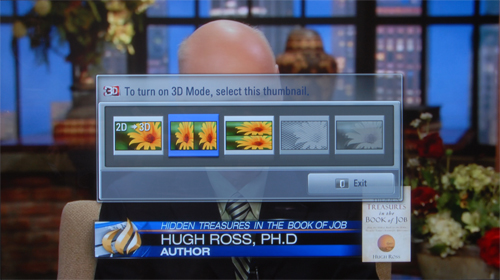
How did you solve this problem? I cant select the split screen when I want to activate 3d. Please help
 
How did you solve this problem? I cant select the split screen when I want to activate 3d. Please help

Press the 3D button on your remote and choose the right 3D option to match your video, such as side-by-side or top-bottom.
My TV's menu does not list them with text, there are images to explain which option you would need.

LG-50PZ950-3D-Menu.jpg
 
Anybody else getting the HDCP error on the HD PVR 2p when using another HDMI device besides the PVR, It started giving me that error after the firmware update

I've had that issue with my low-spec 42" LG LCD since day 1. My Samsung 32" LCD never gave me the issue but it seems to be more a problem with the PVR as my mate with a high-end Pioneer reciever has the same issue.
 
Top
Sign up to the MyBroadband newsletter
X