


Thank you, didn't know this.Newer Xiaomis have AV1?
-
- News
-
Categories
- 5G
- ADSL
- AI
- Banking
- Black Friday
- Broadband
- Broadcasting
- Business
- Business Telecoms
- Cellular
- Cloud and Hosting
- Columns
- Cryptocurrency
- Energy
- Enterprise
- Fibre
- Gadgets
- Gaming
- Government
- Hardware
- Industry News
- Internet
- Internet of Things
- Investing
- IT Services
- Motoring
- Reviews
- Science
- Security
- Smartphones
- Software
- Technology
- Telecoms
- Trending
- Wireless
- Press Office
- Forum
- Industry News
- What's Next
- Company hub
- Speed Test
- About us
- Advertise with us
- Contact
- Careers
-
Join the MyBroadband community
South Africa’s biggest forum. Discuss, discover, and connect with thousands of members.
-
Question of the Day: Do you get motion sick?
- Forums
- General discussions
- Entertainment: Movies and TV Series
- TV & Streaming Services - DSTV, VoD, etc
You are using an out of date browser. It may not display this or other websites correctly.
You should upgrade or use an alternative browser.
You should upgrade or use an alternative browser.
Netogy Nova Feedback
- Thread starter killerbyte
- Start date


Brandonbgibson
New Member
- Joined
- Oct 7, 2024
- Messages
- 1
- Reaction score
- 0
Think it works great, I'm just battling with configuring the control to my Sinotec TV because the name is not listed in the brands. Is there perhaps a work around for this?Hi all
This is just a feedback thread for anyone with a Netogy Nova.
How you finding the device?
This thread is not officially monitored by Nology, but those of us on the forum will assist where we can in our private capacity.
As always you can drop us an email to get official support: [email protected]

HAL 9000
Honorary Master
- Joined
- May 27, 2008
- Messages
- 22,626
- Reaction score
- 26,421
Just make sure that you have set the HDMI-CEC settings on the Netogy Nova as follows...Think it works great, I'm just battling with configuring the control to my Sinotec TV because the name is not listed in the brands. Is there perhaps a work around for this?
1. go to Settings, then select Display and sound
2. Select HDMI-CEC
3. Switch the first three CEC Control options (CEC Switch / One key play / Device auto power off) to the ON position (blue dot on right) - leave the Auto change language setting in the OFF position (grey dot on left)
Also make sure that the HDMI cable from the Nova is plugged into an HDMI input port on the Sinotec TV that has ARC / eARC capabilities (if indicated on the labels for the HDMI inputs on the TV)
Then change the appropriate settings on your Sinotec TV for its HDMI-CEC options to ON / AUTO (you may have to RTFM to find out where they are located in the TV settings menus)
This should allow your Nova remote to power on / off the TV and also adjust its volume level as well.
I bought a Nova about six weeks ago. I was so impressed I then bought another one.
My primary reason was to get AV1 codec support which the Raspberry Pi 3&4 do not support. So far I'm very happy. I installed Kodi as my interface to my local Windows shares as this is what I had on the Raspberry Pi. I did try the aptly named Nova app but it seemed overly clunky to use.
DSTV & Showmax work like a dream. I connect the Nova via Ethernet though and even though the port only support 100mpbs, I've not had any issues streaming from these two apps.
There are four improvements I would like.
1. The ability to re-map the hard buttons at the bottom on the remote as I don't watch Netflix, Prime Video or Google Play but would like to use them for DSTV, Showmax and Kodi.
2. Change the Ethernet port to 1000mbps.
3. Allow the device to boot via active PoE.
4. Configuration to automatically reboot the device every day/week.
The support locally is brilliant which is sadly somewhat lacking in South Africa for lots of other providers.
My primary reason was to get AV1 codec support which the Raspberry Pi 3&4 do not support. So far I'm very happy. I installed Kodi as my interface to my local Windows shares as this is what I had on the Raspberry Pi. I did try the aptly named Nova app but it seemed overly clunky to use.
DSTV & Showmax work like a dream. I connect the Nova via Ethernet though and even though the port only support 100mpbs, I've not had any issues streaming from these two apps.
There are four improvements I would like.
1. The ability to re-map the hard buttons at the bottom on the remote as I don't watch Netflix, Prime Video or Google Play but would like to use them for DSTV, Showmax and Kodi.
2. Change the Ethernet port to 1000mbps.
3. Allow the device to boot via active PoE.
4. Configuration to automatically reboot the device every day/week.
The support locally is brilliant which is sadly somewhat lacking in South Africa for lots of other providers.
HAL 9000
Honorary Master
- Joined
- May 27, 2008
- Messages
- 22,626
- Reaction score
- 26,421
I bought a Nova about six weeks ago. I was so impressed I then bought another one.
My primary reason was to get AV1 codec support which the Raspberry Pi 3&4 do not support. So far I'm very happy. I installed Kodi as my interface to my local Windows shares as this is what I had on the Raspberry Pi. I did try the aptly named Nova app but it seemed overly clunky to use.
DSTV & Showmax work like a dream. I connect the Nova via Ethernet though and even though the port only support 100mpbs, I've not had any issues streaming from these two apps.
There are four improvements I would like.
1. The ability to re-map the hard buttons at the bottom on the remote as I don't watch Netflix, Prime Video or Google Play but would like to use them for DSTV, Showmax and Kodi.
2. Change the Ethernet port to 1000mbps.
3. Allow the device to boot via active PoE.
4. Configuration to automatically reboot the device every day/week.
The support locally is brilliant which is sadly somewhat lacking in South Africa for lots of other providers.
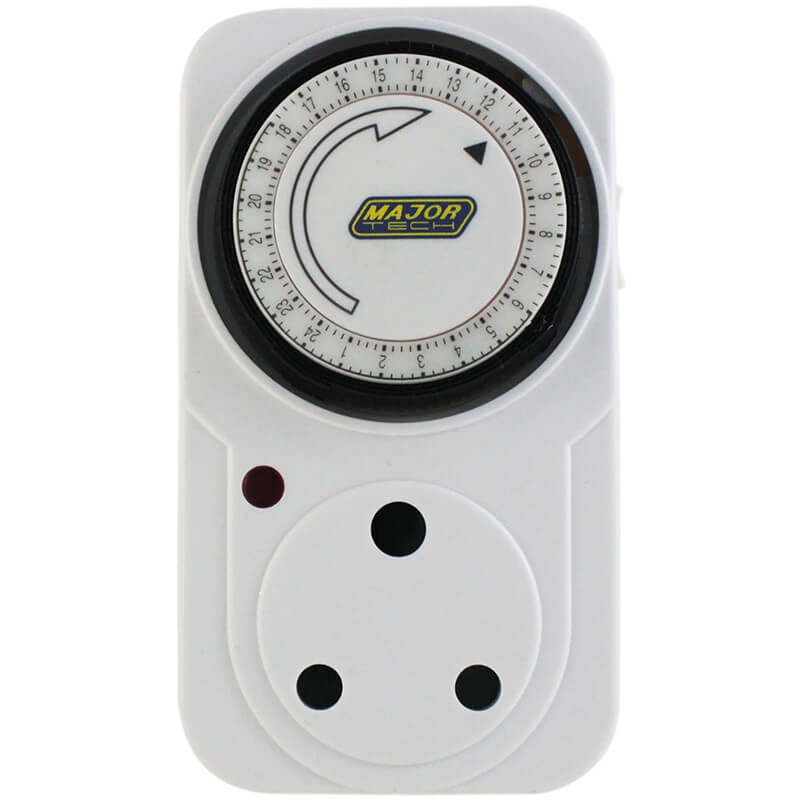
This plug-in power timer will solve issue no.4 for you...



Soul Assassin
Honorary Master
- Joined
- Mar 27, 2006
- Messages
- 11,767
- Reaction score
- 2,345
I use Button Mapper to change the buttons at the bottom.
SkylineR34
Active Member
- Joined
- Aug 30, 2023
- Messages
- 73
- Reaction score
- 48
Hi Gents, can somebody help me with a small issue. I have 2 of these tv boxes. The one TV box in the bedroom is connected to a Samsung tv. When we switch off the Nova tv box, the TV switches off automatically as well. I can't remember changing anything on the tv box settings. The other Nova TV box in the living room connected to a Hisense tv, the tv does not switch off when I switch off the tv box. Any settings I can change in the tv box to do this?
Bernoldus Niemand
Expert Member
- Joined
- Aug 21, 2024
- Messages
- 3,386
- Reaction score
- 5,208
Enable HDMI CEC.Hi Gents, can somebody help me with a small issue. I have 2 of these tv boxes. The one TV box in the bedroom is connected to a Samsung tv. When we switch off the Nova tv box, the TV switches off automatically as well. I can't remember changing anything on the tv box settings. The other Nova TV box in the living room connected to a Hisense tv, the tv does not switch off when I switch off the tv box. Any settings I can change in the tv box to do this?
HAL 9000
Honorary Master
- Joined
- May 27, 2008
- Messages
- 22,626
- Reaction score
- 26,421
See post #284 where I detail the procedure for the Nova & a TV set to communicate with one another...Hi Gents, can somebody help me with a small issue. I have 2 of these tv boxes. The one TV box in the bedroom is connected to a Samsung tv. When we switch off the Nova tv box, the TV switches off automatically as well. I can't remember changing anything on the tv box settings. The other Nova TV box in the living room connected to a Hisense tv, the tv does not switch off when I switch off the tv box. Any settings I can change in the tv box to do this?

Does this have profiles for different apps? At the moment the the stop/ff/rw buttons of netflix vs plex vs kodi do different things and the wife gets confused.I use Button Mapper to change the buttons at the bottom.

killerbyte
Expert Member
While I do not work for Nology any more, I can provide some thoughts to your questions.I bought a Nova about six weeks ago. I was so impressed I then bought another one.
My primary reason was to get AV1 codec support which the Raspberry Pi 3&4 do not support. So far I'm very happy. I installed Kodi as my interface to my local Windows shares as this is what I had on the Raspberry Pi. I did try the aptly named Nova app but it seemed overly clunky to use.
DSTV & Showmax work like a dream. I connect the Nova via Ethernet though and even though the port only support 100mpbs, I've not had any issues streaming from these two apps.
There are four improvements I would like.
1. The ability to re-map the hard buttons at the bottom on the remote as I don't watch Netflix, Prime Video or Google Play but would like to use them for DSTV, Showmax and Kodi.
2. Change the Ethernet port to 1000mbps.
3. Allow the device to boot via active PoE.
4. Configuration to automatically reboot the device every day/week.
The support locally is brilliant which is sadly somewhat lacking in South Africa for lots of other providers.
1. Not likely possible. Every Android device has this and it's done at the factory. So you have to go the software route.
2. What are you streaming that would max out 100Mbps?
3. So few people would use this feature that its not worth it.
4. Speak to Google
SkylineR34
Active Member
- Joined
- Aug 30, 2023
- Messages
- 73
- Reaction score
- 48
Thanks. I had to go into the input settings. Add the TV. And then calibrate the Power button with the TV and only then it worked.See post #284 where I detail the procedure for the Nova & a TV set to communicate with one another...

I just purchased the Nova and have a disconnect from wifi problem.
It disconnects from the wifi and the error message say I must review the wifi password and try again. Only rebooting solve this (for a few minutes).
I never had this problem with the Lit box, Mi Box S and Mi TV Stick.
If this persist, I'm returning it and will buy the Mi Box S2.
It disconnects from the wifi and the error message say I must review the wifi password and try again. Only rebooting solve this (for a few minutes).
I never had this problem with the Lit box, Mi Box S and Mi TV Stick.
If this persist, I'm returning it and will buy the Mi Box S2.
Bernoldus Niemand
Expert Member
- Joined
- Aug 21, 2024
- Messages
- 3,386
- Reaction score
- 5,208
I’ve had the same with a mi stick. Had to change my Wifi channel bandwith.I just purchased the Nova and have a disconnect from wifi problem.
It disconnects from the wifi and the error message say I must review the wifi password and try again. Only rebooting solve this (for a few minutes).
I never had this problem with the Lit box, Mi Box S and Mi TV Stick.
If this persist, I'm returning it and will buy the Mi Box S2.
Bernoldus Niemand
Expert Member
- Joined
- Aug 21, 2024
- Messages
- 3,386
- Reaction score
- 5,208
Had a self reboot yesterday. Go with Android TV they say lol
HAL 9000
Honorary Master
- Joined
- May 27, 2008
- Messages
- 22,626
- Reaction score
- 26,421
Install WiFi Analyzer on a Windows or Android device that's connected to wi-fi, and then check your router's 2.4GHz wi-fi broadcast channel - you may need to go into your router's configuration settings to change the channel if there is a conflict with other router 2.4GHz broadcast channels in your immediate vicinity.I just purchased the Nova and have a disconnect from wifi problem.
It disconnects from the wifi and the error message say I must review the wifi password and try again. Only rebooting solve this (for a few minutes).
I never had this problem with the Lit box, Mi Box S and Mi TV Stick.
If this persist, I'm returning it and will buy the Mi Box S2.


WiFi Analyzer — Matt Hafner
 matthafner.com
I changed it to 20, from Auto. It's been 10 minutes with no disconnect. Holding thumbs.I’ve had the same with a mi stick. Had to change my Wifi channel bandwith.
Thank you.