New The PC Build Thread

You can ignore that builder recommendation.

Why the ASRock? Wifi?

Yeah just the wifi, currently pc is next to the router but might move the rig or house next year then I will probably need wifi.
 
Thanks also rather looking at the mobo although I will ahve to wait https://www.wootware.co.za/asrock-b...dakTlhvUk1pAqhkzZkktCyPzbxNh2w7XxMGGjao27to_r

Wootware also recommend this ram, doesnt appear on the PC builder but think it is compatabile


All those RAMs are the same, all CL30 and DDR5-6000 so I guess it's just different companies.

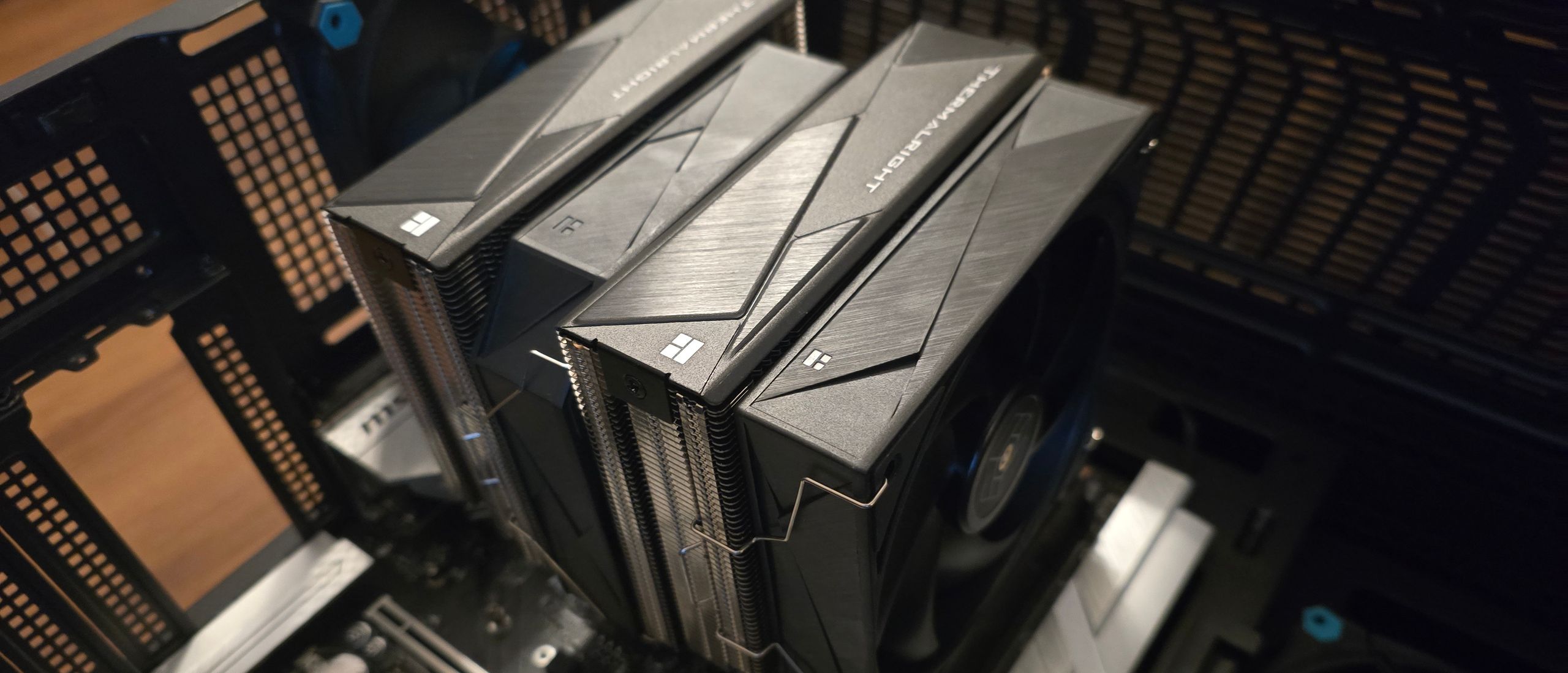
If you worried about the fan and RGB ram then you can always change the cooler for this : comes in white / RGB as well.
 
Best to save the disco lights for AIO's. Plenty of space then. You cannot see RAM with double fan coolers.

Wootware has no low profile RGB RAM.

And those Adata's are XMP only. Not sure why Wootware would suggest those. Probably have an open packet for the build in the workshop already.

EDIT: NVM I see that's a small thing. No RAM obstruction at all with it.
 
All those RAMs are the same, all CL30 and DDR5-6000 so I guess it's just different companies.

If you worried about the fan and RGB ram then you can always change the cooler for this : comes in white / RGB as well.

I see this fan is liek R 430 cheaper than my original spec, do these fans make a big difference ? Already budgeted for the better cooler could just take saving and add it to buy a dif mobo that is in stock


I see this fan is liek R 430 cheaper than my original spec, do these fans make a big difference ? Already budgeted for the better cooler could just take saving and add it to buy a dif mobo that is in stock


Depends on the CPU you going to run.

But I would stick to the original bigger CPU cooler. Cool and quiet cpu is always better.

Especially if it's an AMD 3DV cache CPU they tend to run hotter than other CPUs. And more difficult to cool.
 
I see this fan is liek R 430 cheaper than my original spec, do these fans make a big difference ? Already budgeted for the better cooler could just take saving and add it to buy a dif mobo that is in stock


I had 2 of those. Cools very well but it has noisy fans and the build quality is not the best.

I went for a Deepcool AK620 and didn't look back. You can use it for the next decade or more. 260W heat dissipation means it can cool even X3d cpu's.

 
I'd rather take The Thermalright Royal Preytor than Deepcool any day of the week, Deepcool AK620 is R1,349.00 excluding shipping, which frankly is out of date and priced too high for that level of performance.

Royal Preytor is R1540.11 (including taxes and shipping) which is a top of the line air cooler for R200 bucks more.
1749813158099.png
 
I'd rather take The Thermalright Royal Preytor than Deepcool any day of the week, Deepcool AK620 is R1,349.00 excluding shipping, which frankly is out of date and priced too high for that level of performance.

Royal Preytor is R1540.11 (including taxes and shipping) which is a top of the line air cooler for R200 bucks more.
View attachment 1827430
Yeah, i would expect a cpu cooler with larger, thicker fans to perform better for an additional cost.

Slap on a 130mm /28cm thick fans to the ak620 and it will probably perform very similar :P
 
Yeah, i would expect a cpu cooler with larger, thicker fans to perform better for an additional cost.

Slap on a 130mm /28cm thick fans to the ak620 and it will probably perform very similar :p
Doubt it, Deepcool AK620 is garbage by comparison, it's old and overpriced.
For that additional R200 you go from a mid level 2021 cooler, all the way to competing with the top end air coolers of today.
Let's not pretend that an extra R200 when you are already spending R1349 on the Deepcool is unmanageable.

The air cooler market has changed significantly since the AK620 was launched, it WAS a decent cooler in it's day ,now it's just overpriced.
 
Doubt it, Deepcool AK620 is garbage by comparison, it's old and overpriced.
For that additional R200 you go from a mid level 2021 cooler, all the way to competing with the top end air coolers of today.
Let's not pretend that an extra R200 when you are already spending R1349 on the Deepcool is unmanageable.

The air cooler market has changed significantly since the AK620 was launched, it WAS a decent cooler in it's day ,now it's just overpriced.
To each their own, for "garbage" it can still cool a 9800x3d without hassle. Has the same amount of heatpipes, same TDP rating (actualy 1c higher) and slightly quieter under load using normal 2.5cmx 120mm fans even.

For it to be garbage it would need to be a massive 20c+ difference in cooling.. a mere 5c at most isnt garbage by anyone standards, unless you're into overclocking like a madman... but then why use fan's and not liquid nitrogen instead since watercooling is garbage by comparison :p

Then there's the OCD that will annoy the **** out of so many with the mismatched fansize/weird shape the thermalright has.
 
Last edited:
Hi,

I have 2x8GB DDR4 modules currently (16 GB total) on a Z690 i5-12400. The RAM running XMP at 4000 MHz.

I'd like to increase to 32 GB.

So my 2 options are:
1. sell the existing and buy 2x16 GB kit
2. buy another 2x8GB kit of exactly the same RAM kit (incl. same timings), etc = easier and cheaper option.

What are chances that the system will run reliably with option 2 - all 4 memory slots filled @ 4000 MHz?

Anyone tried this? I know that adding more modules (4 vs 2) reduces the signal quality and reduces overclocking stability.

Thanks,
Greg
Will be absolutely fine.

As with everything, consumers love to oversell gains which only will make marginal differences to “professionals”.
 
Will be absolutely fine.

As with everything, consumers love to oversell gains which only will make marginal differences to “professionals”.
yes on standard timings it will run fine

sometimes with more sticks you can be bad luck that it simply won't run at xmp with 4 sticks

most ram also point out that the xmp is only gauranteed if bought as a kit ie
if you have a 2 set kit that is what it has been tested

and if you want a 4 kit gauranteed to run at that speed you have to buy a kit tested with 4

now naturally even the xmp can't be gauranteed to run on every single setup
as not all boards are made equal

most of the time you will just have things work
have mixed memory chips of different brands and speeds and naturally configured the system to run at lowest xmp value chip
and had no problems the higher the freq the more luck you would need mixing stuff

so if the xmp freq max is imprtant to you buying a 2x16gb set and selling the old set may be better bet
 
yes on standard timings it will run fine

sometimes with more sticks you can be bad luck that it simply won't run at xmp with 4 sticks

most ram also point out that the xmp is only gauranteed if bought as a kit ie
if you have a 2 set kit that is what it has been tested

and if you want a 4 kit gauranteed to run at that speed you have to buy a kit tested with 4

now naturally even the xmp can't be gauranteed to run on every single setup
as not all boards are made equal

most of the time you will just have things work
have mixed memory chips of different brands and speeds and naturally configured the system to run at lowest xmp value chip
and had no problems the higher the freq the more luck you would need mixing stuff

so if the xmp freq max is imprtant to you buying a 2x16gb set and selling the old set may be better bet
My xmp is fine on 4 sticks
 
yes on standard timings it will run fine

sometimes with more sticks you can be bad luck that it simply won't run at xmp with 4 sticks

most ram also point out that the xmp is only gauranteed if bought as a kit ie
if you have a 2 set kit that is what it has been tested

and if you want a 4 kit gauranteed to run at that speed you have to buy a kit tested with 4

now naturally even the xmp can't be gauranteed to run on every single setup
as not all boards are made equal

most of the time you will just have things work
have mixed memory chips of different brands and speeds and naturally configured the system to run at lowest xmp value chip
and had no problems the higher the freq the more luck you would need mixing stuff

so if the xmp freq max is imprtant to you buying a 2x16gb set and selling the old set may be better bet

Yeah, XMP is sometimes finicky.

I once bought a set of 2x16 3600MHz CL 16 ripjaws that would work perfectly in standard trim, but just couldn't be stable with XMP enabled. Thankfully Wootware are good and just swapped them out.

I definitely agree with that if you can afford it, rather buy 2x16 kit and see if you can sell the 2x8.
That said, I did add an “identical” 2x16 kit about 2 years later for a total of 64gb to my AM4 (Gigabyte X570 GAMING X + 5900x) and have been stable.
 
Yeah, XMP is sometimes finicky.

I once bought a set of 2x16 3600MHz CL 16 ripjaws that would work perfectly in standard trim, but just couldn't be stable with XMP enabled. Thankfully Wootware are good and just swapped them out.

I definitely agree with that if you can afford it, rather buy 2x16 kit and see if you can sell the 2x8.
That said, I did add an “identical” 2x16 kit about 2 years later for a total of 64gb to my AM4 (Gigabyte X570 GAMING X + 5900x) and have been stable.
Yea same have 4x 16gb running at xmp no problem

have had cases where xmp just won't work , slightly lower clocks and it works

But yea Xmp is just a stick of ram tested to work at an overclock

Just did not want to say yea xmp will always just work
 
My xmp is fine on 4 sticks
Some system just handle it better than others

Intel tends to be easier

Am4 have had systems that wont go past 3200mhz with a 4000mhz set

The same set will run 3600mhz in another am4 system and 4000 on the intel system

I believe most am5's will run 6000mhz above that is where the lucky packet comes in

Am5 opinions have not had an am5 system yet,

 
Last edited:
Top
Sign up to the MyBroadband newsletter
X