-
- News
-
Categories
- 5G
- ADSL
- AI
- Banking
- Black Friday
- Broadband
- Broadcasting
- Business
- Business Telecoms
- Cellular
- Cloud and Hosting
- Columns
- Cryptocurrency
- Energy
- Enterprise
- Fibre
- Gadgets
- Gaming
- Government
- Hardware
- Industry News
- Internet
- Internet of Things
- Investing
- IT Services
- Motoring
- Reviews
- Science
- Security
- Smartphones
- Software
- Technology
- Telecoms
- Trending
- Wireless
- Press Office
- Forum
- Industry News
- What's Next
- Company hub
- Speed Test
- About us
- Advertise with us
- Contact
- Careers


-
Join the MyBroadband community
South Africa’s biggest forum. Discuss, discover, and connect with thousands of members.
-
Question of the Day: What time do you plan to get to your local voting station on Wednesday?

You are using an out of date browser. It may not display this or other websites correctly.
You should upgrade or use an alternative browser.
You should upgrade or use an alternative browser.
Official Samsung Galaxy Note (N7000) Thread

shamalh108
Well-Known Member
- Joined
- Oct 5, 2010
- Messages
- 139
- Reaction score
- 7
Thanks so much  needed that!
needed that! shamalh108
Well-Known Member
- Joined
- Oct 5, 2010
- Messages
- 139
- Reaction score
- 7
My Note Problem..
Does any one here use check Fus? if so could you tell me the product code of the rertail note? i have an issue updating my Note, OTA fails, Kies says device not Supported. My Product Code is HKAXFA and my CSC is OjvKJ3, PDAXXKJ4 ,Phone is also XXKJ4.. I've been told the problem is my CSC and Firmware don't match. So I'd like to change my CSC to the correct one. According to the CSC menu my CSC is XFA.
If anyone knows what could help, please do.. hehe thanks
Does any one here use check Fus? if so could you tell me the product code of the rertail note? i have an issue updating my Note, OTA fails, Kies says device not Supported. My Product Code is HKAXFA and my CSC is OjvKJ3, PDAXXKJ4 ,Phone is also XXKJ4.. I've been told the problem is my CSC and Firmware don't match. So I'd like to change my CSC to the correct one. According to the CSC menu my CSC is XFA.
If anyone knows what could help, please do.. hehe thanks
whos your service provider..eg: mtn etc.your product code etc. varies for different service providers.Does any one here use check Fus? if so could you tell me the product code of the rertail note? i have an issue updating my Note, OTA fails, Kies says device not Supported. My Product Code is HKAXFA and my CSC is OjvKJ3, PDAXXKJ4 ,Phone is also XXKJ4.. I've been told the problem is my CSC and Firmware don't match. So I'd like to change my CSC to the correct one. According to the CSC menu my CSC is XFA.
If anyone knows what could help, please do.. hehe thanks
shamalh108
Well-Known Member
- Joined
- Oct 5, 2010
- Messages
- 139
- Reaction score
- 7
Its Generic, not bought from a network 
I went to MTN in Menlyn, PTA and they told me that no one had stock in PTA and have to go to JHB. I just phoned Irene and they have stock of it, but I've been waiting for 5 days now and still nothing has been heard from their side. But it's R399 for Top Up 200, with 350MB of data for 6 Months and I think 25 smses. If they ever call me back, that is what I'll be paying. lol!
oronte
Expert Member
I went to MTN in Menlyn, PTA and they told me that no one had stock in PTA and have to go to JHB. I just phoned Irene and they have stock of it, but I've been waiting for 5 days now and still nothing has been heard from their side. But it's R399 for Top Up 200, with 350MB of data for 6 Months and I think 25 smses. If they ever call me back, that is what I'll be paying. lol!
Try MTN Direct?

Please let someone say that we will be getting the white ones too. Never understand why we don't get any choice. Vodacom and SamsungSA - pull finger and get it done....
White Galaxy Note : http://www.slashgear.com/galaxy-nexus-vs-white-galaxy-note-hands-on-27191503/
Found my screen protector after a lot of reading: http://www.ebay.ca/itm/SGP-Oleophob...s&hash=item3a6d25cdce&clk_rvr_id=307584781630
The "barely-there" case that I want to order (I don't like cases, but this one is different): http://www.rearthusa.com/galaxy_note_slim.html
This case comes with a screen protector too - bonus. Anyone else going to place an order (save on shipping??)
White Galaxy Note : http://www.slashgear.com/galaxy-nexus-vs-white-galaxy-note-hands-on-27191503/
Found my screen protector after a lot of reading: http://www.ebay.ca/itm/SGP-Oleophob...s&hash=item3a6d25cdce&clk_rvr_id=307584781630
The "barely-there" case that I want to order (I don't like cases, but this one is different): http://www.rearthusa.com/galaxy_note_slim.html
This case comes with a screen protector too - bonus. Anyone else going to place an order (save on shipping??)
shamalh108
Well-Known Member
- Joined
- Oct 5, 2010
- Messages
- 139
- Reaction score
- 7
Doubt we'll get the white one  probably just isn't enough demand for it, remember with the SGS2 they did a survey about potentially getting the white version?
probably just isn't enough demand for it, remember with the SGS2 they did a survey about potentially getting the white version?Doubt we'll get the white one
I hear you but their argument is BULL! Look at how popular the iPhone is and that is white. It's just that no-one has ever seen any other white phones here to know the difference.

DominionZA
Executive Member
Just a few suggestions. I got my Note on the second day it was released in SA and pretty much got everything down. Note that some of these are just my opinion.
1. Root with CF Root. Your binary counter is not incremented and you get CWM. Thereafter you can flag away through Odin Mobile and counter is unaffected. I am pretty not 100% sure if this but I have flashed many times and all seems to be fine.
2. Flash CheckRom. Best ROM at the mo. Used it on my SGS2 and was brilliant there too.
3. Flash the Speedmod kernel. Your phone will fly and battery life is very good.
4. Flash the LA4 modem. It is the latest as of today.
5. Get 3G Watchdog or My Data Manager to monitor your data usage. I found MDM to not be add accurate as 3GW so I stick to the latter.
6. Get Droidwall to limit what apps have access to the net. Can specify for 3G and wifi. I open up completely for wifi and only selected apps on 3G.
7. Switch your mobile connection to 2G. Your battery will last longer and you won't chomp through data. Email, WhatsApp, GTalk, etc... Work 100% on 2G.
8. Don't rely on local retailers for your goodies. You will have much more joy on eBay. And cheaper.
9. Grab the desktop dock. It's awesome.
10. Grab the windscreen dock. It's awesome.
11. Don't get the flip pouch. It sux and you can't use the goodies in 10 and 11 above. Rather get the official pouch. It's really nice.
12. Don't bother with screen protectors. They ruin the look of your phone and you don't need them. Your screen is gorilla glad for a reason. Only paranoia makes you want a screen protector.
Please don't flame me if you disagree with above. It is just what I find works best for me.
I am happy to put up a step by step on flashing and setting up the apps mentioned above if you guys want. Just let me know.
The Note is one awesome piece of tech
1. Root with CF Root. Your binary counter is not incremented and you get CWM. Thereafter you can flag away through Odin Mobile and counter is unaffected. I am pretty not 100% sure if this but I have flashed many times and all seems to be fine.
2. Flash CheckRom. Best ROM at the mo. Used it on my SGS2 and was brilliant there too.
3. Flash the Speedmod kernel. Your phone will fly and battery life is very good.
4. Flash the LA4 modem. It is the latest as of today.
5. Get 3G Watchdog or My Data Manager to monitor your data usage. I found MDM to not be add accurate as 3GW so I stick to the latter.
6. Get Droidwall to limit what apps have access to the net. Can specify for 3G and wifi. I open up completely for wifi and only selected apps on 3G.
7. Switch your mobile connection to 2G. Your battery will last longer and you won't chomp through data. Email, WhatsApp, GTalk, etc... Work 100% on 2G.
8. Don't rely on local retailers for your goodies. You will have much more joy on eBay. And cheaper.
9. Grab the desktop dock. It's awesome.
10. Grab the windscreen dock. It's awesome.
11. Don't get the flip pouch. It sux and you can't use the goodies in 10 and 11 above. Rather get the official pouch. It's really nice.
12. Don't bother with screen protectors. They ruin the look of your phone and you don't need them. Your screen is gorilla glad for a reason. Only paranoia makes you want a screen protector.
Please don't flame me if you disagree with above. It is just what I find works best for me.
I am happy to put up a step by step on flashing and setting up the apps mentioned above if you guys want. Just let me know.
The Note is one awesome piece of tech
Doubt we'll get the white one
Strange thing is I saw a white demo version of the SGS II in a Vodashop window today! Are these actually available for sale?
Bodes well for the Note (I hope.....)

Tsepz_GP
Executive Member
Rob
Yep, here's my white GS2:
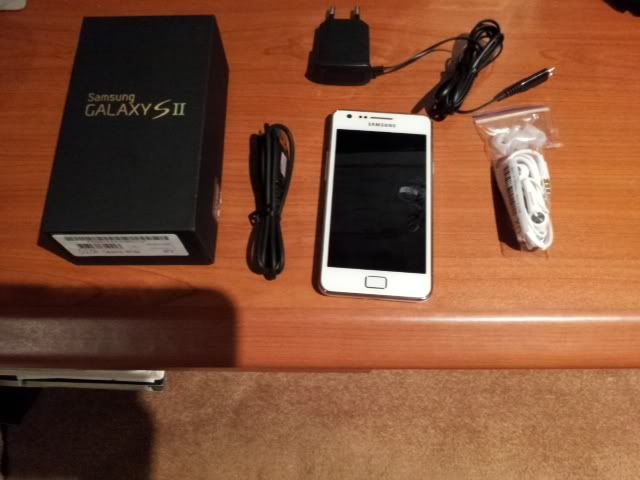
They've been available for a while, got mine middle of December and loving it, looks gorgeous and more classy than the black one.
Yep, here's my white GS2:
They've been available for a while, got mine middle of December and loving it, looks gorgeous and more classy than the black one.
When u use Odin, it increments the flash counter. Best is to CF root, then CWM to install the new official firmware, but install a matching kernel first, so u keep the root access. Dont ever use Odin if u care about your warranty... Not sure about Odin Mobile, but the PC version is unsafe

Maverick Jester
The Special One
Just a few suggestions. I got my Note on the second day it was released in SA and pretty much got everything down. Note that some of these are just my opinion.
1. Root with CF Root. Your binary counter is not incremented and you get CWM. Thereafter you can flag away through Odin Mobile and counter is unaffected. I am pretty not 100% sure if this but I have flashed many times and all seems to be fine.
2. Flash CheckRom. Best ROM at the mo. Used it on my SGS2 and was brilliant there too.
3. Flash the Speedmod kernel. Your phone will fly and battery life is very good.
4. Flash the LA4 modem. It is the latest as of today.
5. Get 3G Watchdog or My Data Manager to monitor your data usage. I found MDM to not be add accurate as 3GW so I stick to the latter.
6. Get Droidwall to limit what apps have access to the net. Can specify for 3G and wifi. I open up completely for wifi and only selected apps on 3G.
7. Switch your mobile connection to 2G. Your battery will last longer and you won't chomp through data. Email, WhatsApp, GTalk, etc... Work 100% on 2G.
8. Don't rely on local retailers for your goodies. You will have much more joy on eBay. And cheaper.
9. Grab the desktop dock. It's awesome.
10. Grab the windscreen dock. It's awesome.
11. Don't get the flip pouch. It sux and you can't use the goodies in 10 and 11 above. Rather get the official pouch. It's really nice.
12. Don't bother with screen protectors. They ruin the look of your phone and you don't need them. Your screen is gorilla glad for a reason. Only paranoia makes you want a screen protector.
Please don't flame me if you disagree with above. It is just what I find works best for me.
I am happy to put up a step by step on flashing and setting up the apps mentioned above if you guys want. Just let me know.
The Note is one awesome piece of tech
Any custom themes or skins for the Note that are, ahem, Note-worthy?
Last edited:
DominionZA
Executive Member
Any custom themes or skins for the Note that are, ahem, Note-worthy?
If you go with CheckROM you have access to the Kitchen app. There are a few themes in there currently with more coming relatively frequently.
The next release of CheckROM will include JKay which will provide tons of ways to style your UI.
There are other ROMS that already have JKay but I honestly would not bother with them. I used CheckROM on my GS2 and use it now on the Note. CheckROM IMO is the only "Note"worthy ROM
But then again - you have CWM. Do a setup of a ROM. If you like it then back it up and try other ROM's. If you don't like them you simply restore your backup. Makes it real easy to try the different ROMs until you find something you really like.