Problem using MTN fast link modem

Fritz Anglers

Active Member
Joined
Sep 15, 2010
Messages
30
Reaction score
0
Location
Pretoria Gangsters Paradise
Hi hope some one can urgently help me ?

I have got so tiered of using my very slow iBurst internet service and decided to get the MTN fast link modem 2 weeks ago. Fast link E367 modem.

I have now ever since its been ricad .Tried to use it but it will not open any websites in chrome and very few in explorer .

I tried it on a friends lap top but it was only working very fast on explorer .

He still use the older windows vista and I am using windows 7 enterprise .

I think may be this modem of MTN is not at all compatible with my windows 7 ??

Any one got any possible solution for me ???

If I am unable to get this modem to work on my computer before 01h30 tomorrow . I will be forced to return it to MTN and cancel the contract.

As it seem to be very fast when it work .I would love to get it to work correctly .

Any suggestions please . I am getting desperate .
 
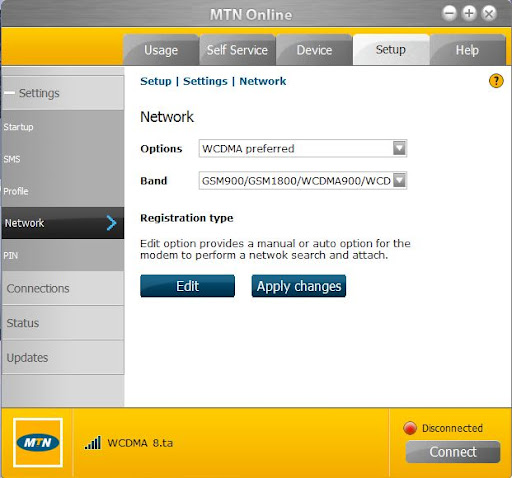
I'm assuming this is the dashboard it has - Check your settings are what you see in the pic below.
"Setup" tab at the top - then "Network' tab on the left

mtndash.JPG
 
Thanks will check just now . Have un install completely and will in stall from fresh for the 12th time. I notice the last part of the info end on only " WCD " should it be " WCDMA1800 " ?
 
I am using the same modem on win7 64 bit.

No issues while still in bundle, but I also experience the "this page can not be displayed. (figure its because of the sloooow connection while being throttled)

Setup from the dongle was straigh forward and hassle free.

I did not have to change any settings to get connected. (all was left on default / Auto)
 
Thanks will check just now . Have un install completely and will in stall from fresh for the 12th time. I notice the last part of the info end on only " WCD " should it be " WCDMA1800 " ?

No WCDMA 2100
 
Ok when you do check out a couple of things

1)is the light on the modem blue or green
2)at the bottom of the dash hover the cursor over the signal bars - what's "signal strength %" value
 
Before I un install it . It was always on green and it show connected and also that it was internet linked if I remember term now correctly . Yet it would not open any web page . Only receive a (if I remember now correctly) Error code 105

Almost forgot . The signal is mostly between 80 and 97 %
 
Ok signal should be ok at 80-97% BUT its only on EDGE or GPRS when the light is green....you want to see Blue light for any speed.
Could be you don't have that available where you are but once you re install,if the light is still green go & try changing the setting to WCDMA ONLY & see what that does - also see what the signal strength is when that light is blue.
 
Ok good
Just so you understand
WCDMA Preferred = modem should use 3G (blue light) if its available - if the 3g signal is too weak this may be your problem as it may stay on 2G(Green light) & not switch over.

WCDMA ONLY = this will force 3G - BUT if your using this setting and go to a 2G only area it won't switch

Ok?
 
Thank you very much seem to really work now for the first time correctly . Even with low %

I closed all web pages and opened 7 sites in a few seconds .

Now I can only wonder why the MTN IT people could not have told me 5 days ago . That would have saved me a load of time and frustrations ???

Thanks again Tun@
 
Ok no problem,good to hear its working properly.
You've got weak 3G signal there so it may play up sometimes as signal comes & goes.
 
Yes it may but the iburst signal also come and go while one is down loading and it is also very slow . I have now done some of my work downloading reel photos on ebay and its with the low % at least 3 times faster than my iburst modem

I can not believe that I had such a battle with the people from MTN ..

They al ready gave up on Wednesday and told me that if I am unable to get some one to sort this out . I can return it to a dealer over the weekend .

Thanks again
 
Hi guys just to give feed back . This modem is now working very well so far .

Tun@ I have fitted on advise of another friend of mine . A 1.5 meter USB extension cable and now I have 99% signal most of the time on 3g (blue signal )

Thanks everyone for the assistance .

If only the MTN IT personal would be so help full . My problems would have been solved many days ago !!!
 
Don't bother. I am prepared to guess that those guys change employment often ... going to places with less pressure
 
Tun@ I have fitted on advise of another friend of mine . A 1.5 meter USB extension cable and now I have 99% signal most of the time on 3g (blue signal )
It works, fine. But read about USB extensions on this forum, they cause power problems. In such case self-powered USB 2.0 hub comes to resque.
 
Top
Sign up to the MyBroadband newsletter
X