


Bona Botse
A little insight goes a long way
This is my stumbling block - I can't figure out how to add either of my two local NZB sources.
Which ones?
South Africa’s biggest forum. Discuss, discover, and connect with thousands of members.
This is my stumbling block - I can't figure out how to add either of my two local NZB sources.

Which ones?
Not sure if I'm violating their site rules but their names rhyme with newshost and NZB-SA.
Not sure about newshost but with NZBSA the url for their Newznab service is https://ssl.nzbsa.co.za/, then you have to hunt for your API key somewhere on the site in your profile.


Too lazy....
Sickbeard still works for me - crashes and all
Yeah but what do you do if a download fails?
Manually go to an indexer, look for a different nzb, send it to sab, then when its downloaded manually rename and move into series folder?
Nah, it's better to just take 20 minutes and get your shows into Sonarr. No more failed downloads.
No more GF waiting by the TV for me to manually get the latest GoT cause the other failed.
You even have a calendar to track episodes grabbed/etc.
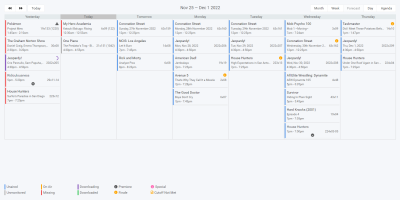
Green = Downloaded
Purple = in SAB.
Red = Missing
Blue = Unaired
Nice way to see what's going on.
)
If you've done a Sickbeard install you will know how to install Sonarr.
In fact Sonarr is way simpler, there are no post processing scripts or none of that shlt.
Sonarr > Settings > Indexers. Add your NZB indexers.
Sonarr > Settings > Download Client. Add SABnzbd as downloader.
Boom, done.
Edit: HERE IS A NOOB PROOF TUTORIAL, If you are still lost.
I did a test download and it created a new directory for an existing show - I'm pretty sure it was a case of "and" vs "&" though.Firstly, if you scan your series directory, it will use YOUR folder names.
Uh....no?
You can scan your existing series, then select the ones you want - is that selection what you're referring to?Sorry, each series...
You can scan your existing series, then select the ones you want - is that selection what you're referring to?
Yeah that was my only headache with Sonarr, needing to "verify" that the shows it finds are correct.
The hard part is now over!
Just remember, something in Sonarr that is "monitored" is like sickbeards "wanted" function. unmonitored basically means "skipped".
That's the only thing you need to get used to coming from sickbeard.

