Server Crashing... Weird!

medicnick83

Paramedic
Joined
Aug 23, 2006
Messages
21,158
Reaction score
565
Location
CBD, Cape Town
Hi guys,

I have a server here at work is crashing alot.
Its Windows Server 2003 Standard Edition.

Now, whenever I stand the server upright (the case) then the PC crashes when it has booted into Windows.

Currently, it's lying on its side and it hasn't crashed yet.

Now, I thought was all weird, so I stood it up and it crashed 3 times, now It's lying on it's side and it hasn't crashed.

Come wise guys... what could be the problem?

I'm stumped!
 
Sounds like a short to me... check stand-offs / loose screws / etc under the motherboard...

If you have the time, take it all out of the chassis, run it on a bench, and see if the problem continues....

But def sounds like a short of some kind.
 
Sounds like a short to me... check stand-offs / loose screws / etc under the motherboard...

If you have the time, take it all out of the chassis, run it on a bench, and see if the problem continues....

But def sounds like a short of some kind.

Well, this sounds like a good idea, Thanks Ryder_JHB, I've already literally taken the bugger apart (not dismantling it completely) and it hasn't fixed it.

*sigh* Guess I need to find the motivation to do this... I'll do it 'another day' :rolleyes: :D
 
Hi guys,

I have a server here at work is crashing alot.
Its Windows Server 2003 Standard Edition.

Now, whenever I stand the server upright (the case) then the PC crashes when it has booted into Windows.

Currently, it's lying on its side and it hasn't crashed yet.

Now, I thought was all weird, so I stood it up and it crashed 3 times, now It's lying on it's side and it hasn't crashed.

Come wise guys... what could be the problem?

I'm stumped!

There's your problem!

Only thing I can think of is a short of some kind.
 
Hey Hey!!! Don't diss Windows Server 2003 SE.

We have to use it... Don't ask me why... It's too long and irratating to explain.

But the main problem is only a name... "Lucas" That's all I'm going to say! :D :D :p
 
If it aint broke, don't fix it. Leave it on it's side if it's working that way. Sometimes these things don't make sense. Probably a dry joint or something and when it's on it's side it always makes contact.
 
I would go with what Ryder_JHB suggests, and take out all the components and set up the machine on a bench without the chassis involved at all.
 
If it aint broke, don't fix it. Leave it on it's side if it's working that way. Sometimes these things don't make sense. Probably a dry joint or something and when it's on it's side it always makes contact.

I'm not the type to just leave things, just today, I'm not the type to wanna do anything really.

I cleaned up the cables etc and this just irratates me because it looks untidy! :(
 
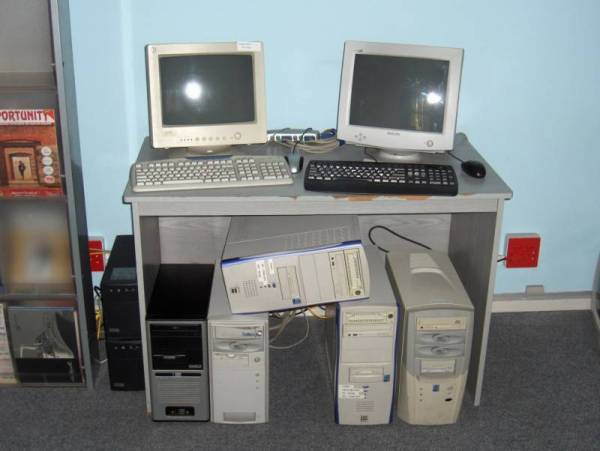
HPIM0150.JPG

2x UPS; E-mail server, production server, terminal server 1, terminal server 2 and then our domain server (which one day, we can hopefully stop using)

Monitor on left is for domain server and monitor on right is connected to a KVA switch ;) for the rest of the PC's.

But just the 1 PC on it's side makes it look so untidy (and I'm a neat person) :(

But at least all the cables etc is neat and tidy and I know what's going on.
 
Last edited:
If it has a monster of a heatsink then investigate that too. They don't cope well with gravity.
 
Overheating? :confused:
Check CPU cooling fan(s)
Sometimes the floating beatings tend to wear out and fan stops spinning. Placing the unit on it's side makes the fans run freely again.
Had a similar problem with a PC a few years ago and after replacing the CPU fan, problem was solved.
 
Might also be a hard drive on its way out. I've had something similar. Try take it out of its bracket and turn it 90 degrees, see if the machine crashes. Easy test if it works or doesnt
 
I am with NoRulez and Wizzard

Loose heatsink on CPU?

I would re-seat everything inside that box. Take out ram, update the thermal paste on the heatsink of the CPU etc...

Make sure everything is nice and tight. My bet is on an overheat when upright...
 
At the one employer we had an amber monitor which worked only when it was on its side :D

I'd try swapping out the PSU with a spare one and see if the problem persists. If it does, then check the fan and heatsink as per the others' recommendations.
 
Top
Sign up to the MyBroadband newsletter
X