


riscbroker
Expert Member
- Joined
- Sep 29, 2006
- Messages
- 2,469
- Reaction score
- 348
Yip, looks like I'm not going to be able to sidestep Tasmota for much longer
South Africa’s biggest forum. Discuss, discover, and connect with thousands of members.
I'll be honest - driving 16 A continuously over that thin track would have me lie awake at night. Just drive a higher-rated contactor or relay with the Sonoff - easy to do and more peace of mind.
Yeah, it's a good start. These days the eWelink can be integrated into Home Assistant directly, back in the day you couldn't and had to flash with Tasmota.
There are guys here with much more experience than me, and very helpful... so enjoy the journey and bottomless pit of money

Yes it has a button on it to manually toggle is on/offSo I can't use a switch to manually turn it on?
My geyser is situated outside. The POW2 is inside an outdoor enclosure at the geyser.Also seems conflicting cause members here seem very comfortable with connecting it directly. Whats the worst case? The switch burns out right?
Yes it has a button on it to manually toggle is on/off
My geyser is situated outside. The POW2 is inside an outdoor enclosure at the geyser.
The reason these a POW can burn out:
Overload, either an element above 3.5kw is used, or there is more than a geyser on the circuit.
Wire type where too thin a gauge wire or incorrect type of wire is used.
Loose connections account for so many burned out electrical breakers and switches.
Eish I can see it already.
So next questions is, I have my front pedestrian gate and front door gates hooked up to etc systems receivers, and I open them with a remote. Is there anyway I can integrate that into this where I tell Alexa to open the gate?
How would one even set this up? Estimated cost for parts?
I do want to know though, if I power the geyser with the pow R2, does that mean I can only control it via app? So I can't use a switch to manually turn it on?
Also seems conflicting cause members here seem very comfortable with connecting it directly. Whats the worst case? The switch burns out right?

You can mount them on a wall easily. Has screw notches top and bottom.Unless I have it wired to somewhere else basically.
 www.robofactory.co.za


Just an idea for those running those portable Inverter/Battery UPS units re the SONOFF: I have 2 separate UPS systems running in my house and I have a POW on the LOAD side...this helps me to monitor the power usage of whatever is connected to the multi-plug and also the ability to remotely switch it off (at set max W limit) should the draw on the inverter be too high. Works like a bomb especially when your domestic decides to plug in the 1500w vacuum cleaner into the inverter plug by accident...Not so much the issue with google home, little I can do about that. Issue is more with punching holes in my network by opening ports. Using the Home assistant cloud service means I don't need to open ports, but does mean I'm trusting Nabu Casa to encrypt my traffic.
Biggest benefit of Tasmota is that traffic doesn't leave my network, so if my internet is dead (or ewelink servers is dead) then my smart devices will still work locally. Also, and this depends on your level or paranoia - I don't like having cheap Chinese made stuff on my network... so most of my IoT is on a separate vlan and flashed with Tasmota. Others are less cautious/paranoid so that's a preference thing.
I'd rather suggest using a Sonoff Pow on your pool pump, will give you the added benefit of power consumption monitoring.
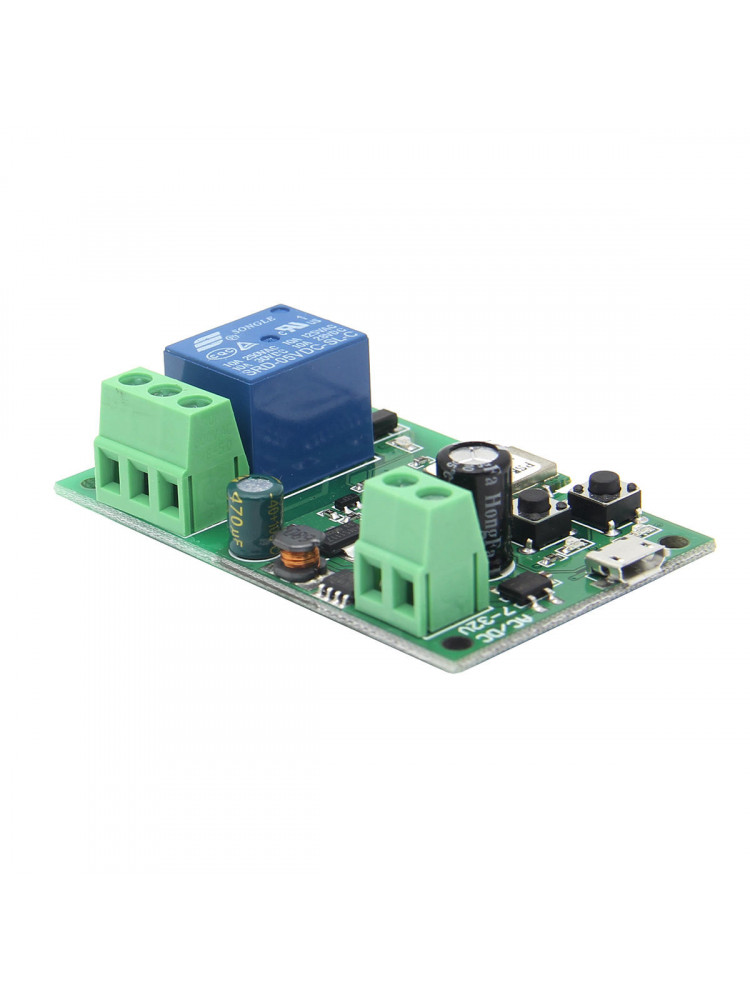
So I've been looking for something similar for my garage and gates. I came across this but have no idea how to wire it up at this point:
Sonoff Gate / Garage Wifi Smart Switch
With this device you can make your electronic gate or garage door smart. When this device is installed, you can open or close your gate/door with either the eWelink app, any voice assistant or home automation hub.
For alarms, I think it will be complex. I have a paradox system and its so difficult to anything with it. I can't wait for modular full scale alarms systems that can replace what I currently have.
Worst case with electricity will almost always be your house burning down. IIRC the Sonoff devices are all IEC 60950 certified, so they should be pretty safe: if it fails it should only be the device burning out. I'm paranoid, though, so I prefer to use a contactor for switching circuits drawing significant current ( > ~5 A in my view) on or off. The prices for contactors vary a lot depending on brand with cheaper ones going for about R200 and more expensive ones for upwards of R500.
As for control - it depends on your setup. If you use the Sonoff in parallel with a switch you can keep the switch off normally and then manually turn it on. My contactor has an override, so I can switch it on manually at the contactor.
Most important thing, though: your circuit needs to be protected. Don't bypass the circuit breaker (so don't use your circuit breaker as a parallel switch to the Sonoff).
*Edit
I missed the "how to" part. A contactor is pretty much the same as a relay. A two-pole contactor will have two inputs, and two outputs. Your live and neutral from the DB will go into the input side, and your live and neutral going to the geyser's circuit breaker will be on the output side. Then there will be a third set of contacts which is the control bit. The live and neutral from the Sonoff's output will connect to those. So the load current will never go through the Sonoff - the Sonoff will merely tell the contactor to switch on or off.
On a Centurion you use 12v+, 12v -, Trigger and Common. Trigger and Common are what the button on your intercom are connected to.Sonoff Inching inside the motor and connect it directly to the trigger pins
I definitely prefer having all my IoT devices in a separate vlan, they can reach my HA server which is on my main network - but only via MQTT port at the moment.Is the general consensus to have the smart switches in its own network? Any guides?
Am I correct in saying I don't have to flash my sonoff switches for local Lan access is I use Hassno?

