The iPhone Tips/Tricks/Apps thread

Status
Not open for further replies.
Hi all. Great thread.

Question. I installed Cydia and now need to install "fake BSD subsystem" but cannot find it in Installer or Cydia. Any ideas.
 
Hi all. Great thread.

Question. I installed Cydia and now need to install "fake BSD subsystem" but cannot find it in Installer or Cydia. Any ideas.

Have a look at this site: http://iappcat.com/

Type in the app you want and it'll give you the source :)

You then go to Sources in installer, Edit, Add, and type the source in..

Heres what your looking for ;)
 
I see appleiphoneschool.com has step by step instructions now on how to use winpwn. Will see if I have time today to give it a try.

Thx for the help!

Would one of you who have done it mind reading their instructions and see if you agree? Thx

You can try to compare it with iClarified's tutorial
http://www.iclarified.com/entry/index.php?enid=957

iClarified's is confirmed to work.
 
Hi all. Great thread.

Question. I installed Cydia and now need to install "fake BSD subsystem" but cannot find it in Installer or Cydia. Any ideas.

For installer it's just 2 steps...

Sources> install big boss recommended and beta sources> refresh repositories.

Then go to "system" and fake BSD should be there for you to install.

I don't use Cydia so not sure how it manages packages.
 
Last edited:
Thnx for all help. Tried all methods and still nothing. Probably doesn't show because original BSD subsystem is installed as limnos stated. Will keep trying.
 
OK SSH means that you can wirelessly log into your iPhone and browse its hard drive contents and install new stuff etc from your iPhone

You will need wireless in your house i.e A wireless access point, router etc. Without this it will not work

Firstly you will need an SCP client like WinSCP (http://winscp.net/) for Windows or simply terminal for Mac which comes pre-installed on the Mac

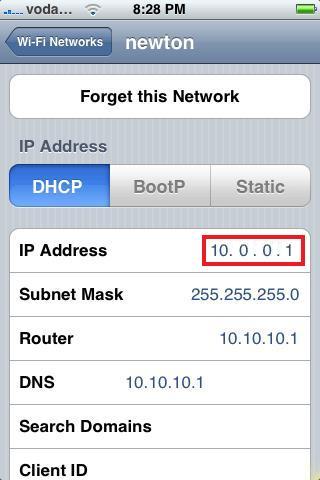
If you have this, go ahead and click on the arrow next to your wireless network in the network settings of your iPhone (>) and take note of the IP Address

Now enter the IP address in WinSCP under host name/address

Username : root
Password: alpine

You should now see your hard disks contents..

And thats SSH for you

If you have a Mac let me know cos i have a much easier method

Let me know if you get this far so i can explain the next steps ;)

Also check this link for a tutorial - http://www.modmyifone.com/forums/showthread.php?p=416291

But if i were you id wait till a stable 1.1.4 release of SMSD comes out...shouldnt take too long ;)


I need some help regarding this issue again. I never got round to trying SSH, but finally got the passwords etc to get into my firewall. My IT guy says he is not sure whether my wireless ADSL modem can do SSH. How will I know? Please help or point me to a thread where I can get more info in this regard. I would like to use iBackup to backup my apps before I start WinPwn.

I now know it has a firewall, and how to get into it, but what next?

Thx
 
I need some help regarding this issue again. I never got round to trying SSH, but finally got the passwords etc to get into my firewall. My IT guy says he is not sure whether my wireless ADSL modem can do SSH. How will I know? Please help or point me to a thread where I can get more info in this regard. I would like to use iBackup to backup my apps before I start WinPwn.

I now know it has a firewall, and how to get into it, but what next?

Thx

Firstly what type of router do you have and is your iPhone and PC connected to it?
(LOL any router will allow you to SSH, your IT guy does not know what he is talking about)

If they are both connected then all you need to do is write down the iPhone's IP address and use that as the address to login on the PC with the SSH client.
 
Last edited:
Solve Syncing with iTunes Errors.

Solve Syncing with iTunes Errors.

If you've had error messages when syncing your iPhone with iTunes try these steps...

1) Reset sync history
iTunes Preferences> Syncing Tab> Click the reset button

2) Reboot iPhone
Hold down the sleep button till the red power off button appears> slide to power off> Then press the sleep button to boot your iPhone.

3) Use a different USB Port
 
Thx Dobee,

I actually thought as much (re him not knowing what hes talking about!!), but he knows more than me unfortunately.

PC is connected to router. iPhone connected to iTunes, etc. Problem is, there is a firewall. I know my IP address for the router, not too sure how to get the iPhones? Do I need to disable my firewall on the router? I have tried using WinSCP and iBackup with it on, and it wont connect. Can I reactivate it again after, and is a huge thing, or just the same as deactivating it, which means selecting a button on the menu?

Just don't want to mess it up and then have to get them out again to make a house-call and having to face him telling me 'I told you so!'.

Thx

Oh, it's a Mecer.

And another thing, the IP address, subnet mask, router and dns on my iPhone I have to manually enter onto my iPhone for it to connect through the firewall (if I understand it correctly), otherwise it wont work. If I enter that IP address in WinSCP it says 'network error : cannot assign address'

Thx again
 
Last edited:
Thx Dobee,

I actually thought as much (re him not knowing what hes talking about!!), but he knows more than me unfortunately.

PC is connected to router. iPhone connected to iTunes, etc. Problem is, there is a firewall. I know my IP address for the router, not too sure how to get the iPhones? Do I need to disable my firewall on the router? I have tried using WinSCP and iBackup with it on, and it wont connect. Can I reactivate it again after, and is a huge thing, or just the same as deactivating it, which means selecting a button on the menu?

Just don't want to mess it up and then have to get them out again to make a house-call and having to face him telling me 'I told you so!'.

Thx

Oh, it's a Mecer.

And another thing, the IP address, subnet mask, router and dns on my iPhone I have to manually enter onto my iPhone for it to connect through the firewall (if I understand it correctly), otherwise it wont work. If I enter that IP address in WinSCP it says 'network error : cannot assign address'

Thx again

You don't need to worry about the firewall, and your iphone does not have to be connected to iTunes... What I recommend is if fxit_man or someone else explain the steps in detail since I've only used SSH on a Mac not PC.
 
Thnx for all help. Tried all methods and still nothing. Probably doesn't show because original BSD subsystem is installed as limnos stated. Will keep trying.

No... It worked for me and I had BSD installed already using my pwned firmware, make sure to install the big boss beta sources, that's what worked for me.
 
You don't need to worry about the firewall, and your iphone does not have to be connected to iTunes... What I recommend is if fxit_man or someone else explain the steps in detail since I've only used SSH on a Mac not PC.
Aah right...

Ok well here it goes:

Please note: Your PC and your iPhone must be connected to the SAME wireless access point for you to SSH into your iPhone

How to SSH into your iPhone - Take 2 (for Windows)

  • Firstly you will need an SCP client like WinSCP (http://winscp.net/) for Windows

  • Go to you iPhone. In Settings, Wireless, click the > arrow next to the wireless access point your connected to. Take note of the IP address listed as indicated below in red:

    iphone-wireless.jpg


  • Open up WinSCP and type in the IP address, username (root) and password (alpine) as shown below:.

    winSCP01.jpg


  • Press login and voila :D You have successfully SSH'd into your iPhone

Not sure about if you have to enter in DNS addresses etc but i shouldnt think so...

Try it out lemme know what you think..
 
Thx fxit! Didn't mean to make you repeat it. When I use the above like that, but with the firewall on, it doesnt allow me access. The IP address, subnet mask, router and dns on my iPhone I have to manually enter onto my iPhone for it to connect through the firewall (if I understand it correctly), otherwise it wont work. If I enter that IP address in WinSCP it says 'network error : cannot assign address'.

That's why I need to know if I have to disable the firewall. And is the process of re-enabling it just a matter of clicking the 'enable' button again.

Thx
 
Thx fxit! Didn't mean to make you repeat it. When I use the above like that, but with the firewall on, it doesnt allow me access. The IP address, subnet mask, router and dns on my iPhone I have to manually enter onto my iPhone for it to connect through the firewall (if I understand it correctly), otherwise it wont work. If I enter that IP address in WinSCP it says 'network error : cannot assign address'.

That's why I need to know if I have to disable the firewall. And is the process of re-enabling it just a matter of clicking the 'enable' button again.

Thx

Aah i see....

Unfortunately i am unfamiliar with the Mecer routers so i wouldnt know how to disable the firewall... Look around in the settings though..

Maybe theres an option to allow only certain IP's/MAC Addresses to connect to the router.. Have a poke around in the router configuration

Sorry i cant help more :o
 
Thx fxit! Didn't mean to make you repeat it. When I use the above like that, but with the firewall on, it doesnt allow me access. The IP address, subnet mask, router and dns on my iPhone I have to manually enter onto my iPhone for it to connect through the firewall (if I understand it correctly), otherwise it wont work. If I enter that IP address in WinSCP it says 'network error : cannot assign address'.

That's why I need to know if I have to disable the firewall. And is the process of re-enabling it just a matter of clicking the 'enable' button again.

Thx

I recommend you start a thread under the hardware section of the forum and ask for help with the Mecer router, a lot of experienced people here.
 
Ok, thx for all the help again. I now have WinScp working.

I have tried IBackup, but it starts and then asks if I trust this host and I can enter either y/n or press return. But then it hangs before I can give any response. Am I suppose to generate a key somewhere else, ie Putty? And how?
 
Yip, but I think I got it, I had to do the key generate thing under misc utilities first, and it is busy backing up right now!

Finally, then I can try WinPwn.....

Which means more questions.... haha.

Thx so much for all the help!
 
Status
Not open for further replies.
Top
Sign up to the MyBroadband newsletter
X