Web Squad ISP

Status
Not open for further replies.

Definitely, new packages taking effect 1 July 2021- remember line speeds are set by FNOs and not the ISPs.. That’s why I hinted to them yesterday. Commercials were sent by Vuma late yesterday. Our commercial team need to review and put together the prices and will send out official comms later during next week.
 
Same question with the VPN :D
Still getting failed connections using IPSEC on the JHB LNS- and would prefer all connections terminate here to simplify things.

Please be patient here. I know it’s been a few days, but this isn’t a priority project at the moment- we have plenty of on the go projects including dealing with FNOs who’s networks aren’t up to scratch. Our team are working on it. When it’s set up, we will let you know- we’re also toying with wireguard (which we all know is better). Thanks for your patience already and just asking for a little more.
 
Last edited:
Could always DIY?

Just a warning with AWS, not everything is "free" and if you manage to use a lot more than the basic free package (which isn't hard) they will start billing you. A friend managed to accidentally use more as a free solution then it became paid and he owed like R1200pm
 
Still getting failed connections using IPSEC on the JHB LNS- and would prefer all connections terminate here to simplify things.

Please be patient here. I know it’s been a few days, but this isn’t a priority project at the moment- we have plenty of on the go projects including dealing with FNOs who’s networks aren’t up to scratch. Our team are working on it. When it’s set up, we will let you know- we’re also toying with wireguard (which we all know is better). Thanks for your patience already and just asking for a little more.

No worries, I was just wondering what the latest was, fully understand it's not a priority :thumbsup:
 
Just a warning with AWS, not everything is "free" and if you manage to use a lot more than the basic free package (which isn't hard) they will start billing you. A friend managed to accidentally use more as a free solution then it became paid and he owed like R1200pm

Please use the billing limits, management tools and notifications on cloud providers. Learnt this the hard way on Azure; we set up an expressroute lab for a project and left that running for two weeks while we tested it. We blew past the “free tier” within 2 days and didn’t check the billing (rookie error I admit). Let’s just say accounts wasn’t that impressed.
 
Hi all

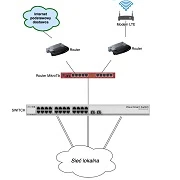
Has anyone with a Mikrotik added a 4g failover?

I've been looking through guides and see many rely on disabling the dynamic route and using a watchdog on a static gateway.

Would this work or any other recommendations? TIA

 
Hi all

Has anyone with a Mikrotik added a 4g failover?

I've been looking through guides and see many rely on disabling the dynamic route and using a watchdog on a static gateway.

Would this work or any other recommendations? TIA


I’ve done it with a edgerouterx and a lte router
 
Ok... Not that easy on a Mikrotik....

If you can get the USB modem to work (this can be a pain at times), there’s two ways to go about this. 1. The simple way, relies on the router detecting that the gateway is down (which you can do if you’re using pppoe) and 2. Using a netwatch script like the one above (which I don’t recommend) and make sure it monitors connectivity to the internet and not just a local interface.

The most common outage will be last mile or middle mile. This will drop a pppoe connection immediately. So setting your LTE’s gateway as a default route with a higher distance than the Pppoe will allow for this route (LTE) to be active once the ppp drops. On Vuma trenched, you can set a static default route (just copy the existing dynamically assigned path and disable default gateway on the dhcp-client) with a ping check on the gateway for the Vuma path and a longer distance path to your LTE’s gateway. For Vuma trenched, and middle mile issue won’t automatically result in a gateway ping check failure as you may still be able to ping the next hop (depending on where you are), so you may have to manually re-route.

The above takes care of routing. Now you need to take care of NAT (determining which outbound IP your device will use to masquerade traffic). The simplest method here is to create a WAN interface list (Interface > interface list) and add both the internet interface (eth1 or pppoe) as well as the LTE interface to it. Make sure your inbound firewall rules reference this WAN interface list and not a specific interface. Then under firewall > NAT, make sure your src-Nat masquerade rule lists the outbound interface list WAN, and not a specific interface. NAT will check for the active route and automatically masquerade out of that interface. When the fibre comes back up, the default route will change and connections will gradually (fairly quickly) move back to the fibre.
 
I wrote a netwatch to disable the usb lte modem for a few seconds and enable it again when the pppoe returns, or the firewall connection tracking tries to keep the old connections open and you get a few seconds of no connectivity for connections that were active.
 
@websquadza latency still hasn't changed. Still hitting ~154ms to Dusseldorf from Cape Town (both my connection and your lg), but adding 25ms to the next hop to the server. That 25ms addition doesn't occur when using your Johannesburg lg, however it seems that whatever you had changed yesterday has impacted that route to now be at 188-190ms.

Edit: Johannesburg is at 188-190ms as opposed to previous tests showing it at expected ~177ms
 
@websquadza latency still hasn't changed. Still hitting ~154ms to Dusseldorf from Cape Town (both my connection and your lg), but adding 25ms to the next hop to the server. That 25ms addition doesn't occur when using your Johannesburg lg, however it seems that whatever you had changed yesterday has impacted that route to now be at 188-190ms.

Edit: Johannesburg is at 188-190ms as opposed to previous tests showing it at expected ~177ms

Still checking here. Global changes to our advertisements to Cogent are affecting other routes. Needing to get creative. Issue is actually outbound routing from your host as the forward route is the shortest (and only 2 AS hops, your host is preferring a return path with 4 AS hops) Will let you know once we’ve tweaked it. Also reached out to your hosts’s noc after signing up as a client to see if they can fix from their side. Basically, they should be preferring the routes they learn at AMS-IX and DECIX, and they’re not.
 
Last edited:
Still checking here. Global changes to our advertisements to Cogent are affecting other routes. Needing to get creative. Issue is actually outbound routing from your host as the forward route is the shortest (and only 2 AS hops, your host is preferring a return path with 4 AS hops) Will let you know once we’ve tweaked it. Also reached out to your hosts’s noc after signing up as a client to see if they can fix from their side. Basically, they should be preferring the routes they learn at AMS-IX and DECIX, and they’re not.

Oh, awesome! Was not expecting a reply on a Sunday. Thank you for keeping on this
 
Ok... Not that easy on a Mikrotik....
Can sell you a FortiGate 40F with SD-WAN that do these things... well... they just do it once setup correctly, I fail over between my two links only noticing it when my ssh connections drops
 
So, how does 1000/500 sound? Coming 1 July :cool:

Also, big changes coming to Vumatel packages 1 July - more updates to follow (we need to crunch commercials).
Hmmm.... no need *yet* as my 200/200 is fast enough (Actually, it's faster than my xneelo hosted servers' outgoing speeds :D )
 
Status
Not open for further replies.
Top
Sign up to the MyBroadband newsletter
X