-
- News
-
Categories
- 5G
- ADSL
- AI
- Banking
- Black Friday
- Broadband
- Broadcasting
- Business
- Business Telecoms
- Cellular
- Cloud and Hosting
- Columns
- Cryptocurrency
- Energy
- Enterprise
- Fibre
- Gadgets
- Gaming
- Government
- Hardware
- Industry News
- Internet
- Internet of Things
- Investing
- IT Services
- Motoring
- Reviews
- Science
- Security
- Smartphones
- Software
- Technology
- Telecoms
- Trending
- Wireless
- Press Office
- Forum
- Industry News
- What's Next
- Company hub
- Speed Test
- About us
- Advertise with us
- Contact
- Careers


-
Join the MyBroadband community
South Africa’s biggest forum. Discuss, discover, and connect with thousands of members.
-
Question of the Day: How much would you be willing to pay for a next-generation gaming console?

You are using an out of date browser. It may not display this or other websites correctly.
You should upgrade or use an alternative browser.
You should upgrade or use an alternative browser.
Windows 10 Update everytime
- Thread starter phly
- Start date


RedViking
Nord of the South
My question is what can I do about it. Nothing. My only other option is Linux or Mac. Which none is a solution. If you have a solution to completely stop any incoming and outgoing updates or traffic please let me know.As you have pointed out to RTFM, well, there is simply no manual available which exposes the functionality behind the thousands of windows threads running inside svchost. Threads don't carry unique ID's in that the thread ID will be different each time that process is executed.
You will notice a few of them which of specific names, however threads you cannot simply shut down as multi-threading is called that for a reason, that one thread which may be problematic, may have several very helpful nested threads and shutting it down could crash your system. I'm a software developer and I create threads quite often. I think I understand a little bit about threading. It's a complex topic.
See this one here? It's downloading at 500kb/s. It's been doing that for several hours now. Feel free to Google svchost.exe+0x4380 or find a manual on Earth that covers that. You won't. Why? Because as I have pointed out threads don't carry the same unique ID.
There are plenty of settings available to manage windows download, but ultimately without 3rd party software, you cannot stop Windows update, only delay it. You are only given so much control over what data streams to and from your machine, but for the most part the internet is filled with "threads" about people wondering where their data is going.
Note: Even with Windows update completely disabled, svchost and it's multiple variants, continues to stream data to and from my machine to god knows where and why.

Edit: I think what I find most fascinating about Microsoft fan boys is that they don't seem bothered by this at all and are happy to just turn a blind eye. People who complain are simply told: "Well if you don't like it then don't use Windows" .

Solarion
Honorary Master
- Joined
- Nov 14, 2012
- Messages
- 28,229
- Reaction score
- 18,024
My question is what can I do about it. Nothing. My only other option is Linux or Mac. Which none is a solution. If you have a solution to completely stop any incoming and outgoing updates or traffic please let me know.
You may not be able to eliminate traffic entirely, but you can stop BITS and Windows Update. BITS you can disable easily enough but Win update will keep starting itself.
Simplest method, put this in text document and save it as UpdateKill.bat
sc stop wuauserv & sc config wuauserv start= disabled
Save it onto your desktop or anywhere you like really. The next step is to schedule a windows task to run every minute or 30 minutes that's up to you.
Control Panel > Administrative Tools > Control Panel > Task Scheduler. Click Create Task in the column to your right.
You need to run it with highest privileges. On Triggers tab set how often you want it to run. In Actions tab browse to UpdateKill.bat and click ok. I think that's pretty much it.
To test it just to into Services and see if Windows Updates gets disabled.

Johnatan56
Honorary Master
Throttling only delays the update to a time when you are not busy with your machine. This won't help OP
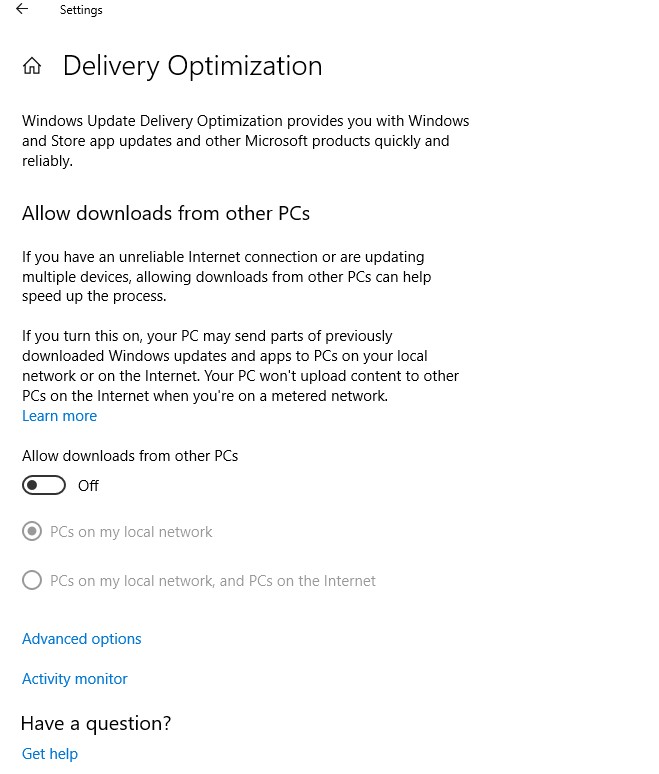
One more thing. If you are wondering why so much bandwidth is leaving your machine, then take note. Your machine is used as part of a giant cloud to update other Windows 10 machines on the internet.


If you set it to On but only local network it will only upload to local network, if off, won't upload.

Johnatan56
Honorary Master
Do you mean why green? Pick it as the accent color, under personalization > Colors.Hey yours looks different to my one. What version/type are you running?
Then tick the boxes for show accent color on the listed surfaces.

It's why my taskbar is green as well.

Running Windows 10 Pro 1803.


Geoff.D
Honorary Master
That is what I mean about RTFM! Work through every setting available and choose and set things to suit you. Including all the settings that have an impact on windows update.
If you don't understand anything follow the links and read up on it. When done, you will know plenty about windows.
If you don't understand anything follow the links and read up on it. When done, you will know plenty about windows.
newby_investor
Executive Member
That is what I mean about RTFM! Work through every setting available and choose and set things to suit you. Including all the settings that have an impact on windows update.
If you don't understand anything follow the links and read up on it. When done, you will know plenty about windows.
That's a good concept in general, but not terribly practical. Windows 10 has a lot of different settings and I've noticed that they're not all in obvious places. I've got long experience with Windows all the way back to 95 (except ME, for some reason I missed out on that one. I was probably lucky.) Pretty much everything is in consistent places, Control Panel was where you needed to go, new editions of Windows for the most part didn't destroy knowledge that you had which worked on the old ones.
I've only been working with 10 for the past 3 weeks or so (and it's on the wife's new computer, so I'm not using it daily). Honestly - it's confusing even for an experienced user such as myself. Microsoft has changed a lot of things since the previous editions of Windows. Even google doesn't help consistently because you need to know how to ask the right question to be able to search for stuff properly.
Geoff.D
Honorary Master
True, things have moved around as you say. But that is the only way to become familiar with win 10. The first thing I did when upgrading was to make windows familiar by placing on the desktop the things I was used to such as control panel, etc. Then the transition was easy.
My first encounter with windows was win 83 ....... Yes also missed out on ME, as well as win 8 and its variants as well as win 7.
Win 95 to win XP to win 10.
Still have those manuals you used to get. Always check them first. Then not all that difficult to find what I want in win 10
My first encounter with windows was win 83 ....... Yes also missed out on ME, as well as win 8 and its variants as well as win 7.
Win 95 to win XP to win 10.
Still have those manuals you used to get. Always check them first. Then not all that difficult to find what I want in win 10

grok
Honorary Master
I just started up my win 10 laptop boss wanted me to check some vpn thing at a client, I last used it while in hospital for the day & set the hotspot connection to unmetered at the time.
Bloody thing gobbled over R80 bucks before I could change the setting back (was busy somewhere else).
What a POS!
Bloody thing gobbled over R80 bucks before I could change the setting back (was busy somewhere else).
What a POS!
Geoff.D
Honorary Master
Why? because you did not manage the process?I just started up my win 10 laptop boss wanted me to check some vpn thing at a client, I last used it while in hospital for the day & set the hotspot connection to unmetered at the time.
Bloody thing gobbled over R80 bucks before I could change the setting back (was busy somewhere else).
What a POS!
You told it, it was okay to use a metered connection!

phly
Expert Member
- Joined
- Mar 13, 2013
- Messages
- 2,097
- Reaction score
- 606
Must admit - I too have come a long way with windows 10 since Win 95 and the - if memory serves me well - 25 floppy disks you needed to install the operating system and if one of them was messed up you are royally screwed. Got all the rest except windows ME, with windows 2000 being the most robust I had ever used. And it was all easy to get up and running - windows 10 however flipped the game with locking some things down. I struggle now and the to find stuff when all you had to do was go to control panel and find things. I hardly ever use Windows now (apple fan gent) so I am spared the headache and heartache that comes with trying to go round MS way of thinking and doing things.
Geoff.D
Honorary Master
The first thing I did was place an icon on the desktop for "control Panel" and "God mode" Still there
phly
Expert Member
- Joined
- Mar 13, 2013
- Messages
- 2,097
- Reaction score
- 606
The first thing I did was place an icon on the desktop for "control Panel" and "God mode" Still there
Ah God mode ... those were the days lol
newby_investor
Executive Member
That may be fine for a boffin. Windows isn't my OS of choice, but I'm a moderately competent computer user (I think?) so I can probably figure things out.
What happens when the wife (or even better, mom or grandma) just wants to show the dropbox icon in the system tray? She knew how to do that in Win7 on her old laptop. Now Win10 hides it away when there's no little notification, but she wants to see at a glance whether it's syncing or not. The "Configure" option that used to appear when you expand the systray isn't there anymore.
Eventually I managed to figure it out thanks to some web searching, but why did that sort of thing need to be changed?
It's easy to say that the whole unmetered connection thing is the user's fault, but it's also not entirely obvious to a non-technical user. Why should Windows be allowed to waste all your data downloading updates if you just wanted to connect and check a few emails or something? IMO a more sensible setting should be a metered connection by default, or at least a wizard should pop up on connecting to a new network where a stupid person can click "I'm at home on a fast line" or "I'm using my mobile phone to tether" or something.
Loads of bad design decisions have been made with Win10. This is a pity. It's got a lot of improvements under the hood, but so far the user experience has been very poor.
What happens when the wife (or even better, mom or grandma) just wants to show the dropbox icon in the system tray? She knew how to do that in Win7 on her old laptop. Now Win10 hides it away when there's no little notification, but she wants to see at a glance whether it's syncing or not. The "Configure" option that used to appear when you expand the systray isn't there anymore.
Eventually I managed to figure it out thanks to some web searching, but why did that sort of thing need to be changed?
It's easy to say that the whole unmetered connection thing is the user's fault, but it's also not entirely obvious to a non-technical user. Why should Windows be allowed to waste all your data downloading updates if you just wanted to connect and check a few emails or something? IMO a more sensible setting should be a metered connection by default, or at least a wizard should pop up on connecting to a new network where a stupid person can click "I'm at home on a fast line" or "I'm using my mobile phone to tether" or something.
Loads of bad design decisions have been made with Win10. This is a pity. It's got a lot of improvements under the hood, but so far the user experience has been very poor.
It is not your fault. it is how it is designed, it is obscured with intention to fool the user.It's easy to say that the whole unmetered connection thing is the user's fault, but it's also not entirely obvious to a non-technical user. Why should Windows be allowed to waste all your data downloading updates if you just wanted to connect and check a few emails or something? IMO a more sensible setting should be a metered connection by default, or at least a wizard should pop up on connecting to a new network where a stupid person can click "I'm at home on a fast line" or "I'm using my mobile phone to tether" or something.
Loads of bad design decisions have been made with Win10. This is a pity. It's got a lot of improvements under the hood, but so far the user experience has been very poor.
You can't really change the connection to a 'metered' unless connection is already established. It is not a bug, it is a feature. It was one option on Win7 to disable automatic updates, it was replaced by number of options hidden in different places, engineered to perfection with one ultimate goal: to do what MS want despite of user intention to do what MS do not want.
Solarion
Honorary Master
- Joined
- Nov 14, 2012
- Messages
- 28,229
- Reaction score
- 18,024
This is what I'm talking about. 500mb in the last hour, have vanished thanks to this. Updates are disabled, BITS disabled.
Half a gig of my data taken by Microsoft and I have no idea where, why or how. Someone's going to need to get to the bottom of this. It wouldn't surprise me if our machines are being used as mining bots or something.
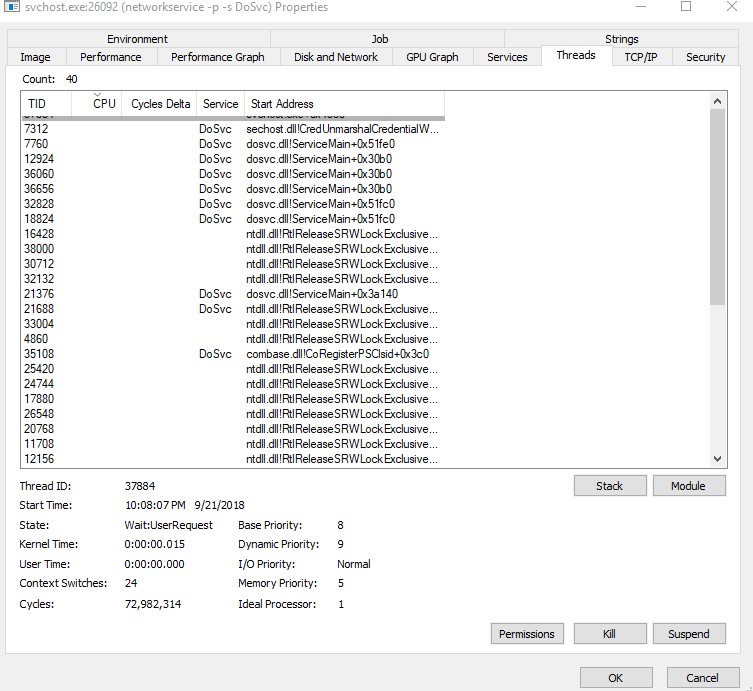
Half a gig of my data taken by Microsoft and I have no idea where, why or how. Someone's going to need to get to the bottom of this. It wouldn't surprise me if our machines are being used as mining bots or something.
Geoff.D
Honorary Master
None of us can comment without you checking a few things. It is ypu machine, you need to find out what is going on in a step for step fashion.
The fact that many of us do not experience these issues means that it is not a generic issue at all.
The fact that many of us do not experience these issues means that it is not a generic issue at all.
Last edited:
A generic issue, it is how Microsoft designed this OS. It didn't happen with Win7, why it should happen with Win10 if it is not a generic issue as you claim?None of us can comment without you checking a few things. It is ypu machine, you need to find out what is going on in a step for step fashion.
The fact that many of us do not experience these issues means that it is not a generic issue at all.