


HAL 9000
Honorary Master
- Joined
- May 27, 2008
- Messages
- 22,585
- Reaction score
- 26,347
Not available here so far on my 'unsupported' Core 2 Duo dinosaur PC... it's still stuck on 21H2 (22000.1165) 

South Africa’s biggest forum. Discuss, discover, and connect with thousands of members.

Anyone else still not being offered 22H2 via Windows Update?
Not available here so far on my 'unsupported' Core 2 Duo dinosaur PC... it's still stuck on 21H2 (22000.1165)
View attachment 1411475
 github.com

Thanks, will give it a try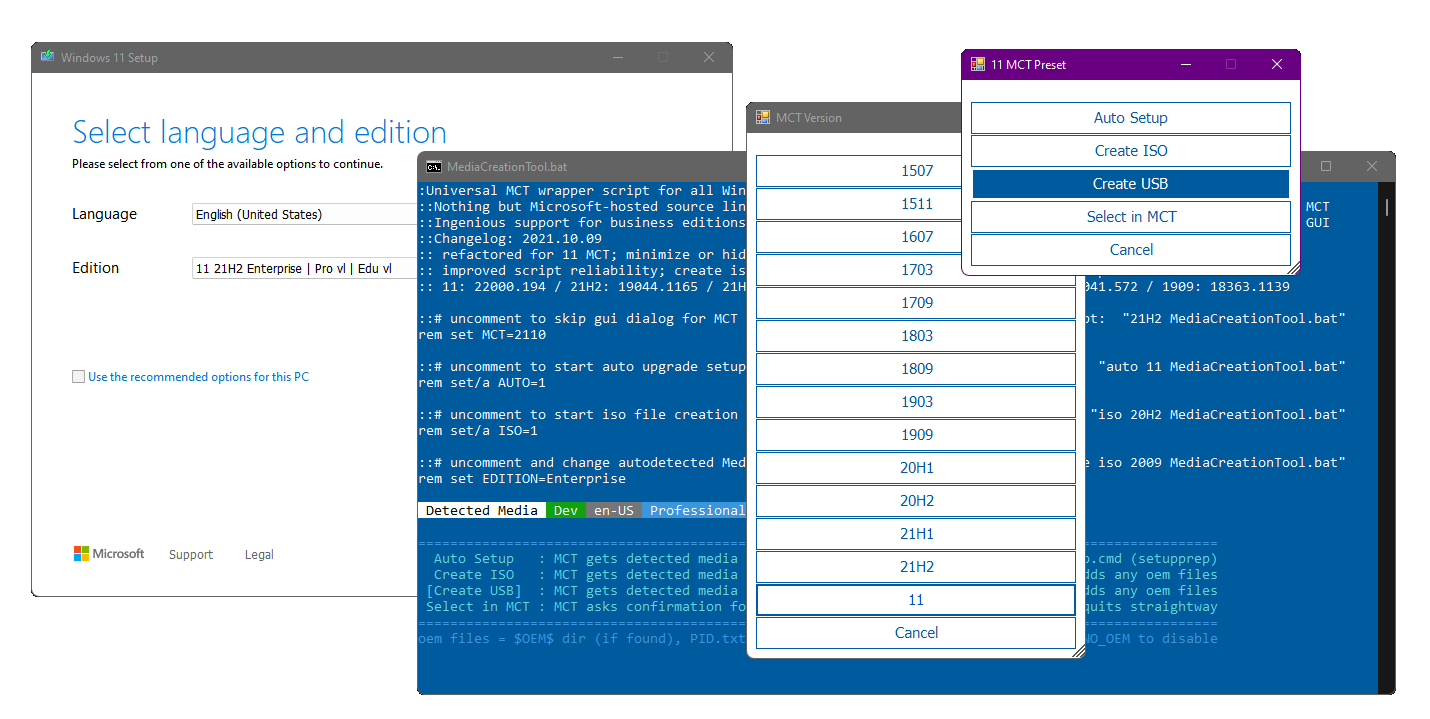
MediaCreationTool.bat/bypass11/Skip_TPM_Check_on_Dynamic_Update.cmd at main · AveYo/MediaCreationTool.bat
Universal MCT wrapper script for all Windows 10/11 versions from 1507 to 21H2! - AveYo/MediaCreationTool.bat
I used this thrice now. It's the sku trick and will say server on the window but just select keep apps and settings
1. Download the windows 11 Media creation tool
2. Start it and download the iso
3. Extract/mount it
4. Run tpm cmd from cmd as admin / or right click run as admin on file
5. Click setup on mounted/extracted iso
...not sure if the tmp cmd works with windows updates, it might or not, perhaps reboot after running it. But I've used the medication tool method with the cmd 3x time now.

This is for non tpm / meeting requirement pcsThanks, will give it a try
Odd that I'm not being offered the update even though my PC exceeds all requirements (including TPM), but I'll try regardless!

Thanks, will give it a try
Odd that I'm not being offered the update even though my PC exceeds all requirements (including TPM), but I'll try regardless!


Easier is to just use Rufus to create a bootable USB out of the ISO that you download from the media creation tool. It has checkboxes to let you bypass the TPM check, Microsoft Account creation/logon, etc.MediaCreationTool.bat/bypass11/Skip_TPM_Check_on_Dynamic_Update.cmd at main · AveYo/MediaCreationTool.bat
Universal MCT wrapper script for all Windows 10/11 versions from 1507 to 21H2! - AveYo/MediaCreationTool.bat
I used this thrice now. It's the sku trick and will say server on the window but just select keep apps and settings
1. Download the windows 11 Media creation tool
2. Start it and download the iso
3. Extract/mount it
4. Run tpm cmd from cmd as admin / or right click run as admin on file
5. Click setup on mounted/extracted iso
...not sure if the tmp cmd works with windows updates, it might or not, perhaps reboot after running it. But I've used the medication tool method with the cmd 3x time now.


 www.neowin.net
Whatever works.Easier is to just use Rufus to create a bootable USB out of the ISO that you download from the media creation tool. It has checkboxes to let you bypass the TPM check, Microsoft Account creation/logon, etc.
Rufus - Create bootable USB drives the easy way
Rufus: Create bootable USB drives the easy wayrufus.ie
I already have i12700k + 3080. These are for my old boxes.You guys need new computers.
I already have i12700k + 3080. These are for my old boxes.

They are good what they are used for now: Bitch/Slave-Boxes.You need new old boxes.
You guys need new computers.


Tips fedoraYou guys should stop using this OS for simpletons and use a real OS like Fedora.
I am that guy now
Smiles in M’ladyTips fedora