-
- News
-
Categories
- 5G
- ADSL
- AI
- Banking
- Black Friday
- Broadband
- Broadcasting
- Business
- Business Telecoms
- Cellular
- Cloud and Hosting
- Columns
- Cryptocurrency
- Energy
- Enterprise
- Fibre
- Gadgets
- Gaming
- Government
- Hardware
- Industry News
- Internet
- Internet of Things
- Investing
- IT Services
- Motoring
- Reviews
- Science
- Security
- Smartphones
- Software
- Technology
- Telecoms
- Trending
- Wireless
- Press Office
- Forum
- Industry News
- What's Next
- Company hub
- Speed Test
- About us
- Advertise with us
- Contact
- Careers


-
Join the MyBroadband community
South Africa’s biggest forum. Discuss, discover, and connect with thousands of members.

You are using an out of date browser. It may not display this or other websites correctly.
You should upgrade or use an alternative browser.
You should upgrade or use an alternative browser.
Windows 11 Support Thread
- Thread starter UrBaN963
- Start date


RunningFromFat
Executive Member

This should be fun

HAL 9000
Honorary Master
- Joined
- May 27, 2008
- Messages
- 22,702
- Reaction score
- 26,538
That was then... 
 www.windowscentral.com
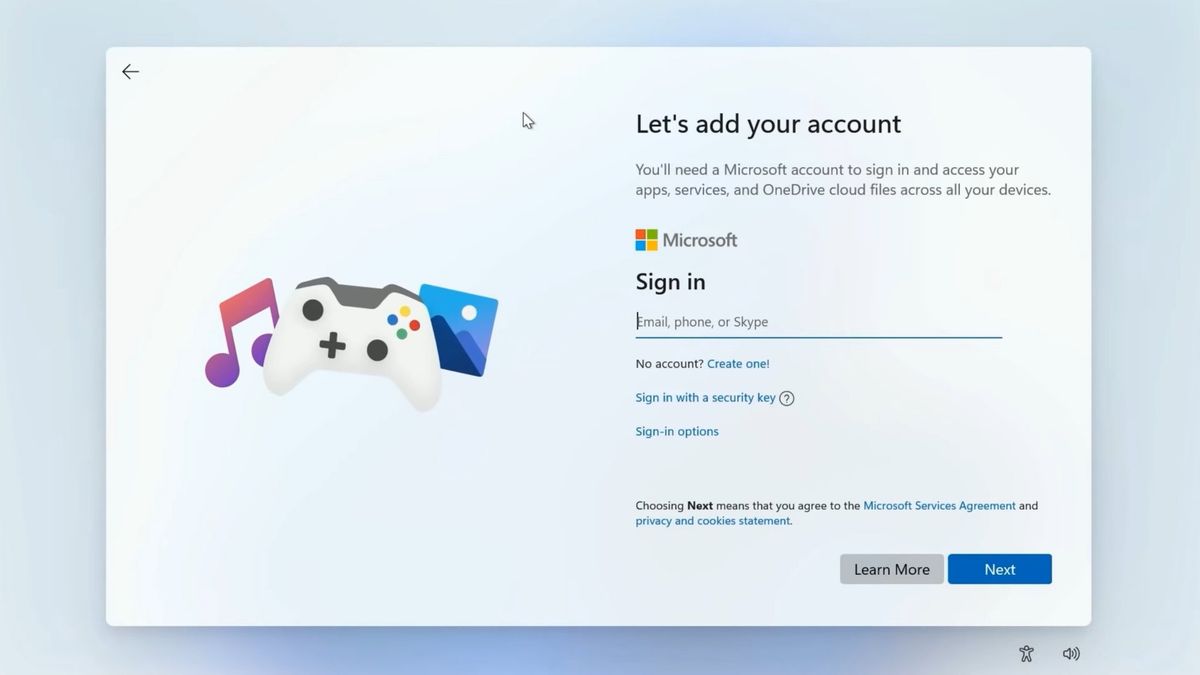
Microsoft wants Windows 11 installs to use a Microsoft Account — confirms removal of popular setup bypass - Windows Central
The popular "bypassnro" command, which let users to skip connecting to the Internet and signing into a Microsoft Account, is being removed.Microsoft has confirmed that it's removing a popular command line that allowed users to bypass connecting to the internet and signing into a Microsoft Account when setting up a new Windows 11 PC.
When Windows 11 version 22H2 launched, Microsoft made it so that both Windows 11 Home and Windows 11 Pro required an internet connection and Microsoft Account during setup, but users quickly discovered workarounds.
The most popular workaround is the command "bypassnro", which when entered into a command prompt while in the Windows setup experience would enable the ability to skip connecting to the internet, therefore bypassing the Microsoft Account requirement.
As noted in the latest Windows 11 preview build, the company is removing the command to "ensure that all users exit setup with internet connectivity and a Microsoft Account."
This change will be controversial among Windows users who don't want to use a Microsoft Account on Windows 11. Going forward, there will be no easy way to bypass this requirement on a new Windows 11 PC.
There are still ways to bypass these requirements, including setting up an unattend.xml installation, which bypasses the setup phase, but this requires a lot more work and includes creating a new Windows installation image from scratch.
Currently, it's also possible to manually re-add the bypassnro command to your system by typing the following into a command prompt: "reg add HKLM\SOFTWARE\Microsoft\Windows\CurrentVersion\OOBE /v BypassNRO /t REG_DWORD /d 1 /f shutdown /r /t 0"
Windows 11 blocks ability to skip Microsoft Account during setup
The popular "bypassnro" command, which let users to skip connecting to the Internet and signing into a Microsoft Account, is being removed.
www.windowscentral.com
HAL 9000
Honorary Master
- Joined
- May 27, 2008
- Messages
- 22,702
- Reaction score
- 26,538
But this is NOW!...
 www.windowscentral.com
An even better Microsoft Account bypass for Windows 11 has already been discovered - Windows Central
Microsoft has announced that it's removing a popular command line that made it easy to skip signing into a Microsoft Account during Windows 11 setup — now a better bypass has been discovered.Earlier this week, Microsoft announced that it was removing a popular command line that allowed users to bypass connecting to the internet and signing into a Microsoft Account during the setup phase on Windows 11.
Since 2022, Windows 11 has required both an internet connection and Microsoft Account when setting up a new PC. Naturally, not everybody wants this, and so workarounds and bypasses have been discovered.
The most popular bypass was "oobe\bypassnro" which, when typed into the command prompt during the Windows 11 setup experience, would enable a button that let you skip connecting to the internet, thus bypassing the Microsoft Account requirement.
Microsoft has said that it is removing this command to push more users to connect to the internet and sign in with a Microsoft Account during the setup phase. Understandably, the internet is outraged.
While oobe\bypassnro is being removed, the actual registry entry that enables the button to skip connecting to the internet isn't, at least not yet. So you can still manually create the registry edit yourself, but that's a much longer and tedious process.
But fret not, as a new, perhaps better bypass has already been discovered that still uses the command prompt (which you can open with Shift + F10) and makes skipping the Microsoft Account sign-in step a total breeze.
Discovered by user @witherornot1337 on X, typing "start ms-cxh:localonly" into the command prompt during the Windows 11 setup experience will allow you to create a local account directly without needing to skip connecting to the internet first.
An even better Microsoft Account bypass for Windows 11 has already been discovered
Microsoft has announced that it's removing a popular command line that made it easy to skip signing into a Microsoft Account during Windows 11 setup — now a better bypass has been discovered.
www.windowscentral.com
HAL 9000
Honorary Master
- Joined
- May 27, 2008
- Messages
- 22,702
- Reaction score
- 26,538
Here's a handy guide for upgrading an 'unsupported' Windows 10 PC or laptop to Windows 11...
Full article at the link below:
 www.windowscentral.com
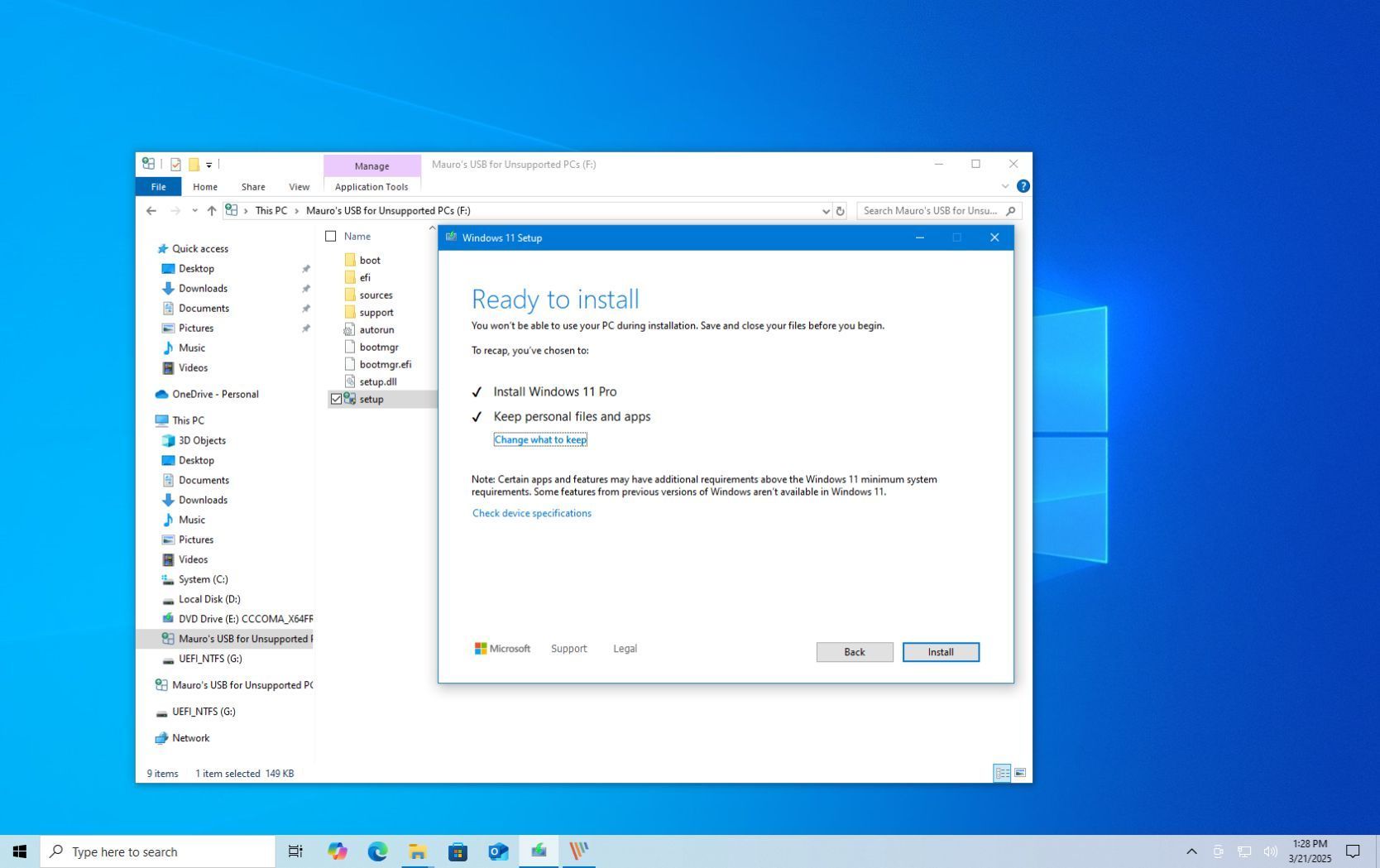
How to upgrade an unsupported computer to Windows 11 - Windows Central
If you use this Microsoft workaround, you can still install Windows 11 on an unsupported computer.Although Windows 11 has a higher system requirement, you may still be able to perform an in-place upgrade or clean installation on an unsupported computer running Windows 10 by creating a custom installation media to bypass the requirements.
It's important to understand that running the latest version of the operating system on incompatible hardware is strongly discouraged. Microsoft does not provide support for devices that fail to meet the minimum specifications, and while updates might still be accessible, their functionality isn't assured.
Moreover, running the operating system without essential security features like Trusted Platform Module (TPM) 2.0 and Secure Boot can expose the system to security risks. Microsoft has reiterated its commitment to these requirements, emphasizing that TPM 2.0 is "non-negotiable" for Windows 11, underscoring its role in enhancing system security and future-proofing the system.
In this how-to guide, I'll explain how to upgrade a device that doesn't meet the minimum system requirements.
Warning: Although the clean installation is the only method that deletes everything on the computer, the in-place upgrade process can always go wrong. As a result, it's critical to create a full backup of your system before proceeding.
Full article at the link below:
How to upgrade an unsupported computer to Windows 11
If you use this Microsoft workaround, you can still install Windows 11 on an unsupported computer, as support for Windows 10 ends.
www.windowscentral.com

dualmeister
Honorary Master
BookmarkedBut this is NOW!...
An even better Microsoft Account bypass for Windows 11 has already been discovered - Windows Central
Microsoft has announced that it's removing a popular command line that made it easy to skip signing into a Microsoft Account during Windows 11 setup — now a better bypass has been discovered.
An even better Microsoft Account bypass for Windows 11 has already been discovered
Microsoft has announced that it's removing a popular command line that made it easy to skip signing into a Microsoft Account during Windows 11 setup — now a better bypass has been discovered.

Jeepers?! What do you knowledgeable guys think?

 www.techradar.com
Here's why you should reinstall Windows 11 every two months - no, I'm not kidding
Do it, and work towards making it routine

elf_lord_ZC5
Honorary Master
Jeepers?! What do you knowledgeable guys think?
Here's why you should reinstall Windows 11 every two months - no, I'm not kidding
Do it, and work towards making it routine
There is method in his madness. You install and uninstall a lot of apps, and a lot of files stay behind, with a lot of registry entries that are no longer have any relevance.
But it takes me about 2 months of occasional fiddling before my box is exactly as I want it.
Besides - I just don't have the time or inclination to re-install Windows, on a regular basis.
dualmeister
Honorary Master
I used to re-install my OS every 2 years or so to keep it "fresh". However, I have not re-installed my OS since I built my current PC in 2018.Jeepers?! What do you knowledgeable guys think?
Here's why you should reinstall Windows 11 every two months - no, I'm not kidding
Do it, and work towards making it routine
I've just been running all the updates including Windows 10 to 11 and surprisingly it has not slowed down.
I will be re-installing soon though as one of my essential apps is not working properly and it is something to do with the Firewall that I have
not been able to fix
Smiggles
Honorary Master
- Joined
- Feb 4, 2025
- Messages
- 12,038
- Reaction score
- 20,127
That hasn't been an issue since Windows 10. This guy must check himself into a psychiatric hospital.The worst culprit, of course, is the classic "upgrade from the previous Windows version to this version." Just don't; it's never worth it.
HAL 9000
Honorary Master
- Joined
- May 27, 2008
- Messages
- 22,702
- Reaction score
- 26,538
When Microsoft eventually stops rolling out any Windows 11 updates for 'unsupported' hardware, I will pension off my dinosaur Intel Core2 Duo 2.0GHz desktop PC - and fork out for a current generation mini-PC that should last me for the next decade or so...
I also have a 5th-Gen i3 Lenovo G80 laptop with 16GB RAM running Windows 10 Pro - I will use Rufus to upgrade it to Windows 11 Pro with a clean install (after backing up all my data) in October 2025.
My other laptop is a 12th-Gen i5 Lenovo Slim3 with 8GB of RAM & Windows 11 Home - that will remain as my primary work laptop for the foreseeable future.
I also have a 5th-Gen i3 Lenovo G80 laptop with 16GB RAM running Windows 10 Pro - I will use Rufus to upgrade it to Windows 11 Pro with a clean install (after backing up all my data) in October 2025.
My other laptop is a 12th-Gen i5 Lenovo Slim3 with 8GB of RAM & Windows 11 Home - that will remain as my primary work laptop for the foreseeable future.
dualmeister
Honorary Master
So frustrating. I have an app (Radarr) which I've been accessing remotely via the web GUI for years. Then all of a sudden I could only access it from the local PC. Every firewall rule allows it through yet it cannot be accessed remotely.as one of my essential apps is not working properly
But, as soon as you disable the firewall then it works perfectly over the net.

elf_lord_ZC5
Honorary Master
When Microsoft eventually stops rolling out any Windows 11 updates for 'unsupported' hardware, I will pension off my dinosaur Intel Core2 Duo 2.0GHz desktop PC - and fork out for a current generation mini-PC that should last me for the next decade or so...
I also have a 5th-Gen i3 Lenovo G80 laptop with 16GB RAM running Windows 10 Pro - I will use Rufus to upgrade it to Windows 11 Pro with a clean install (after backing up all my data) in October 2025.
My other laptop is a 12th-Gen i5 Lenovo Slim3 with 8GB of RAM & Windows 11 Home - that will remain as my primary work laptop for the foreseeable future.
My MSI 14 laptop is on Win 11, my Lenovo G50-80 ( gen5 i5 ) will stay on WIN10, my Celeron NUC wants to upgrade to WIN11, undecided on the wisdom of allowing that.
My desktop needs a TPM2 Module that I may or may not buy, to enable it to go to WIN11.

There is method in his madness. You install and uninstall a lot of apps, and a lot of files stay behind, with a lot of registry entries that are no longer have any relevance.
But it takes me about 2 months of occasional fiddling before my box is exactly as I want it.
Besides - I just don't have the time or inclination to re-install Windows, on a regular basis.
The suggestion alone is insanity, never mind the practical implications for any large company with a few 100 laptops.
It's brand new 100k Dell machine.
You are probably right.
My daughter has a Lenovo X230 - been running Windows 10 fine for years until it upgraded to Win11 "by itself" (suspect she clicked upgrade by mistake)
Nothing but problems, no audio / bluetooth / wifi was slow and constantly disconnecting / touch screen glitchy / random reboots / the list goes on.
Formatted the drive and reinstalled with Windows 10 - no more issues until it miraculously upgraded to 11 again + same issues.
I offered to reinstall again but she asked if she could rather have what i'm using (Ubuntu Desktop LTS) and she's been happy ever since; not a single issue or complaint.
If even Gen-Z's prefer alternatives over Windows you know it's bad

Smiggles
Honorary Master
- Joined
- Feb 4, 2025
- Messages
- 12,038
- Reaction score
- 20,127
That's not going to slow your PC down anyway. The registry consists of zillions of entries. Deleting a few is not going to make a dent.There is method in his madness. You install and uninstall a lot of apps, and a lot of files stay behind, with a lot of registry entries that are no longer have any relevance.
But it takes me about 2 months of occasional fiddling before my box is exactly as I want it.
Besides - I just don't have the time or inclination to re-install Windows, on a regular basis.
dualmeister
Honorary Master
Since TPM was mentioned.
My Windows 11 reported that it could not install the latest version as of Win 11 as i did not have TPM 2. I thought this cannot be correct.
Checked the BIOS and it was disabled. Apparently many manufacturers disable it by default (or used to). Afterwards everything updated OK.
My Windows 11 reported that it could not install the latest version as of Win 11 as i did not have TPM 2. I thought this cannot be correct.
Checked the BIOS and it was disabled. Apparently many manufacturers disable it by default (or used to). Afterwards everything updated OK.

There is method in his madness. You install and uninstall a lot of apps, and a lot of files stay behind, with a lot of registry entries that are no longer have any relevance.
But it takes me about 2 months of occasional fiddling before my box is exactly as I want it.
Besides - I just don't have the time or inclination to re-install Windows, on a regular basis.
This is why you use revo uninstaller and not just control panel/Apps and settings.
elf_lord_ZC5
Honorary Master
That's not going to slow your PC down anyway. The registry consists of zillions of entries. Deleting a few is not going to make a dent.
Non-relevant registry entries have away of causing weird and wonderful issues, other than slowing your PC down.
Last edited:
elf_lord_ZC5
Honorary Master
Since TPM was mentioned.
My Windows 11 reported that it could not install the latest version as of Win 11 as i did not have TPM 2. I thought this cannot be correct.
Checked the BIOS and it was disabled. Apparently many manufacturers disable it by default (or used to). Afterwards everything updated OK.
My motherboard lacks the TPM2 module, which was not included by default, but that I can now buy as an "upgrade" module. Nothing in the BIOS.

Dimpie (JIGSAW)
Honorary Master
Non-relevant registry entries have away of causing weird and wonderful issues, other than slowing your PC down.
That myth has been busted