Windows 7 Beta 1 - Download here

thriel : You actually suggested incredimail as a mail app?.. have u ever worked as a techie? ANYWHERE?
 
Maybe this is actually just Vista SP2 with a new theme lol
 
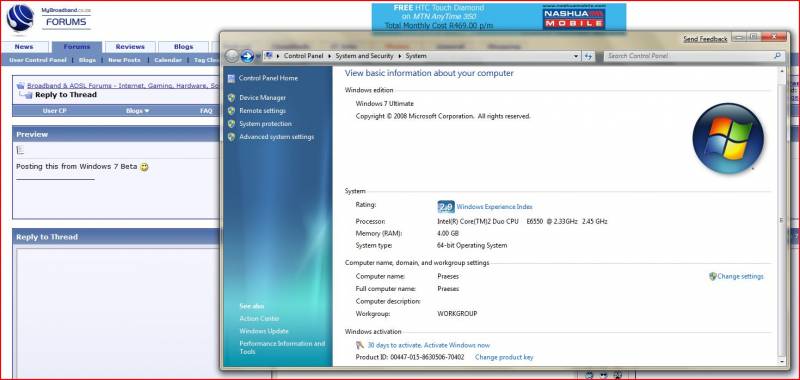
Posting this from Windows 7 Beta :)

Win_Info.JPG

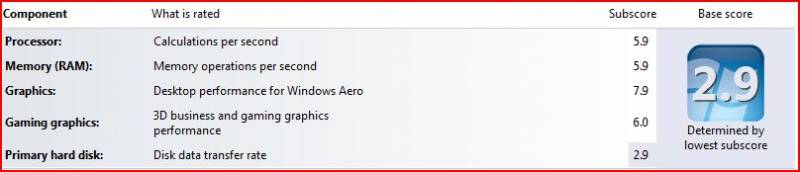
WPI.JPG


I think I need one of these to improve my score a lil:
http://www.guru3d.com/news/ocz-jacks-up-vertex-2ssd-to-550mbps/
 
Installed Windows 7 (32bit)

Let it dualboot with Vista 32 Ultimate on same hard drive with seperate 40gb partition.
Just after setup but before full desktop was loaded , it prompted me for my wireless details.
Seems much "smoother" even with all the graphics bits turned on , probably flies with
System Properties - Advanced - Performance Options - Visual Effects - set to performance mode.
 
I'm just backing everything important ontoa second hard drive and going for a clean install, no partiioning. I don't care if it doesn't work, I need to reintall my windows anyway, i think I have a virus or something in here.
 
Crap thing is I can't select a Windows Classic taskbar , I hate this XP / Vista / 7 style taskbar :-(

Already in Performance tab deselected everything besides Smooth Edges of screen fonts.
 
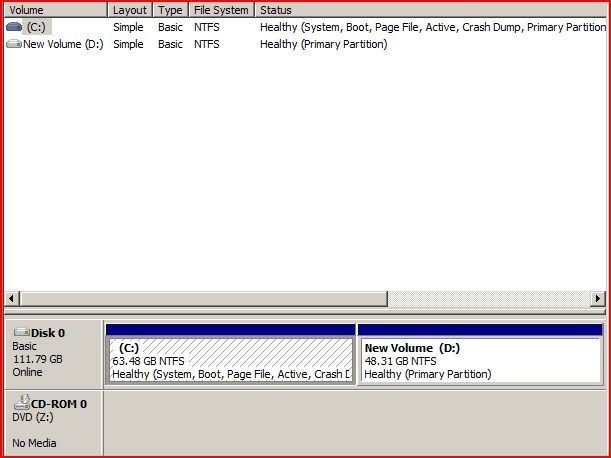
Amazingly Vista Disk Management displays the full content of the hard drive along with all its partitions.

vista-disk-management.jpg


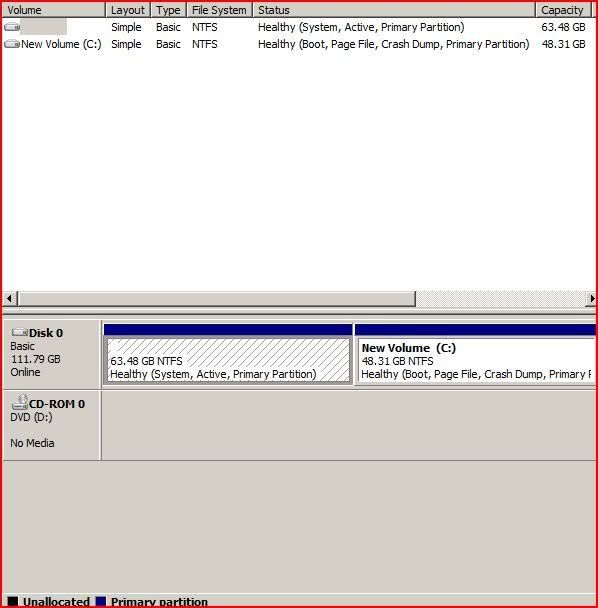
However Windows 7 Ultimate does things a bit differently ... will post pic once I reboot into 7.

windows7-disk-management.jpg


One can assign a drive letter to the other partition that boots XP / Vista (in my case , not too sure of its impact aside from confusing you if you don't know what system you booted into initially or copying files and folders from one drive to the other)
 
Last edited:
Processor Intel(R) Core(TM)2 CPU 6700 @ 2.66GHz 6.1 5.2
Memory (RAM) 2.00 GB 5.5
Graphics NVIDIA GeForce 7900 GS (Microsoft Corporation - WDDM) 5.9
Gaming graphics 1023 MB Total available graphics memory 5.6
Primary hard disk 26GB Free (37GB Total) 5.2

And that is an IDE HDD. :D Will load Windows 7 on my other pc soon. :p
 
Anyone know if there are beta Nvidia drivers available yet? I know ATI has some for windows 7. Can even play warcraft3 on this pc. :(

Edit: FYI, the one I loaded Windows 7 on.
 
Jeez. I installed Windows 7 and first thing installed COD5 and it worked.
Windows detected all drivers (HD4850)
 
2449071 said:
Anyone know if there are beta Nvidia drivers available yet? I know ATI has some for windows 7. Can even play warcraft3 on this pc.

Edit: FYI, the one I loaded Windows 7 on.
NVIDIA drivers for Windows 7 Beta

NVIDIA drivers for the Windows 7 Beta release can be downloaded directly from Microsoft’s Windows Update service.

Instructions:

1. After a fresh installation of the Windows 7 Beta, click on the Start button.
2. Click Windows Update (it will be pinned to the top of the start menu). You can also type “Windows Update” into the start menu Search to locate Windows Update.
3. Within Windows Update, locate and install the NVIDIA driver update (it will either be an important update or an optional update depending on your system).

This should help :)
 
I am amazed at the performance of the system on 2gb ram.
I do notice a absence of memory available to Windows by doing Start , Run , Winver or launching the Task Manager (in Vista it will give you memory available to the OS , in 7 it does'nt)

For some reason I reckon SuperFetch (which everyone knew about in Vista) seems to be more efficient in 7.

windows7-SuperFetch.jpg


Default page/swop file setting on 2GB ram.

windows7-pagefile.jpg


On the whole the system seems to be a lot quicker / full of boost and Firefox 3.0.5 is'nt compatible in Windows XP mode or native Windows 7 mode.
 
Last edited:
Score

Proc : 4.4
Mem : 5.5
Graphics : 7.1
Gaming Graphics : 4.9
HDD : 5.2

CPU : Pentium D915
Ram : 4GB Transcend
GFX : ATI Radeon X850XT PE 256MB 256bit
HDD : WD 400GB 16MB cache connected via HCPI (or what ever it's called)
Windows 7 Ultimate

Strange your disk scored so low Aqox.

I just swapped the 400GB for the Seagate 500GB that Aqox is using and got the following.


Proc : 4.4
Mem : 5.5
Graphics : 6.9
Gaming Graphics : 4.9
HDD : 5.9

I didn't touch the jumper.
 
Last edited:
Well I got the disk completely wrong, not sure how that happened.

It's actually a Hitachi 400GB (HDS724040KLSA80)

This is the benchmark from my other machine running windows.


Read Transfer Rate
Minimum: 2.9MB/sec
Maximum: 111.8MB/sec
Average: 74.2MB/sec

Access Time: 16.6ms
Burst Rate: 111.8MB/sec
CPU Usage: 1.9%

This is what I get with the 500GB Seagate withough removing the jumper.

Read Transfer Rate
Minimum: 32.2MB/sec
Maximum: 110.4MB/sec
Average: 84.2MB/sec

Access Time: 13.1ms
Burst Rate: 102.1MB/sec
CPU Usage: -1.0%
 
Results with the jumper removed (full 3gbps throughput)

Read Transfer Rate
Minimum: 43.6MB/sec
Maximum: 108.6MB/sec
Average: 80.1MB/sec

Access Time: 14.5ms
Burst Rate: 117.1MB/sec
CPU Usage: -1.0%

So the jumper was worse apart from the burst rate. I suspect my mobo doesn't support the higher 3gbps throughput.
 
My system is very similar to yours, how does Windows 7 run on it?

Smooth or laggy?

Saw DarthCat's pc last nite. Definite speed improvement over his beloved Vista :D
I'm even contemplating installing Winders 7.
 
Top
Sign up to the MyBroadband newsletter
X