-
- News
-
Categories
- 5G
- ADSL
- AI
- Banking
- Black Friday
- Broadband
- Broadcasting
- Business
- Business Telecoms
- Cellular
- Cloud and Hosting
- Columns
- Cryptocurrency
- Energy
- Enterprise
- Fibre
- Gadgets
- Gaming
- Government
- Hardware
- Industry News
- Internet
- Internet of Things
- Investing
- IT Services
- Motoring
- Reviews
- Science
- Security
- Smartphones
- Software
- Technology
- Telecoms
- Trending
- Wireless
- Press Office
- Forum
- Industry News
- What's Next
- Company hub
- Speed Test
- About us
- Advertise with us
- Contact
- Careers


-
Join the MyBroadband community
South Africa’s biggest forum. Discuss, discover, and connect with thousands of members.
-
Question of the Day: Do you get motion sick?

You are using an out of date browser. It may not display this or other websites correctly.
You should upgrade or use an alternative browser.
You should upgrade or use an alternative browser.
Windows 7 File Copy Speed

LazyLion
King of de Jungle
I'm saying what I get. You get 20MB/sec. Cool. I'm just seeing how much I'm missing with the newest Windows.
What are you so uptight about?
Not uptight about anything. Just pointing out that the information you provided is useless to me. What does the file copy speed in Mac OS have to do with Windows 7, since none of us are actually using it?
You did notice that this thread title says Windows 7 file copy speed?

BravoDrie
Well-Known Member
Did a quick test over our network:

LazyLion
King of de Jungle
Did a quick test over our network:
Ja, I also get those speeds when doing small transfers like that. But try 100 times that and see what happens.
Not uptight about anything. Just pointing out that the information you provided is useless to me. What does the file copy speed in Mac OS have to do with Windows 7, since none of us are actually using it?
You did notice that this thread title says Windows 7 file copy speed?
Actually it's quite useful, because I told you that over FW800 a Seagate 1.5TB 7200RPM drive is capable of 70MB/sec (at least). If you're getting substantially less on a faster connection (SATA 2) but on a similar drive - you should know that you have some bugs in your system - either it's software (OS, drivers, anti-virus) or hardware (SATA controller, hard drive). At least you know you're way behind.
LazyLion
King of de Jungle
Actually it's quite useful, because I told you that over FW800 a Seagate 1.5TB 7200RPM drive is capable of 70MB/sec (at least). If you're getting substantially less on a faster connection (SATA 2) but on a similar drive - you should know that you have some bugs in your system - either it's software (OS, drivers, anti-virus) or hardware (SATA controller, hard drive). At least you know you're way behind.
I am quite well aware of the theoretical transfer speeds for SATA drives, and obviously I already know there is some kind of bug in the system or the OS or I would not have made the thread.
My point was that this seems to be endemic to Windows 7 across all systems since I have tried it on numerous systems.
I just wanted other users of Windows 7 to confirm this for me.
The_Techie
Resident Techie
Ja, I also get those speeds when doing small transfers like that. But try 100 times that and see what happens.
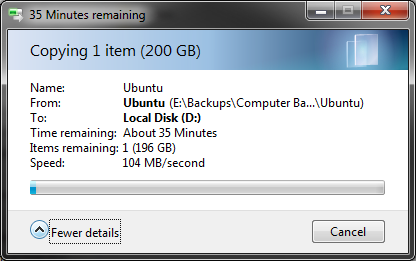
This is between two Seagate Barracuda 7200.11 1.5TB drives. It dropped from 120MB/s to 104MB/s where it stabilized for the duration of the copy.
Last edited:
LazyLion
King of de Jungle
This is between two Seagate Barracuda 7200.11 1.5TB drives.
Ja, but that is in Ubuntu!

see you can't sneak one past me!

Peder
Hobbit
This is between two Seagate Barracuda 7200.11 1.5TB drives.
that is also only one file! meaning it is far faster!!!
The_Techie
Resident Techie
Ja, but that is in Ubuntu!
see you can't sneak one past me!
that is also only one file! meaning it is far faster!!!
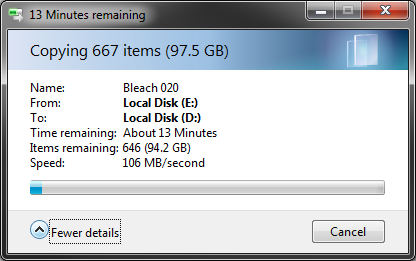
I posted that specifically in reply to the quoted message, where I did in fact copy a hundred times the size of the small transfer. Let me see if I can't enqueue a few smaller files.
EDIT: Here we go, 180MB files:
Last edited:
LazyLion
King of de Jungle
OK, so what is common to all my seven computers at home and at the office that I am getting these slow speeds?
The_Techie
Resident Techie
OK, so what is common to all my seven computers at home and at the office that I am getting these slow speeds?
Lower copy speeds when copying thousands of small files (say 100KB or smaller) is to be expected, in fact I only get about 50MB/s when copying such files between hard drives.
Do you also experience a max copy speed of about 20MB/s when copying large (100MB and larger) files between drives?
LazyLion
King of de Jungle
Lower copy speeds when copying thousands of small files (say 100KB or smaller) is to be expected, in fact I only get about 50MB/s when copying such files between hard drives.
Do you also experience a max copy speed of about 20MB/s when copying large (100MB and larger) files between drives?
not sure, I'll have to do more tests. I'll see how fast the ISO images go and then some video files and then some pictures. Will post tonight.
The_Techie
Resident Techie
not sure, I'll have to do more tests. I'll see how fast the ISO images go and then some video files and then some pictures. Will post tonight.
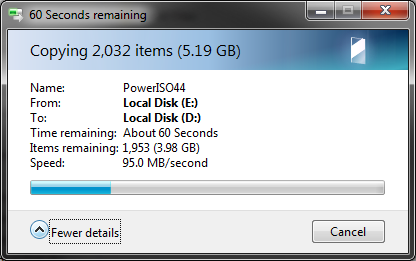
Actually make that anything from 40MB/s to 100MB/s. I actually just received close to 100MB/s average when copying my collection of install files from one drive to another:
I'll drop by this thread tonight to see what's what

Last edited:

Can't say I've ever had a problem with the speed of copying files on W7. Are you sure you got better speeds with XP? It doesn't tell you how fast it's going (unless you're using another program) Maybe it just felt faster, oh and you can clearly see that's^^ not burst speed.
LazyLion
King of de Jungle
Can't say I've ever had a problem with the speed of copying files on W7. Are you sure you got better speeds with XP? It doesn't tell you how fast it's going (unless you're using another program) Maybe it just felt faster, oh and you can clearly see that's^^ not burst speed.
Ja, it did feel a bit faster in XP, but as you say I had no way of knowing... but I do know that 20 MB/s is not normal for SATA transfer. so something is interfering, maybe some software that I have a habit of installing on all my systems, or maybe it is just that my drives are so full and fragmented (although windows says they are 0% fragmented).
Could it be SATA cables? Must I look for better quality SATA cables other than those default red ones?
The_Techie
Resident Techie
Can't say I've ever had a problem with the speed of copying files on W7. Are you sure you got better speeds with XP? It doesn't tell you how fast it's going (unless you're using another program) Maybe it just felt faster, oh and you can clearly see that's^^ not burst speed.
Indeed, seeing 233MB/s burst speeds. However the average stable speed seems to be about 105MB/s for large files and 80MB/s for small files (it does fluctuate between 40MB/s and 105MB/s though).
Could it be SATA cables? Must I look for better quality SATA cables other than those default red ones?
I'm using the default red cables as well

LazyLion
King of de Jungle
speedcommander FTW
Hmm, definitely helps. Gives me around 44 MB/s
I tried some tests. Older drives (like my 320 Gb) are slower, and in fact they don't even give you the option of viewing the extra info. But they are not that old, should not be that much of a performance degradation.
But between my newer Samsung 1 Tb drives the copy speed is 55 MB/s.
but surely according the SATA standards, the newer SATA should transfer close to 300 MB/s ???
Last edited: