WootBook Metal II - Thoughts

weelzSA

Expert Member
Joined
Jul 23, 2009
Messages
3,257
I've been offered an Ideabook 14 for R16k (LENOVO TB 20SL001WSA
Thinkbook 14.0'' FHD;i7-1065G7;8GB DDR4;512GB M.2 NVMe;Wifi+BT;Y-FPR;3 Cell;65W;KYB US;Mineral Grey;Win10Pro64) should I go for this or the Wootbook metal as the wootbook has better cpu.

Just take into account the wootbook will need storage, ram and OS.
 

weelzSA

Expert Member
Joined
Jul 23, 2009
Messages
3,257
I was planning of getting the 500gb ssd, 2*16gb ram and extended warranty with no OS for R16 595. I can always use fedora or Ubunto

I luckily already had a 500 Samsung 970 evo pro nvme to put into laptop.

Ram I am getting else where tho as 3200mhz is the way to go for this laptop and unfortunately wootware don’t have any in stock.

Look back a few posts I posted links to 3200mhz ram.
 

weelzSA

Expert Member
Joined
Jul 23, 2009
Messages
3,257
So an update - received the laptop and first impressions are great build wise. Still waiting for Ram to arrive so have not been able to use it yet.

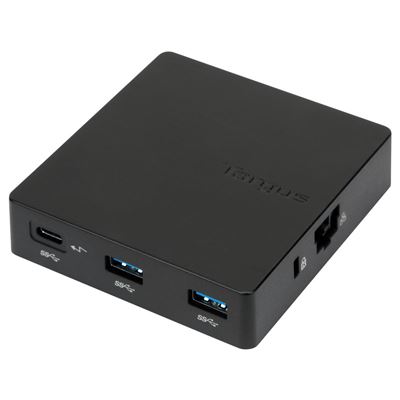
I am going to be purchasing a laptop stand so it could be setup next to my main monitor off to the side and then was also thinking of getting some sort of USB-C "dock" so my question is can this laptop support such a dock?

Ideally would like to connect "dock" via usb-c to laptop usb-c port then connect external HDD's, K+M, ethernet all to "dock" that will be hidden behind stand? Bonus if HDMI could also be connected to "dock" so if I need to leave with laptop, can just un-plug one singlde cable.

Anyone able to confirm if this will work and if so any recommendations for a "dock"
 

PhireSide

Honorary Master
Joined
Dec 31, 2006
Messages
14,236
So an update - received the laptop and first impressions are great build wise. Still waiting for Ram to arrive so have not been able to use it yet.

I am going to be purchasing a laptop stand so it could be setup next to my main monitor off to the side and then was also thinking of getting some sort of USB-C "dock" so my question is can this laptop support such a dock?

Ideally would like to connect "dock" via usb-c to laptop usb-c port then connect external HDD's, K+M, ethernet all to "dock" that will be hidden behind stand? Bonus if HDMI could also be connected to "dock" so if I need to leave with laptop, can just un-plug one singlde cable.

Anyone able to confirm if this will work and if so any recommendations for a "dock"
Something like this?


I can't see why it wouldn't work. I have used one on my Ryzen notebook without any issues. Not sure if it would handle 4k/60fps as I don't have a screen of that type though. Normal 1080p screen gang represent.
 

weelzSA

Expert Member
Joined
Jul 23, 2009
Messages
3,257
Something like this?


I can't see why it wouldn't work. I have used one on my Ryzen notebook without any issues. Not sure if it would handle 4k/60fps as I don't have a screen of that type though. Normal 1080p screen gang represent.

Was looking at the below as examples:


PhireSide

Honorary Master
Joined
Dec 31, 2006
Messages
14,236
Was looking at the below as examples:


I think that they are much of a muchness, just go for the one that suits your needs best.

I'm not too clued up on the exact specs but I know that USB 3.0 for instance doesn't support as high a resolution as USB 3.1, for example, so maybe just bear that in mind if you are pushing high framerates or resolutions and the laptop doesn't support it.
 

weelzSA

Expert Member
Joined
Jul 23, 2009
Messages
3,257
I think that they are much of a muchness, just go for the one that suits your needs best.

I'm not too clued up on the exact specs but I know that USB 3.0 for instance doesn't support as high a resolution as USB 3.1, for example, so maybe just bear that in mind if you are pushing high framerates or resolutions and the laptop doesn't support it.

Current monitor is 34" ultrawide 3340x1440 144hz.

Worst case scenario then is I just connect monitor directly to laptop and then all other devices to usb-c dongle?

The canyon one I linked to says 4k 30hz so will ignore that one for now. Others seem to have mixed reviews too so need to do some more research it seems.
 

lexity

Executive Member
Joined
Jan 31, 2020
Messages
7,093
@weelzSA

Did you get your 2x16 RAM modules installed, yet? I'm in the market for an upgrade.

I'm assuming you went for 2x 16GB DDR4 3200Mhz

On another note, how is your wootbook's chasis? I just saw this review....
Apparently not all Tongfang chasis have this amount of (black&decker) flex. How does yours compare? (watch the short video review see the flex)
 
Last edited:

weelzSA

Expert Member
Joined
Jul 23, 2009
Messages
3,257
@weelzSA

Did you get your 2x16 RAM modules installed, yet? I'm in the market for an upgrade.

I'm assuming you went for 2x 16GB DDR4 3200Mhz

Ended up going for 2x 8gb now. If I see 16gb not enough for my needs can always look at upgrading later. But yes went 3200MHz.
 

lexity

Executive Member
Joined
Jan 31, 2020
Messages
7,093
Ended up going for 2x 8gb now. If I see 16gb not enough for my needs can always look at upgrading later. But yes went 3200MHz.
What brand of RAM did you go for?

(I added a 2nd question to my 1st... re the chasis. See above)
 

weelzSA

Expert Member
Joined
Jul 23, 2009
Messages
3,257
What brand of RAM did you go for?

(I added a 2nd question to my 1st... re the chasis. See above)

Adata 8gb 3200mhz - stock of 3200mhz is very slim it seems.

Honestly have not yet turned laptop on as still waiting for ram (which should arrive this week still).

First look build seems solid tho.
 

weelzSA

Expert Member
Joined
Jul 23, 2009
Messages
3,257
@weelzSA

Did you go through laptopdirect.co.za? Just checking before I order some RAM.

Yeah ordered from the link above I posted.

Also finally got around to booting up and installing on laptop. Tested the “flex” issue in your video posted and don’t have that issue at all. Pressed quite hard too but nothing.
 

lexity

Executive Member
Joined
Jan 31, 2020
Messages
7,093
Yeah ordered from the link above I posted.

Also finally got around to booting up and installing on laptop. Tested the “flex” issue in your video posted and don’t have that issue at all. Pressed quite hard too but nothing.
Ok. Thanks for that. Will bear that in mind during my comparisons. So the RAM works, then, right?

I have heard two stories about the fan noise. From a paid review, the fans were very quiet. From more than one non-paid review, the fans are quite loud under increased/heavy processor load.

Be interesting to hear your feedback if you have any.

What do you think of the mouse pad having no buttons?

And what OS do you plan on installing?
 

weelzSA

Expert Member
Joined
Jul 23, 2009
Messages
3,257
During install and updates fan turned on once and then off again and was loud at all.

Ram works perfectly fine.

Mouse doesn’t faze me at all as I hardly ever used the buttons on laptop trackpads. Also will use external mouse majority of the time as laptop will be put to the side connected to 34” ultra wide and use external M+K.

Build is solid and even tho all I’ve done so far is install windows and updates, I’m very happy.

Using windows 10.
 

lexity

Executive Member
Joined
Jan 31, 2020
Messages
7,093
During install and updates fan turned on once and then off again and was loud at all.

Ram works perfectly fine.

Mouse doesn’t faze me at all as I hardly ever used the buttons on laptop trackpads. Also will use external mouse majority of the time as laptop will be put to the side connected to 34” ultra wide and use external M+K.

Build is solid and even tho all I’ve done so far is install windows and updates, I’m very happy.

Using windows 10.
Thanks for your feedback.

Here is a question for you that is not specific to the machine you bought...

What screen-size have you been using up till now? Are you used to the same 14-inch screen on a laptop? I see you are planning on augmenting your screen-config with an external monitor, but so far as the laptop itself goes, have you been using 14inch up till now?
 

weelzSA

Expert Member
Joined
Jul 23, 2009
Messages
3,257
First laptop in a few years. Always had a Gaming PC and then used iPad Pro 12.9” for travel.

Honestly don’t travel too much (especially now) but need something for those times I do so the screen size is not a major issue to me as when docked, will be connected to 34” ultra wide.

What I can say tho is even after doing a fresh windows install, this screen is brilliant. Very sharp detail and great picture. Haven’t changed any settings yet.
 
Top