Xbox Series X / S

Frankie23

Expert Member
Joined
Jan 22, 2013
Messages
2,076
Is there any workaround or fix for games downloading so slowly?

I'm on a Series X with a 200/200MB fibre line, with the Xbox on a wired connection.

I'm pulling down a game now and it's not going any faster than ~38Mbps.

I'm not playing any other games or using the Xbox while I'm waiting for the download to complete. I believe this was a thing previously but not sure if MS fixed it in the meantime?

I also rebooted the Xbox a couple of times (I believe this was also something that would've fixed slow downloads sometimes) but I haven't seen it make much of a difference yet.

There's also no other usage on my network right now, besides one other device streaming YouTube, but I can't see that making that much of a difference.

Any tips or tricks from anyone that managed to find a fix for this?
 

DarkStarMonday

Expert Member
Joined
May 17, 2019
Messages
1,060
Is there any workaround or fix for games downloading so slowly?

I'm on a Series X with a 200/200MB fibre line, with the Xbox on a wired connection.

I'm pulling down a game now and it's not going any faster than ~38Mbps.

I'm not playing any other games or using the Xbox while I'm waiting for the download to complete. I believe this was a thing previously but not sure if MS fixed it in the meantime?

I also rebooted the Xbox a couple of times (I believe this was also something that would've fixed slow downloads sometimes) but I haven't seen it make much of a difference yet.

There's also no other usage on my network right now, besides one other device streaming YouTube, but I can't see that making that much of a difference.

Any tips or tricks from anyone that managed to find a fix for this?

Maybe this will help


ld13

Honorary Master
Joined
Oct 28, 2005
Messages
12,997
Maybe this will help


I am sorry, but this dude (in the video), has no idea what he is talking about.

Yes, ethernet will always trump wifi/wireless. I have never in my life heard of anyone using an ethernet cord. He also seems to be using megabytes/second instead of megabits/second - there is a difference.

No, simply changing your DNS to 1.0.0.1 will not automagically increase your download speeds. Test 1.1.1.1 and 8.8.8.8 and see what your pings are and as a rule, always use the one with the lowest ping. In fact, this should be set on your router itself, and not your end devices. Tweaking your DNS will only give you a better ping to the DNS server in the end - if your downloads are still being routed to the same server, your download speeds will NOT improve.

I have no idea what his whole alternate MAC/Port settings spiel was about...
 

mr_norris

Expert Member
Joined
Jun 12, 2007
Messages
3,886
The only time I've had issues with downloads was when games were running. Otherwise my Xbox chops and changes between 20Mbps and 100Mbps (my line). For the most part, it hovers around the top end. I use WiFi.
 

Markd

Expert Member
Joined
Oct 8, 2009
Messages
1,677
I just think what XBOX shows you as a download speed is generally wrong. Using a calculator that I made, the speed/time comes in generally on time.
 

Mike Hoxbig

Honorary Master
Joined
Apr 25, 2010
Messages
43,328
Is there any workaround or fix for games downloading so slowly?

I'm on a Series X with a 200/200MB fibre line, with the Xbox on a wired connection.

I'm pulling down a game now and it's not going any faster than ~38Mbps.

I'm not playing any other games or using the Xbox while I'm waiting for the download to complete. I believe this was a thing previously but not sure if MS fixed it in the meantime?

I also rebooted the Xbox a couple of times (I believe this was also something that would've fixed slow downloads sometimes) but I haven't seen it make much of a difference yet.

There's also no other usage on my network right now, besides one other device streaming YouTube, but I can't see that making that much of a difference.

Any tips or tricks from anyone that managed to find a fix for this?
From what I've noticed it's just an issue with reporting the current speed.

I have the same issue on a 100/100 line. It will hover around 30-40 Mbps for a bit and then suddenly spike to like 250 Mbps while the download size "catches up". In the end it averages out to 80-90 Mbps.

You can verify this by logging into your router and checking the network traffic in real time...
 
Last edited:

Sumeet2005

Active Member
Joined
Apr 11, 2017
Messages
41
Hello gamers. I am looking to purchase the Xbox series S for my son(10yrs) and occasional gaming by myself. Don't have the capital right now to purchase the series X (covid and all). Would the series S be sufficient enough for our needs or is it just too bad. Would it be better advisable to continue saving up and buying the series X at a later stage?

Thanks for any advise given
 

Solitude

Executive Member
Joined
Jul 23, 2008
Messages
7,312
Hello gamers. I am looking to purchase the Xbox series S for my son(10yrs) and occasional gaming by myself. Don't have the capital right now to purchase the series X (covid and all). Would the series S be sufficient enough for our needs or is it just too bad. Would it be better advisable to continue saving up and buying the series X at a later stage?

Thanks for any advise given
I know of many people who are very happy with the Series S. Get that and Game Pass and you are sorted.
 

DrJohnZoidberg

Honorary Master
Joined
Jul 24, 2006
Messages
23,995
Is there any workaround or fix for games downloading so slowly?

I'm on a Series X with a 200/200MB fibre line, with the Xbox on a wired connection.

I'm pulling down a game now and it's not going any faster than ~38Mbps.

I'm not playing any other games or using the Xbox while I'm waiting for the download to complete. I believe this was a thing previously but not sure if MS fixed it in the meantime?

I also rebooted the Xbox a couple of times (I believe this was also something that would've fixed slow downloads sometimes) but I haven't seen it make much of a difference yet.

There's also no other usage on my network right now, besides one other device streaming YouTube, but I can't see that making that much of a difference.

Any tips or tricks from anyone that managed to find a fix for this?

If you figure out a permanent solution for this let me know.

One workaround I found that seemed to work sometimes is to open a game and leave it running in the background, then start your download. Then on the manage queue screen it will then give you a warning that the download speed will be affected by the open game and give you an option there to close it, use that option there to quit the game and check if your speeds improve.

Also another thing I found helps sometimes is switching between wired and wireless, so disconnect the ethernet cable and let it fallback to wifi, then once that's going put the ethernet cable back in.

I have no idea what causes this, but I really hope they can fix it. I have zero issues on PC (using the Microsoft Store) nor do I have issues on PS5 where downloads run at expected consistent speeds, only Xbox where my speeds jump up and down like crazy - I've had sub-1Mbit speeds multiple times with no clear indication on what's wrong. Super annoying.

EDIT: Just started a download now, wouldn't go over 30Mbps. The open game trick didn't improve anything but plugging out the ethernet cable and plugging it back in did - it's now going at average around 80Mbps peaking to 300Mbps (I have gigabit) - still super frustrating that it's so unstable but better than 30Mbps :shrug:
 
Last edited:

AlphaJohn

Honorary Master
Joined
Sep 10, 2012
Messages
14,636
Hello gamers. I am looking to purchase the Xbox series S for my son(10yrs) and occasional gaming by myself. Don't have the capital right now to purchase the series X (covid and all). Would the series S be sufficient enough for our needs or is it just too bad. Would it be better advisable to continue saving up and buying the series X at a later stage?

Thanks for any advise given

If capital is already an issue I would say go S. Rather use future income for kid's education than buying an X

I am perfectly happy with Series S. Plays all the current gen games and I know Im good for the next "7 years". Have a 58" TV and set my console to 4K with internal upscale. Games run smooth and looks great from my armchair 2 meters away. Also using it for Mrs 4K streaming of TV/movies.

Slap a 2 TB USB, GamePass & Netflix onto Series S and you got some great entertainment that you can even take with you when going on holiday.
 

Sumeet2005

Active Member
Joined
Apr 11, 2017
Messages
41
If capital is already an issue I would say go S. Rather use future income for kid's education than buying an X

I am perfectly happy with Series S. Plays all the current gen games and I know Im good for the next "7 years". Have a 58" TV and set my console to 4K with internal upscale. Games run smooth and looks great from my armchair 2 meters away. Also using it for Mrs 4K streaming of TV/movies.

Slap a 2 TB USB, GamePass & Netflix onto Series S and you got some great entertainment that you can even take with you when going on holiday.
Great stuff! Yeah thanks for the advice. I think will definitely need to get an external drive. I've got a 55 inch 4k TV so concern was that graphics during game play will be poor with the S. In saying that it's probably better that the xbox 1 that I had many years ago.

Side note: Kids education always comes first! The reason I'm buying this for his birthday is that he is topping his class in math and science and got through a second round for a math national competition.
 

Solitude

Executive Member
Joined
Jul 23, 2008
Messages
7,312

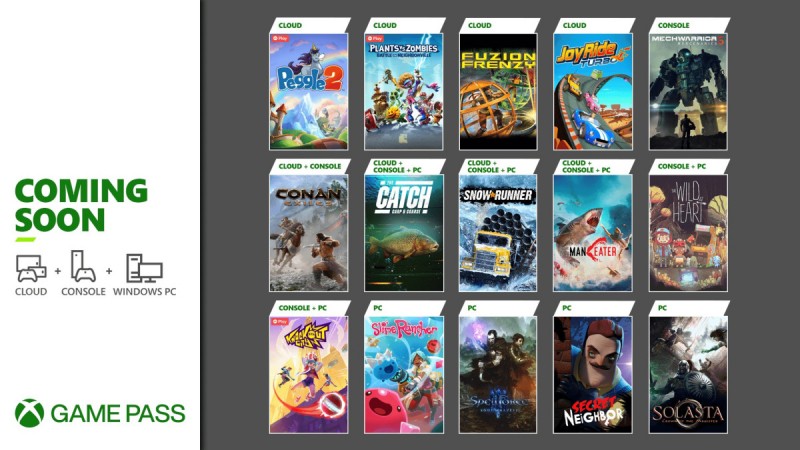
What's coming to Xbox Game Pass:​

tw_available-today_coming-soon_templates_5.18.2021_3.jpg

  • Snowrunner, Cloud, Console, PC - Today
  • Peggle 2, Cloud - May 20
  • Plants vs. Zombies: Battle for Neighborville, Cloud - May 20
  • Secret Neighbor, PC - May 20
  • The Wild At Heart, Console and PC - May 20
  • The Catch: Carp & Course Fishing, Cloud, Console, and PC - May 21
  • Knockout City, Console and PC - May 21
  • Maneater, Cloud, Console, and PC - May 25
  • Conan Exiles, Cloud and Console - May 27
  • Fusion Frenzy, Cloud - May 27
  • Joy Ride Turbo, Cloud - May 27
  • MechWarrior 5: mercenaries, Console - May 27
  • Slime Rancher, PC - May 27
  • Solasta: Crown of the Magister, PC - May 27
  • SpellForce 3: Soul Harvest, PC - May 27
In case you missed what was previously announced earlier this month:

What else arrived this month:​

  • Dragon Quest Builders 2, Console and PC - May 4
  • FIFA 21, Console and PC - May 6
  • Outlast 2, Cloud, Console, and PC - May 6
  • Steep, Cloud and Console - May 6
  • Final Fantasy X/X-2 HD Remaster, Console and PC - May 13
  • Just Cause 4: Reloaded, Cloud, Console, and PC - May 13
  • Psychonauts, Cloud, Console, and PC - May 13
  • Red Dead Online, Cloud and Console - May 13
  • Remnant: From the Ashes, PC - May 13

DLC and Game Updates:​

  • Fallout 76: Locked and Loaded
  • Gears: Tactics Anniversary
  • Grounded April Update
  • Halo Infinite PC Update
  • Minecraft: R2D2 Beanie - Until May 6
  • Sea of Thieves: Reapers vs. The World - Until June 22

What's leaving - May 31​

  • Assetto Corsas, Cloud and Console
  • Broforce, PC
  • Kingdom Hearts HD 1.5+2.5 Remix
  • Kingdom Hearts HD 2.8 Final Chapter Prologue
  • Surviving Mars
  • Void Bastards
 

Solitude

Executive Member
Joined
Jul 23, 2008
Messages
7,312
My XBox Wireless Headset will be delivered today! :D

*edit*

And got it! Will try it out tonight.
 
Last edited:

Solitude

Executive Member
Joined
Jul 23, 2008
Messages
7,312
Let us know what's the first impressions!
Firstly, the headset looks great. It's really sleek.

And then you connect to the XBox the same way as a controller. It wanted to update immediately. And then you can change the settings of the headset, same as a controller which is really nice. It also comes with free Dolby Atmos until September.

First there were no sound and I thought what the hell, but it was the volume. You change the volume by rotating the earcups or pieces on the earcups rather. It works very well.

It sounds very different to my Arctis headset that I used to plug into the controller. It's more bass heavy but this can be changed. I found this guide however which is great:

However, I decided to give the default EQ settings a chance and you get used to it very quickly. It's clear and crisp and more bass heavy. I'll try the Reddit EQ settings next week and decide which one I prefer.

I've got a big head and initially the headset felt like it was really clamping down but even with glasses on I didn't experience any discomfort after about 3 hours of gaming.

So I definitely recommend it. Personally I think that if you can get the Arctis 7x then go for that but the 7x is a lot more expensive, not available in South Africa and sold out most of the time.
 
Top