


ASUS DSL-AC52U - a stable ADSL link and smart features
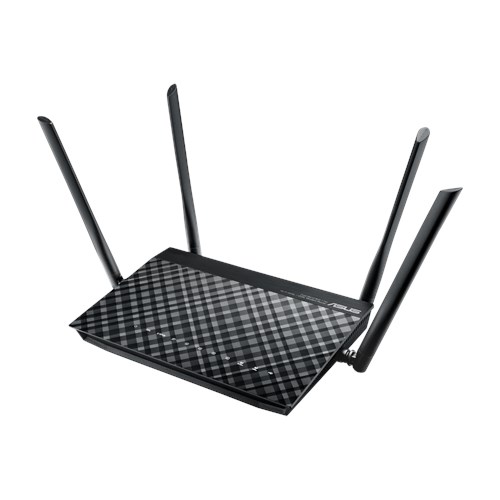
The ASUS DSL-AC52U is part of a new generation of modems where a combination of products is rolled into one. As the name suggests, it offers concurrent 802.11ac wireless up to 433Mbps on 5Ghz, and up to 300Mbps for 802.11n on 2.4Ghz. Two WAN ports for DSL and Ethernet cater for use as a wireless router (when using FTTH or another DSL modem in Bridged Mode), or as a DSL modem for VDSL2, ADSL2/2+ and ADSL. Four Gigabit Ethernet LAN ports and one USB 2.0 port for a 3G/4G modem, file sharing, printer sharing or media streaming, round off a very complete package. It is available locally at a RRP of R1999, but you may find it cheaper at South African online retailers.
The Good
• Wireless 802.11ac
• Gigabit Ethernet LAN
• Comprehensive set of connectivity options on the WAN side with 3G/4G fail over
• A new xDSL driver for ASUS modems
• Universal beamforming for 802.11ac clients and 802.11a/b/g/n clients
• OpenVPN Server and OpenVPN protocol support for client applications
• The usual ASUS router features: AiCloud for NAS features, Download Master, AiCloud
• Familiar and easy to use ASUSWRT User Interface
The Bad
• Wi-Fi connection speed on 802.11n not as fast as I expected - only reached 144Mbps
DSL Performance
I am using a Telkom (ADSL) line connected to an old Centillium exchange quite far away. I am therefore a person most likely to gain from improvements in xDSL drivers. ASUS modems will by default monitor the quality of your ADSL/VDSL line and automatically adjust parameters in the ADSL/VDSL settings to ensure a stable connection. In my case this resulted in a number of reloads immediately after installation to compensate for my poor quality ADSL line, but after the modem had adjusted itself accordingly, the connection was stable. To prevent unnecessary further interruptions in the DSL link, I prefer to disable the Dynamic Line Adjustment (DLA) option in the ASUSWRT menu once I have reached this point
On this Telkom line it is always a trade off between a stable ADSL connection, and a high link speed. Most of the time being stable means the link speed is restricted to about 6Mbps, out of a potential 10Mbps. With the new xDSL drivers the DSL-AC52U decided the maximum connection possible was at 8.2Mbps and managed to maintain the link for four days at a link speed of 7.6Mbps, before I voluntarily reloaded it to change other settings in the modem. If you have similar problems on your Telkom line, it could be worth your while to check for new firmware on your particular model and ask for suggestions on the best settings for your modem/line combination
3G/4G Failover
The WAN definition can be set at "Dual WAN" with a USB modem being one of the alternative WAN types. This means any mobile device able to share its Internet connection when connected to the USB port, can act as a secondary Internet connection when the primary connection, for example ADSL, fails. I did not have any of the models already certified available, so I tried two 3G/4G USB sticks from Vodacom - a HUAWEI K5150 and a ZTE K4201-Z. The modem recognised both and failover to their connection and failback to the primary connection occurred automatically. Failover timing can be set at a number of seconds after the primary connection has failed and is not seamless, failback, however, is seamless as soon as the primary connection is restored.
VPN Support (PPTP or OpenVPN)
Once you get used to the idea of linking back to your home network when away from home, it becomes a very useful feature. In my opinion the best way to do this is through an OpenVPN server running on your router, and the use of OpenVPN clients on your mobile devices/laptops/PCs. Not only is this preferable to exposing a Samba or FTP server on your LAN to the Internet, you also gain access to all your local IP addresses once securely connected to your LAN. If you have mobile applications that only work to services on a local network, then this is a very easy way of making those applications work when you connect from the WAN side of your network. You do need to register a DNS name with a Dynamic DNS service if your ISP does not provide static IP addresses - but ASUS provides free registration of a name within the asuscomm.com domain, with your external IP address being kept up to date by the modem. The router will also generate the OpenVPN key required to authenticate your client software when making the connection. It may sound complicated, but it is really very simple, secure, and costs nothing to implement
Once connected you have the usual web access to your router at 192.168.1.1 , without the need to allow WAN access to your router's management console. It is also much easier to use any Wake On LAN (WOL) ability once on the LAN, than if you did it from the WAN side. If you prefer not to leave your home PC or server on while you're away, just in case you may need to access it, try Pulseway for remotely turning your device on, and off again once you have completed your remote access. It's free for personal use
Wi-Fi Performance
Using a number of Android apps, I tested signal strength, connection speed and latency on both bands at various points in the house. On the 5Ghz band performance was as good as any of the other products I normally use - devices with dual antennas connected up to 866Mbps. On the 2.4Ghz band signal strength and latency were good, but connection for mobile devices is never higher than 144Mbps - this seems to be a common result on Wireless N when a router does not include TurboQAM® technology
Ease of use
ASUS modems have a similar look and feel in their web management console, but even if you are unfamiliar with it, replying to a few questions about your time zone and ISP credentials will have you up and running in no time. There is also a printed Quick Setup guide to follow. If the router defaults do not meet your requirements, a wide range of options can be manually selected - hover over an item with the mouse and it will explain the meaning and working of that parameter before you set it
Ratings
Overall 7.5/10
Ease of Use 8.0/10
Performance 8.0/10*
Support 7.0/10**
Value for Money 7.0/10***
* High ADSL and 802.11ac speed make up for the absence of TurboQAM® technology
** "Support" includes a wide range of activities by many parties - from sales advice and hand holding, to bug fixes and product enhancements. While the efforts of ASUS as manufacturer deserves applaud (and a higher score), others along the chain are neglecting their responsibilities by simply passing the buck. As consumers we must make it known that we expect better service and start supporting only those who are prepared to step up to the plate, be they manufacturers, distributors, retailers or online merchants.
*** I would have liked the price to be a bit lower - these features at a lower price would make it a steal
The Bottom Line
xDSL modems with 802.11ac wireless are a step above ordinary Wireless N300 modems, both in price and in features. In the ASUS line-up the DSL-AC52U adds features not present on the ever popular N300 DSL-N14U, without straying into the price band of the high end AC1900 DSL-AC68U. 802.11ac performance on the 5Ghz band is excellent and makes it well worth your while to use wireless ac adapters in your client devices. This router seems to punch above its weight is some areas, so if you want a flexible and feature rich xDSL modem that can easily handle a number of different WAN situations, then give this one your serious consideration.
The ASUS DSL-AC52U is part of a new generation of modems where a combination of products is rolled into one. As the name suggests, it offers concurrent 802.11ac wireless up to 433Mbps on 5Ghz, and up to 300Mbps for 802.11n on 2.4Ghz. Two WAN ports for DSL and Ethernet cater for use as a wireless router (when using FTTH or another DSL modem in Bridged Mode), or as a DSL modem for VDSL2, ADSL2/2+ and ADSL. Four Gigabit Ethernet LAN ports and one USB 2.0 port for a 3G/4G modem, file sharing, printer sharing or media streaming, round off a very complete package. It is available locally at a RRP of R1999, but you may find it cheaper at South African online retailers.
The Good
• Wireless 802.11ac
• Gigabit Ethernet LAN
• Comprehensive set of connectivity options on the WAN side with 3G/4G fail over
• A new xDSL driver for ASUS modems
• Universal beamforming for 802.11ac clients and 802.11a/b/g/n clients
• OpenVPN Server and OpenVPN protocol support for client applications
• The usual ASUS router features: AiCloud for NAS features, Download Master, AiCloud
• Familiar and easy to use ASUSWRT User Interface
The Bad
• Wi-Fi connection speed on 802.11n not as fast as I expected - only reached 144Mbps
DSL Performance
I am using a Telkom (ADSL) line connected to an old Centillium exchange quite far away. I am therefore a person most likely to gain from improvements in xDSL drivers. ASUS modems will by default monitor the quality of your ADSL/VDSL line and automatically adjust parameters in the ADSL/VDSL settings to ensure a stable connection. In my case this resulted in a number of reloads immediately after installation to compensate for my poor quality ADSL line, but after the modem had adjusted itself accordingly, the connection was stable. To prevent unnecessary further interruptions in the DSL link, I prefer to disable the Dynamic Line Adjustment (DLA) option in the ASUSWRT menu once I have reached this point
On this Telkom line it is always a trade off between a stable ADSL connection, and a high link speed. Most of the time being stable means the link speed is restricted to about 6Mbps, out of a potential 10Mbps. With the new xDSL drivers the DSL-AC52U decided the maximum connection possible was at 8.2Mbps and managed to maintain the link for four days at a link speed of 7.6Mbps, before I voluntarily reloaded it to change other settings in the modem. If you have similar problems on your Telkom line, it could be worth your while to check for new firmware on your particular model and ask for suggestions on the best settings for your modem/line combination
3G/4G Failover
The WAN definition can be set at "Dual WAN" with a USB modem being one of the alternative WAN types. This means any mobile device able to share its Internet connection when connected to the USB port, can act as a secondary Internet connection when the primary connection, for example ADSL, fails. I did not have any of the models already certified available, so I tried two 3G/4G USB sticks from Vodacom - a HUAWEI K5150 and a ZTE K4201-Z. The modem recognised both and failover to their connection and failback to the primary connection occurred automatically. Failover timing can be set at a number of seconds after the primary connection has failed and is not seamless, failback, however, is seamless as soon as the primary connection is restored.
VPN Support (PPTP or OpenVPN)
Once you get used to the idea of linking back to your home network when away from home, it becomes a very useful feature. In my opinion the best way to do this is through an OpenVPN server running on your router, and the use of OpenVPN clients on your mobile devices/laptops/PCs. Not only is this preferable to exposing a Samba or FTP server on your LAN to the Internet, you also gain access to all your local IP addresses once securely connected to your LAN. If you have mobile applications that only work to services on a local network, then this is a very easy way of making those applications work when you connect from the WAN side of your network. You do need to register a DNS name with a Dynamic DNS service if your ISP does not provide static IP addresses - but ASUS provides free registration of a name within the asuscomm.com domain, with your external IP address being kept up to date by the modem. The router will also generate the OpenVPN key required to authenticate your client software when making the connection. It may sound complicated, but it is really very simple, secure, and costs nothing to implement
Once connected you have the usual web access to your router at 192.168.1.1 , without the need to allow WAN access to your router's management console. It is also much easier to use any Wake On LAN (WOL) ability once on the LAN, than if you did it from the WAN side. If you prefer not to leave your home PC or server on while you're away, just in case you may need to access it, try Pulseway for remotely turning your device on, and off again once you have completed your remote access. It's free for personal use
Wi-Fi Performance
Using a number of Android apps, I tested signal strength, connection speed and latency on both bands at various points in the house. On the 5Ghz band performance was as good as any of the other products I normally use - devices with dual antennas connected up to 866Mbps. On the 2.4Ghz band signal strength and latency were good, but connection for mobile devices is never higher than 144Mbps - this seems to be a common result on Wireless N when a router does not include TurboQAM® technology
Ease of use
ASUS modems have a similar look and feel in their web management console, but even if you are unfamiliar with it, replying to a few questions about your time zone and ISP credentials will have you up and running in no time. There is also a printed Quick Setup guide to follow. If the router defaults do not meet your requirements, a wide range of options can be manually selected - hover over an item with the mouse and it will explain the meaning and working of that parameter before you set it
Ratings
Overall 7.5/10
Ease of Use 8.0/10
Performance 8.0/10*
Support 7.0/10**
Value for Money 7.0/10***
* High ADSL and 802.11ac speed make up for the absence of TurboQAM® technology
** "Support" includes a wide range of activities by many parties - from sales advice and hand holding, to bug fixes and product enhancements. While the efforts of ASUS as manufacturer deserves applaud (and a higher score), others along the chain are neglecting their responsibilities by simply passing the buck. As consumers we must make it known that we expect better service and start supporting only those who are prepared to step up to the plate, be they manufacturers, distributors, retailers or online merchants.
*** I would have liked the price to be a bit lower - these features at a lower price would make it a steal
The Bottom Line
xDSL modems with 802.11ac wireless are a step above ordinary Wireless N300 modems, both in price and in features. In the ASUS line-up the DSL-AC52U adds features not present on the ever popular N300 DSL-N14U, without straying into the price band of the high end AC1900 DSL-AC68U. 802.11ac performance on the 5Ghz band is excellent and makes it well worth your while to use wireless ac adapters in your client devices. This router seems to punch above its weight is some areas, so if you want a flexible and feature rich xDSL modem that can easily handle a number of different WAN situations, then give this one your serious consideration.