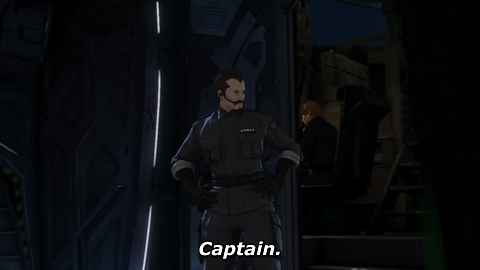
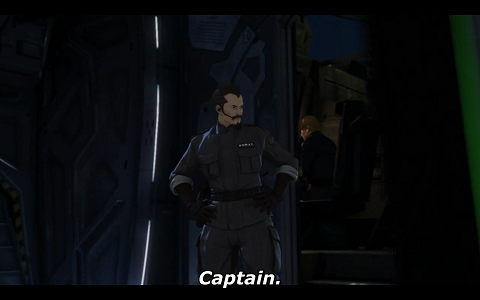
1920x1080 VS 1920x1200

You guys do realize that not all games0handles ratios the same. Remember when bioshock came out the uproar that came because 4:3 monitors ended up showing more. Mass effect crops the 4:3 to get the widescreen image.

It all depends on the developer.
 
You guys do realize that not all games0handles ratios the same. Remember when bioshock came out the uproar that came because 4:3 monitors ended up showing more. Mass effect crops the 4:3 to get the widescreen image.

It all depends on the developer.

I've already gone over the relevant different widescreen modes. Bioshock (initially) and Mass Effect use Vert-, which is an inferior widescreen mode for gaming due to the reduced FOV in widescreen resolutions.
 
Unfortunately, there don't ever seem to be commands to fiddle with vertical FOV to do so.

You're in luck!

there is a whole forum dedicated to get this done.

you can now play, say, Fable, an old game that didn't support other resolutions, on 3 screens for a SURROUND experience, if you wanted to, with the correct FOV... they use mods, cracks, or simple ini/cfg edits to accomplish it :)

you can find more info on how to do this stuff here

GT Legends:
gtlegends_th2go.jpg


BF 2:
bf2_th2go.jpg


NFS:
nfs-mw_th2go.jpg
 
Keeper: I'm talking about Vertical FOV, whch is different. It is your vertical viewing area. Almost all games have a locked vertical FOV that adjusts automatically to your horizontal FOV, often based on your aspect ratio. Mods, etc... only adjust the horizontal viewing area while keeping the vertical the same. I have yet to come across a hack that allows you to change vertical FOV, and ini files only allow you to only adjust the Horizontal FOV.
 
Sweet that's how you would have to do for "eyefinity" I suppose.

Anyway, I don't like too much horizontal FOV - I like to look up and down a little too. So, whatever.
 
Keeper: I'm talking about Vertical FOV, whch is different. It is your vertical viewing area. Almost all games have a locked vertical FOV that adjusts automatically to your horizontal FOV, often based on your aspect ratio. Mods, etc... only adjust the horizontal viewing area while keeping the vertical the same. I have yet to come across a hack that allows you to change vertical FOV, and ini files only allow you to only adjust the Horizontal FOV.

lol, sorry - I read "FOV" and not "Vertical FOV" :D

yes, vertical FOV is usually locked in place - nobody needs to see more dirt and clouds.
 
So, another annoying thing.

I don't watch much TV. But these days, you get 16:9 TV's. And TV is generally 4:3. So it's stretched. But some of the TV now is 16:9. Some stuff is 4:3 - with Black bars.

So when I watch DSTV I'm continually adjusting the TV's settings - depending on the channel!
 
You flatter me :o

Well here we have comparison screenshots of Crysis Warhead, standing in the exact same spot. I took these screenshots so don't question the validity :p

1920x1080:

1920x1080.jpg


1920x1200:

1920x1200.jpg


Hopefully this should end the argument once and for all. As you can see, 1920x1080 clearly shows more horizontally at no real expense of vertical detail.
Thanks for the screenshots. I prefer the 1920x1200 view!
 
Hopefully this should end the argument once and for all. As you can see, 1920x1080 clearly shows more horizontally at no real expense of vertical detail.

We get that. Now do the same with a HD movie run at 1920x1080 on both a 16:9 & 16:10 display and you will see the picture looks identical.
 
lol, sorry - I read "FOV" and not "Vertical FOV" :D
yes, vertical FOV is usually locked in place - nobody needs to see more dirt and clouds.
To quote "Dude, that's just, like, your opinion, man" - The Dude

and another
"How many times must a man look up, before he can see the sky" Bob Dylan
 
yes, vertical FOV is usually locked in place - nobody needs to see more dirt and clouds.

The point was that if you could adjust the vertical FOV, then you could get the same horizontal FOV on a 16:10 resolution as a 16:9 resolution without distortion, meaning it would be at least as good as 16:9 for gaming.

So, another annoying thing.

I don't watch much TV. But these days, you get 16:9 TV's. And TV is generally 4:3. So it's stretched. But some of the TV now is 16:9. Some stuff is 4:3 - with Black bars.

So when I watch DSTV I'm continually adjusting the TV's settings - depending on the channel!

Yeah, that is so annoying!
 
Last edited:
1920 x1080 is fullHD.

the other one is not a native hd format, but will give you 120 extra pixels of screen space....

I think 1920x1080 is also a better aspect for movies (it's wider) but all in all it doesn't matter too much on a PC Screen

off topic
how do you share digichili with a friend if only one logon allowed?
 
We get that. Now do the same with a HD movie run at 1920x1080 on both a 16:9 & 16:10 display and you will see the picture looks identical.

I only have 720p content available at the moment. Excuse the frame differences.

1920x1080:

1920x1080.png


1920x1200:

1920x1200.png
 
I only have 720p content available at the moment. Excuse the frame differences.

1920x1080:

1920x1080.png


1920x1200:

1920x1200.png

This is exactly what I'm trying to say. 1920x1200 ENCOMPASSES 1920x1080. Some may not like the black bars, but for the others, you can still get your 16:9 without scaling.
 
This is exactly what I'm trying to say. 1920x1200 ENCOMPASSES 1920x1080. Some may not like the black bars, but for the others, you can still get your 16:9 without scaling.

+1

And the image won'y be small either because 16:10 displays are generally larger than their equivalent 16:9 displays (23.6" vs 23" etc)

I don't get the issue with black bars, if it bothers you then surely the housing border around the lcd also bothers you.
 
+1

And the image won'y be small either because 16:10 displays are generally larger than their equivalent 16:9 displays (23.6" vs 23" etc)

I don't get the issue with black bars, if it bothers you then surely the housing border around the lcd also bothers you.

+1000

No complaining about black bars unless you have a true edge-to-edge LCD :rolleyes:
 
Top
Sign up to the MyBroadband newsletter
X