Any tips for budget mITX gaming pc build?

Dom8

Well-Known Member
Joined
Jul 1, 2016
Messages
193
Reaction score
0
Location
Hogwarts
Hi citizens of MBB,

I am planning to build a budget (or no budget) gaming pc build but in a mini-ITX formfactor. My reason for this is that consoles get outdated pretty quickly these days and I also don't want the hassle of paying for a subscription to play online.

I know that a good build would probably be R20 000 but I am going to do it over a long term.

What I roughly want in it is a full GPU, CPU, Optical drive. The rest I don't know a lot about...

If you have any tips for me I would appreciate it :D

(Also don't shoot me but I have a cute small casing in mind for it )


The planning check list so far:

1. Case: Cooler Master Elite 130 Lan Box [Negotiable]
2. CPU: Intel i7 6700
3. CPU Cooler: Corsair H75 Hydro Series Closed Loop Liquid CPU Cooler
4.GPU: AMD RX480 or Nvidia 1070 (Whichever is cheapest when I buy it)
5.RAM: 8GB - 16GB
6.PSU: Undecided
7.Other Devices: Console Controller (KB + Mouse not necessary as already have)
8. Convincing the 'rents that this is what I will be spending my hard earned pay checks on...
 
Last edited:
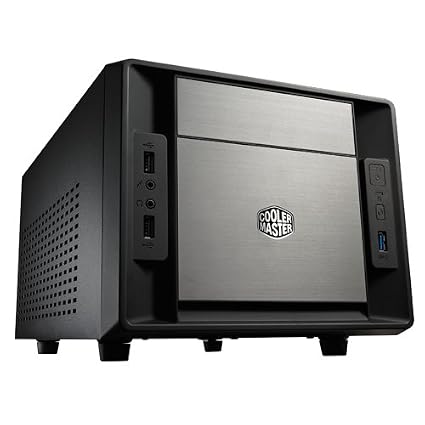
Link to case? What's your initial budget? Gtx gaming had the i7 6700 for 3.5k recently.
 
Link to case? What's your initial budget? Gtx gaming had the i7 6700 for 3.5k recently.


41L3o67dd3L._SX425_.jpg


https://www.amazon.com/Cooler-Master-Elite-130-Mini-ITX/dp/B00DJ6A88G?ie=UTF8&redirect=true&tag=11018812-20

I was thinking something like this. I will still look around for something else but this one will do for my planning phase.


Intitial budget is about R15000 but can go up to R20000

[Fan Cooling is the Go-to since liquid cooling is foreign to me]
 
Last edited:
41L3o67dd3L._SX425_.jpg


https://www.amazon.com/Cooler-Master-Elite-130-Mini-ITX/dp/B00DJ6A88G?ie=UTF8&redirect=true&tag=11018812-20

I was thinking something like this. I will still look around for something else but this one will do for my planning phase.


Intitial budget is about R15000 but can go up to R20000

[Fan Cooling is the Go-to since liquid cooling is foreign to me]

That case doesn't really have enough room for any decent CPU air cooler, a 120mm AIO will do just fine in that case though like this one: http://www.wootware.co.za/corsair-h75-hydro-series-closed-loop-liquid-cpu-cooler.html
 
Also, one thing to note is that it is very important to choose the best case that will maybe fit any setting.
Yeah you are building a mITX gaming machine but it can back up as an HTPC setup in the living room as well.

I went for a Lian Li PC-C60 as it will perfectly fit with everything around it, like my Receiver for example.

Don't just go for any mITX case because it fits the specs. It's a pity that there isn't any well known brands like Silverstone in SA.
 
Regarding the GPU, I would go for AMD RX480 or Nvidia 1060/70
Add at least 8GB Ram,SSD, a decent power supply (Seasonic etc - at least 550w) and you're ready to rumble.
 
Also, one thing to note is that it is very important to choose the best case that will maybe fit any setting.
Yeah you are building a mITX gaming machine but it can back up as an HTPC setup in the living room as well.

I went for a Lian Li PC-C60 as it will perfectly fit with everything around it, like my Receiver for example.

Don't just go for any mITX case because it fits the specs. It's a pity that there isn't any well known brands like Silverstone in SA.

I am still looking at others but maybe I will opt for another case without the optical drive bay and instead get a USB 3.0 external one if I don't want to rely on downloading games alone.

The RVZ02 from silverstone also looks good
 
Regarding the GPU, I would go for AMD RX480 or Nvidia 1060/70
Add at least 8GB Ram,SSD, a decent power supply (Seasonic etc - at least 550w) and you're ready to rumble.

The AMD RX480 is at a better price for me at the moment but I will look out for sales on the 1070.

Ram will be easy and I should be able to get an SSD or Hybrid drive as well.

I will do some more research on the PSU's.
 
Leave the AIO if you're not going for an unlocked (K) CPU. That CPU stock will last for a long time anyway. I like the smaller cases more but you'll need a SFX PSU and I don't know what the supply is like in SA.
 
Last edited:
The AMD RX480 is at a better price for me at the moment but I will look out for sales on the 1070.

Ram will be easy and I should be able to get an SSD or Hybrid drive as well.

I will do some more research on the PSU's.

The 1070 will always be more expensive than the 480, it's in a completely different league. It's just that 480s are overpriced here and and the affordable ones are out of stock.
 
Leave the AIO if you're not going for an unlocked (K) CPU. That CPU stock will last for a long time anyway. I like the smaller cases more but you'll need a SFX PSU and I don't know what the supply is like in SA.

The case I have decided on so far has space for a full ATX PSU.
 
Regarding the GPU, I would go for AMD RX480 or Nvidia 1060/70
Add at least 8GB Ram,SSD, a decent power supply (Seasonic etc - at least 550w) and you're ready to rumble.
I have a seasonic 520w EVO,and its pretty epic

Leave the AIO if you're not going for an unlocked (K) CPU. That CPU stock will last for a long time anyway. I like the smaller cases more but you'll need a SFX PSU and I don't know what the supply is like in SA.
Corsair SF450 modular 450w - R1880.00 SFX,so pretty darn expensive
 
Hi there. Prepare for a rant. :D

I've recently built a similar gaming PC through wootware and here are some tips/caveats.

I have used the Cooler master 110 and 130 cases, it depends on how big you want the PC to be.

My specs:

MSI Z97i
i5 4690K
Corsair H80i-GT cooler.
16Gb (2x8) G-skill 1866
AMD R9 Nano
Corsair VS 550w
3x Crucial BX200 250Gb
1x Toshiba 1TB

I originally had the cooler master 110 case (very small cube) and decided I wanted to better cool the CPU, so I got the CM 130 case and put everything in that.

1.) I wouldn't recommend this, but I have done it without too much issue. The corsair water cooling unit I got has very rigid piping and worries me for how much I have to bend it to get it in the case. (but all is working after I had pre-conditioned the pipes with zip-ties)

2.) GET A MODULAR PSU. My goodness I own the corsair VS-550 and the cable management issues I have are horrible with 3x unused connector chains. Spend the extra money for a semi-modular and make your life easier, the CM 130 case has a nice empty gap in the front left where I wedged all of these.

3.) Size your graphics card. When I owned the Cooler master 110 case (small cube) I owned a MSI 29 280X card, I was able to modify the case to fit the card in without it being visible, but it was an annoyance. The Cooler master 130 case can accept much longer cards.

4.) This relates to point 1, but rather than getting a K-edition i5 and water cooling it would have been cheaper for me to buy a non-K i7 processor and keep the stock heatsink. (new processors don't really overheat if you're not overclocking.)

5.) Buy cable ties.

Both the Cooler master 110 and 130 cases have surprisingly good airflow and had no issues dealing with internal heat other than a few hotspots on the case surface where there was no internal airflow. I would recommend a blower-style cooler if you intend to buy a high-powered graphics card, then all the hot GPU air will leave the case.

There is an included fan on the Cooler master 130 case on the side panel that is EXTREMELY noisy at speed, I was forced to buy a fan controller and install it in the already cramped case in order to power and down-speed the included side-fan as well as the corsair-H80iGT fans (corsair included software is all broken English and horrible, would not recommend.)

If you want to install an optical drive and water cooler in the Cooler master 130 case you will only have room for 1x 3.5/2.5 drive on the side panel, there is an extra spot on the bottom front of the case, but if you have a water cooling radiator there you won't have room to use it, without a optical drive in the top bay you will be able to fit 4x 2.5inch drives there.


This sounds like your first PC build, if it is, you don't need an i7 processor or a gtx 1070. (Although it is nice, but overkill)

Maybe post what games you intend to play and what screen resolution/HZ you intend to play on and maybe we on MyBB can recommend stuff.

Edit:
As of right this second you can get a (very) decent gaming system for R13,946

Intel Core i3-6100
GeForce GTX 1060
CoolerMaster 130
Asus H110i
G.Skill 2x8GB 2400MHz
Super Flower Golden Green HX 750W Semi-Modular
Samsung 750 EVO 250GB

If you've got anything left in budget you can upgrade the i3 to an i5, or the 1060 to a 1070.
 
Last edited:
Hi there. Prepare for a rant. :D

I've recently built a similar gaming PC through wootware and here are some tips/caveats.

I have used the Cooler master 110 and 130 cases, it depends on how big you want the PC to be.

My specs:

MSI Z97i
i5 4690K
Corsair H80i-GT cooler.
16Gb (2x8) G-skill 1866
AMD R9 Nano
Corsair VS 550w
3x Crucial BX200 250Gb
1x Toshiba 1TB

I originally had the cooler master 110 case (very small cube) and decided I wanted to better cool the CPU, so I got the CM 130 case and put everything in that.

1.) I wouldn't recommend this, but I have done it without too much issue. The corsair water cooling unit I got has very rigid piping and worries me for how much I have to bend it to get it in the case. (but all is working after I had pre-conditioned the pipes with zip-ties)

2.) GET A MODULAR PSU. My goodness I own the corsair VS-550 and the cable management issues I have are horrible with 3x unused connector chains. Spend the extra money for a semi-modular and make your life easier, the CM 130 case has a nice empty gap in the front left where I wedged all of these.

3.) Size your graphics card. When I owned the Cooler master 110 case (small cube) I owned a MSI 29 280X card, I was able to modify the case to fit the card in without it being visible, but it was an annoyance. The Cooler master 130 case can accept much longer cards.

4.) This relates to point 1, but rather than getting a K-edition i5 and water cooling it would have been cheaper for me to buy a non-K i7 processor and keep the stock heatsink. (new processors don't really overheat if you're not overclocking.)

5.) Buy cable ties.

Both the Cooler master 110 and 130 cases have surprisingly good airflow and had no issues dealing with internal heat other than a few hotspots on the case surface where there was no internal airflow. I would recommend a blower-style cooler if you intend to buy a high-powered graphics card, then all the hot GPU air will leave the case.

There is an included fan on the Cooler master 130 case on the side panel that is EXTREMELY noisy at speed, I was forced to buy a fan controller and install it in the already cramped case in order to power and down-speed the included side-fan as well as the corsair-H80iGT fans (corsair included software is all broken English and horrible, would not recommend.)

If you want to install an optical drive and water cooler in the Cooler master 130 case you will only have room for 1x 3.5/2.5 drive on the side panel, there is an extra spot on the bottom front of the case, but if you have a water cooling radiator there you won't have room to use it, without a optical drive in the top bay you will be able to fit 4x 2.5inch drives there.


This sounds like your first PC build, if it is, you don't need an i7 processor or a gtx 1070. (Although it is nice, but overkill)

Maybe post what games you intend to play and what screen resolution/HZ you intend to play on and maybe we on MyBB can recommend stuff.

Edit:
As of right this second you can get a (very) decent gaming system for R13,946

Intel Core i3-6100
GeForce GTX 1060
CoolerMaster 130
Asus H110i
G.Skill 2x8GB 2400MHz
Super Flower Golden Green HX 750W Semi-Modular
Samsung 750 EVO 250GB

If you've got anything left in budget you can upgrade the i3 to an i5, or the 1060 to a 1070.

I will still wait till about December before I buy anything. Or if I change my mind then, then I will probably opt for a console and other things.

But I really don't want a console because of how fast they go out of fashion so pc is the best option.

The games I want to play is:

Call of Duty: Black Ops III
Skyrim
Dark Souls III
Mirror's Edge: Catalyst
Overwatch -looks good as well-
CS:GO
Assassin's Creed series
Watchdogs 2
Resident Evil 7
Minecraft
Oblivion
Destiny (if it is on pc)
Sims 4 (I was a huge sims fan 9 years ago so why not)
And some others I can't remember right now....

I will most likely upgrade the case to a BitFenix Mini Tower so there is a little more space. It will stand on my desk and connect to a 1080p hd tv.

I will probably get a gaming mouse/keyboard if I want to play an MMO game but I will mostly want to use a console remote (most likely xbox).

Is it worth getting an internal optical drive or rather one that connects via usb 3.0?
 
Last edited:
Is it worth getting an internal optical drive or rather one that connects via usb 3.0?

Not really. Haven't used an optical drive in years.
Unless you purchase physical PC games, then you rather get one. Most of them just have a small installer and a key inside thou.
 
Not really. Haven't used an optical drive in years.
Unless you purchase physical PC games, then you rather get one. Most of them just have a small installer and a key inside thou.

I really like the idea of buying a game normally but digital will be fine too. I think we have a portable optical reader actually.... I completely forgot about it.
 
For 1080p gaming a 1070 would indeed be overkill if you're on a budget.
The system I wrote in above would be more than sufficient for your needs (especially if you're only gaming at 1080p-60
You could probably cut a few hundred off the price by getting a cheaper power supply, SF-650w would save you 300 bucks.

On the note of the optical drive, I haven't installed a game from a disk since 2012. (modern warfare 2)
I wouldn't worry about it.
If you do need something from a disk you can always put it in a laptop (everyone has a laptop somewhere, right?) and image the disk or network share the drive to your other pc.

#PcMasterRace
 
Top
Sign up to the MyBroadband newsletter
X