-
- News
-
Categories
- 5G
- ADSL
- AI
- Banking
- Black Friday
- Broadband
- Broadcasting
- Business
- Business Telecoms
- Cellular
- Cloud and Hosting
- Columns
- Cryptocurrency
- Energy
- Enterprise
- Fibre
- Gadgets
- Gaming
- Government
- Hardware
- Industry News
- Internet
- Internet of Things
- Investing
- IT Services
- Motoring
- Reviews
- Science
- Security
- Smartphones
- Software
- Technology
- Telecoms
- Trending
- Wireless
- Press Office
- Forum
- Industry News
- What's Next
- Company hub
- Speed Test
- About us
- Advertise with us
- Contact
- Careers


-
Join the MyBroadband community
South Africa’s biggest forum. Discuss, discover, and connect with thousands of members.
-
Question of the Day: How do you normally pay for purchases in stores?

You are using an out of date browser. It may not display this or other websites correctly.
You should upgrade or use an alternative browser.
You should upgrade or use an alternative browser.
Hardware Bargains - Open Thine Wallet
- Thread starter morkhans
- Start date
- Status
- Not open for further replies.

Duan
Senior Member
4K 32" TVs is not a common thing and the samsung ones I saw cost more than most 27-28" 4K monitors.
I bought one of these in October last year for R5k but they seem to be out of stock most places. Maybe you can search around a bit although it only has HDMI and Displayport. Might be an option to use a cable like this to convert to usb c
Thanks a lot!
Great recommendation!
I bought one over the weekend from Makro for R4,999 (heads up, they no longer accept ebucks).
I am currently using HDMI as I am wishing for the DisplayPort cable to arrive and I am getting 4k @30 Hz.
It works really well for me and I can even see the display brightness via my Mac!
I might go and get another one for a dual screen setup...
Thanks a lot!
Great recommendation!
I bought one over the weekend from Makro for R4,999 (heads up, they no longer accept ebucks).
I am currently using HDMI as I am wishing for the DisplayPort cable to arrive and I am getting 4k @30 Hz.
It works really well for me and I can even see the display brightness via my Mac!
I might go and get another one for a dual screen setup...
This one? Can’t remember if it was the Samsung or the Lg


RogueTr00per
Honorary Master
Samsung Galaxy S10+ 512GB Black - Incredible Connection
Sale ends Sunday, 28 February 2021
R11,499R19,999
Sale ends Sunday, 28 February 2021
R11,499
enerdude
Expert Member
Yes it is that one. Model nr LG 27UL500This one? Can’t remember if it was the Samsung or the Lg

Mr Scratch
Expert Member
- Joined
- May 15, 2013
- Messages
- 4,872
- Reaction score
- 1,040
Any 4K USB-C monitors you gents can recommend?
enerdude
Expert Member
Did you follow the conversation the last 3 pages? There is LGs but they quite expensive. If you go for the LG 27UL500 for R5K at Makro you can probably use a converter to do DP to usb-c, not sure if that is an option for you.Any 4K USB-C monitors you gents can recommend?
Mr Scratch
Expert Member
- Joined
- May 15, 2013
- Messages
- 4,872
- Reaction score
- 1,040
Did you follow the conversation the last 3 pages? There is LGs but they quite expensive. If you go for the LG 27UL500 for R5K at Makro you can probably use a converter to DP 2 usb-c, not sure if that is an option for you.
Just caught up and saw another member with the same setup as me minus the USB-C (one cable to charge and hub from my Mac)

I wouldn't advise that especially for 4k. Passive may work but active converters often have issues with flickering or choppy visuals and are limited in resolution and refresh rate.Did you follow the conversation the last 3 pages? There is LGs but they quite expensive. If you go for the LG 27UL500 for R5K at Makro you can probably use a converter to do DP to usb-c, not sure if that is an option for you.
Mr Scratch
Expert Member
- Joined
- May 15, 2013
- Messages
- 4,872
- Reaction score
- 1,040
I'm currently using a HDMI to USBC cable to drive my 1440p @ 144Hz
Only reason I need USBC is to charge my Mac while it's plugged into the display, and maybe enjoy 4K's PPI
Thank you all for the input
Only reason I need USBC is to charge my Mac while it's plugged into the display, and maybe enjoy 4K's PPI
Thank you all for the input
enerdude
Expert Member
Yeah never tried usb-c converters but 3 years ago when I built my 9th gen system without a GPU and wanted to use the onboard HDMI but I only got 4K @ 30hz. The motherboard also has DP 1.2 but my 27" 1080p monitor at the time only had HDMI input so I got this DP to HDMI active converter (think I paid R300 from pclinkshop) and it worked fine. Even now if I use it without my GPU straight from the motherboard to my new LG 4k monitor there is no issues.I wouldn't advise that especially for 4k. Passive may work but active converters often have issues with flickering or choppy visuals and are limited in resolution and refresh rate.
Edit:
This vantec model might just do the job for USB-C to DisplayPort 1.2 4K/60Hz
Last edited:
Duan
Senior Member
This one? Can’t remember if it was the Samsung or the Lg
Yeah thats the one

Barbarian Conan
Executive Member
I'm currently using a HDMI to USBC cable to drive my 1440p @ 144Hz
Only reason I need USBC is to charge my Mac while it's plugged into the display, and maybe enjoy 4K's PPI
Thank you all for the input
It sounds like what you actually need is a dock.
Gtx Gaming
Gtx Gaming
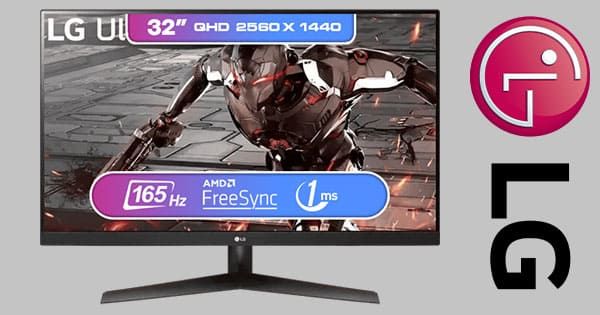
LG UltraGear 32GN600 Gaming Monitor - Ultra HD, 165Hz Refresh Rate
Experience immersive gaming with the LG UltraGear 32GN600 Gaming Monitor. Featuring 32-inch Ultra HD display, 165Hz refresh rate, and adaptive sync for smooth visuals. Perfect for gamers seeking top performance.
 www.evetech.co.za
HomeComponentsMonitorsPC MonitorsItem#: 32GN600
LG UltraGear 32GN600 32" QHD 2560 x 1440 Gaming Monitor / 165Hz Refresh Rate / 1ms Response Rate / AMD FreeSync ™ Premium / Virtually Frameless Design / Incredible Speed to Victory / 32GN600
R6500
enerdude
Expert Member
Maisonware Foldable Adjustable Laptop Stand - R399 from TAL
Handy if you want to use the laptop in bed to avoid overheating...
Edit:
This also looks cool, not adjustable but come with 4 usb ports and fan and led light from BOB:

 www.bidorbuy.co.za
Handy if you want to use the laptop in bed to avoid overheating...
Edit:
This also looks cool, not adjustable but come with 4 usb ports and fan and led light from BOB:
Maisonware Foldable Laptop Stand with 4 USB Ports - Default | bobshop.co.za
Buy Maisonware Foldable Laptop Stand with 4 USB Ports - Default for R301.28
Last edited:

Orbiter
Senior Member
So sorry to ask, but will this one or the one from Makro be best for normal office work, not gaming?LG UltraGear 32GN600 Gaming Monitor - Ultra HD, 165Hz Refresh Rate
Experience immersive gaming with the LG UltraGear 32GN600 Gaming Monitor. Featuring 32-inch Ultra HD display, 165Hz refresh rate, and adaptive sync for smooth visuals. Perfect for gamers seeking top performance.
HomeComponentsMonitorsPC MonitorsItem#: 32GN600
LG UltraGear 32GN600 32" QHD 2560 x 1440 Gaming Monitor / 165Hz Refresh Rate / 1ms Response Rate / AMD FreeSync ™ Premium / Virtually Frameless Design / Incredible Speed to Victory / 32GN600
R6500
Gtx Gaming
Gtx Gaming
Not sure which one makro sell, but this really good deal. I use older model that also cost me 6500 it's really good gaming and work due to size and 165hz. My old one is 144hzSo sorry to ask, but will this one or the one from Makro be best for normal office work, not gaming?
enerdude
Expert Member
Makro one is 4K so great for spreadsheets etc and cheaper @R5k and more suited to office work provided your display card support 4K.So sorry to ask, but will this one or the one from Makro be best for normal office work, not gaming?
This one is 1440p so res is lower but have better refresh for gaming and 5" bigger though I would still choose the LG 27" 4K for office work.

Lupus
Honorary Master
- Joined
- Apr 25, 2006
- Messages
- 91,577
- Reaction score
- 62,169
That's not bad, that seems to be the upgrade to my kg650LG UltraGear 32GN600 Gaming Monitor - Ultra HD, 165Hz Refresh Rate
Experience immersive gaming with the LG UltraGear 32GN600 Gaming Monitor. Featuring 32-inch Ultra HD display, 165Hz refresh rate, and adaptive sync for smooth visuals. Perfect for gamers seeking top performance.
HomeComponentsMonitorsPC MonitorsItem#: 32GN600
LG UltraGear 32GN600 32" QHD 2560 x 1440 Gaming Monitor / 165Hz Refresh Rate / 1ms Response Rate / AMD FreeSyncPremium / Virtually Frameless Design / Incredible Speed to Victory / 32GN600
R6500
 Premium / Virtually Frameless Design / Incredible Speed to Victory / 32GN600
Lupus
Honorary Master
- Joined
- Apr 25, 2006
- Messages
- 91,577
- Reaction score
- 62,169
Have the same one, been using it for work more than gaming recently and it's really good. Go to my tiny 24" at work and ehNot sure which one makro sell, but this really good deal. I use older model that also cost me 6500 it's really good gaming and work due to size and 165hz. My old one is 144hz
- Status
- Not open for further replies.