-
- News
-
Categories
- 5G
- ADSL
- AI
- Banking
- Black Friday
- Broadband
- Broadcasting
- Business
- Business Telecoms
- Cellular
- Cloud and Hosting
- Columns
- Cryptocurrency
- Energy
- Enterprise
- Fibre
- Gadgets
- Gaming
- Government
- Hardware
- Industry News
- Internet
- Internet of Things
- Investing
- IT Services
- Motoring
- Reviews
- Science
- Security
- Smartphones
- Software
- Technology
- Telecoms
- Trending
- Wireless
- Press Office
- Forum
- Industry News
- What's Next
- Company hub
- Speed Test
- About us
- Advertise with us
- Contact
- Careers


-
Join the MyBroadband community
South Africa’s biggest forum. Discuss, discover, and connect with thousands of members.
-
Question of the Day: What is your stance on AI?

You are using an out of date browser. It may not display this or other websites correctly.
You should upgrade or use an alternative browser.
You should upgrade or use an alternative browser.
HP Compaq NX7010
- Thread starter Pooky
- Start date
It is not there when plugged into an external display.
Okay... that then rules out the actual ATI chip...
So, the issue now is either a loose connection between the LCD cable and the connector on the mainboard... or it is actually the screen.
If the screen has been damaged, and not cracked, you will see black streaks or strips... when cracked, you get that awful broken pattern where the actual LCD has been rippled.
I would first check that the LCD cable is sitting firmly in the connector on the mainboard. This may have been dislodged during the RAM upgrade.
Make sure that it is sitting securely in the connector... press down firmly, but gently on the edges and try again.
Where is the connector? There are no black streaks or broken pattern.
Can you take a photo of your problem ?
The connector can be found under a strip of plastic just above where the keyboard sits...
remove the keyboard, then the plastic strip and you will see the connector...
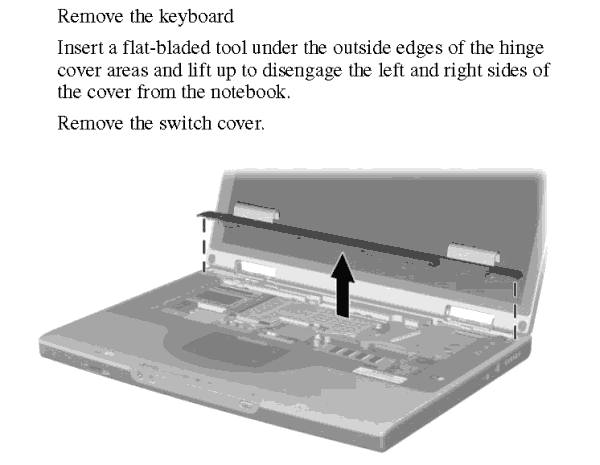
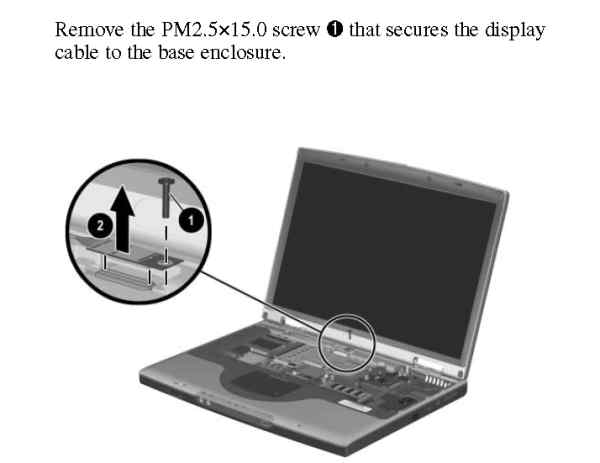
Remove the screw as per above, and press firmly down on the sides of the connector. Replace screw and see if it helps.
That didn't help, here is a picture: http://mybroadband.co.za/photos/showphoto.php?photo=14884&cat=500
Hi Pooky
That looks like the ribbon connector is loose from the main board... there is a ribbon like connector on the back of the screen itself... this might be the culprit. It is a relatively simple thing to slip back in, but quite a monster of a task as it involves removing the entire LCD screen from the lid and carefully sliding the pins pack into the socket securely. The connector usually lies behind the actual LCD screen itself.
or
the contacts on the display edge have split... this is a bad one and the screen may need to be replaced.
Is there not a friendly PC repair shop you could pop into for some friendly advice?
That looks like the ribbon connector is loose from the main board... there is a ribbon like connector on the back of the screen itself... this might be the culprit. It is a relatively simple thing to slip back in, but quite a monster of a task as it involves removing the entire LCD screen from the lid and carefully sliding the pins pack into the socket securely. The connector usually lies behind the actual LCD screen itself.
or
the contacts on the display edge have split... this is a bad one and the screen may need to be replaced.
Is there not a friendly PC repair shop you could pop into for some friendly advice?
Hi Pooky
That looks like the ribbon connector is loose from the main board... there is a ribbon like connector on the back of the screen itself... this might be the culprit. It is a relatively simple thing to slip back in, but quite a monster of a task as it involves removing the entire LCD screen from the lid and carefully sliding the pins pack into the socket securely. The connector usually lies behind the actual LCD screen itself.
or
the contacts on the display edge have split... this is a bad one and the screen may need to be replaced.
Is there not a friendly PC repair shop you could pop into for some friendly advice?
I could go but they will probably want to charge me...

Can I do it myself?
Yes, don't be scared

Just download the service manual from HP's site and follow the steps taking it apart.
Yes, don't be scared
Just download the service manual from HP's site and follow the steps taking it apart.
I took it all apart and looked at all the ribbons/cables etc. and took them out and plugged back in, but still nothing...

Someone please advise me
I also need to knowif I can replace it with a 1680x1050 screen as was in some of the nx7010's
Heeey Pooky...
Sorry to hear about your sad screen news..
Screens are expensive... perhaps look around a bit longer... or try and buy phiber's nx7010 from him for spares!!
You should have no trouble replacing it with the 1680x1050 as long as you have the 64MB Radeon VGA card.
Or... save yourself some money and just use it with an external screen!!!
Heeey Pooky...
Sorry to hear about your sad screen news..
Screens are expensive... perhaps look around a bit longer... or try and buy phiber's nx7010 from him for spares!!
You should have no trouble replacing it with the 1680x1050 as long as you have the 64MB Radeon VGA card.
Or... save yourself some money and just use it with an external screen!!!
I don't really want to have a laptop and use it with another screen... I have a desktop for that....
I can get a whole new screen unit, the normal resolution off ebay for R1500, or a one with higher res for about R2000, that's all with shipping...
Hey
http://capetown.gumtree.co.za/c-Stu...e-LED-and-LCD-professional-W0QQAdIdZ181636909
Add for screens... maybe they got something for ya?
http://capetown.gumtree.co.za/c-Stu...e-LED-and-LCD-professional-W0QQAdIdZ181636909
Add for screens... maybe they got something for ya?
LED and LCD one stop service
All brand new!
LED will feature new LCD screen technology. Instead of the regular fluorescent lamps that serve as backlights for your typical LCD screen, the new displays will use LEDs. LED effect will be a brighter image with better contrast. What it doesn't mention is that LED-backlit displays will allow for thinner laptop designs and longer battery life.
LED renovation making laptop thinner gorgeous, long battery life, high resolution and supper bright! Life is more colorful by LED
WE Supply LED renovation service, Dell M1330, LCD renovate into LED.
A lot of laptop make can be done
15.0, 15.4matt 15.4glossy 17wide glossy、。
12.1:TM121XG-02L03,IAXG01W(IBM X22)
12.1: N121X5-L01(IBM X60)
12.1wide LTN121AT03,LTD121EWVB(IBM X200)
12.1wide: LTN121W3-L01 N121I6-L01(LED IBMX200)
13.3wide: LP133WX1(20pins),LP133WX1,B133EW01(30pins),
13.3:LP133WX2-PLC1 LP133WX2-PLCA(LED)
14。wide: LTN140W1-L01 LP140WH1(LED)
14.0: LP141WP2(LED) glossy
14.1:B141XG05 LTN141XB-L02
14.1wide:B141EW04,LP141WX3,N141I3-L05
14.1wide: LP141WX5 B141EW05 LP141WXV(LED)
15.6 LED, 16.4 LCD
giving free consultancy and solution
also deliver installation and repair
PLEASE contact David, 0729135750.or [email protected]