


I've just installed a TP-Link MR3220 3G Wireless Lite N Router for a friend, no problems getting it to work with an iBurst UTD.
South Africa’s biggest forum. Discuss, discover, and connect with thousands of members.
Sorry never used iBurst:I've just installed a TP-Link MR3220 3G Wireless Lite N Router for a friend, no problems getting it to work with an iBurst UTD.
The User Terminal Desktop (UTD) is the "Desktop Modem Black", aka Dark Knight.What is an iBurst UTD?
Make sure you get a router than allows you to set the MTU.Someone I know is looking for a cheap WiFi router that is compatible with the iBurst "Desktop Modem Black". Should I worry about routers without MTU settings?
/lostThe User Terminal Desktop (UTD) is the "Desktop Modem Black", aka Dark Knight.
Make sure you get a router than allows you to set the MTU.
Yup.Thanks ginggs, does the TP-Link MR3220 allow you to set the MTU?
Cool, thanks man.Yup.
Thanks ginggs, does the TP-Link MR3220 allow you to set the MTU?
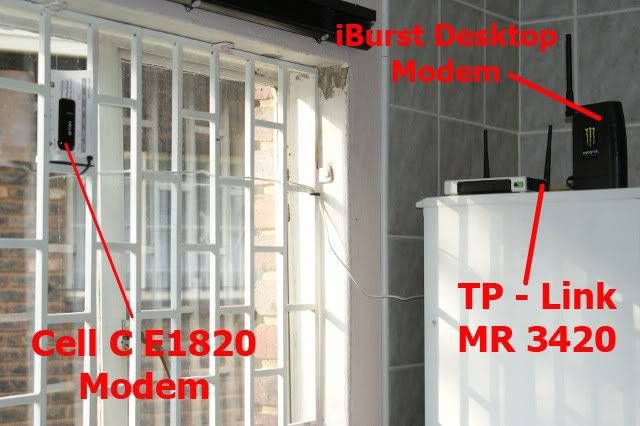
I assume you need to plug the iBurst modem into the WAN port of the router? /does the TP-link support the iBurst modem via usb?

From the first post it seems the Billion BiPac 7402GX/L are the recommended ones to get.Is there a wireless router availalbe somewhere in cape town to plug in my USB modem?
From the first post it seems the Billion BiPac 7402GX/L are the recommended ones to get.
See Where to buy for dealers in the Western Cape.
Eish! At that price I'd consider getting an iBurst desktop modem and a cheaper router like one of the TP-Link models.R1500 average price in cape town.... from supplier....
Well then, look at renewing your contract and getting the desktop modem as part of the deal. It works out less than buying the new modem cash, and you spread the cost out over two years.Im on month 2 month..contracts expired..but still most cost effectice solution in my specific area.
So if I get this straight, I will be able to connect both my 1mb (desktop) modem and my 2mb modem with the TP-LINK R470T+ Load Balancing Broadband Router to get both modems running at the same time?
Will the TP-LINK WA500G 54Mbps Wireless Access Point work pretty well with the TL-R470T to setup a wireless network?
Thanks for the help.
I have been reading this thread with interest. I have a similar issue where I have two iburst modems, and would like to connect them via a single router. Obviously, the focus would be on using both connections at the same time to load balance. Mention has been made by various members on the best solutions for this. Some advocate the use of the RB750 as the best method, while others mention specific routers such as the TP-Link (mentioned above).
My research always come back to a single problem though - especially across the RouterOS configurations - that both connections need to be from different ISP's or at least have different gateways. I presume two connections to iburst will have dynamic IP's and the same gateway so would it make more sense to use the TP-link solution with a wireless AP than try and use the RB750 (I am not a expert on the configuration required for the RB750 and I see RockRelic has a similar question in this thread ). Ronald mentioned the use of the RB750 would be perfect if you use two desktops, I however would like this setup:
Two iburst modems ----> Router ----> Wireless AP ----> Devices on internal DHCP (Desktop, Laptop, and everything else wireless)
The desktop would be used for various downloads using a multithread ftp client which would then spread the download threads across the two modems. The main aim is essentially to have a single router connection both modems rather than my current setup as per below:
1 modem --> Linkysys 54GL ---> Devices. (I have also read up about using the linksys as a dual wan router but the single gateway issue seems a bottleneck?)
1 modem ---> Laptop.
Any advice or suggestions before I jump in? If possible a faster internal network would be preferred for streaming/copying within the lan.

