New The PC Build Thread

More system RAM would be good for future proofing, but 32GB is probably sufficient for now. You really don't want to fall back on system RAM for SD if you don't have to, it'll take hours/days/weeks to render stuff.

Ideally I would rather get a 24Gb GPU, but the cost... I don't have enough organs to sell. I would also then need to upgrade my PSU as I doubt my current one would hold up with a 3090 or a 4090. It should suffice for a 4070.
These are the same issues I have, I want the 24Gb, but organs are in short supply as you say. Before I got the 12Gb card I ran a 1060Ti 4Gb, I would wait 8 to 12 hours for 8 seconds of animation to render. With the 12Gb that time has now dropped to 5 minutes (arround 10 if you count the time it takes for the models to load).

So you can see I have tasted what its like to have GPU power, now I want more :)
The workflows I am interested in learning/running all suggest a 24Gb card but they state people have gotten away with running them on 16Gb with lots of system RAM.

And my power supply will need to switch from a 600W to 850W. Al my geld, weg :(
Edit: spellink
 
These are the same issues I have, I want the 24Gb, but organs are in short supply as you say. Before I got the 12Gb card I ran a 1060Ti 4Gb, I would wait 8 to 12 hours for 8 seconds of animation to render. With the 12Gb that time has now dropped to 5 minutes (arround 10 if you count the time it takes for the models to load).

So you can see I have tasted what its like to have GPU power, now I want more :)
The workflows I am interested in learning/running all suggest a 24Gb card but they state people have gotten away with running them on 16Gb with lots of system RAM.

And my power supply will need to switch from a 600W to 850W. Al my geld, weg :(
Edit: spellink
5-10 minutes for animations isn't bad for a 3060. I have still images that take that long to render, though I suppose my workflows might be overly complex and might be doing overkill on the number of steps I use at each pass. For advanced video generation I generally use Kling or Luma AI. Runway seems nice with the new features they've introduced but it's probably the most expensive of all the online AI video services.
 
5-10 minutes for animations isn't bad for a 3060. I have still images that take that long to render, though I suppose my workflows might be overly complex and might be doing overkill on the number of steps I use at each pass. For advanced video generation I generally use Kling or Luma AI. Runway seems nice with the new features they've introduced but it's probably the most expensive of all the online AI video services.
I still need to get around Kling/Luma/Runway...its pretty much hit and miss whether I get the result I want, I`d say 1 in 3 renders does exactly what I want, but I dont think I`m speaking the right language/words to them. Still use them tho.

All this is quite new to me, but if you play with it every day it all work out in the end I guess.
 
Qualcomm wanting to acquire Intel is my opinion not the best thing to happen, but is in Intel's and the US's best interest. Neither would it spell immediate improvements on Intel's side. Considering the US's CHIPS and Sciences Act, FABS Act etc., among other regulations, this could be a broader move by the state US to centralise, and monopolise. The US have long campaigned to bring semiconductors back home, and limiting its advancements to adversaries.

The above I am all cool with, unless Qualcomm sinks Intel. For driving competition, it isn't a plus. All I want is better priced 'semiconductor', and related, goods. In the current, it is not becoming cheaper. All I know is, such an acquisition will see bigger slices into materials in a time that the market is challenged by shortages. It will be a long process, as the acquisition will take some time to complete.
 
7 years.....might be time to look at upgrading.

View attachment 1758774

Yohhhh prices have truly jumped

I wouldn't buy Zen 5 now, to game, best wait until the X3D CPUs go to market. Unless you want to build a workstation or lab PC. For that, a 9700X might be enough. You want a gaming PC, Zen 3 is still a very valid option, and Zen 5 prices are becoming a treat.

I am currently looking into AM4. The CPUs are very well priced, and DDR4 is cheap in comparison to DDR5, as is the motherboards.
 
For those who have read the news, AMD is allegedly releasing Ryzen 9000 X3D sooner than expected. The rumours have it that the 9800X3D is expected to drop in October, possibly nearing November, and that a 9600X3D is on the table. This is more than likely in response to Intel showing good anticipated benchmarks with their new CPUs. Expectations are high.

The 9900X3D and 9950X3D are still slated to release in 2025, and is said to have new technologies, but I think it is BS, and more up to microcode and OS optimisations.

Now that I have brought up Intel... For those with 13th and 14th gen CPUs, here you go again:


Intel finds root cause of CPU crashing and instability errors, prepares new and final microcode update​

Although Intel recognized the root cause of failures among 13th and 14th Generation Core 'Raptor Lake' processors in late July — its microcode made the CPU demand elevated voltage levels beyond safe limits — the company never delivered a precise diagnosis. It has now outlined an issue known as Vmin Shift Instability, which can occur under four circumstances.

The problem stems from a clock tree circuit in the IA core that is prone to failure under high voltage and temperature, causing a shift in the clock duty cycle and leading to system instability. Intel has pinpointed four key operating conditions that trigger this issue and implemented mitigations through various microcode updates.
  • First, motherboard power settings exceed Intel's recommended guidelines, causing Vmin shift. Intel advises users to follow its default power settings to avoid this problem.
  • Second, the eTVB microcode allowed certain 13th and 14th Generation Core i9 processors to maintain high performance even at elevated temperatures, which was corrected with the 0x125 microcode update released in June 2024.
  • Third, the SVID microcode sometimes requests higher voltages over an extended period, increasing the risk of instability. Intel resolved this with the 0x129 microcode update, distributed in August 2024.
  • Lastly, both microcode and BIOS were requesting elevated voltages during idle or light activity, which is mitigated by the 0x12B microcode update, combining previous fixes.
Intel's internal tests show that the 0x12B update does not noticeably affect performance. Benchmarks and gaming tests, including popular titles like Cyberpunk 2077 and Shadow of the Tomb Raider, showed results within normal expected variations when compared to the earlier 0x125 update.
 

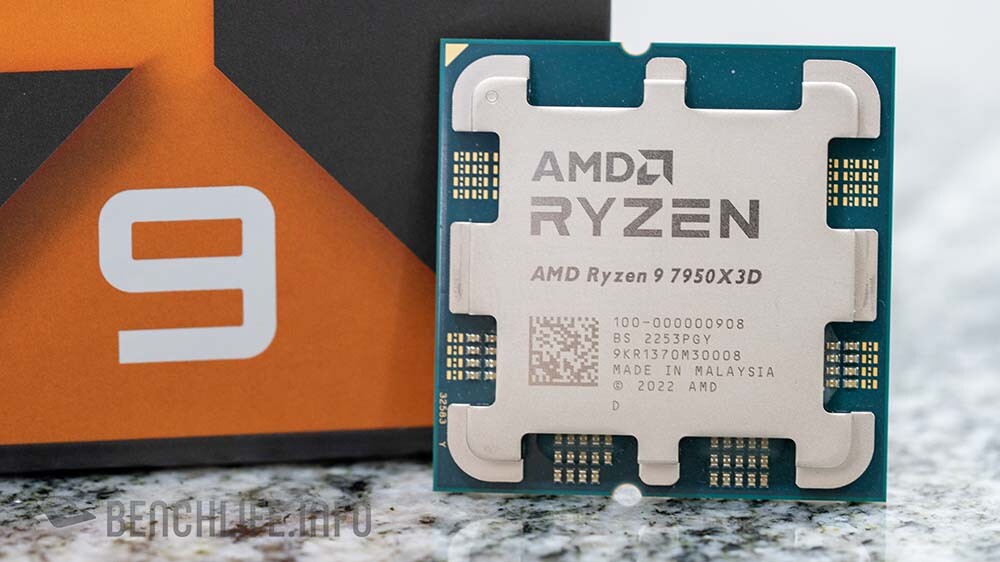
A new report by Benchlife.info claims that the higher core-count 9950X3D and 9900X3D will implement 3D V-cache on both CCD chiplets, giving these processors an impressive 192 MB of L3 cache (96 MB per CCD), and 208 MB or 204 MB of "total cache" (L2+L3).

Gamers would want this, but does it make sense?

I am curious why Windows, Linux, and AMD struggle to get logic processing in their OS schedulers under control. People still have to use "ParkControl" and "Process Lasso" to maximise 3D V-cache usage, and sometimes the schedulers work.

I guess having 3D V-cache on both CCD chiplets could resolve this? There are other uses, but the market speaks gaming. Doing this, will AMD and OS developers still seek to resolve this? I won't be surprised to see the 9800X3D still being the better gaming CPU. Just due to complexities.

This said, the people who made CPUCores are making CPUCores Advanced. It could also help gamers have better experiences in gaming with these CPUs which aren't appropriately scheduled/parked.
 
:oops:


AMD’s High-End X670E Motherboards Limiting Gen5 SSDs To Gen1 Speeds, Users Unable To Boot Into Windows After Restart​


Crucial's response:

We would like to inform you that we escalated your issue to our dedicated team for further investigation, and they informed us that the problem lies with the motherboard rather than the Crucial SSD. This behavior has been observed across various motherboards from different manufacturers, and we were able to replicate it on our in-house systems as well.

The issue seems to occur when a Gen5 SSD is connected to a Gen5 slot on the motherboard, which is why you are not experiencing this problem with your Gen4 drive. If you were to connect the Crucial T705 SSD to Gen4 speeds at all times, this issue would likely be resolved.

Unfortunately, the only fix for this issue is a BIOS update from the motherboard manufacturer. We recommend reaching out to your motherboard's manufacturer to inquire about a potential BIOS update that addresses this specific problem. We have seen BIOS updates from multiple manufacturers that help resolve this kind of issue.

Please note that the Crucial T705 SSD will perform at whatever speed the motherboard allows, and this is not a fault of the drive itself. We understand the inconvenience and will continue to support you, but at this point, it is necessary to work with the motherboard manufacturer to find a solution.

Crucial Engineering Team

I don't know how widespread this is and whether only Gen5 is impacted. All that money to have Gen1 speeds... :ROFL: Just run at Gen4 then :ROFL:

I am curious though, does this only apply to Crucial drives, and it is only happening with ASUS and MSI boards?
 
These are the same issues I have, I want the 24Gb, but organs are in short supply as you say. Before I got the 12Gb card I ran a 1060Ti 4Gb, I would wait 8 to 12 hours for 8 seconds of animation to render. With the 12Gb that time has now dropped to 5 minutes (arround 10 if you count the time it takes for the models to load).

So you can see I have tasted what its like to have GPU power, now I want more :)
The workflows I am interested in learning/running all suggest a 24Gb card but they state people have gotten away with running them on 16Gb with lots of system RAM.

And my power supply will need to switch from a 600W to 850W. Al my geld, weg :(
Edit: spellink
Dont get a gaming card if you want to do animation. They honestly suck for that.

Here is why. Get a Quadro/RTX. Ive had to yank some gaming cards and basically bin it for friends' businesses who needed 3d rendering done but was sold a gaming card. Its just not the same. Gaming cards are great for gaming, but for rendering and animation you need a proper workstation level graphics card.


1727474083763.png
 
Now that CUDIMM is making its way onto the scene:


MSI X870E CUDIMM Support
GYeQKo5W8AEFWzL

This requires a more detailed explanation. AMD and its motherboard partners also needs to give clarity in how CUDIMM will be supported. To quite an Anandtech article:


In any case, CKDs will be coming to all of JEDEC's DDR5 memory form factors. So along with the CUDIMM, we'll have the Clocked SODIMM (CSODIMM), and even DDR5 CAMM2 memory modules will use clock drivers.

Though since the need (or at least, standardization) around clocked DIMMs is based on the memory frequency, CUDIMMs and their other variations are all designed to be backwards compatible with existing DDR5 systems and memory controllers. Which means that a CUDIMM will use the same 288-pin DIMM slot as standard DDR5 DIMMs.

Under the hood, this is accomplished by allowing a CUDIMM to either run a clock signal though the buffers on its CKD, or bypass those buffers entirely, running in the aptly named PLL Bypass mode. Officially, bypass mode is only supported for speeds up to DDR5-6000 (3000MHz), so JEDEC complaint DIMMs will be expecting to use CKD mode (Single PLL or Dual PLL) at DDR5-6400 and beyond. The end result being that a CUDIMM should work with a slower/older DDR5 memory controller by going into bypass mode, whereas DIMMs without a CKD won't be available at the higher speeds that require a CKD (not at JEDEC-standard voltages and timings, at least).

CUDIMM will behave like a normal UDIMM on X870E. This should be the same with all 800 and 600 series AM4/5 boards. Nothing is said about JEDEC complaint DIMMs that will support Single and Dual PPL mode.

To be honest, I don't know. It is best explained by those integrating the technology. Some people could buy very expensive RAM which won't work. Not having the right RAM is an issue with AM4.

ADDING:

It does not seem that Ryzen 7000 will support CUDIMM, it is said to be due to incompatibilities. Not cool though. I hope that this isn't the case.
 
Last edited:
Dont get a gaming card if you want to do animation. They honestly suck for that.

Here is why. Get a Quadro/RTX. Ive had to yank some gaming cards and basically bin it for friends' businesses who needed 3d rendering done but was sold a gaming card. Its just not the same. Gaming cards are great for gaming, but for rendering and animation you need a proper workstation level graphics card.


View attachment 1760557

A laptop with a GTX1070 isn't good for anything. Comparing that to a quadro card is like comparing a ferrari to a golf cart.

Let's look at the RTX 3090 rather:

1727597474748.png


The A5000 costs almost 60k, the A6000 costs 100k. The 3090 is in the 20k+ range new and 13k used on carbonite.
 
Last edited:


Gamers would want this, but does it make sense?

I am curious why Windows, Linux, and AMD struggle to get logic processing in their OS schedulers under control. People still have to use "ParkControl" and "Process Lasso" to maximise 3D V-cache usage, and sometimes the schedulers work.

I guess having 3D V-cache on both CCD chiplets could resolve this? There are other uses, but the market speaks gaming. Doing this, will AMD and OS developers still seek to resolve this? I won't be surprised to see the 9800X3D still being the better gaming CPU. Just due to complexities.

This said, the people who made CPUCores are making CPUCores Advanced. It could also help gamers have better experiences in gaming with these CPUs which aren't appropriately scheduled/parked.

I expect these to be some killer CPUs...
 
For a X870E this is well priced to be honest:


Gigabyte X870E AORUS ELITE WIFI7 @ R 7 549

I will take that board over an ASUS TUF every time.
 
Hi all

Have an odd issue have a Ryzen 7 5700x and 32gb of ram and a RX 6950 xt

Previously had 2 x 8GB Corsair vengeance ram 3600 and bought the same one again to upgrade to 32gb ram

The pc worked fine after the upgrade and all of a sudden shows a orange light on the motherboard indicating dram

Could it be the newer ram is faulty ?

Edit : after two power cycles it booted up fine ?? But see the display resolution is all messed up like with the boot logo and bios
 
Last edited:
Hi all

Have an odd issue have a Ryzen 7 5700x and 32gb of ram and a RX 6950 xt

Previously had 2 x 8GB Corsair vengeance ram 3600 and bought the same one again to upgrade to 32gb ram

The pc worked fine after the upgrade and all of a sudden shows a orange light on the motherboard indicating dram

Could it be the newer ram is faulty ?

Edit : after two power cycles it booted up fine ?? But see the display resolution is all messed up like with the boot logo and bios
It's best not to mix and match even if it's the exact same thing, there's a reason they sell them in kits together.

It might have been doing memory training on the previous boots and now it's working, the resolution thing I have no idea.
 
Hi all

Have an odd issue have a Ryzen 7 5700x and 32gb of ram and a RX 6950 xt

Previously had 2 x 8GB Corsair vengeance ram 3600 and bought the same one again to upgrade to 32gb ram

The pc worked fine after the upgrade and all of a sudden shows a orange light on the motherboard indicating dram

Could it be the newer ram is faulty ?

In preparation, it is best to make sure that you have the latest, or a stable, BIOS flashed. Reset to the default BIOS settings, for compatibility reasons. Then the best steps as follows are to test if all the RAM works, if not to install them one by one, after a reboot each time. The usual A1/A2-B1/B2 troubleshooting. If not booting, interchange the RAM, also applicable if you want to test the RAM modules for errors.

If the issue persists, disconnect everything from the PSU except for the motherboard (and the CPU fan). Irregular voltages can be tricky IF it is the issue.

It is hard to say without having the issue hands-on, but see if the above helps.

Worst case is a faulty motherboard, or worse, bent pins. If the RAM is faulty, just RMA. Odd chance is the PSU, or even a faulty case fan.
 
It's best not to mix and match even if it's the exact same thing, there's a reason they sell them in kits together.

It might have been doing memory training on the previous boots and now it's working, the resolution thing I have no idea.

Odd chance is that the GPU power connectors aren't properly fitted any more. Hard knocks.
 
For a X870E this is well priced to be honest:


Gigabyte X870E AORUS ELITE WIFI7 @ R 7 549

I will take that board over an ASUS TUF every time.
R 7,399 now, because raisins.
 
Top
Sign up to the MyBroadband newsletter
X