-
- News
-
Categories
- 5G
- ADSL
- AI
- Banking
- Black Friday
- Broadband
- Broadcasting
- Business
- Business Telecoms
- Cellular
- Cloud and Hosting
- Columns
- Cryptocurrency
- Energy
- Enterprise
- Fibre
- Gadgets
- Gaming
- Government
- Hardware
- Industry News
- Internet
- Internet of Things
- Investing
- IT Services
- Motoring
- Reviews
- Science
- Security
- Smartphones
- Software
- Technology
- Telecoms
- Trending
- Wireless
- Press Office
- Forum
- Industry News
- What's Next
- Company hub
- Speed Test
- About us
- Advertise with us
- Contact
- Careers


-
Join the MyBroadband community
South Africa’s biggest forum. Discuss, discover, and connect with thousands of members.
-
Question of the Day: Have you had a bad taxi / ride hailing experience in South Africa?

You are using an out of date browser. It may not display this or other websites correctly.
You should upgrade or use an alternative browser.
You should upgrade or use an alternative browser.
Samsung Galaxy Note 2
- Thread starter saffakanera
- Start date
K
kingrob
Guest
Is it only some networks that have the 4.3 update? I'm on Vodacom and when I check software update it says I already have the latest updateI'm on 4.1.2
Might be that Vodacom is still doing network testing on the 4.3 update.
Telkom Mobile sells the XFA (unbranded) version, so it will always get the update first.

w1tw0lf
Expert Member
Fonts are way too big & you cant make it any smaller.
In settings under display, fonts. There is an option to make it smaller.
K
kingrob
Guest
In settings under display, fonts. There is an option to make it smaller.
The fonts are perfect when using WhatsApp, or Google Keep, or Phone, etc. but just in the Messaging app, it's absolutely HUGE...even when using the volume button to make it smaller, it's still massive text blocks.
Another thing that bugs me, they give us the new lockscreen, but the weather widget stays the same? Makes it feel a bit disjointed.
w1tw0lf
Expert Member
A lot od the note 3 updates have been left out. Thinking they rushed 4.3 for note 2, s3 and s4 for gear support and the updates will come next year sometime.
I am running ditto rom, which is stock samsung 4.3 for note 2 with almost all note 3(excluding software that requires hardware) apps. Dont use rhe stock weather widget so cant really comment on that.
My fonts is set to tiny and also changed the dpi to 240 from 340(requires root) which makes it perfect.
I am running ditto rom, which is stock samsung 4.3 for note 2 with almost all note 3(excluding software that requires hardware) apps. Dont use rhe stock weather widget so cant really comment on that.
My fonts is set to tiny and also changed the dpi to 240 from 340(requires root) which makes it perfect.
K
kingrob
Guest
A lot od the note 3 updates have been left out. Thinking they rushed 4.3 for note 2, s3 and s4 for gear support and the updates will come next year sometime.
I tend to a agree with you, the UI feels a bit disjointed.
Not sure what Samsung's reasoning was, but most probably to keep sales of the Note 3 going strong as a new product with exclusive features.
Hopefully it will all come together with the Android 4.4 update.
w1tw0lf
Expert Member
Only time will tell. Very happy with mine at the moment. All works perfectly.

I doubt whether the Note 2 will get 4.4 from Samsung. The Note 1 stopped on 4.1.2 after the Note 2 was released, so this is prolly where it stops.Hopefully it will all come together with the Android 4.4 update.

biometrics
Honorary Master
- Joined
- Aug 7, 2003
- Messages
- 71,856
- Reaction score
- 2,240
Is it only some networks that have the 4.3 update? I'm on Vodacom and when I check software update it says I already have the latest update
I'm on Vodacom and updated last night.
biometrics
Honorary Master
- Joined
- Aug 7, 2003
- Messages
- 71,856
- Reaction score
- 2,240
4.3 has disabled the ability to ping.

I doubt whether the Note 2 will get 4.4 from Samsung. The Note 1 stopped on 4.1.2 after the Note 2 was released, so this is prolly where it stops.
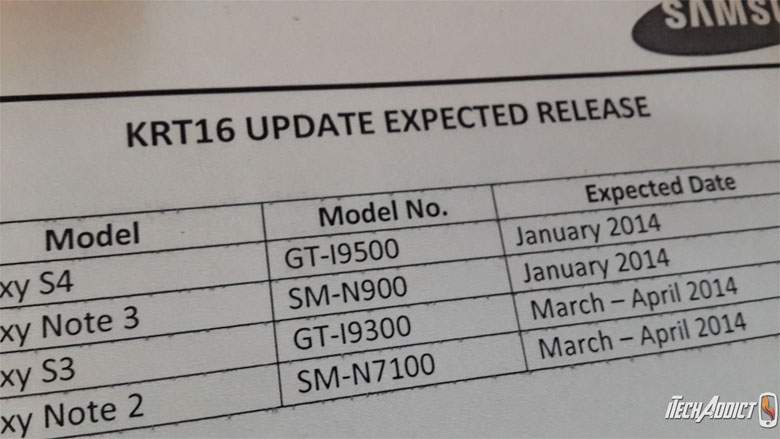
note the word "expected"
This may be interesting reading for you:Expected meaning it is planned. I've also read that it's planned for the Note 2 and iirc their plan is to get their top of the range phones all on the new ARM runtime...
http://www.gottabemobile.com/2013/12/03/samsung-galaxy-note-2-expect-android-4-3/
As I said, I am certain the Note2 will follow the Note1 into obscurity. FWIW, my Note1 is still as capable now as when I got it from Mike Smit in 2012 and can comfortably run 4.3 and 4.4, yet Samsung dumped development at the end of 2012.
BTW, I saw that pic you showed on Android Central (or equivalent) recently, but other than "leaked from a reliable inside source", there was no concrete reference.
I reckon XDA is the way to go if you want 4.4, but not sure what will be missing (like the s-pen capability). Personally, I'm not too impressed with 4.4 on the Nexus 7.

biometrics
Honorary Master
- Joined
- Aug 7, 2003
- Messages
- 71,856
- Reaction score
- 2,240
My email isn't auto synching since the update. Can't find the setting! Using Exchange. Where do you check/set it?
biometrics
Honorary Master
- Joined
- Aug 7, 2003
- Messages
- 71,856
- Reaction score
- 2,240
My email isn't auto synching since the update. Can't find the setting! Using Exchange. Where do you check/set it?
Found it. There is now a "Master Sync" which is off by default. Pull down the notification bar, on the right is a new icon which will display this. Enable Sync.

My Samsung and Google was set to not sync before and this enabled both. Need to go disable it in Settings/Accounts. Also by default Exchange mail has "Peak Hours" enabled which I turned off.
Samsung fail update ...
So getting a Nexus next year. I hate this extra layer they add.
K
kingrob
Guest
My Note 2 is buttery smooth after the 4.3 update.
I love it!
I love it!

K
kingrob
Guest
I will have to check it out, as I am still trying to use up my 5GB data bundle on my phone.