Service Pack 3 FTL.

sorry but im still having issues. i have clicked on the link below but whem i try to click on "i accept" nothing elses happens, get a error message saying error on page. i have read

http://support.microsoft.com/hotfix/KBHotfix.aspx?kbnum=953761&kbln=en-us

I have found this below from the TECHIE do i just need to install servic pack then then do as he says??

Please help


My computer can no longer access the internet. I just installed Service Pack 3 for Windows XP...
That's your problem right there. Many Telkom customers have had problems, after installing Windows XP, of their bundled router/modem not assigning an IP address or configuring the DNS service properly. The best solution at the moment seems to be to manually specify your DNS servers, unfortunately. Here is a step-by-step guide on how to configure your computer in order to solve the problem:

http://mybroadband.co.za/photos/data/500/Pic_1.PNG

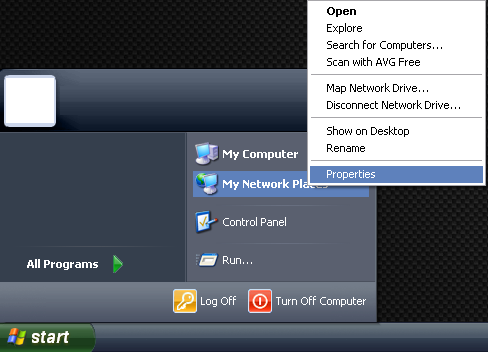
a) Click on Start, right-click on My Network Places and click on Properties.

http://mybroadband.co.za/photos/data/500/Pic_2.PNG

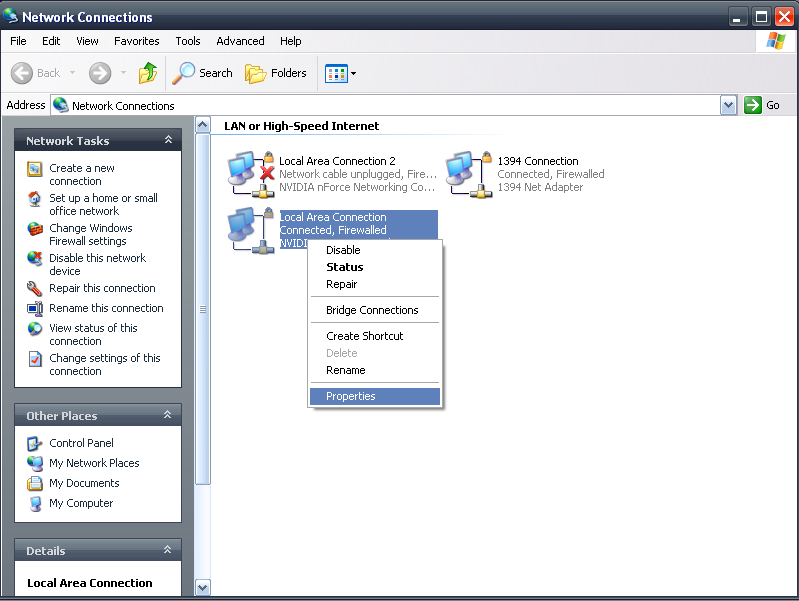
b) Right-click on your primary network adapter (the one which you are using to connect to your router/modem, be it wireless or wired), in this case the wired local area adapter and click on Properties.

http://mybroadband.co.za/photos/data/500/Pic_3.PNG

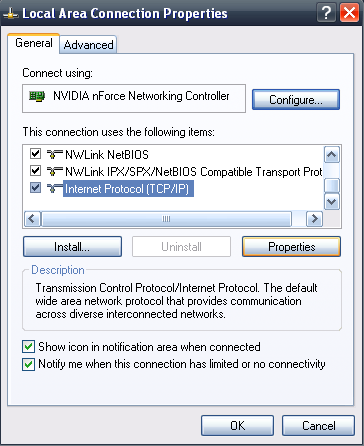
c) Scroll down to "Internet Protocol (TCP/IP)", select it and click on Properties.

http://mybroadband.co.za/photos/data/500/Pic_4.PNG

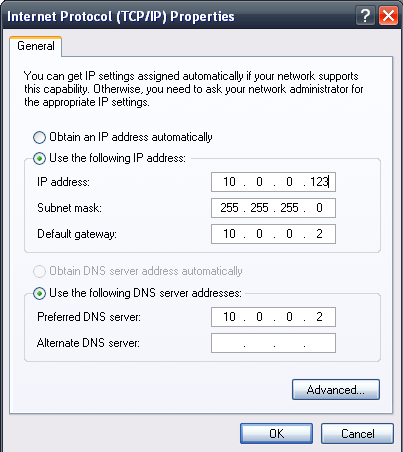
d) Select the "Use the following IP address:" option, as well as the "Use the following DNS server addresses:" option. Enter you're router's IP address in the "Primary DNS Server" field, as well as in the "Default Gateway" field. Use 255.255.255.0 for your subnet mask and enter an IP address similar to the one shown above.
 
sorry but im still having issues. i have clicked on the link below but whem i try to click on "i accept" nothing elses happens, get a error message saying error on page. i have read

http://support.microsoft.com/hotfix/KBHotfix.aspx?kbnum=953761&kbln=en-us

I have found this below from the TECHIE do i just need to install servic pack then then do as he says??

Please help


My computer can no longer access the internet. I just installed Service Pack 3 for Windows XP...
That's your problem right there. Many Telkom customers have had problems, after installing Windows XP, of their bundled router/modem not assigning an IP address or configuring the DNS service properly. The best solution at the moment seems to be to manually specify your DNS servers, unfortunately. Here is a step-by-step guide on how to configure your computer in order to solve the problem:

http://mybroadband.co.za/photos/data/500/Pic_1.PNG

a) Click on Start, right-click on My Network Places and click on Properties.

http://mybroadband.co.za/photos/data/500/Pic_2.PNG

b) Right-click on your primary network adapter (the one which you are using to connect to your router/modem, be it wireless or wired), in this case the wired local area adapter and click on Properties.

http://mybroadband.co.za/photos/data/500/Pic_3.PNG

c) Scroll down to "Internet Protocol (TCP/IP)", select it and click on Properties.

http://mybroadband.co.za/photos/data/500/Pic_4.PNG

d) Select the "Use the following IP address:" option, as well as the "Use the following DNS server addresses:" option. Enter you're router's IP address in the "Primary DNS Server" field, as well as in the "Default Gateway" field. Use 255.255.255.0 for your subnet mask and enter an IP address similar to the one shown above.

Well, seeing as I wrote that of course I'd advise you to follow it :p

But yes, after you've installed Service Pack 3 follow the steps I outlined above and you should be able to access the internet :)
 
Just for the MS Bashers... I would not think its unreasonable not to parse anything after Option 43.. given that Option 43 is defined as Vendor-specific options...
 
Top
Sign up to the MyBroadband newsletter
X