TelkomZA

taking a stab in the dark, maybe Charl can put some fire to the telkom repair division

fault: 795crk160914
reported 16th Sept
escalation ref: 644375


I'm told the lines were burnt in our area. But oddly enough my neighbours lines are working perfectly fine. Granted i could be on a different exchange.

Its now 11 days and counting of no service :(
 
Telkom Fault Reporting

Hello,

I've been trying to get a fault on my line fixed since 19/09/14. The line is noisy and internet speeds are disastrous with international latency up to 12k at times. Today I received an SMS stating that fault number 665CWK190914 was restored. Needless to say it wasn't and I had to contact Telkom again, only to be told that this was now an entirely new fault and I had to wait the prescribed two to three days again! Fault number 251CWK270914 created. :wtf:

I can't even do a speedtest via the Saix site as it times out repeatedly. Could you please help?
 
My router has been re syncing itself every 10 mins for the past 2 hours. In between that, the speeds are utterly dismal! Can't even run a dammed speed test.
 
Been having incredibly bad speeds for the last 2 months. Often having pings upwards of 3000ms during the evening. Right now it is so bad I cant even get onto Telkoms fancy new website to log a fault. Friend who lives in the same complex is having the exact same experience, and my attempts to get the fault resolved via Afrihost (the line is with them) has resulted in Telkom just closing the fault (Telkom reference number 102AWK050914. Edit: I have just received the new reference number from Afrihost - 206AWK290914) without ever even talking to me or Afrihost giving up and just resetting the port. My friends repeated attempts with logging faults with Telkom directly have also proved unsuccessful, as they typically ask to test the line during business hours, then there is usually not much of an issue. As a result, the fault is closed without anything being done (except for the blanket solution of resetting the port).

Here is an example of what I am dealing with:
Code:
[rsimpson@kontrust:~]$ mtr -i5 -s0 -n -r -c 20 8.8.8.8
Start: Mon Sep 29 20:45:23 2014
HOST: kontrust                    Loss%   Snt   Last   Avg  Best  Wrst StDev
1.|-- 192.168.1.1                0.0%    20    0.5   0.5   0.4   0.8   0.0
2.|-- 196.210.147.1              5.0%    20  3718. 2557. 911.3 3718. 655.4
3.|-- 196.38.72.193              5.0%    20  3563. 2537. 1023. 3563. 617.7
4.|-- 196.35.115.136             5.0%    20  3372. 2512. 1271. 3447. 560.8
5.|-- 168.209.6.13               5.0%    20  3196. 2470. 1490. 3196. 468.8
6.|-- 168.209.6.12               5.0%    20  3067. 2508. 1717. 3421. 482.3
7.|-- 168.209.100.101            5.0%    20  2947. 2508. 1732. 3423. 488.8
8.|-- 168.209.1.179              5.0%    20  3388. 2519. 1542. 3415. 550.4
9.|-- 72.14.205.16              10.0%    20  3546. 2451. 1359. 3546. 555.6
10.|-- 66.249.95.8              10.0%    20  3910. 2634. 1652. 3910. 574.9
11.|-- 209.85.253.196           10.0%    20  3943. 2639. 1654. 3943. 605.2
12.|-- 72.14.238.16              5.0%    20  4099. 2738. 1705. 4099. 677.9
13.|-- 209.85.248.101            5.0%    20  4175. 2755. 1563. 4175. 692.8
14.|-- ???                      100.0    20    0.0   0.0   0.0   0.0   0.0
15.|-- 8.8.8.8                   5.0%    20  4079. 2760. 1344. 4079. 684.8

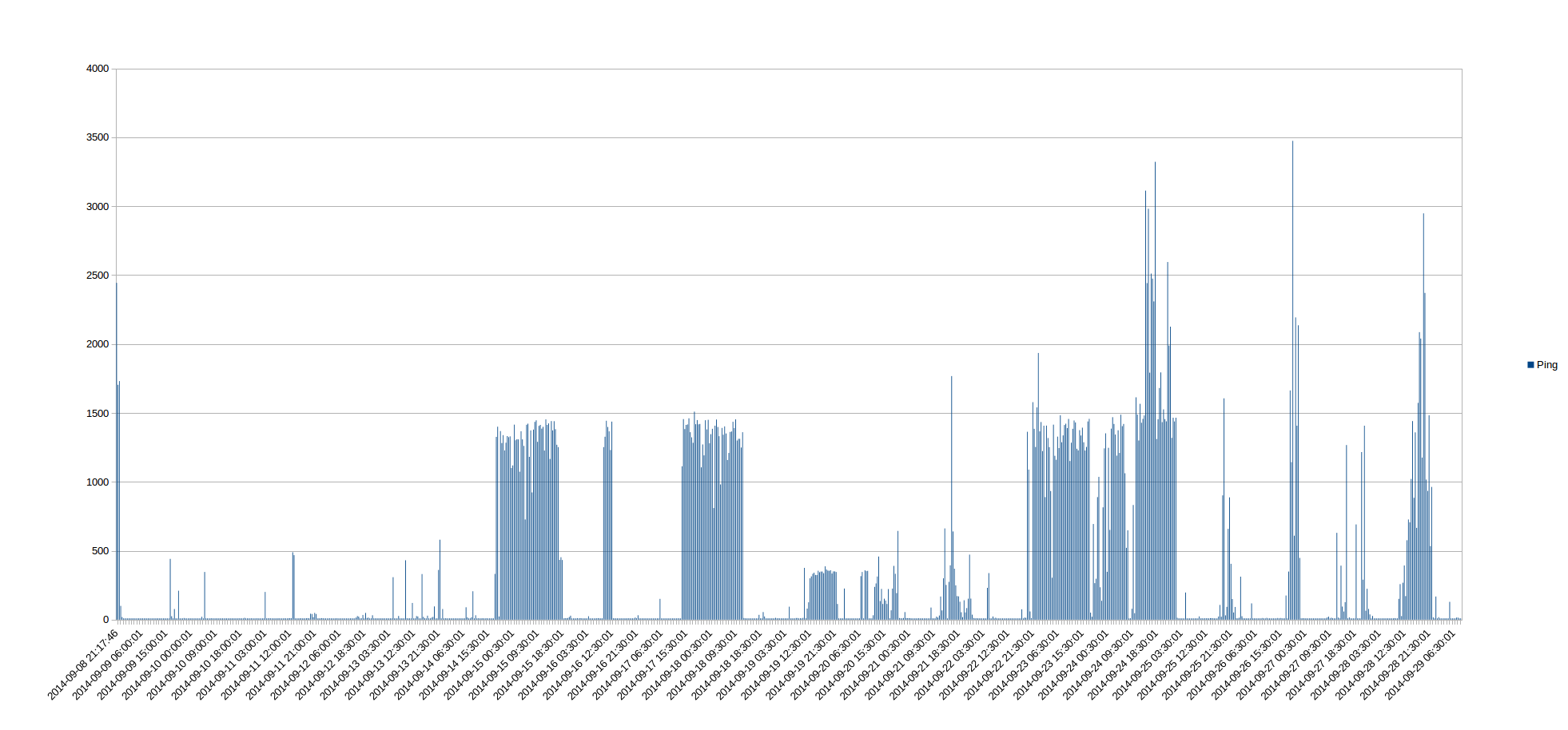
Since most support requests are met with just resetting the port and closing the ticket, I've been gathering data since the beginning of September to prove that there is a serious issue. Every 30 minutes I run a traceroute (via mtr) and log the data to a file. Today I parsed this file, and took the average ping of the second hop over the last month to produce the following graph:

exchange_congestion.png

Remember, this is the *average* ping, not the *worst* ping.

If you want to check the collected data for the worst case scenarios (or best case ... HAHAHA!), or want to check how the graph was generated, or just want more details, I've put the raw data and tools for parsing the data up on github at https://github.com/SilverCode/ExchangeCongestion
 
Last edited:
Ag nee. Randomly no throughput again... connection runs along happily, then doesn't even slow down - it just stops.
 
Received a call from a nice clued up sounding guy from Telkom (sorry I didn't catch his name). Unfortunately he couldn't see historic usage information for the DSLAM and could only see what the usage capacity was at the current time (30Mbps of 140Mbps). He said he would send a request on to Bellville to monitor the DSLAM over time if it was running out of capacity, then put in a request for an upgrade.

So I'm glad to hear that some progress is being made. I just hope the Bellville guys do see the exchange congestion, otherwise I'm back to square one :(

Telkom should really look at investing in some monitoring equipment that can provide historical data and a reporting system that shows exchange X exceeds capacity at time Y, so they can be more proactive in fixing these sorts of issues, instead of waiting for someone to make enough noise before looking in to it.
 
I have a similar problem as SilverCode my line also keeps getting high packet loss during peek times, it been like that for almost 8 months now I've pretty much given up.

Technicians have been out multiple times and they say its been "Fixed" but its still exactly the same most of the time they don't even come and check they just close the call, a few times I have told its probably the ISP I have had 6 different ISP's in the last year and its still the same.

I'm a Network Administrator for a large corporate I think I know when there is a problem with DSLAM congestion.

Anyway I opted to get a Microwave point to point link which has been working great for the last 4 months, I've kept the ADSL line as a backup in case the p2p link didn't pan out but now i think its time to cancel the ADSL.

I'm my professional career I will never ever recommend Telkom to anyone.
 
I'm trying to order do Premium Plus, but when I choose Bundles on the product order page, I get "No products available for this selection" :(
 
Received a call from a nice clued up sounding guy from Telkom (sorry I didn't catch his name). Unfortunately he couldn't see historic usage information for the DSLAM and could only see what the usage capacity was at the current time (30Mbps of 140Mbps). He said he would send a request on to Bellville to monitor the DSLAM over time if it was running out of capacity, then put in a request for an upgrade.

So I'm glad to hear that some progress is being made. I just hope the Bellville guys do see the exchange congestion, otherwise I'm back to square one :(

Telkom should really look at investing in some monitoring equipment that can provide historical data and a reporting system that shows exchange X exceeds capacity at time Y, so they can be more proactive in fixing these sorts of issues, instead of waiting for someone to make enough noise before looking in to it.

Just to put this into perspective. Last night at 9:30pm, Steam was only managing to download at 80KB/s and during that time I struggled to load the Coursera website (let alone watch any videos) ... or any website for that matter. I also had a 1039ms average ping on the 2nd hop.

Today, at 11:30am, Steam is downloading at 420KB/s and I'm able to VNC into the PC remotely at Medium Quality (DSL) with little to no lag. I currently have a 339ms avg ping on the 2nd hop ... not ideal, but certainly not 1039ms (also because I'm utilizing almost all my lines capacity with Steam downloads at the moment).

This is why the faults get closed with no resolution. During the day when people are attending to them, there is no problem because the demand for bandwidth is low. At night, when all the support people have gone home, the demand increases and speeds to to hell in a handbasket.
 
This is why the faults get closed with no resolution. During the day when people are attending to them, there is no problem because the demand for bandwidth is low. At night, when all the support people have gone home, the demand increases and speeds to to hell in a handbasket.
Classic exchange congestion at peak time, not a lot you can do other than moving to a WISP.
 
I've had the same problems with high latency, very slow line etc but only at "peak" times (from 16:00 - 22:00), some days I can't even load Google search page. I dm'd telkom on Twitter a while ago and they sent a tech out (I've dealt with him before and he's very helpful and knowledgeable) he said they were upgrading my exchange and that it'll be done by the end of the month. So I dm'd telkom again yesterday and asked if upgrades were complete and they replied saying the exchange wasn't even being upgraded and they have no plans to either. So now who is talking out their valves? Tech guy or Twitter guys and who can I confirm this story with?
 
Hi there

Please tell me how to cancel my line?

I have tried now to contact you via phone and email and online, with no success.
I have been on hold three times for an hour each time for the past two days and nobody picks up.

Now please tell me how I can cancel my line as I am not going to phone telkom again.

Regards
 
My latency is still super high. Asked "TelkomZA" how I can get my exchange congestion fixed and he replied by saying that my exchange doesn't seem to be experiencing any exchange congestion... He then asked for trace routes so he can investigate further. I sent him multiple trace routes yesterday, clearly showing that the second hop is also high latency and he hasn't got back to me yet. Once he does, hopefully he can fix the problem.
 
Good Day, where can one find out when the exchange in Randpark Ridge Ext 57 will be upgraded in order to access the 10Mbps ADSL service. I was told we link to the Honeydew exchange and due to distance we get this poor service.
 
I am having serious problems in East London during the evening (after +- 6pm).

Daytime speeds and latency are great

Traceroute has started…

traceroute: Warning: www.bbc.co.uk has multiple addresses; using 212.58.246.94
traceroute to www.bbc.net.uk (212.58.246.94), 64 hops max, 72 byte packets
1 gargoyle (192.168.0.1) 0.550 ms 0.299 ms 0.223 ms
2 196-210-155-129.dynamic.isadsl.co.za (196.210.155.129) 7.980 ms 7.928 ms 6.910 ms
3 vlan2473.cdsl2-ctn.isdsl.net (196.38.72.193) 22.714 ms 22.737 ms 22.469 ms
4 196.35.115.136 (196.35.115.136) 28.475 ms 23.186 ms 22.604 ms
5 168.209.6.13 (168.209.6.13) 24.179 ms 23.033 ms 23.019 ms
6 core2b-ctn-gi0-1.ip.isnet.net (168.209.2.3) 22.667 ms 23.557 ms 23.432 ms
7 bbc-linx.pr01.rbsov.bbc.co.uk (195.66.236.103) 174.751 ms 174.298 ms 175.943 ms
8 * * *
9 ae0.er01.cwwtf.bbc.co.uk (132.185.254.93) 183.867 ms 182.573 ms 187.639 ms
10 132.185.255.165 (132.185.255.165) 174.672 ms 174.860 ms 175.198 ms
11 bbc-vip015.cwwtf.bbc.co.uk (212.58.246.94) 175.175 ms 176.624 ms 174.973 ms


After 6pm I get this

Traceroute has started…

traceroute: Warning: bbc.co.uk has multiple addresses; using 212.58.244.18
traceroute to bbc.co.uk (212.58.244.18), 64 hops max, 72 byte packets
1 gargoyle (192.168.0.1) 0.458 ms 0.254 ms 0.249 ms
2 196-210-155-129.dynamic.isadsl.co.za (196.210.155.129) 85.176 ms 77.065 ms 76.957 ms
3 vlan2473.cdsl2-ctn.isdsl.net (196.38.72.193) 104.458 ms 103.966 ms 102.765 ms
4 196.35.115.136 (196.35.115.136) 102.982 ms 104.342 ms 104.263 ms
5 168.209.6.13 (168.209.6.13) 104.025 ms 102.745 ms 100.439 ms
6 core2b-ctn-gi0-2.ip.isnet.net (168.209.6.3) 94.599 ms 92.834 ms 95.013 ms
7 168.209.0.74 (168.209.0.74) 269.378 ms 273.261 ms 271.366 ms
8 bbc-linx.pr01.rbsov.bbc.co.uk (195.66.236.103) 264.842 ms 269.558 ms 261.177 ms
9 * * *
10 * * *
11 ae0.er01.telhc.bbc.co.uk (132.185.254.109) 258.781 ms 263.480 ms 252.398 ms
12 132.185.255.149 (132.185.255.149) 257.870 ms 242.542 ms 243.556 ms
13 fmt-vip72.telhc.bbc.co.uk (212.58.244.18) 255.501 ms 257.874 ms 248.090 ms
 
Top
Sign up to the MyBroadband newsletter
X