-
- News
-
Categories
- 5G
- ADSL
- AI
- Banking
- Black Friday
- Broadband
- Broadcasting
- Business
- Business Telecoms
- Cellular
- Cloud and Hosting
- Columns
- Cryptocurrency
- Energy
- Enterprise
- Fibre
- Gadgets
- Gaming
- Government
- Hardware
- Industry News
- Internet
- Internet of Things
- Investing
- IT Services
- Motoring
- Reviews
- Science
- Security
- Smartphones
- Software
- Technology
- Telecoms
- Trending
- Wireless
- Press Office
- Forum
- Industry News
- What's Next
- Company hub
- Speed Test
- About us
- Advertise with us
- Contact
- Careers


-
Join the MyBroadband community
South Africa’s biggest forum. Discuss, discover, and connect with thousands of members.
-
Question of the Day: Have you had a bad taxi / ride hailing experience in South Africa?

You are using an out of date browser. It may not display this or other websites correctly.
You should upgrade or use an alternative browser.
You should upgrade or use an alternative browser.
The iPhone Tips/Tricks/Apps thread
- Thread starter fxit_man
- Start date
- Status
- Not open for further replies.
MarvMart
Well-Known Member
yeah that's to save battery
you can try "keep awake" from cydia which keeps wifi active, but I'm sure it will affect your battery life.
Pretty sure it fetches in standby on normal cellular data network (i.e 3G etc). But I don't really use the mail client so I'm not 100% sure.
So if you are using Bosspref's and turn off 3G and EDGE and manually sync email via Wireless, would that work ? I dont want to sync anything via 3G unless i am either surfing or manually pull mail.
I looked at my stats, I have used 100Mb in 2 weeks and I have not even used anything other than a couple of messages via Skype and a 5 min surf

Interesting, when my iPhone is on standby it doesn't fetch my mails from Gmail (even when set to 15 minute update intervals) via the WiFi (my data service only gets activated on Sunday). Seems to be because the WiFi is disabled during standby.
Anybody else experience this? And does it fetch in standby mode when a cellular data service is activated (thereby eliminating the need for an active WiFi connection)?
Yip it happens automatically, you can perhaps try insomniac, you can activate that and it will keep your wifi connection active (and is not TOO heavy on the battery)
Post your springboards here guys!
http://mybroadband.co.za/vb/group.php?do=discuss&group=&discussionid=155
Posted my uber boring screenshots, but on 3G, speed and memory is more important than over the top eye candy


Rumour has it that Google might be releasing a FREE turn-turn navigation option for the iPhone
..but the maps will be downloaded as you go!! will eat your cap!
fxit_man
Executive Member
..but the maps will be downloaded as you go!! will eat your cap!
No worries
 I will upload the cache then which we update every now and again as Google Maps update their maps.
Then no cap used

Hintry
Well-Known Member
Deleted and reinstalled, same problem. Maybe there's an issue with Tom Tom 1.0 and 3.1.2? Anyone else got it working?Hmm I'm on 3GS 3.1. Just delete and reinstall. Happens sometimes
fxit_man
Executive Member
Deleted and reinstalled, same problem. Maybe there's an issue with Tom Tom 1.0 and 3.1.2? Anyone else got it working?
Hmm i'm sure others are on 3.1.2 with it working here?
Seems you are not the only guy though..
http://www.austech.info/gps/28113-tomtom-v1-1-iphone-australia-map-v835-2419-a.html
These guys have problems with the v1.1 too..
fxit_man
Executive Member
Google Launches Its Own Free Navigation App
http://www.iclarified.com/entry/index.php?enid=5789
Check out the pics + youtube vid
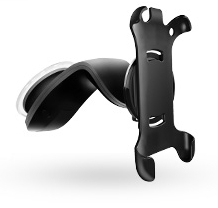
NAVIGON Releases iPhone Car Mount
Finally something cheaper than the TomTom mount and which looks good..
http://www.iclarified.com/entry/index.php?enid=5776
http://www.iclarified.com/entry/index.php?enid=5789
Check out the pics + youtube vid
NAVIGON Releases iPhone Car Mount
Finally something cheaper than the TomTom mount and which looks good..
http://www.iclarified.com/entry/index.php?enid=5776
Last edited:
fxit_man
Executive Member
Please remember to subscribe to the discussions on the Social Group guys with email notification so you know when a reply is posted
Last edited:
..but the maps will be downloaded as you go!! will eat your cap!
True, hopefully won't be too much data though.
theron.roland
Expert Member
- Joined
- Oct 7, 2008
- Messages
- 1,073
- Reaction score
- 0
I'm on MTN and ever since the upgrade to 3.1, I can't connect to EDGE, is anybody else having this problem?
settings -> general -> network -> cellular data network ->
set data apn to myMTN, set mms apn to myMTN (and complete other mms settings on the first page of this thread)
and read before you ask....
theron.roland
Expert Member
- Joined
- Oct 7, 2008
- Messages
- 1,073
- Reaction score
- 0
Deleted and reinstalled, same problem. Maybe there's an issue with Tom Tom 1.0 and 3.1.2? Anyone else got it working?
don't install with installous, drag the ipa into itunes applications section, then with appsync for os 3.1 installed, sync with itunes
3.1.2 + 3gs + appsync for 3.1 and it works
anyone have tomtom southern africa v1.1 yet???

d0b33
Honorary Master
theron.roland
Expert Member
- Joined
- Oct 7, 2008
- Messages
- 1,073
- Reaction score
- 0
lol some things never change
Grrrr............
Hintry
Well-Known Member
Thanks I'm about to give it a go.don't install with installous, drag the ipa into itunes applications section, then with appsync for os 3.1 installed, sync with itunes
3.1.2 + 3gs + appsync for 3.1 and it works
anyone have tomtom southern africa v1.1 yet???
Question: What will happen to any other apps that were installed with Installous and are NOT visible in the Itunes Application list? Will these apps be deleted?
Hey guys,
I'm thinking of installing blackra1n RC2.
I got my iPhone in August from Vodacom and I am using it with an MTN sim card (without having to do an unlock). Does this classify my phone as factory unlocked?
If so, I want to upgrade my firmware to 3.1.2 using iTunes. and then use blackra1n RC2 to jailbreak. Will it work even though im on MTN?
Thanks..
I'm thinking of installing blackra1n RC2.
I got my iPhone in August from Vodacom and I am using it with an MTN sim card (without having to do an unlock). Does this classify my phone as factory unlocked?
If so, I want to upgrade my firmware to 3.1.2 using iTunes. and then use blackra1n RC2 to jailbreak. Will it work even though im on MTN?
Thanks..
- Status
- Not open for further replies.