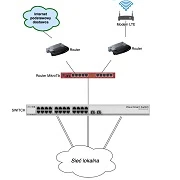
If you can get the USB modem to work (this can be a pain at times), there’s two ways to go about this. 1. The simple way, relies on the router detecting that the gateway is down (which you can do if you’re using pppoe) and 2. Using a netwatch script like the one above (which I don’t recommend) and make sure it monitors connectivity to the internet and not just a local interface.
The most common outage will be last mile or middle mile. This will drop a pppoe connection immediately. So setting your LTE’s gateway as a default route with a higher distance than the Pppoe will allow for this route (LTE) to be active once the ppp drops. On Vuma trenched, you can set a static default route (just copy the existing dynamically assigned path and disable default gateway on the dhcp-client) with a ping check on the gateway for the Vuma path and a longer distance path to your LTE’s gateway. For Vuma trenched, and middle mile issue won’t automatically result in a gateway ping check failure as you may still be able to ping the next hop (depending on where you are), so you may have to manually re-route.
The above takes care of routing. Now you need to take care of NAT (determining which outbound IP your device will use to masquerade traffic). The simplest method here is to create a WAN interface list (Interface > interface list) and add both the internet interface (eth1 or pppoe) as well as the LTE interface to it. Make sure your inbound firewall rules reference this WAN interface list and not a specific interface. Then under firewall > NAT, make sure your src-Nat masquerade rule lists the outbound interface list WAN, and not a specific interface. NAT will check for the active route and automatically masquerade out of that interface. When the fibre comes back up, the default route will change and connections will gradually (fairly quickly) move back to the fibre.