-
- News
-
Categories
- 5G
- ADSL
- AI
- Banking
- Black Friday
- Broadband
- Broadcasting
- Business
- Business Telecoms
- Cellular
- Cloud and Hosting
- Columns
- Cryptocurrency
- Energy
- Enterprise
- Fibre
- Gadgets
- Gaming
- Government
- Hardware
- Industry News
- Internet
- Internet of Things
- Investing
- IT Services
- Motoring
- Reviews
- Science
- Security
- Smartphones
- Software
- Technology
- Telecoms
- Trending
- Wireless
- Press Office
- Forum
- Industry News
- What's Next
- Company hub
- Speed Test
- About us
- Advertise with us
- Contact
- Careers


-
Join the MyBroadband community
South Africa’s biggest forum. Discuss, discover, and connect with thousands of members.
-
Question of the Day: Have you registered your home solar with Eskom?

You are using an out of date browser. It may not display this or other websites correctly.
You should upgrade or use an alternative browser.
You should upgrade or use an alternative browser.
XBMC Tips, Tricks, Troubleshooting
- Thread starter APoc184
- Start date

Jabberwocky
Expert Member
Using one of those tiny keyboards with a trackball, works fine.

charge it with something like this, that I got with my cellphone, I think... it was lying around.

charge it with something like this, that I got with my cellphone, I think... it was lying around.
Last edited:
Jabberwocky
Expert Member
Jabberwocky, is that Bluetooth? Whered u get yours? What OS u using with XBMC?
Using openelec, . windows picks it up as a standard keyboard and mouse as well. If I had to get another one i`d rather go for a touch-pad version than a trackball. The trackball works fine with those big buttons on xbmc though. And the arrow buttons are ok-ish for NES emulation.
Got it at a shop in mafikeng.
http://www.pricecheck.co.za/offers/24015843/Esquire+Mini+Wireless+Keyboard+With+Optical+Tack+Mouse/
Last edited:
Funny, I don't even have a keyboard or mouse connected to my main openelec machine: just the remote. Do all the necessary via another windows pc - file moving, deleting, copying etc.
(I still laugh whenever I reboot the thing and I get the BIOS message onscreen "Keyboard missing: Press F1 to resume" and then it boots.)
Since this is a tips and tricks thread, one thing I've found very handy is to remove the flash drive that openelec is installed on, stick it in a windows machine every now and then and make a backup image of it. This has saved many hours of reconfiguring whenever updates go squiffy and stuff like that.
(I still laugh whenever I reboot the thing and I get the BIOS message onscreen "Keyboard missing: Press F1 to resume" and then it boots.)
Since this is a tips and tricks thread, one thing I've found very handy is to remove the flash drive that openelec is installed on, stick it in a windows machine every now and then and make a backup image of it. This has saved many hours of reconfiguring whenever updates go squiffy and stuff like that.
Jabberwocky
Expert Member
Funny, I don't even have a keyboard or mouse connected to my main openelec machine: just the remote. Do all the necessary via another windows pc - file moving, deleting, copying etc.
(I still laugh whenever I reboot the thing and I get the BIOS message onscreen "Keyboard missing: Press F1 to resume" and then it boots.)
Since this is a tips and tricks thread, one thing I've found very handy is to remove the flash drive that openelec is installed on, stick it in a windows machine every now and then and make a backup image of it. This has saved many hours of reconfiguring whenever updates go squiffy and stuff like that.
Got one of those el-cheapo baobab remotes. Using its arrows to simulate a mouse so you can type in a youtube search does not work very well.
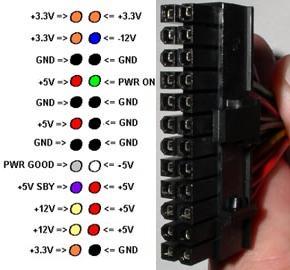
Its was nice for turning the pc on, had it connected to the 24 pin atx connection between the mobo and the PSU to turn the pc on and off, but it came loose and now I can`t for the life of me figure out which pins to connect it to again.
maybe someone here can help
Last edited:
zamicro
Expert Member
- Joined
- Oct 22, 2007
- Messages
- 3,823
- Reaction score
- 5
You need to connect the green and one of the black wires. If you connect only one wire, it will be the green one.
Jabberwocky
Expert Member
power on and ground? thanks I`ll try it.
Since this is a tips and tricks thread, one thing I've found very handy is to remove the flash drive that openelec is installed on, stick it in a windows machine every now and then and make a backup image of it. This has saved many hours of reconfiguring whenever updates go squiffy and stuff like that.
Awesome tip - need to do this when I get home
Awesome tip - need to do this when I get home
I use this:
http://sourceforge.net/projects/win32diskimager/
Go into Get add-ons, open the context menu for XMBC.org Add-ons (right click mouse or 'c' on keyboard) and then select Force Refresh.
You might have to close and open XBMC again after it finished (I had to)
Thanks for this ^
Worked like a charm!
Right, will be well-pleased if anyone can help me with this. If I have a video card, with 3 different output connectors (DVI, VGA, HDMI):
- can I connect different screen to all of them, and display content on all of them? (mirrored content, i.e. identical content on all 3 screens)
- would it be possible to output different resolutions to them e.g. 1920x1080 on one, 1366x768 on another, 800x600 on another
- if I ran XMBC, and the screen had different resolutions, would it display on all of them, and scale or something?
- lastly, is there a way in XBMC to send different media to the different output connector e.g. movie1 to the DVI out, and movie2 to the HDMI out...
I know some of the above won't be possible, just trying to understand what options I have... want to use a single XMBC machine sending media to different rooms (even if it's the same content going to all)
- can I connect different screen to all of them, and display content on all of them? (mirrored content, i.e. identical content on all 3 screens)
- would it be possible to output different resolutions to them e.g. 1920x1080 on one, 1366x768 on another, 800x600 on another
- if I ran XMBC, and the screen had different resolutions, would it display on all of them, and scale or something?
- lastly, is there a way in XBMC to send different media to the different output connector e.g. movie1 to the DVI out, and movie2 to the HDMI out...
I know some of the above won't be possible, just trying to understand what options I have... want to use a single XMBC machine sending media to different rooms (even if it's the same content going to all)

Thank you. Tried looking for guides but it's harder than you might think. For a N54L with Nvidia GPU which build of openelec is recommended....? (Fusion...?)

Sorry ! Yay. Fusion sounds appropriate.

Hahaha thanks. Off I go.
I always used the Generic builds on my N40L with Nvidia GPU. According to this site - http://wiki.openelec.tv/index.php?title=Supported_Hardware that's the correct version. Any reason why it would be different in the N54L?