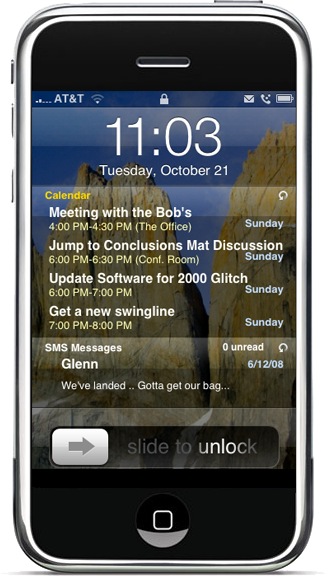
The iPhone Tips/Tricks/Apps thread

Status
Not open for further replies.
How to Install and Use IntelliScreen for iPhone

Just did this on my iPhone after using the iBackup utility above (just in case i have to restore), which i must say is very nice, and it works very nicely for me..

I did have to uninstall vWallpaper though.. (Not that i used it anyways :p)

Remember its a beta :)


IntelliScreen1.png

IntelliScreen2.png

IntelliScreen3.png
 
Last edited:
Hey there guys, I didn't know there was an iPhone thread. I should have done a search first before posted on the Mac Hardware thread :p

As I posted before i've got the BETA 2.0 Version 5 iPhone software with the relevant software to uploaded and Jailbreak/Unlock/Activate it to your iPhone. I don't really know any good places to uploaded it to, any suggestions would be great please! :)

It's a good 176Mb's.

It has all the new features that Apple announced in their keynote not to long ago.

Microsoft Exchange support, Cisco Support, Can save pictures from Safari to your Gallery to use for wallpapers. Other really cool features! You can get a list of all the new features here: http://www.apple.com/pr/library/2008/03/06iphone.html

I will admit I downgraded back to 1.1.4 because the new 2.0 is running some sort of Debugger in the background so when you open up an application, it kinda hooks for a second before opening the App...

But still, lemmie know if u guys want it?

Quick Tip: When you are typing an SMS and need to goto symbols (.?123)
Try this: Type your message and press and hold down the Symbol button, keep it held down and then select the symbol you want like a "?" or something. Then let go. The iPhone will put the symbol in and then revert to the normal keyboard for you to continue typing.
 
Welcome Cybermoo :)

I personally dont want the beta thanks.. I have the first version that was leaked, however i never installed it because i dont have much use for it and, as you said, would just have to downgrade again to 1.1.4 :p Thanks for the offer though.

But if anyone wanted it im sure you could host it on uunet (the local FTP). Im sure there are threads explaining how to do it here (i must admit i dont know how to myself)

Which version is it? Is it the Latest 2.0 Beta 5 (5a274d)?

Anyways if you havent already, take a read through the thread.. Theres some good tips and apps mentioned.. ;)
 
Thanks, I'll upload it a little later. :-) Have to pop into a meeting for a few hours.

Hmm.. It's not the latest Build the one I got is (5A225C). I'm gonna have to talk to that friend of a friend again to get the latest update. >:-)

I'm busy reading through the thread now, some seriously awesome Tips and Goodies. :-)
 
How to fix Package download failed and permissions issues with Installer 3.1

How to fix Package download failed and permissions issues with Installer 3.1

I found a pretty simple but really efficient way to solve Installer 3.1 issues.
Restart your phone and from a computer, use SSH to connect to your phone and type this:
(You can also use TermVT-100 if it is already installed in your phone)

Update > New Method
Code:
rm -R /var/mobile/Library/Caches/Installer
rm -R /var/mobile/Library/Installer/Temp
cd /Applications
chmod -R 755 Installer.app
chown -R root:admin Installer.app
chmod 6755 /Applications/Installer.app/Installer
Quit SSH and start Installer from its icon on Springboard.
The Permissions and "Package download failed" errors are gone.

If after doing this method you still have the "Package download failed" error while installing apps (but not with all of them), they are in fact caused by down repositories, so you might try again later
Source

Easier method:
http://www.iclarified.com/entry/index.php?enid=1132
 
That is so stupid. If he sells it, people won't use it. They are so many free alternatives available.

People are already spending enough money on the phone, why would they want to pay extra to unlock it?!?!

What a tool...
 
Hi,

I need some help again pls. Went away for a few days and decided to use my iTrip with MxTube to play music through the radio. Told me 'device is not made for iPhone' and would have to switch to airplane mode. Made no difference, still wouldnt play. But since my phone has been acting strange, worst side-effect being that it doesn't get reception, constant no signal, freezes and apps load veeeerrrrrrryyyyyy slowly. Reboot, ok for 2 minutes, then starts again. Anyway, Ziphoned it, all ok now. Trying to get BossTool to relocate everything but nothing relocates. Any advice?
 
Hi,

I need some help again pls. Went away for a few days and decided to use my iTrip with MxTube to play music through the radio. Told me 'device is not made for iPhone' and would have to switch to airplane mode. Made no difference, still wouldnt play. But since my phone has been acting strange, worst side-effect being that it doesn't get reception, constant no signal, freezes and apps load veeeerrrrrrryyyyyy slowly. Reboot, ok for 2 minutes, then starts again. Anyway, Ziphoned it, all ok now. Trying to get BossTool to relocate everything but nothing relocates. Any advice?

Thats weird...Sounds like a permissions problem to me..

Add the iClarified source (installer.iClarified.com) and install the Installer 3.1 Fix (that is of course assuming you have the latest Installer 3.1).
This will fix permissions AFAIK..

Try it out and install bosstool again..

And re the Iphone Video Recorder - Very cool app.. Just a shame it takes a while to encode..

EDIT: But you should use WinPwn anyways Or pwnge tool if your on a Mac. Ive had no problems with that whereas i had problems similar to yours in the past when using ziPhone
 
Last edited:
Thx. Very strange, I have iClarified, but it doesnt show the fix? Maybe delete the source and add again?

I have no clue where to start with winpwn? Could you perhaps tell me where to look to learn more?
 
Ok, downloaded fix, uninstalled BossTool, rebooted and reinstalled, still no change. Any other ideas pls? Thx
 
It seems many people are having this problem..

Look through this thread.. I've picked out some of the things that may help you:

also before using bosstools, make sure your old applications folder isnt sitting in /private/var that was my problem bosstools didnt like already having the folder there once deleted hey presto bosstools worked
See if this is the case with you
bosstools is totally easier, if you are too lazy to uninstall just a few apps, this is for you
Seems maybe an app that is installed on your iPhone is conflicting with BossTools.. Also try uninstalling/reinstalling BSD Subsystem
alright found out my problem you needed to chmod 4755 /private/var/Applications/Installer.app/Installer to get it to work.
If the above doesnt work


Otherwise you can do it manually as a last resort...

Gotta go, will catch up later

Good luck
 
Status
Not open for further replies.
Top
Sign up to the MyBroadband newsletter
X