


ld13
Honorary Master
Thanks for the advice. Maybe I should just go for an Inverter hehe. Keep the TV & Apple TV going to (kids will love me)
2 x Gizzu (Gizzi?) + Small UPS + 5 extra batteries in parallel = Wife+Kids loves me
South Africa’s biggest forum. Discuss, discover, and connect with thousands of members.
Thanks for the advice. Maybe I should just go for an Inverter hehe. Keep the TV & Apple TV going to (kids will love me)

2 x Gizzu (Gizzi?) + Small UPS + 5 extra batteries in parallel = Wife+Kids loves me

A power station ........Whats a good choice these days to backup the router?
Only way to do this is to measure the total power drain for the devices yu want tp power and then decide on what to get.Will this be good for a fibre modem thing and a WiFi router?
Anything better in a similar price range?
Search results for: 'gizzu 8800mah mini portable ups black' - Incredible Connection
Incredible Connection is a brand of JD Consumer Electronics and Appliances. We have the widest range of leading national and international brands and work hard at supplying products that, while pushing the technology boundaries, make a practical difference in any home or business environment.www.incredible.co.za
Only just enough, does not allow much margin. Too small as far as I am concerned.12V x 1A x2 and 12V x 0.5A = 30W
The Gizzu's output is 12V @ 3A = 36W. so you should be fine.

Messy and risky solutions. Get a PSU with separate outputs one for each device, sized correctly or get separate units for each voltage required.Easiest way to reduce the voltage for the one unit is to wire 4 1N4007 or 1N4001 diodes in series to that unit. That will reduce voltage by about 2.8V.
Interesting point. It depends If you can open them up or not. Expected it to be a bit of a mission as the batteries are probably soldered into place with cable leads on them. Or equipped with Custom made tags spot welded on the terminals to be soldered direct onto circuit boards.I was just thinking about All these mini ups although more efficient as its direct 12V compared to using a regular UPS(and the internal timer of a ups but i found some that can be disabled or do not come with that) - but what about after a year or 2 when the battery needs replacement?
any idea if you can replace these yourself?
regular UPS is easy and can even put larger batteries
Go and buy an el cheapo emergency PSU such as this:Hi
I am trying to get my hands on a Ratel 860p but I am concerned about the connector cables.
How would I know what size the pins on the included Y cable are?
I have a Tenda AC-10U router and a Calix Gigapoint 803Gv2 ONT.
The manuals do not have the pin size, how can I find this out?
Eggs in one basket is the issue. I opted for a separate PSU for each location and a sep one for each voltage type at the time because mainly there were not dual voltage units available and did not want to fiddle with multiple DC-DC converters.Thanks for the advice. Maybe I should just go for an Inverter hehe. Keep the TV & Apple TV going to (kids will love me)

Except those ratings were from the power supplies, so those are the maximum values. The actual power draw for a wi-fi router, a fibre CPE and a wi-fi extender would be less than 30W.Only just enough, does not allow much margin. Too small as far as I am concerned.
Because you have measured it or because it is documented somewhere or just what we all believe is the case?Except those ratings were from the power supplies, so those are the maximum values. The actual power draw for a wi-fi router, a fibre CPE and a wi-fi extender would be less than 30W.
Thanks.i will look into thisGo and buy an el cheapo emergency PSU such as this:
Remote YC668 PSU.
3/4.5/6/7.5/9/12V
3A max
30W
Comes with a connector adaptor of 7 plugues Chinese English
Use it occasionally but use the "plugues" as a quick reference check of plug standards all the time.

Because you have measured it or because it is documented somewhere or just what we all believe is the case?

Hi all. Been going through this thread as the dreaded LS is back. But I have to admit I am lost. I am not "electrically minded"
Advice please:
1. Vumatel ONT - Huawei (Ariel) - 12v / 1A?
2. TP-LINK AC5400X Router - 12v/5A (as per power supply)
All I want is to keep these two devices powered on through 4 hours of Loadshedding (JHB Blocks)
Can someone advise on products, power requirements etc.
Thanks all...
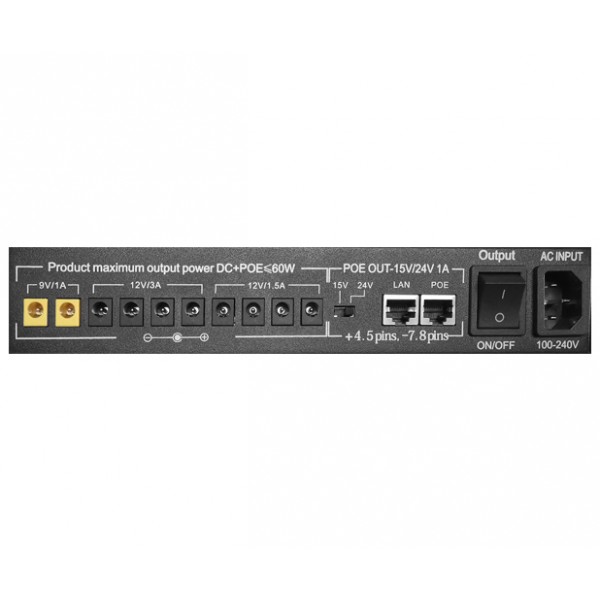
Confirm. The ONT and Router I have are 12V 2.A each as per the PSU. I would assume as a safety factor to assume 2A generally. The "Fat" you build in will help with those double LS sessions or at the very least ensure 50%DoD on the batteries both good things in the longer term.Hi all, I don't usually comment here but I found a solution that was cheap and works for me. Picked up a small USB DC 5V to 12V step-up converter on Takealot for R250 and just use an old power bank and it's working like a dream. Just a heads up that whatever power bank you use needs 2 amp output and needs to allow pass-through charging if you want to leave it plugged in as a mini UPS.
Good advice this! Switching off Wi-Fi you are not using is a very good idea on many fronts. Cutting back on RF power also, to the minimum you need to still cover the areas you want is another very good measure.I've got my ONT and Archer router on two separate DC UPS/power backup/whatever you want to call it (Gizzu 8800 ones)
The ONT use fokol power really
The router - I switched off the 5ghz since we only use the 2.4ghz and then I dropped the signal strength from high to low.
Lasts 4 hours and I've left those settings on the router as is because it doesn't have any real negative effect for us.
Good advice this! Switching off Wi-Fi you are not using is a very good idea on many fronts. Cutting back on RF power also, to the minimum you need to still cover the areas you want is another very good measure.
