TelkomZA

Yeah kinda assumed that but nice to have confirmation. Though when I call the call center they have no clue what I'm talking about. Frustrating to say the least.

Edit: 4th call to telkom in 2days managed to sort it out. Hopefully for longer this time.
 
Last edited:
Had the same Tech came and Line Tests Fine he can't understand why ASSIA would drop the line and reduce speed whole time said he will escalate it but not getting my hopes up so for now 6 mbps / 948 kbps it is on my 10 Mbps line
According to Telkom tech Test i could go 15-13 mbps max
 
Ok so this thread is my last resort.

Had my line go from 4mbit to 2.5mbit (From what I read here it seems to be ASSIA?) When I called Telkom and had them reset the port it did nothing though. Tech came out (After 3days wait) Said there was nothing physically wrong with the line, he called somebody at telkom had them change settings and I was back at 4mbit.

Now am back under 3mbit. Called telkom, was told she'd call me right back (5mins) that was a week ago. Nobody at the call center can help. Tried sending a tweet to @telkomza but got zero response there (I know am not the only one with a problem but some indication that they will get around to it would be nice)

Who do I contact to get this fixed?

Speed%20NO_zps8ds9auqm.jpg

Yeah kinda assumed that but nice to have confirmation. Though when I call the call center they have no clue what I'm talking about. Frustrating to say the least.

Edit: 4th call to telkom in 2days managed to sort it out. Hopefully for longer this time.

Your ATT is the same as mine, I had to Change to ADSL G.Dmt to get my full 4mb line, now syncing @5120kbps...goodluck removing ASSIA...changing the modulation was the only thing that worked for me.. The longest I went without ASSIA interfering, after I changed to fast path, was a week, week and a half. Running on ADSL G.Dmt Now and I have no ASSIA interference accept for the Interleaving issue but that's under control and haven't had a single drop in over a two months
 
Last edited:

Tx. Tried it already TOTO-LINK Router doesn't have Telnet ports enabled.

Code:
$show acl
Lan ACL State: Enable
Current ACL Table:
Index Direction IP/Interface    Service Port
0     LAN       0.0.0.0         web     80
1     LAN       0.0.0.0         ssh     22
2     LAN       0.0.0.0         ftp     21
3     LAN       0.0.0.0         tftp    69
4     LAN       0.0.0.0         snmp    161
5     LAN       0.0.0.0         ping    --

Will try it on my OLD MWEB TG589vn V3..
 
I logged about 2 call already and both where closed without my voice on my line being fixed. So how does Telkom do this. It must be against policy. Faults is 746CTK150316 and 646ctk160316 and when I call the call center they said they can't reopen faults so they then we have to start from scratch
 
Try this app called dslstats... http://www.s446074245.websitehome.co.uk/

this will tell you if interleaving is enabled :)
see my stats below

Code:
Stats recorded 19 Mar 2016 10:28:58

DSLAM/MSAN type:        	BDCM:0xa41b / v0xa41b
Modem/router firmware:  	AnnexA version - A2pD035g.d23k
DSL mode:               	G
Status:                 	Showtime
Uptime:                 	10 hours 40 min 26 sec
Resyncs:                	0 (since 19 Mar 2016 10:28:55)
			
				Downstream	Upstream
Line attenuation (dB):  	47,0		31,5
Signal attenuation (dB):	47,0		0,0
Connection speed (kbps):	5120		512
SNR margin (dB):        	9,6		20,0
Power (dBm):            	19,8		12,3
[SIZE=3][B]Interleave depth:       	32		8[/B][/SIZE]
INP:                    	1,00		2,00
G.INP:                  	Not enabled		

RSCorr/RS (%):          	0,9070		0,0000
RSUnCorr/RS (%):        	0,0001		0,0000
ES/hour:                	226		0

Got it working on OLD MWEB Router..

Code:
Stats recorded 20 Mar 2016 13:36:53

DSLAM/MSAN type:        	BDCM
Modem/router firmware:  	Not reported
DSL mode:               	G.992.5 Annex A
Status:                 	Showtime
Uptime:                 	0 days, 0:24:36
Resyncs:                	0 (since 20 Mar 2016 13:32:52)
			
				Downstream	Upstream
Line attenuation (dB):  	26.5		17.7
Signal attenuation (dB):	Not monitored		
Connection speed (kbps):	6398		1021
SNR margin (dB):        	17.3		8.6
Power (dBm):            	19.7		12.1
Interleave depth:       	511		0
INP:                    	11.73		4.08
G.INP:                  	Enabled		

RSCorr/RS (%):          			
RSUnCorr/RS (%):        			
ES/hour:
 
I logged about 2 call already and both where closed without my voice on my line being fixed. So how does Telkom do this. It must be against policy. Faults is 746CTK150316 and 646ctk160316 and when I call the call center they said they can't reopen faults so they then we have to start from scratch

They usually check on Outside box/Exchange and some Mobile App/Device (that doesn't work without Telkom Mobile Signal) for Errors or that's what Telkom Tech did after meeting him for the 1st Time and 4/6 Faults Logged Later

They don't phone on Your Cellphone, only on your Landline if you not home tough luck.

He then checks the Line Stats on His device and if it is above 5000> or something no reason to Find Fault.
Also checked SNR Ratios and in my case 22 which Tech deemed OK and no reason for Fault.
 
Got it working on OLD MWEB Router..

Code:
Stats recorded 20 Mar 2016 13:36:53

DSLAM/MSAN type:        	BDCM
Modem/router firmware:  	Not reported
DSL mode:               	G.992.5 Annex A
Status:                 	Showtime
Uptime:                 	0 days, 0:24:36
Resyncs:                	0 (since 20 Mar 2016 13:32:52)
			
				Downstream	Upstream
Line attenuation (dB):  	26.5		17.7
Signal attenuation (dB):	Not monitored		
Connection speed (kbps):	6398		1021
SNR margin (dB):        	17.3		8.6
Power (dBm):            	19.7		12.1
[SIZE=4][B]Interleave depth:       511  0[/B][/SIZE]
INP:                    	11.73		4.08
G.INP:                  	Enabled		

RSCorr/RS (%):          			
RSUnCorr/RS (%):        			
ES/hour:

yep interleaving :P..is your line stable?, upstream looks a bit dodgy though..but hey a lot of lines run stable on that SNR so who knows :)
 
Last edited:
They usually check on Outside box/Exchange and some Mobile App/Device (that doesn't work without Telkom Mobile Signal) for Errors or that's what Telkom Tech did after meeting him for the 1st Time and 4/6 Faults Logged Later

They don't phone on Your Cellphone, only on your Landline if you not home tough luck.

He then checks the Line Stats on His device and if it is above 5000> or something no reason to Find Fault.
Also checked SNR Ratios and in my case 22 which Tech deemed OK and no reason for Fault.

They can't phone my home line as it's not working.
 
yep interleaving :P..is your line stable?, upstream looks a bit dodgy though..but hey a lot of lines run stable on that SNR so who knows :)

Still drops sometimes even with other router etc.

Curren Stats:

Code:
Stats recorded 22 Mar 2016 13:09:04

DSLAM/MSAN type:        	BDCM
Modem/router firmware:  	Not reported
DSL mode:               	G.992.5 Annex A
Status:                 	Showtime
Uptime:                 	0 days, 18:32:21
Resyncs:                	0 (since 21 Mar 2016 20:04:42)
			
				Downstream	Upstream
Line attenuation (dB):  	26.5		15.8
Signal attenuation (dB):	N/A		N/A
Connection speed (kbps):	6398		1021
SNR margin (dB):        	16.7		7.6
Power (dBm):            	19.6		12.1
Interleave depth:       	511		0
INP:                    	11.73		4.08
G.INP:                  	Enabled		

RSCorr/RS (%):          			
RSUnCorr/RS (%):        			
ES/hour:

xdsl info expand=enabled
Physical Layer Statistics:        

  Modem state:                  		 up
  Up time (Days hh:mm:ss):      		 0 days, 18:40:36
  xDSL Standard:                		 ITU-T G.992.5 Annex A (ADSL2+ over POTS)
  xDSL Annex:                   		 Annex A
  Channel Mode:                       		 Interleaved

  Number of reset:              		 12

  Chipset Vendor info (G.994.1):   		 Local 		Remote
    Country code:                  		 B500  		B500
    ID:                            		 BDCM  		BDCM
    Specific:                      		 0000  		A41B

  System Vendor info (showtime): 		 Local 		Remote
    Country code:                		 0F00  		0000
    ID:                          		 TMMB  		----
    Specific:                    		 3C61  		0000

  Bearers generic info          	 	 DS         	US       
    Payload rate [kbps]: 	 		 6398    	1021   
    Attenuation [dB]:     			 26.5           15.8           
    Margins [dB]:         			 16.7           7.6            
    Output power [dBm]:   			 19.6           12.1           

    Number of bearers:          		 1
    Bearer 0                    		 DS         	US       
      INP [DMT symbols]:    			 11.73          4.08           
      Delay [ms]:           			 13.93          11.65          
      Depth []:           			 511            0.00
      R:                  			 16        	0       

G.997.1 Statistics (Current):        

  Failures:
    Line failures              		 	 Near end
      Loss of signal (LOS):   		 	 12      
      Loss of frame (LOF):    		 	 97      
      Loss of power (LPR):   		 	 0       

  Performance monitoring:
    Line PM:           		 		 Near end
      Error second (ES):     			 250     

    Channel PM:        				 Near end 	Far end
      Bearer 0:
        Code Violation (CV):    		 269      	1306    
        FEC:                    		 786419   	49325   

    ATM data path PM:            		 Near end 	Far end
      Bearer 0:
        HEC violation count (HEC):       	 4080     	N/A

G.997.1 Statistics (last 15 minutes):        

  Failures:
    Line failures              		 	 Near end
      Loss of signal (LOS):   		 	 0       
      Loss of frame (LOF):    		 	 0       
      Loss of power (LPR):   		 	 0       

  Performance monitoring:
    Line PM:           		 		 Near end
      Error second (ES):     			 0       

    Channel PM:        				 Near end 	Far end
      Bearer 0:
        Code Violation (CV):    		 269      	1306    
        FEC:                    		 786419   	49325   

    ATM data path PM:            		 Near end 	Far end
      Bearer 0:
        HEC violation count (HEC):       	 4080     	N/A

G.997.1 Statistics (last 24 hours):        

  Failures:
    Line failures              		 	 Near end
      Loss of signal (LOS):   		 	 0       
      Loss of frame (LOF):    		 	 0       
      Loss of power (LPR):   		 	 0       

  Performance monitoring:
    Line PM:           		 		 Near end
      Error second (ES):     			 0       

    Channel PM:        				 Near end 	Far end
      Bearer 0:
        Code Violation (CV):    		 269      	1306    
        FEC:                    		 786419   	49325   

    ATM data path PM:            		 Near end 	Far end
      Bearer 0:
        HEC violation count (HEC):       	 4080     	N/A

{Administrator}=>

20160322_130853_000083_Greenshot.jpg
 
Still drops sometimes even with other router etc.

Curren Stats:

Code:
Stats recorded 22 Mar 2016 13:09:04

DSLAM/MSAN type:        	BDCM
Modem/router firmware:  	Not reported
DSL mode:               	G.992.5 Annex A
Status:                 	Showtime
Uptime:                 	0 days, 18:32:21
Resyncs:                	0 (since 21 Mar 2016 20:04:42)
			
				Downstream	Upstream
Line attenuation (dB):  	26.5		15.8
Signal attenuation (dB):	N/A		N/A
Connection speed (kbps):	6398		1021
SNR margin (dB):        	16.7		7.6
Power (dBm):            	19.6		12.1
Interleave depth:       	511		0
INP:                    	11.73		4.08
G.INP:                  	Enabled		

RSCorr/RS (%):          			
RSUnCorr/RS (%):        			
ES/hour:

xdsl info expand=enabled
Physical Layer Statistics:        

  Modem state:                  		 up
  Up time (Days hh:mm:ss):      		 0 days, 18:40:36
  xDSL Standard:                		 ITU-T G.992.5 Annex A (ADSL2+ over POTS)
  xDSL Annex:                   		 Annex A
  Channel Mode:                       		 Interleaved

  Number of reset:              		 12

  Chipset Vendor info (G.994.1):   		 Local 		Remote
    Country code:                  		 B500  		B500
    ID:                            		 BDCM  		BDCM
    Specific:                      		 0000  		A41B

  System Vendor info (showtime): 		 Local 		Remote
    Country code:                		 0F00  		0000
    ID:                          		 TMMB  		----
    Specific:                    		 3C61  		0000

  Bearers generic info          	 	 DS         	US       
    Payload rate [kbps]: 	 		 6398    	1021   
    Attenuation [dB]:     			 26.5           15.8           
    Margins [dB]:         			 16.7           7.6            
    Output power [dBm]:   			 19.6           12.1           

    Number of bearers:          		 1
    Bearer 0                    		 DS         	US       
      INP [DMT symbols]:    			 11.73          4.08           
      Delay [ms]:           			 13.93          11.65          
      Depth []:           			 511            0.00
      R:                  			 16        	0       

G.997.1 Statistics (Current):        

  Failures:
    Line failures              		 	 Near end
      Loss of signal (LOS):   		 	 12      
      Loss of frame (LOF):    		 	 97      
      Loss of power (LPR):   		 	 0       

  Performance monitoring:
    Line PM:           		 		 Near end
      Error second (ES):     			 250     

    Channel PM:        				 Near end 	Far end
      Bearer 0:
        Code Violation (CV):    		 269      	1306    
        FEC:                    		 786419   	49325   

    ATM data path PM:            		 Near end 	Far end
      Bearer 0:
        HEC violation count (HEC):       	 4080     	N/A

G.997.1 Statistics (last 15 minutes):        

  Failures:
    Line failures              		 	 Near end
      Loss of signal (LOS):   		 	 0       
      Loss of frame (LOF):    		 	 0       
      Loss of power (LPR):   		 	 0       

  Performance monitoring:
    Line PM:           		 		 Near end
      Error second (ES):     			 0       

    Channel PM:        				 Near end 	Far end
      Bearer 0:
        Code Violation (CV):    		 269      	1306    
        FEC:                    		 786419   	49325   

    ATM data path PM:            		 Near end 	Far end
      Bearer 0:
        HEC violation count (HEC):       	 4080     	N/A

G.997.1 Statistics (last 24 hours):        

  Failures:
    Line failures              		 	 Near end
      Loss of signal (LOS):   		 	 0       
      Loss of frame (LOF):    		 	 0       
      Loss of power (LPR):   		 	 0       

  Performance monitoring:
    Line PM:           		 		 Near end
      Error second (ES):     			 0       

    Channel PM:        				 Near end 	Far end
      Bearer 0:
        Code Violation (CV):    		 269      	1306    
        FEC:                    		 786419   	49325   

    ATM data path PM:            		 Near end 	Far end
      Bearer 0:
        HEC violation count (HEC):       	 4080     	N/A

{Administrator}=>

View attachment 351355

wow that's very unstable dude, you better get telkom to check that out, or ask telkomZA to drop your line speed to 5120kbps DL and 512kbps to test your if its your line or ASSIA
 
People....Telkom doesnt care.
I have no ADSL for the past 4 weeks and 5 days...and counting.
Every Telkom agent, whether online or on phone, gives me the same scripted responses and still no ADSL.

Yesterday, Telkom closed the fault for no reason and no solution because I still cannot use my ADSL line.
Today, Telkom opened a new online fault.......so now everything starts again from step 1......

ADSL in our beloved country is something to cry about........it is a real adventure.
 
Last edited:
The end of another day without service 11CRK010316 - End of Day 22 and my service is still not restored.
 
The end of another day without service 11CRK010316 - End of Day 22 and my service is still not restored.


People....Telkom doesnt care.
I have no ADSL for the past 4 weeks and 5 days...and counting.
Every Telkom agent, whether online or on phone, gives me the same scripted responses and still no ADSL.

Yesterday, Telkom closed the fault for no reason and no solution because I still cannot use my ADSL line.
Today, Telkom opened a new online fault.......so now everything starts again from step 1......

ADSL in our beloved country is something to cry about........it is a real adventure.

Welcome to South Africa. The best you can do is by looking for a WISP that goes through Neotel or get FTTH. I've been having issues for a week now and Telkom says my line is testing fine but my upload speed is so slow and browsing is beyond cr@p. Some websites don't even load and get latency spike and also no voice but they test everything fine. Then I log my Telephone only and they said it's fine but no voice. Tech comes out to exchange to check but my line still faulty. Telkom is government based so no surprise here.

I'm thinking of going with a WISP here just to get better service than this useless telkom. I was at a friends place with some WISP and although expensive they give you uncapped on weekends I think and then after hours it's almost 100mb up and down. It's expensive but great for streaming downloading and gaming was just fine. It's expensive but actually not bad price for what you get. They go through Neotel as their backbone so you can rest assure that you have someone better than Telkom.

We also moved to Neotel 5mb/5mb fibre at the office and it's so good never had a single downtime since it started last year October/November. We in the process of having our Telephones migrated to Neotel that goes via fibre. We can also migrate our Telephone number from Telkom to Neotel so that's great. If we do that we can finally tell Telkom to stuff it.
 
Welcome to South Africa. The best you can do is by looking for a WISP that goes through Neotel or get FTTH. I've been having issues for a week now and Telkom says my line is testing fine but my upload speed is so slow and browsing is beyond cr@p. Some websites don't even load and get latency spike and also no voice but they test everything fine. Then I log my Telephone only and they said it's fine but no voice. Tech comes out to exchange to check but my line still faulty. Telkom is government based so no surprise here.

I'm thinking of going with a WISP here just to get better service than this useless telkom. I was at a friends place with some WISP and although expensive they give you uncapped on weekends I think and then after hours it's almost 100mb up and down. It's expensive but great for streaming downloading and gaming was just fine. It's expensive but actually not bad price for what you get. They go through Neotel as their backbone so you can rest assure that you have someone better than Telkom.

We also moved to Neotel 5mb/5mb fibre at the office and it's so good never had a single downtime since it started last year October/November. We in the process of having our Telephones migrated to Neotel that goes via fibre. We can also migrate our Telephone number from Telkom to Neotel so that's great. If we do that we can finally tell Telkom to stuff it.

Thanks for this.
I was thinking of going with Level-7.
Any other recommendations on a WISP ?

And yes, Telkom is majority owned by government.......so I guess the Guptas must be taking all the bandwidth
 
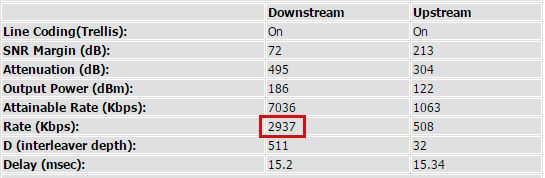
The past 2 weeks my internet has been getting slower. This week is the slowest. I messaged Telkom on Facebook last night advising them how slow it is and then I get told that my area only supports a 4meg line even though the Telkom website checker says it's max 10meg copper but that still does not explain why I'm getting these ridiculously slow speeds on my 4meg line..


Update: I tested my line with my free Afrihost account and here are the results:
 
Last edited:
Hey guys...not expecting a response out of Telkom over a long weekend, but how does one go about requesting a line speed upgrade on Telkoms site?

Trawled it and I can only assume that I would have to just order the required product. Does the old product fall away? Does it need to be in by the first of the month?
 
Hey guys...not expecting a response out of Telkom over a long weekend, but how does one go about requesting a line speed upgrade on Telkoms site?

Trawled it and I can only assume that I would have to just order the required product. Does the old product fall away? Does it need to be in by the first of the month?

phone and tell them you want an upgrade and then they should bill you pro-rata. That's what happened when I upgraded a couple of years ago.
 
phone and tell them you want an upgrade and then they should bill you pro-rata. That's what happened when I upgraded a couple of years ago.

Thanks! Telkom Facebook page couldn't even tell me that...
 
Top
Sign up to the MyBroadband newsletter
X