


What specifically seems to be the problem exactly?
Mweb has been down again. Did you miss the memo ;-)
South Africa’s biggest forum. Discuss, discover, and connect with thousands of members.
What specifically seems to be the problem exactly?

DownStream Connection Speed 4096 kbps
UpStream Connection Speed 512 kbps

traceroute www.mweb.co.za
traceroute to www.mweb.co.za (196.2.63.110), 30 hops max, 60 byte packets
1 192.168.0.1 (192.168.0.1) 204.737 ms 205.637 ms 206.757 ms
2 dsl-244-64-01.telkomadsl.co.za (41.244.64.1) 207.741 ms 1126.216 ms 1127.184 ms
3 196.43.39.62 (196.43.39.62) 1128.123 ms 1129.070 ms 1129.999 ms
4 tiscali-gw.telkom-ipnet.co.za (196.25.55.178) 1130.951 ms 1131.859 ms 1132.782 ms
5 196.41.144.36 (196.41.144.36) 1133.674 ms 1134.675 ms 1135.683 ms
6 * * *
7 * * *
8 * * *
9 * * *
10 * * *
11 * * *
12 * * *
13 * * *
14 * * *
15 * * *
16 * * *
17 * * *
18 * * *
19 * * *
20 * * *
21 * * *
22 * * *
23 * * *
24 * * *
25 * * *
26 * * *
27 * * *
28 * * *
29 * * *
30 * * *

MWEB Ops: What is going on--every morning I get up--and this is the deal--slow as hell today. See my previous posts as well on this thread. Common, let us a good stint of speed for a decent time period. Just yesterday, I was singing praises to my wife about the MWEB download speeds (I was getting close to 400K downloading Ubuntu Daily Image CD 700MB iso--justifying why we need a fastest Telkom speed ;-) ) now this> At least tell us that things are under construction and all will be fine on x date/time. Please note I have even asked telkom tech to come on site to resolve line interference and reset my line so it links to my exchange at full line speed.
BTW I am only 1km from my fibre-optic link (last mile is copper), and i have confirmation from telkom that all is good on their side.
206.757ms
What specifically seems to be the problem exactly?
That is a decimal point. I have checked my router, reset, and rebooted. Still the same.

Will, Are you recommending I move back to MWEB's @dslweb?
MWeb uncapped 384 has been ridiculously slow for the last couple of days.
Today i really need to do some work/research and i can barely even browse, local sites are very slow too.
http://www.speedtest.net/result/948991437.png
What's going on?


MWEB 384kbps UnCapped
Constantia Park, Pretoria
Syncing @ 512000 / 224000


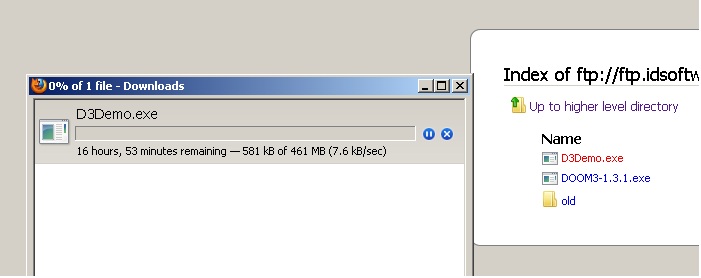
tracert ftp.idsoftware.com
Tracing route to charon.idsoftware.com [192.246.40.185]
over a maximum of 30 hops:
1 <1 ms <1 ms <1 ms . [10.10.10.1]
2 9 ms 9 ms 8 ms dsl-240-128-01.telkomadsl.co.za [41.240.128.1]
3 * * * Request timed out.
4 * * * Request timed out.
5 12 ms 11 ms 11 ms 196.43.10.130
6 11 ms 10 ms 10 ms 196.43.33.5
7 191 ms 191 ms 190 ms lon-ip-dir-telecity-gig-1-0-2.telkom-ipnet.co.za
[196.43.9.217]
8 191 ms 211 ms 191 ms gi4-8.ccr01.lon05.atlas.cogentco.com [149.6.2.19
3]
9 292 ms 191 ms 191 ms te4-7.mpd01.lon01.atlas.cogentco.com [130.117.49
.93]
10 533 ms 190 ms 193 ms te3-2.ccr01.lon01.atlas.cogentco.com [130.117.1.
73]
11 264 ms 265 ms 264 ms te0-0-0-1.ccr21.jfk02.atlas.cogentco.com [130.11
7.0.46]
12 272 ms 272 ms 272 ms te0-1-0-3.ccr21.dca01.atlas.cogentco.com [66.28.
4.126]
13 283 ms 282 ms 474 ms te8-1.ccr01.atl01.atlas.cogentco.com [154.54.2.4
5]
14 297 ms 298 ms 297 ms te0-0-0-1.ccr21.iah01.atlas.cogentco.com [154.54
.24.18]
15 303 ms 303 ms 302 ms te4-1.ccr02.dfw01.atlas.cogentco.com [154.54.25.
217]
16 302 ms 303 ms 303 ms te4-2.ccr01.dfw02.atlas.cogentco.com [154.54.26.
162]
17 304 ms 302 ms 303 ms gi0-1.ca01.dfw02.atlas.cogentco.com [154.54.26.1
66]
18 305 ms 305 ms 306 ms 38.104.36.150
19 304 ms 304 ms 304 ms *.doom.com [192.246.40.185]
Trace complete.
tracert ftp.idsoftware.com
Tracing route to charon.idsoftware.com [192.246.40.185]
over a maximum of 30 hops:
1 <1 ms <1 ms <1 ms . [10.10.10.1]
2 * * * Request timed out.
3 11 ms 11 ms 11 ms tengig-0-0-0-104.vic-ipc-1.mweb.co.za [196.22.16
9.146]
4 20 ms 22 ms 22 ms vl-92.vic-hscore-1.mweb.co.za [196.22.189.2]
5 19 ms 16 ms 17 ms tengig-0-0-0-0-11.vic-up-1.mweb.co.za [196.22.16
9.225]
6 24 ms 25 ms 25 ms tengig-0-3-1-0.mid-1.mweb.co.za [196.22.169.211]
7 248 ms 245 ms 242 ms pos-0-0-0-0.lon-1.mweb.co.za [196.22.163.230]
8 249 ms 269 ms 262 ms 130.117.136.1
9 260 ms 260 ms 255 ms te1-2.ccr02.lon02.atlas.cogentco.com [130.117.50
.117]
10 329 ms 334 ms 333 ms te0-0-0-1.ccr22.jfk02.atlas.cogentco.com [154.54
.30.21]
11 323 ms 324 ms 324 ms te0-1-0-3.ccr22.dca01.atlas.cogentco.com [154.54
.2.133]
12 335 ms 335 ms 335 ms te3-1.ccr02.atl01.atlas.cogentco.com [154.54.28.
218]
13 363 ms 363 ms 363 ms te0-3-0-2.ccr22.iah01.atlas.cogentco.com [66.28.
4.90]
14 363 ms 362 ms 362 ms te2-1.ccr02.dfw01.atlas.cogentco.com [154.54.3.1
77]
15 361 ms 359 ms 367 ms te4-4.ccr01.dfw02.atlas.cogentco.com [154.54.26.
34]
16 362 ms 363 ms 363 ms gi0-2.ca01.dfw02.atlas.cogentco.com [154.54.41.1
70]
17 365 ms 364 ms 364 ms 38.104.36.150
18 371 ms 363 ms 364 ms *.doom.com [192.246.40.185]
Trace complete.
Hi BigBear
I'm not sure what would have caused that. We had some latency on the network this morning, but that's been resolved now, so please let me know if you're still having a problem.
For future reference it would help a lot more if you posted something like a tracert result if you think you might be having a problem - speedtests can be quite subjective and I've seen the results fluctuate significantly over a matter of minutes - also they don't really give us any clues about where the problem might be if there is one
Thanks
MWEB Operations
W
so pretoria should be cool now ? also getting very slow speeds and i'm currently on just @mweb as @dslmweb gives same result.
file used for testing
ftp://ftp.idsoftware.com/idstuff/doom3/win32/D3Demo.exe
@dslmweb
I can't see anything wrong with that trace Necuno, except possibly some congestion on hop 10 (notice how it spikes to 533). I think we might be able to put this one on ID's doorstep. I got the same results and for comparison kicked off an unmanaged download of an ubuntu iso and it's going at full speed. Are you having any issues currently other than trying to retrieve this file?

Hi Gushesh, please PM your contact details to me and I'll get some to contact you to troubleshoot.
I think you will struggle to find better value for money than Mweb atm


