


Invaluable advice. Thank you!I would personally be slightly suspicious of the "12000mah" description on Takealot, there are are some 8800mah units that have been incorrectly described as 12000mah on there. Sometimes one sees reviews there where people have opened them to find the same 4*2200mah cells as on all the 8800mah units. There are loads of identical 8800mah units like that, all from the same base model but sometimes with different branding or an extra cable or something, but generally they are the same model one can order in bulk from China.

Poe430p Mini Dc Ups 110v 220v On-line Ups With Poe Output 9v 12v 15v 24v Single Phase For Networking Lithium Battery - Buy Mini Ups Lithium Battery Ups 12v Ups For Wifi Router On-line Ups 110v Networking Single Phase Ups Mini Online Ups For Networkin
Poe430p Mini Dc Ups 110v 220v On-line Ups With Poe Output 9v 12v 15v 24v Single Phase For Networking Lithium Battery - Buy Mini Ups Lithium Battery Ups 12v Ups For Wifi Router On-line Ups 110v Networking Single Phase Ups Mini Online Ups For Networking mini Ups 12v For Wifi Router dc Ups 110v...www.alibaba.com
It looks like even the newer 530p model will still have 4*2200mah li-ion cells:
POE-530P-Mini dc UPS 12V 1A 9V 1.8A for wifi router_UPS Manufacturer, SKE UPS Power
UPS Manufacturer, SKE UPS PowerProvide enterprisesPOE-530P-Mini dc UPS 12V 1A 9V 1.8A for wifi router,POE-530P-Mini dc UPS 12V 1A 9V 1.8A for wifi routerPrice,POE-530P-Mini dc UPS 12V 1A 9V 1.8A for wifi routerParametersRelated Information.www.skepower.com
The thing about the 8800mah/32wh units is they are cheap and will give you a good period of service before declining too much, even if they are not LFP - I had one on my router a couple of years ago before replacing with a Gizzu 69wh LFP unit which has been excellent. But I still have that old 430p ups as a power supply for a 12v emergency light so it's still in use in some way and for the price they will do the job for a while.
-
- News
-
Categories
- 5G
- ADSL
- AI
- Banking
- Black Friday
- Broadband
- Broadcasting
- Business
- Business Telecoms
- Cellular
- Cloud and Hosting
- Columns
- Cryptocurrency
- Energy
- Enterprise
- Fibre
- Gadgets
- Gaming
- Government
- Hardware
- Industry News
- Internet
- Internet of Things
- Investing
- IT Services
- Motoring
- Reviews
- Science
- Security
- Smartphones
- Software
- Technology
- Telecoms
- Trending
- Wireless
- Press Office
- Forum
- Industry News
- What's Next
- Company hub
- Speed Test
- About us
- Advertise with us
- Contact
- Careers
-
Join the MyBroadband community
South Africa’s biggest forum. Discuss, discover, and connect with thousands of members.
You are using an out of date browser. It may not display this or other websites correctly.
You should upgrade or use an alternative browser.
You should upgrade or use an alternative browser.
Router Battery Backup
- Thread starter werfie
- Start date
-
- Tags
- adsl load shedding router ups
backstreetboy
Honorary Master
- Joined
- Jun 15, 2011
- Messages
- 49,395
- Reaction score
- 56,417
https://www.builders.co.za/Load-She...DC-WiFi-UPS---White--5W-/p/000000000000769068 grabbed this since the Ultralan only lasts 1h 45 minutes now.

https://www.builders.co.za/Load-She...DC-WiFi-UPS---White--5W-/p/000000000000769068 grabbed this since the Ultralan only lasts 1h 45 minutes now.
Veeeerrrry expensive for what it does
Gizzu is much better, even has 24/48v PoE
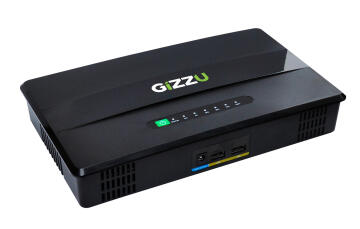
Gizzu Mini POE UE UPS 100W 46WH
Small and lightweight: The Gizzu Mini POE UE UPS is small and lightweight, making it easy to transport and install. Long backup time: The Gizzu Mini POE UE UPS can provide up to 8 hours of backup power for small network devices, giving you enough time to gracefully shut down your devices during...
 leroymerlin.co.za
backstreetboy
Honorary Master
- Joined
- Jun 15, 2011
- Messages
- 49,395
- Reaction score
- 56,417
Thanks will get that after a year when I need to inevitably replace this one again.Veeeerrrry expensive for what it does
Gizzu is much better, even has 24/48v PoE
Gizzu Mini POE UE UPS 100W 46WH
Small and lightweight: The Gizzu Mini POE UE UPS is small and lightweight, making it easy to transport and install. Long backup time: The Gizzu Mini POE UE UPS can provide up to 8 hours of backup power for small network devices, giving you enough time to gracefully shut down your devices during...
Last edited:

airborne
Honorary Master
- Joined
- Jul 13, 2007
- Messages
- 29,731
- Reaction score
- 16,075
But if you don’t need 24/48v Poe that’s only 46Wh vs 57Wh of the Vizia, which in my books makes it better value?Veeeerrrry expensive for what it does
Gizzu is much better, even has 24/48v PoE
Gizzu Mini POE UE UPS 100W 46WH
Small and lightweight: The Gizzu Mini POE UE UPS is small and lightweight, making it easy to transport and install. Long backup time: The Gizzu Mini POE UE UPS can provide up to 8 hours of backup power for small network devices, giving you enough time to gracefully shut down your devices during...

Mike Angelo
Expert Member
Got this one in July from Takealot was R899 on a special. Have 2 routers totalling 48 watts running from it and also use it to charge the usb lights and lamps. Just keeps on running and lasts for at least 6 hours without power and the batteries show no signs of degrading yet. So no complaints yet.Veeeerrrry expensive for what it does
Gizzu is much better, even has 24/48v PoE
Gizzu Mini POE UE UPS 100W 46WH
Small and lightweight: The Gizzu Mini POE UE UPS is small and lightweight, making it easy to transport and install. Long backup time: The Gizzu Mini POE UE UPS can provide up to 8 hours of backup power for small network devices, giving you enough time to gracefully shut down your devices during...

SubtleBeast
Expert Member
- Joined
- May 16, 2019
- Messages
- 3,362
- Reaction score
- 2,995
Purchased two "knock-off" Ultralans in Nov '21 and both have powered my Huawei B618 for 4-hour loadshedding slots with spare capacity left.https://www.builders.co.za/Load-She...DC-WiFi-UPS---White--5W-/p/000000000000769068 grabbed this since the Ultralan only lasts 1h 45 minutes now.
Both are still in use, but the usable capacity are somewhat diminished.
One powers ONT + Huawei router, but doesn't last for 2 hours, while the other one easily powers a ZTE LTE router for 2 hours+
Your Ultralan is probably from a bad batch.
Edit: Payed R998 for both and they're cheaper than ever on Takealot now.
backstreetboy
Honorary Master
- Joined
- Jun 15, 2011
- Messages
- 49,395
- Reaction score
- 56,417
It's got LifeP04 vs Lithium-Ion though. I just wanted something fast so will get the 69Wh Gizzu next time.But if you don’t need 24/48v Poe that’s only 46Wh vs 57Wh of the Vizia, which in my books makes it better value?
backstreetboy
Honorary Master
- Joined
- Jun 15, 2011
- Messages
- 49,395
- Reaction score
- 56,417
Had mine since the end of '22. Using it to power my USB fan now and it'll last even a 4h LS stint so it's still getting used.Purchased two "knock-off" Ultralans in Nov '21 and both have powered my Huawei B618 for 4-hour loadshedding slots with spare capacity left.
Both are still in use, but the usable capacity are somewhat diminished.
One powers ONT + Huawei router, but doesn't last for 2 hours, while the other one easily powers a ZTE LTE router for 2 hours+
Your Ultralan is probably from a bad batch.
SubtleBeast
Expert Member
- Joined
- May 16, 2019
- Messages
- 3,362
- Reaction score
- 2,995
Need some advice please.
Recently received a faulty unit that "popped" while driving an ONT+router.
Batteries are shot too, although I could salvage one.
Upon opening I discovered two blown caps, 16V1000uF which I'll replace with 25V ones.
It's a 10000mAh, but can't confirm as the cells do not have any markings on.
Now, I want to replace those with 3000+ ones.
The question is, will the BMS (built-in to cct board) be able to handle the larger capacity?
They're connected in a 2S2P config.
Recently received a faulty unit that "popped" while driving an ONT+router.
Batteries are shot too, although I could salvage one.
Upon opening I discovered two blown caps, 16V1000uF which I'll replace with 25V ones.
It's a 10000mAh, but can't confirm as the cells do not have any markings on.
Now, I want to replace those with 3000+ ones.
The question is, will the BMS (built-in to cct board) be able to handle the larger capacity?
They're connected in a 2S2P config.
SubtleBeast
Expert Member
- Joined
- May 16, 2019
- Messages
- 3,362
- Reaction score
- 2,995
Thanks. Appreciated.The BMS will still work fine. It uses voltages to manage the cells for OVP,UVP
Replace them with any capacity you want bigger capacity cells will give you longer runtime.
Tell us how it goes as well. Always good to have feedback with extending these things lives.Thanks. Appreciated.
I'm looking to buy a mini UPS to power my Fibre router. I am with metrofibre and have a Calix Giga center 844G-2, which is a combination ONT and Router, so I only require a single connection to the mini UPS. My problem being, I need to match the correct voltage between the mini UPS to the router, and for the life of me I cannot confirm the voltage of the router. I did not receive a manual with the router, and the voltage is not displayed on the box, the router or even the plug.
Does anyone have any advise?
Does anyone have any advise?
So just to confirm, there's no info written on the power supply at all (eg, like on this one)?I'm looking to buy a mini UPS to power my Fibre router. I am with metrofibre and have a Calix Giga center 844G-2, which is a combination ONT and Router, so I only require a single connection to the mini UPS. My problem being, I need to match the correct voltage between the mini UPS to the router, and for the life of me I cannot confirm the voltage of the router. I did not receive a manual with the router, and the voltage is not displayed on the box, the router or even the plug.
Does anyone have any advise?
Apparently I did not think to unplug the plug and check below it. But I managed - its a 12V.So just to confirm, there's no info written on the power supply at all (eg, like on this one)?

That adapter has a strange connector.Apparently I did not think to unplug the plug and check below it. But I managed - its a 12V.
ld13
Honorary Master
I'm looking to buy a mini UPS to power my Fibre router. I am with metrofibre and have a Calix Giga center 844G-2, which is a combination ONT and Router, so I only require a single connection to the mini UPS. My problem being, I need to match the correct voltage between the mini UPS to the router, and for the life of me I cannot confirm the voltage of the router. I did not receive a manual with the router, and the voltage is not displayed on the box, the router or even the plug.
Does anyone have any advise?
Could you show us what the power plug (on the router side) looks like?
I think we touched on this plug in this thread: https://mybroadband.co.za/forum/threads/ups-not-compatible-with-frogfoot-ont.1195930/post-29653274
I received my Gizzu mini UPS today, and have a couple of questions:
1. How long does it take to charge from completely dead to 100%?
2. How does one know when it is fully charged?
I would assume it is fully charged when no lights are blinking? I plugged it in to test it quickly, so that I can return it if it's faulty, when I plugged it in the fourth (100%) indicator light started blinking, and when it stopped blinking, I assumed it was fully charged. When I plugged my router in, the 100% indicator light went off, which led me to believe it wasn't fully charged?
3. It is my understanding that you leave it plugged in permanently, after all that is what the "U" in UPS stands for, I guess - but just want to double check if that is the correct way to use it?
The model I have is the 30W 38Wh 10400mAh
1. How long does it take to charge from completely dead to 100%?
2. How does one know when it is fully charged?
I would assume it is fully charged when no lights are blinking? I plugged it in to test it quickly, so that I can return it if it's faulty, when I plugged it in the fourth (100%) indicator light started blinking, and when it stopped blinking, I assumed it was fully charged. When I plugged my router in, the 100% indicator light went off, which led me to believe it wasn't fully charged?
3. It is my understanding that you leave it plugged in permanently, after all that is what the "U" in UPS stands for, I guess - but just want to double check if that is the correct way to use it?
The model I have is the 30W 38Wh 10400mAh
Mannydefreitas
Expert Member
- Joined
- Nov 28, 2022
- Messages
- 3,232
- Reaction score
- 3,516
Yes.I received my Gizzu mini UPS today, and have a couple of questions:
1. How long does it take to charge from completely dead to 100%?
2. How does one know when it is fully charged?
I would assume it is fully charged when no lights are blinking? I plugged it in to test it quickly, so that I can return it if it's faulty, when I plugged it in the fourth (100%) indicator light started blinking, and when it stopped blinking, I assumed it was fully charged. When I plugged my router in, the 100% indicator light went off, which led me to believe it wasn't fully charged?
3. It is my understanding that you leave it plugged in permanently, after all that is what the "U" in UPS stands for, I guess - but just want to double check if that is the correct way to use it?
The model I have is the 30W 38Wh 10400mAh
Plug it in.
Switch it on.
Plug in your router.
Go to bed.